
×

CSS Margin

CSS Margin: The CSS margin property is employed to describe the space throughout the elements. It clears the range throughout the element. These properties do not have a background color because it is fully transparent.

Left, right, top, and bottom margins may be altered individually with the use of separate properties. We can also change every property with the use of a shorthand margin at once.

Margin Properties

Following are a few margin properties:

margin: Every property can be set-up within just one declaration by using this property.

margin-left: An element’s left margin can be set-up by using this property.

margin-right: An element’s right margin can be set-up by using this property.

margin-top: An element’s top margin can be set-up by using this property.

margin-bottom: An element’s bottom margin can be set-up by using this property.

Margin Values

Following are some possible and essential values for some margin properties:

auto: It defines that the browser will automatically calculate the margin using auto value.

length: The length value specifies the margin cm, pt, px, etc. 0px is its default value.

%: It is applied to describe the margin property in percent of containing element’s width.

inherit: It is applied to acquire the margin from the parent element.

Example:

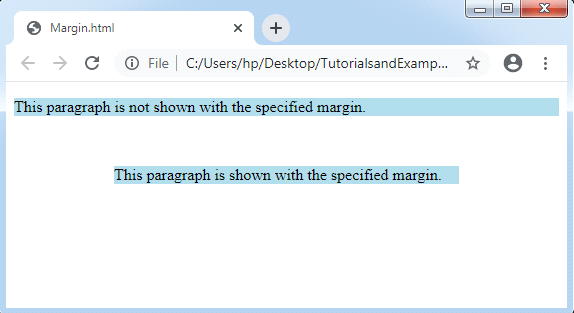
We can explore distinct margin for distinct sides of an element.

<!DOCTYPE html>
<html>
<head>
<style>
p {
background-color: lightblue;
}
p.one {
margin-top: 50px;
margin-bottom: 50px;
margin-left: 100px;
margin-right: 100px;
}
</style>
</head>
<body>
<p>This paragraph is not shown with the specified margin.</p>
<p class="one">This paragraph is shown with the specified margin.</p>
</body>
</html>

 Output:
CSS Margin

Related Topics

Grid Vs Flexbox in CSS

Grid: - CSS Grid Layout is a 2D grid-based matrix-based layout method with columns and rows that simplifies web pages created by eliminating the need for floats and placement. A grid layout, like...

4 minutes read.

CSS Text-align

Text-align The text-align property of CSS sets the table-cell box’s horizontal alignment or any block element. The text-align property is the same as the CSS property vertical-align but towards any horizontal...

1 minute read.

Cascading Style Sheet

CSS refers to the Cascading Style Sheet. CSS is a form of a programming language. In other words, CSS is a language of the style sheet that is utilised for...

7 minutes read.

CSS Ellipsis

The CSS ellipsis kind of is the value that mostly is used by the property: text-overflow. Here, we will discuss the following: What is CSS Ellipsis? Syntax for CSS ellipsis How to...

3 minutes read.

CSS Text-Overflow

Introduction: The text-overflow property of CSS is used to format the text which is overflowing the boundaries of the container. This property helps user to clip the text, to display the...

5 minutes read.

Internal CSS

What is CSS? CSS stands for Cascading Style Sheet.CSS is used to apply styling the HTML elements.With CSS user can add or change color, font-size and font-family. It also helps user...

4 minutes read.

CSS Pseudo-class

Pseudo-class The pseudo-class may be depicted as the keyword which can be mixed to any selector that specifies the elected element’s unique state. It can be included to a selector to...

6 minutes read.

CSS Tutorial

CSS refers to the Cascading Style Sheet. CSS is a form of a programming language. In other words, CSS is a language of the style sheet that is utilised for...

9 minutes read.

What is CSS

CSS stands for Cascading Style Sheet. It gives an additional style to the HTML document. A cascading style sheet is a language that is designed to define the document formatting...

3 minutes read.

CSS Radio Button

Radio Button A radio button has been defined as an element of HTML. It can support us to take any input from the user. But it is challenging to design a...

4 minutes read.

What is CSS used for

What is CSS used for? CSS stands for Cascading Style Sheet. CSS is a stylesheet language for web pages. It specifies how a document created in a markup language looks and...

4 minutes read.

CSS Flex-Box

Introduction The flex-box property of CSS stands for Flexible Box Layout Module. It is specifically used to design a flexible responsive layout. Flex-box is a one dimensional layout model, i.e. it works...

6 minutes read.

CSS Gradient

CSS Gradient: The CSS gradient property is applied to show the smooth transition inside two specified colors or more than two specified colors. Need of CSS Gradient The following are a few...

4 minutes read.

CSS Text Effects

Text Effects in CSS We can use distinct text effects used inside the HTML document. Few attributes can be applied to insert the text effects. We can also style various web documents...

5 minutes read.

CSS Line Height

CSS Line Height: This property in CSS can be used to describe the line box’s minimal height inside the element. It sets-up the distinction among two lines in our content. It...

3 minutes read.

How to Set Space between the Flexbox

For managing layout on the Web, CSS Flexbox and CSS Grid are two excellent tools. Flexbox handles one-dimensional layouts quite well, whereas CSS Grid manages two-dimensional layouts with columns and...

4 minutes read.

CSS Width

CSS Width The width property in CSS sets the content width of area of the element. These properties do not provide margin and border features. It is used to set the...

1 minute read.

CSS Vertical Align

Vertical Align The vertical align CSS property describes the cell box of the table and an inline alignment vertically. This property is a self-explanatory and an essential property in CSS. But,...

2 minutes read.

CSS Sticky

CSS Sticky The position property in CSS is applied to set an element’s position. This property is also applied to position an element behind the other element. It is useful for...

1 minute read.

CSS Outline

CSS Outline: This CSS property is quite similar to the border property of CSS. It eases us to design an additional border around the element to obtain visual attention. The...

4 minutes read.