
×

CSS Specificity

CSS Specificity: If one or more conflicting rules of CSS express a similar element, a browser will pursue a few rules to examine the specific one. Specificity can be specified in a form in which it helps several browsers to determine which value of the property is most convenient for an element. Also, it specifies which declaration of style is used to the element.

Before starting to discuss the specificity, let’s understand some key points, which are listed below:

  • When multiple selectors are stirring any same element, only CSS specificity plays an important role. When any browser requires determining a style to use to any matching element, the CSS specificity comes and does it.
  • When more than two selectors have the same value of the specificity, a current one is considered. 
  • An inherited value and the universal selectors (*) have a lower (0) specificity.
  • The style property in CSS adds a higher specificity as compared to any selector, excluding the !important CSS property inside the selector of style-sheet.
  • The !important CSS property changes the specificity of the selectors. If two or more selectors have the same specificity, it includes !important.

Specificity Hierarchy

All the selectors contain a place inside the hierarchy of specificity. Here are four types in which we are defining the selector’s levels of specificity.

Inline styles: This hierarchy type can be directly fixed to an element that is to be designed. Example: <p style= “color: blue;”>. It will have a greater priority.

IDs: It is a special identifier for a lot of elements of the page that contains the priority as second-greater. Example: #para.

Classes, pseudo-classes, and attributes: It adds classes, pseudo-classes, and attributes (like :hover, :focus, etc.).

Pseudo-elements and elements: It adds the pseudo-elements (like :before and :after) and the element’s name (h1, div). They have the least priority.

Specificity Rules

The CSS specificity can be defined as a weight, which can be used for any declaration of CSS. Also, it is identified by a number of each selector type inside any matching selector.

The rules of specificity are mentioned below with the example.

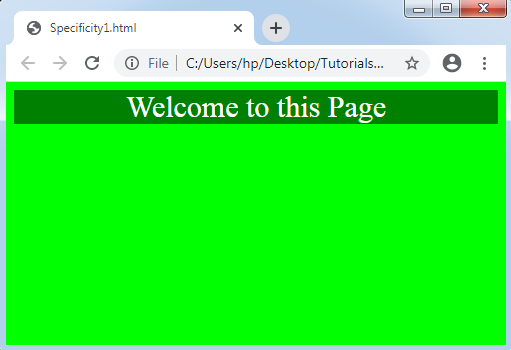
  1. The ID selector’s specificity is greater than the attribute selectors

Let’s take an example to define it.

Example:

In the example, we are using an id selector along with the CSS property background-color.

<!DOCTYPE html>
<html>
<head>
<style>
body
{
text-align: center;
font-size: 30px;
color: white;
background-color: lime;
}
#div1
{
background-color: lime;
}
div#div1        /*Higher specificity*/
{
background-color: green;
}
div[id=div1]
{
background-color: red;
}
</style>
</head>
<body>
<div id="div1"> Welcome to this Page </div>
</body>
</html>

Output:
CSS Specificity
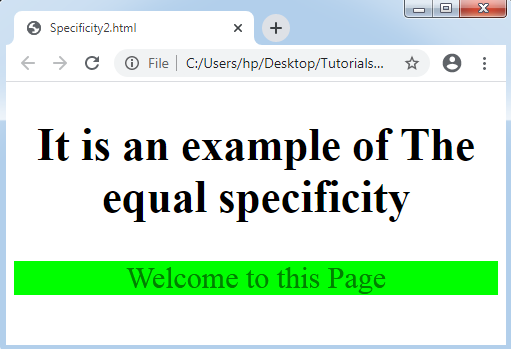
  • In the equal specificity, the current rule will consider

When any similar rules are used twice, any current rule will be considered in an external style-sheet.

Example:

In the following example, the element name’s specificity is the same. Thus, the current specified name of the element will be used.

<!DOCTYPE html>
<html>
<head>
<style>
body
{
text-align: center;
font-size: 30px;
}
div
{
background-color: lightblue;
color: blue;
}
div
{
background-color: lime;
color: green;
}
</style>
</head>
<body>
<h2> It is an example of The equal specificity </h2>
<div id="div1"> Welcome to this Page </div>
</body>
</html>

Output:
CSS Specificity
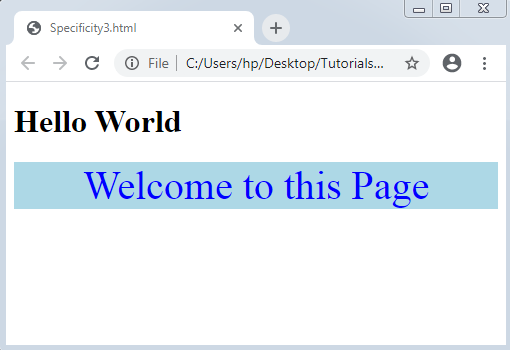
  • The class selector specificity is higher than any element selector

Class selector (.high, .nav, etc.) has higher specificity when compared to any element selector ( such as p, h1, and div).

Example:

<!DOCTYPE html>
<html>
<head>
<style>
.intro
{
background-color: lightblue;
color: blue;
text-align: center;
font-size: 40px;
}
div
{
background-color: lime;
color: green;
text-align: right;
}
</style>
</head>
<body>
<h1> Hello World </h1>
<div class= "intro"> Welcome to this Page </div>
</body>
</html>

Output:
CSS Specificity

Related Topics

CSS 2d Transform

Transform property in CSS is used mainly for enhancing the effects and to animate the elements. Transform is an effect that changes the shape, size and position of an element. It helps...

6 minutes read.

CSS Line Height

CSS Line Height: This property in CSS can be used to describe the line box’s minimal height inside the element. It sets-up the distinction among two lines in our content. It...

3 minutes read.

CSS Arrow

CSS Arrow The arrow of CSS is applied to insert an array with the tooltip. It can make a tooltip as any speech bubble. Also, this arrow can be illustrated in...

4 minutes read.

How to make smooth bounce animation using CSS

The smooth bouncing animation project is done with the help of HTML and CSS. This project gives so much fun and excitement to the users. What is HTML? The HTML or HyperText...

2 minutes read.

CSS Navigation bar

CSS Navigation bar: A navigation system or navigation bar comes upon GUI that can help many visitors to access the information. A Navigation bar is a UI component on the...

11 minutes read.

CSS Pseudo-class

Pseudo-class The pseudo-class may be depicted as the keyword which can be mixed to any selector that specifies the elected element’s unique state. It can be included to a selector to...

6 minutes read.

CSS Animation

CSS Animation: The animation property of CSS is applied to make animation over any webpage. It is used as the animation replacement made by JavaScript and Flash. Rules of CSS3 @keyframes The...

3 minutes read.

CSS @keyframes rule

CSS @keyframes rule It describes the rule of animation that depicts the properties of CSS for the components at every state along with the timeline. We may make the properties of complex...

4 minutes read.

CSS Clip

CSS Clip The Clip property in CSS describes the element’s visible area. It applies over the elements which are absolutely positioned (position: absolute ;). Generally, it is used when an image...

2 minutes read.

How to get rid/remove of bullet pioints in CSS

We include a list of items on the web pages that were sometimes numbered and sometimes bulleted in various styles. In HTML, there are two kinds of lists: ordered and unordered...

3 minutes read.

How to change background color in CSS

How to change background color in CSS? The background-color property in CSS would be used to specify the color of an element's background. As the element's background, it uses solid colors. The...

3 minutes read.

CSS Color Keywords

Here, we will discuss the following keywords: transparent currentcolor Inherit Transparent keyword A color can generally be made transparent by using the transparent keyword. Often it is used to for all intents...

4 minutes read.

CSS Checkbox style

CSS Checkbox style: It is an element of HTML, which is used to get input from various users. It is difficult to style any checkbox. However, some elements make it...

6 minutes read.

CSS Background Color

It is one of the CSS properties to apply styling to html elements.This property is used to apply the background color to any HTML element.The background of an element includes...

2 minutes read.

CSS Pseudo-elements

Pseudo-elements The pseudo-classes in CSS can be represented as any keyword which is connected to the selector that represents any selected element’s unique state. On the other hand, pseudo-elements can be...

6 minutes read.

CSS Variables

CSS Variables These variables of CSS are applied to add the custom property values to our various web-pages. The custom properties are often called as CSS variables or cascading variables. Various...

4 minutes read.

CSS Functions

CSS functions are used for different CSS properties. Every front-end developer should have knowledge of all CSS functions. It makes the coding easier. FunctionsExplanationattr().It returns the value of an attribute of...

5 minutes read.

CSS Syntax

The CSS syntax contains the selector and the declaration block, which will be clearer with the following example: Selector: A CSS selector specifies the HTML tag we wish to style. A selector can be...

2 minutes read.

Is CSS a programming language?

 A programming language is a set of grammatical rules and a vocabulary for commanding a machine to accomplish specified tasks. High-level languages like BASIC, C, C++, COBOL, Java, FORTRAN, Ada...

4 minutes read.

Radial-gradient() CSS function

Radial-gradient() CSS function It defines a CSS in-built function, which produces a smooth transition among multiple colors. It is used to set any radial-gradient that is same as a background-image. This...

4 minutes read.