CSS Font
CSS Font: CSS has font property, which makes the text more attractive. We can alter the entire look by changing font color, font size, font style, and much more. In this section, we will learn how to change the size of our font by the use percentage. The following are a few critical attributes which we can use in our text to make it more attractive:
| Attributes | Description |
| Font color | Font color property is applied to modify the text color. |
| Font size | Font size property is applied to either increase the font size or decrease the font size. |
| Font family | Font family property is applied to modify the font face. |
| Font style | Font style property is applied to produce the font oblique, italic, or bold. |
| Font weight | Font weight property is applied to increase the font’s lightness and boldness or decrease the same. |
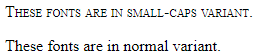
| Font variant | The font-variant is applied to makes an effect of small-caps. |
Font Color
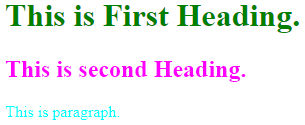
The font color property of CSS is a unique and standalone attribute, although it looks like a type of fonts in CSS. It is applied to make modifications to the text color. We can define the font color by one of the following formats:
- Color name
- Hexadecimal value
- RGB
Example:
<!DOCTYPE html>
 <html>
 <head>
 <style>
 body {
 font-size: 100%;
 }
 h1 {color: green;}
 h2 {color: #FF00FF;}  /*Fuchsia Color*/
 p {color: rgb(0, 255, 255);}   /*Aqua Color*/
 </style>
 </head>
 <body>
 <h1>This is First Heading.</h1>
 <h2>This is second Heading.</h2>
 <p>This is paragraph.</p>
 </body>
 </html>
Output:
Font Size
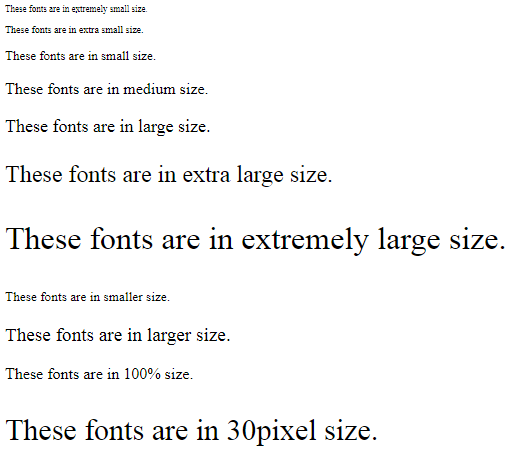
The font size attribute of CSS is applied to modify the font size. Some of the essential values that are applied to set-up the size of the font:
- xx-small: It isapplied to show the text in extremely small size.
- x-small: It isapplied to show the text in extra small size.
- small: It isapplied to show the text in small size.
- medium: It isapplied to show the text in medium size.
- large: It isapplied to show the text in large size.
- x-large: It isapplied to show the text in extra-large size.
- xx-large: It isapplied to explain the text in extremely large size.
- smaller: It isapplied to show the text comparatively in smaller size.
- larger: It isappliedto show the text comparatively in larger size.
- % or pixels size: It isemployed to set the font size in percentage or in pixels.
Example:
<!DOCTYPE html>
 <html>
 <head>
 </head>
 <body>
 <p style="font-size:xx-small;">These fonts are in extremely small size.</p>
 <p style="font-size:x-small;">These fonts are in extra small size.</p>
 <p style="font-size:small;">These fonts are in small size.</p>
 <p style="font-size:medium;">These fonts are in medium size.</p>
 <p style="font-size:large;">These fonts are in large size.</p>
 <p style="font-size:x-large;">These fonts are in extra large size.</p>
 <p style="font-size:xx-large;">These fonts are in extremely large size.</p>
 <p style="font-size:smaller;">These fonts are in smaller size.</p>
 <p style="font-size:larger;">These fonts are in larger size.</p>
 <p style="font-size:100%;">These fonts are in 100% size.</p>
 <p style="font-size:30px;">These fonts are in 30pixel size.</p>
 </body>
 </html>
Output:
Font Family
The font family is categorized into two parts:
- Font family: It defines the name of the font family such as Times New Roman, Arial etc.
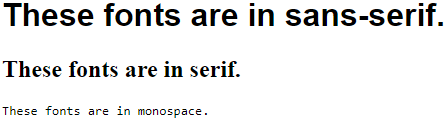
- Generic family: The generic family includes Sans-serif, Monospace, and Serif.
Serif: These types of fonts incorporate tiny lines at any character’s end. Its examples are- Georgia, and Times New Roman.
Sans-serif: It does not hold tiny lines at any character end. The examples are- Verdana, Arial, etc.
Monospace: Every character of monospace has the similar width.
Example:
<!DOCTYPE html>
 <html>
 <head>
 <style>
 .sansserif {
 font-family: sans-serif;
 }
 .serif {
 font-family: serif;
 }
 .monospace {
 font-family: monospace;
 }
 </style>
 </head>
 <body>
 <h1 class="sansserif">These fonts are in sans-serif.</h1>
 <h2 class="serif">These fonts are in serif.</h2>
 <p class="monospace">These fonts are in monospace.</p>
 </body>
 </html>
Output:
Font Style
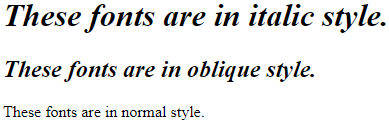
This property describes what kind of font view we wish to illustrate on the screen. These styles can be normal, italic, oblique etc.
Example:
<!DOCTYPE html>
 <html>
 <head>
 <style>
 .italic {
 font-style: italic;
 }
 .oblique {
 font-style: oblique;
 }
 .normal {
 font-style: normal;
 }
 </style>
 </head>
 <body>
 <h1 class="italic">These fonts are in italic style.</h1>
 <h2 class="oblique">These fonts are in oblique style.</h2>
 <p class="normal">These fonts are in normal style.</p>
 </body>
 </html>
Output:
Font Weight
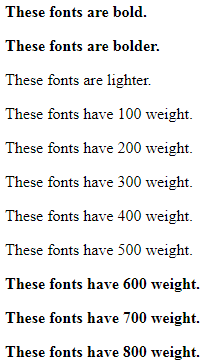
It is used to depict the weight of the font. Some of the values to determine the font’s weight are- bold, bolder, lighter, normal, number, or lighter.
Example:
<!DOCTYPE html>
 <html>
 <head>
 </head>
 <body>
 <p style="font-weight:bold;">These fonts are bold.</p>
 <p style="font-weight:bolder;">These fonts are bolder.</p>
 <p style="font-weight:lighter;">These fonts are lighter.</p>
 <p style="font-weight:100;">These fonts have 100 weight.</p>
 <p style="font-weight:200;">These fonts have 200 weight.</p>
 <p style="font-weight:300;">These fonts have 300 weight.</p>
 <p style="font-weight:400;">These fonts have 400 weight.</p>
 <p style="font-weight:500;">These fonts have 500 weight.</p>
 <p style="font-weight:600;">These fonts have 600 weight.</p>
 <p style="font-weight:700;">These fonts have 700 weight.</p>
 <p style="font-weight:800;">These fonts have 800 weight.</p>
 </body>
 </html>
Output:
Font Variant
It determines that either the text should be viewed in the small-caps font effect. The effect can also be set as normal.
Example:
<!DOCTYPE html>
 <html>
 <head>
 <style>
 .smallcaps {
 font-variant: small-caps;
 }
 .normal {
 font-variant: normal;
 }
 </style>
 </head>
 <body>
 <p class="smallcaps">These fonts are in small-caps variant.</p>
 <p class="normal">These fonts are in normal variant.</p>
 </body>
 </html>
Output: