
×

CSS Background-clip

CSS Background-clip: The background-clip property describes the background’s painting area. It limits an area where the image or color of the background appears by using any clipping box. Everything will be invisible or discarded, which is outside of the box.

It sets, if an element’s background spreads under the content-box, padding-box, and border-box.

Syntax:

background-clip: border-box| padding-box| content-box| inherit; 

Property Values

The possible values are discussed below:

border-box

It is used as a default value. The border-box specifies that the color and image of the background will be designed within a border-box. It also sets the color of the background, which spreads on the entire distribution.

Example:

<!DOCTYPE html>
<html>
<head>
<style>
div
{
 background-color: lightblue;
 background-clip: border-box;
 text-align: center;
 border: 5px dashed  navy;
}
h1,h2
{
 color: navy;
}
</style>
</head>
<body>
<div>
<h1> Welcome to this Page </h1>
<h2> background-clip: border-box; </h2>
</div>
</body>
</html>

Output:
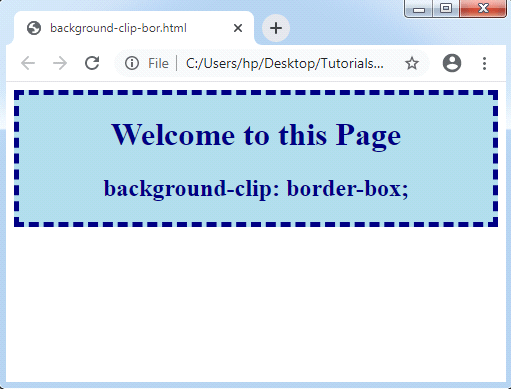
CSS Background-clip

padding-box

It is used to address the background inside the border. The color and image of the background are designed within a padding-box.

Example:

<!DOCTYPE html>
<html>
<head>
<style>
div
{
 background-color: lightblue;
 background-clip: padding-box;
 padding: 25px;
 text-align: center;
 border: 5px dotted  navy;
}
h1,h2
{
 color: navy;
}
</style>
</head>
<body>
<div>
<h1> Welcome to this Page </h1>
<h2> background-clip: padding-box; </h2>
</div>
</body>
</html>

Output:
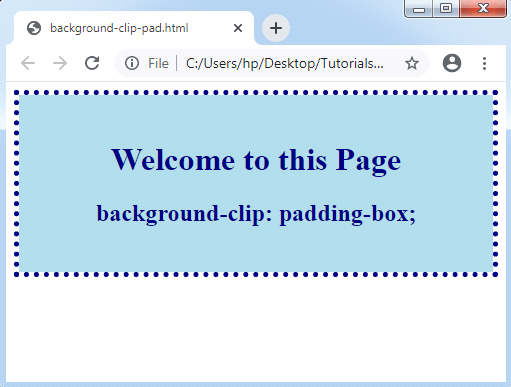
CSS Background-clip

content-box

The content-box value is used to set the color of the background only up to any content. In this, the backgrounds are drawn within a content-box. The color and image of the background will be designed within a content-box.

Example:

<!DOCTYPE html>
<html>
<head>
<style>
div
{
 background-color: lightblue;
 background-clip: content-box;
 padding: 25px;
 text-align: center;
 border: 5px dashed  navy;
}
h1,h2
{
 color: navy;
}
</style>
</head>
<body>
<div>
<h1> Welcome to this Page </h1>
<h2> background-clip: content-box; </h2>
</div>
</body>
</html>

Output:
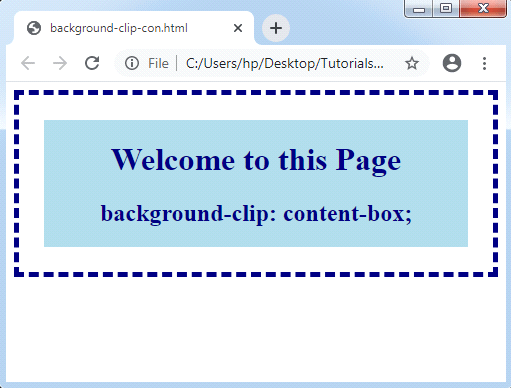
CSS Background-clip

Related Topics

Is CSS a programming language?

 A programming language is a set of grammatical rules and a vocabulary for commanding a machine to accomplish specified tasks. High-level languages like BASIC, C, C++, COBOL, Java, FORTRAN, Ada...

4 minutes read.

CSS Zoom

CSS Zoom: Zoom property in CSS extents the content. This property controls the content’s level of magnification. Rather than the use of this CSS property, we may also apply the...

3 minutes read.

CSS calc()

CSS calc(): The CSS calc() function is a CSS function of inbuilt type, which permits us to implement calculations. It is used for calculating the angle, integer frequency, number, time,...

3 minutes read.

CSS Flex-Box

Introduction The flex-box property of CSS stands for Flexible Box Layout Module. It is specifically used to design a flexible responsive layout. Flex-box is a one dimensional layout model, i.e. it works...

6 minutes read.

CSS Images

Images in CSS: Images are a critical part of a web application. It includes various types of images in the web application that cannot be recommended. However, it is essential...

4 minutes read.

CSS Margin

CSS Margin: The CSS margin property is employed to describe the space throughout the elements. It clears the range throughout the element. These properties do not have a background color...

2 minutes read.

Combine Background Image with Gradient Overlay

With the help of CSS gradient, we can display smooth and straightforward transitions between two or more colours. We can add the background images by combining the gradient property with...

2 minutes read.

CSS Transition

CSS Transition The transitions in CSS are influenced, included to modify the component from one design to another, without the use of the JavaScript or Flash. We should describe two of the...

2 minutes read.

CSS: nth-selector

CSS nth selector can be used to match an element according to its position regardless of its parent’s type. Here, n can be any number, formula, or a keyword. These selectors...

2 minutes read.

CSS Variables

CSS Variables These variables of CSS are applied to add the custom property values to our various web-pages. The custom properties are often called as CSS variables or cascading variables. Various...

4 minutes read.

CSS Arrow

CSS Arrow The arrow of CSS is applied to insert an array with the tooltip. It can make a tooltip as any speech bubble. Also, this arrow can be illustrated in...

4 minutes read.

CSS Image Gallery

Image galleries are used to display and store collections of images. Example Let’s discuss an example. CSS was used to create the following image gallery: Code is as follows: <html> <head> <style> div.gallery {   margin: 6px;   border: 1px...

5 minutes read.

CSS Word Wrap

Word Wrap in CSS: The word-wrap property in CSS is referred to break any lengthy word and wrap towards the next or following line. It is employed for preventing overflow...

1 minute read.

CSS Radio Button

Radio Button A radio button has been defined as an element of HTML. It can support us to take any input from the user. But it is challenging to design a...

4 minutes read.

CSS Syntax

The CSS syntax contains the selector and the declaration block, which will be clearer with the following example: Selector: A CSS selector specifies the HTML tag we wish to style. A selector can be...

2 minutes read.

What is CSS used for

What is CSS used for? CSS stands for Cascading Style Sheet. CSS is a stylesheet language for web pages. It specifies how a document created in a markup language looks and...

4 minutes read.

CSS Pagination

CSS Pagination The pagination in CSS is an advantageous approach for indexing of a website’s distinct pages over the homepage. When our site contains multiple pages, we must insert a few...

13 minutes read.

CSS Introduction

CSS stands for Cascading Style Sheet. It is a design language which is used to design the web pages. It was developed by Håkon Wium Lie on October 10, 1994. It provides...

1 minute read.

CSS Specificity

CSS Specificity: If one or more conflicting rules of CSS express a similar element, a browser will pursue a few rules to examine the specific one. Specificity can be specified...

3 minutes read.

How to make smooth bounce animation using CSS

The smooth bouncing animation project is done with the help of HTML and CSS. This project gives so much fun and excitement to the users. What is HTML? The HTML or HyperText...

2 minutes read.