
×

CSS Overflow

CSS Overflow: The Overflow property in CSS is used to manage the content if it overflows from its container of the block level. We have seen that all the elements are placed in the form of a rectangular box, whereas these box’s behavior, positioning, and size can be controlled and created by using the CSS.

For example: - If we don’t mention the height and width of a particular box, it will set as vast as any content. Although, if we specify the width and height of a box specifically and any content inside will not be adjusted then what should do. The Overflow Property can be applied to solve this problem. The Overflow Property portrays whether we have to clip the content, show the content on the screen, and render the scroll bars.

Note: The CSS overflow property implements only for the block elements along with the particular height.

Property Values

ValuesDescription
visibleA visible value says that the overflow content is not cropped or clipped. It delivers outer side box of an element. A visible is a type of default value.
hiddenThe overflow content is clipped; the other content is invisible.
scrollThe overflow content is clipped, although a scroll-bar will be added to explore the other content.
autoThe overflow content is clipped, although a scroll-bar will be added to examine the other content.
inheritIt acquires the properties from the parent element.
initialIt sets the properties of CSS to their default value.

Overflow Example

Take a look on the following example:

<!DOCTYPE html>
<html>
<head>
<style>
div.scroll
{
 background-color: lightblue;
 width: 100px;
 height: 100px;
 overflow: scroll;
}
div.hidden
{
 background-color: lime;
 width: 100px;
 height: 170px;
 overflow: hidden;
}
div.visible
{
 background-color: pink;
 width: 100px;
 height: 170px;
 overflow: visible;
}
div.auto
{
 background-color: yellow;
 width: 100px;
 height: 170px;
 overflow: auto;
}
</style>
</head>
<body>
<p> The CSS overflow property defines that what should do when an element's content grow-up to the element box's size. </p>
<h3> Overflow: scroll </h3>
<div class= "scroll"> We can apply the CSS Overflow Property if we wish to gain better layout control.
Default value will be visible. </div>
<h3> Overflow: hidden </h3>
<div class= "hidden"> We can apply the CSS Overflow Property if we wish to gain better layout control.
Default value will be visible. </div>
<h3> Overflow: visible </h3>
<div class= "visible"> We can apply the CSS Overflow Property if we wish to gain better layout control.
Default value will be visible. </div>
<h3> Overflow: auto </h3>
<div class= "auto"> We can apply the CSS Overflow Property if we wish to gain better control on the layout.
Default value will be visible. </div>
</body>
</html>

Output:
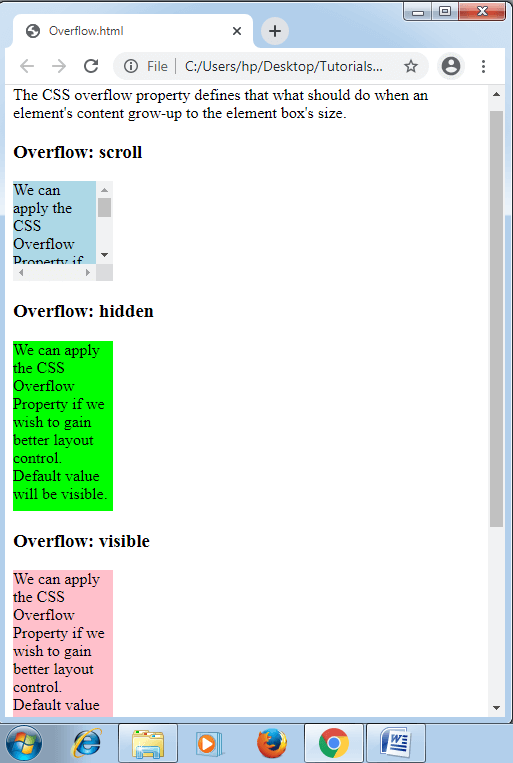
CSS Overflow

Related Topics

CSS Tutorial

CSS refers to the Cascading Style Sheet. CSS is a form of a programming language. In other words, CSS is a language of the style sheet that is utilised for...

9 minutes read.

CSS Page-break-before Attribute

Page-break-before Attribute As its name implies, the page-break-before property is applied to include page break before any element, at the time of printing any document. It adds the page break before...

5 minutes read.

CSS Descendant Selector

Descendant Selector The Descendant selector in CSS is used to match the descendant components of a particular component. The term descendant depicts nested in whatever place, inside a DOM tree. This...

2 minutes read.

CSS Filter

CSS Filter CSS filter is used to apply visual effects on the images, text, and other factors of the webpage. This filter property in CSS allows us to admit the effects like...

7 minutes read.

CSS Margin

CSS Margin: The CSS margin property is employed to describe the space throughout the elements. It clears the range throughout the element. These properties do not have a background color...

2 minutes read.

CSS Inline

What is CSS? CSS is an acronym for Cascading Style Sheets. CSS is the language that we use to style an HTML document. It specifies how HTML components should appear. CSS...

4 minutes read.

CSS Table

CSS table provides better look and feel. There are various properties of CSS table that are given below. border border-collapse padding width height text-align color background-color CSS Table Border You can set...

4 minutes read.

CSS Font

CSS Font: CSS has font property, which makes the text more attractive. We can alter the entire look by changing font color, font size, font style, and much more. In...

5 minutes read.

CSS Comments

CSS Comments: Generally, comments in CSS are used to describe our code. Further, it will provide support to many users who are concerned with the code. Somewhat, these are ignored...

2 minutes read.

CSS Order

CSS Order CSS order property in CSS describes the flex item’s order inside the flex or any grid container. It is applied to order any flex item. Note: If any component is...

3 minutes read.

CSS Links

CSS Link is used to create styled link. There are various ways to implement it. Styling Links Link can be styled with CSS properties like color, font-family, background etc. Example: <!DOCTYPE html>   <html>   <head>   <style>   a {       color: red;   }   </style>   </head>   <body>   <p><b><a href="https://www.tutorialandexample.com"    target="_blank">This is a link</a></b></p>   </body>   </html> Try Now There are four...

2 minutes read.

CSS translate() Function

Translate() CSS function This function in CSS is a CSS in-built function. It relocates the element in the horizontal direction or in the vertical direction. It can move the items from...

2 minutes read.

CSS Radio Button

Radio Button A radio button has been defined as an element of HTML. It can support us to take any input from the user. But it is challenging to design a...

4 minutes read.

Css Text Orientation

Introduction: The text-orientation property of CSS is used to specify the orientation of the text characters in the line of content. This property applies only with the vertical writing-mode and not...

4 minutes read.

CSS Border

CSS Border: The border property of CSS allows us to define the style, color, width, and radius of the element’s border. It is applied to various elements to set-up the...

4 minutes read.

CSS :root selector

CSS :root selector This CSS pseudo-class matches any document’s root element. It chooses the parent of the highest-level inside the document DOM or tree. An element of <html> is always a...

2 minutes read.

How to use google fonts in CSS

Fonts: - Fonts are used to make our website look more beautiful. Choosing appropriate font according to the web design or layout is also important. Many typefaces are accessible in...

4 minutes read.

CSS: nth-selector

CSS nth selector can be used to match an element according to its position regardless of its parent’s type. Here, n can be any number, formula, or a keyword. These selectors...

2 minutes read.

CSS Ellipsis

The CSS ellipsis kind of is the value that mostly is used by the property: text-overflow. Here, we will discuss the following: What is CSS Ellipsis? Syntax for CSS ellipsis How to...

3 minutes read.

CSS Lists

CSS Lists: Several properties are available in CSS that are used to manage the lists. Lists are distributed as ordered and unordered kind of lists. The ordered lists provide the...

7 minutes read.