CSS Page-break-before Attribute
Page-break-before Attribute
As its name implies, the page-break-before property is applied to include page break before any element, at the time of printing any document. It adds the page break before any specified item at the time of printing a document. We are not required to apply this CSS attribute on the elements which are absolutely positioned or any empty <div> tag that can’t produce any box.
It illustrates that any page break can be permitted before the box of an element or not. The CSS properties like page-break-before, page-break-inside, page-break-after support us to specify the document’s behavior when printed.
Syntax:
page-break-before: auto | always | left | right | avoid | initial | inherit;
Property Values
A tabulated form description of the above property values is as below.
| Values | Description |
| auto | This value is used as a default value. It adds the page break before any item if required. |
| always | It forces the page break before any specified item always. |
| avoid | This property value avoids the page break before any item whenever possible. |
| left | It forces a few page breaks before any item so that the next page can be illustrated as the left side page. |
| right | It forces a few page breaks before any item so that the next page can be represented as the right side page. |
| initial | The initial value sets the page-break property to the default value. |
| inherit | When this property value is described, the corresponding item applies its parent item page break before attribute computed value. |
Let’s take some examples of the above-discussed values in detail one by one.
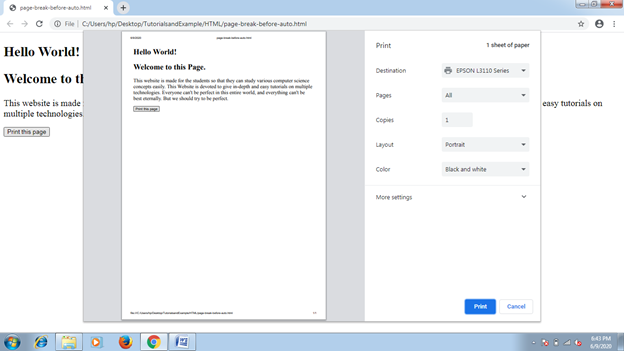
Example: auto
This value is used as a default value. It includes the page break before any item automatically, if necessary. In the following example, we will use a button and two <div> components. The button will be responsible for page printing. We will examine the value effect after clicking over the button.
<!DOCTYPE html>
<html>
<head>
<style type= "text/css">
div
{
 font-size: 20px;
 page-break-before: auto;
}
</style>
</head>
<body>
<div>
<h2> Hello World! </h2>
<h2> Welcome to this Page. </h2>
</div>
<div>
This website is made for the students so that they can study various computer science concepts easily. This Website is devoted to give in-depth and easy tutorials on multiple technologies. Everyone can't be perfect in this entire world, and everything can't be best eternally. But we should try to be perfect.
</div>
<br>
<button onclick= "fun()">Print this page</button>
<script>
function fun()
{
 window.print();
}
</script>
</body>
</html>
Output:
Example: always
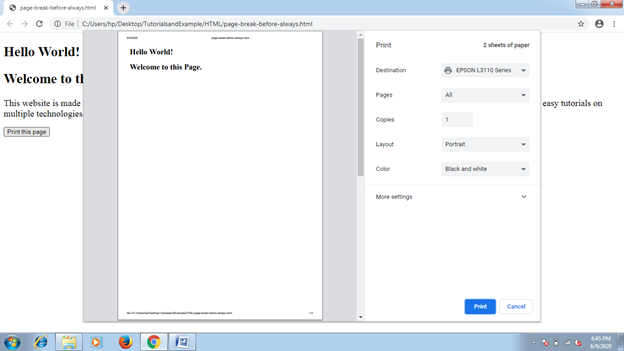
It forces to include the page break always. However, it is necessary or not. We will use the button for page printing. To examine the effect, we must click over the button.
A page break is used before <div> item, so the button can’t be printed at the upcoming page, in the following example. In case it is used after any item, then the page break will occur after an <div> item, which will result in the button to be printed on the upcoming page.
<!DOCTYPE html>
<html>
<head>
<style type= "text/css">
div
{
 font-size: 20px;
 page-break-before: always;
}
</style>
</head>
<body>
<div>
<h2> Hello World! </h2>
<h2> Welcome to this Page. </h2>
</div>
<div>
This website is made for the students so that they can study various computer science concepts easily. This Website is devoted to give in-depth and easy tutorials on multiple technologies. Everyone can't be perfect in this entire world, and everything can't be best eternally. But we should try to be perfect.
</div>
<br>
<button onclick= "fun()">Print this page</button>
<script>
function fun()
{
 window.print();
}
</script>
</body>
</html>
Output:
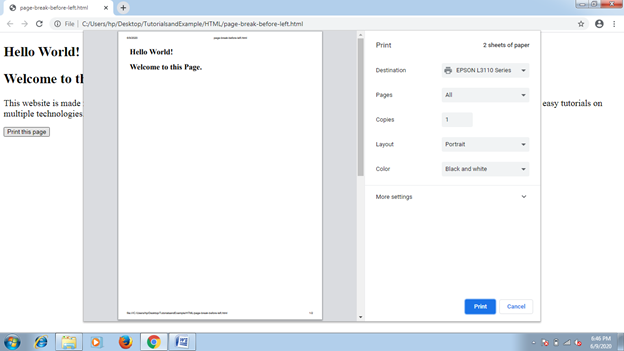
Example: left
The left value forces to include either one single or two page-breaks. Thus, the next-page formatting can be like the left side page.
<!DOCTYPE html>
<html>
<head>
<style type= "text/css">
div
{
 font-size: 20px;
 page-break-before: left;
}
</style>
</head>
<body>
<div>
<h2> Hello World! </h2>
<h2> Welcome to this Page. </h2>
</div>
<div>
This website is made for the students so that they can study various computer science concepts easily. This Website is devoted to give in-depth and easy tutorials on multiple technologies. Everyone can't be perfect in this entire world, and everything can't be best eternally. But we should try to be perfect.
</div>
<br>
<button onclick= "fun()">Print this page</button>
<script>
function fun()
{
 window.print();
}
</script>
</body>
</html>
Output:
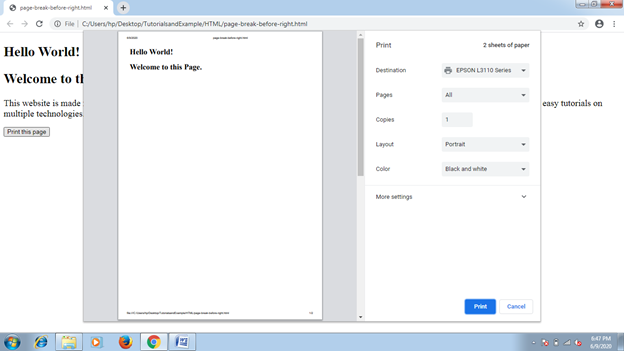
Example: right
The right value forces to include either one single or two page-breaks. Thus, the next-page formatting can be like the right side page.
<!DOCTYPE html>
<html>
<head>
<style type= "text/css">
div
{
 font-size: 20px;
 page-break-before: right;
}
</style>
</head>
<body>
<div>
<h2> Hello World! </h2>
<h2> Welcome to this Page. </h2>
</div>
<div>
This website is made for the students so that they can study various computer science concepts easily. This Website is devoted to give in-depth and easy tutorials on multiple technologies. Everyone can't be perfect in this entire world, and everything can't be best eternally. But we should try to be perfect.
</div>
<br>
<button onclick= "fun()">Print this page</button>
<script>
function fun()
{
 window.print();
}
</script>
</body>
</html>
Output: