
×

CSS Padding

CSS Padding: The padding property in CSS is addressed to describe the space among the element border and the element content.
This property is quite different from the margin property of CSS because the margin property of CSS depicts the space over elements. The CSS background color affects the CSS padding property. It clears the space over the content.

Left, right, top, and bottom padding may be altered by the use of separate properties independently. We can also change every property by the use of the shorthand CSS padding property at once.

Padding Properties

PropertyDescription
paddingThis property is applied to set every property in just one declaration.
padding-leftThe padding-left property is referred to set an element’s left padding.
padding-rightThis property in CSS is applied to set an element’s eight padding.
padding-topThe padding-top property in CSS is employed to set an element’s top padding.
padding-bottomThis property in CSS is applied to set an element’s bottom padding.

Padding Values

ValueDescription
lengthIt can be used to describe fixed padding with em, px, and pt.
%It is used to describe padding with % of any containing element.

Padding Example

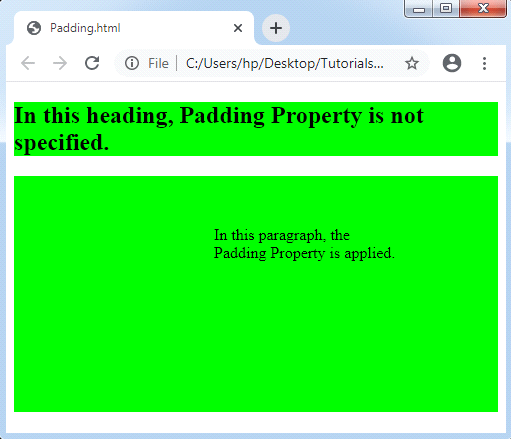
Let’s take a look on the following padding example it will help us to understand the padding property:

<!DOCTYPE html>
<html>
<head>
<style>
p,h2
{
 background-color: lime;
}
p.padding
{
 padding-top: 50px;
 padding-right: 100px;
 padding-bottom: 150px;
 padding-left: 200px;
}
</style>
</head>
<body>
<h2> In this heading, Padding Property is not specified. </h2>
<p class= "padding"> In this paragraph, the Padding Property is applied. </p>
</body>
</html>

Output:

Related Topics

CSS Masking

CSS Masking The CSS mask property is applied to hide a component with the use of the masking or clipping an image at any specific point. The masking depicts the use...

3 minutes read.

CSS Sticky

CSS Sticky The position property in CSS is applied to set an element’s position. This property is also applied to position an element behind the other element. It is useful for...

1 minute read.

CSS Width

CSS Width The width property in CSS sets the content width of area of the element. These properties do not provide margin and border features. It is used to set the...

1 minute read.

CSS 3D Transform

Introduction To understand 3D transformation property of transform you need to first understand the difference between 2D and 3D transform. 2D transform is a CSS effect which transforms the elements according to...

6 minutes read.

Hover condition for a:before and a:after in CSS

In CSS, :after and :before are used to add content after and before the element. The CSS pseudo-class is used to add some styling effect to the webpage. We can change...

4 minutes read.

CSS Line Height

CSS Line Height: This property in CSS can be used to describe the line box’s minimal height inside the element. It sets-up the distinction among two lines in our content. It...

3 minutes read.

Difference between CSS Grid and CSS Flexbox

The way that information is arranged on a website reveals a lot about you or your company. Organizational abilities are just as important as having the right materials. The design...

3 minutes read.

CSS Letter-spacing

CSS Letter-spacing: Letter-spacing attribute is applied to manage the space among all letters within the block or element of the text. This property sets the behavior of the spacing between...

2 minutes read.

What is CSS used for

What is CSS used for? CSS stands for Cascading Style Sheet. CSS is a stylesheet language for web pages. It specifies how a document created in a markup language looks and...

4 minutes read.

CSS Arrow

CSS Arrow The arrow of CSS is applied to insert an array with the tooltip. It can make a tooltip as any speech bubble. Also, this arrow can be illustrated in...

4 minutes read.

Combine Background Image with Gradient Overlay

With the help of CSS gradient, we can display smooth and straightforward transitions between two or more colours. We can add the background images by combining the gradient property with...

2 minutes read.

CSS Button Style

CSS button style: Using CSS properties, we can easily modify the default BUTTON and enhance its appearances using simple graphic commands. TYPES OF BUTTON STYLE: - Program to change button using CSS ...

35 minutes read.

How to change background color in CSS

How to change background color in CSS? The background-color property in CSS would be used to specify the color of an element's background. As the element's background, it uses solid colors. The...

3 minutes read.

CSS Animation

CSS Animation: The animation property of CSS is applied to make animation over any webpage. It is used as the animation replacement made by JavaScript and Flash. Rules of CSS3 @keyframes The...

3 minutes read.

CSS Dropdowns

Dropdowns are one of the maximum crucial parts of an interactive internet site. CSS is a kind used to design the drop-down menus. A drop-down essentially is a group of...

5 minutes read.

CSS Lists

CSS Lists: Several properties are available in CSS that are used to manage the lists. Lists are distributed as ordered and unordered kind of lists. The ordered lists provide the...

7 minutes read.

CSS Background-clip

CSS Background-clip: The background-clip property describes the background’s painting area. It limits an area where the image or color of the background appears by using any clipping box. Everything will...

2 minutes read.

CSS Margin

CSS Margin: The CSS margin property is employed to describe the space throughout the elements. It clears the range throughout the element. These properties do not have a background color...

2 minutes read.

CSS Overflow

CSS Overflow: The Overflow property in CSS is used to manage the content if it overflows from its container of the block level. We have seen that all the elements...

3 minutes read.

CSS translate() Function

Translate() CSS function This function in CSS is a CSS in-built function. It relocates the element in the horizontal direction or in the vertical direction. It can move the items from...

2 minutes read.