
×

CSS Line Height

CSS Line Height: This property in CSS can be used to describe the line box’s minimal height inside the element. It sets-up the distinction among two lines in our content.

It depicts the amount of space below and above the inline elements. It also allows us to set-up the line height, which is independent of various font sizes.

Values of Line-height

Following are a few values properties which can be applied in Line Height attribute:

normal: Normal value is used as a default value. It portrays the line-height normally.

number: It depicts a number which will be multiplied with a font size, which is currently in use, to set-up line-height.

length: Length value is applied to set-up line-height with pt, cm, px, etc.

%: It can be specified by the use of the current font’s percent for setting line-height.

initial: It is used to sets-up this attribute to the default value.

inherit: It acquires this attribute from the parent element.

Example:

<!DOCTYPE html>
<html>
<head>
<style>
h4.small {
line-height: 150%;
}
h4.big {
line-height: 200%;
}
</style>
</head>
<body>
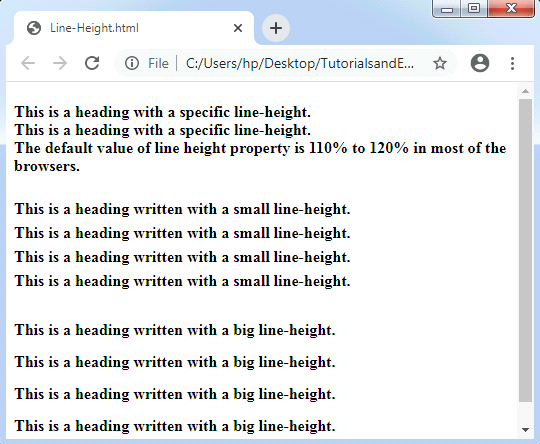
<h4>This is a heading with a specific line-height.<br>
This is a heading with a specific line-height.<br>
The default value of line height property is 110% to 120% in most of the browsers.
</h4>
<h4 class="small">
This is a heading written with a small line-height.<br>
This is a heading written with a small line-height.<br></h4>
<h4 class="big">
This is a heading written with a big line-height.<br>
This is a heading written with a big line-height.<br></h4>
</body>
</html>

Output:
CSS Line Height

Example:

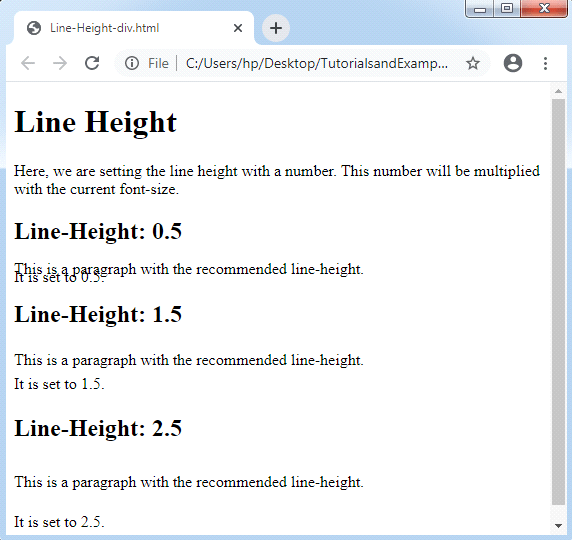
In the following example, line height is set-up with a number along with different <div> tags:

<!DOCTYPE html>
<html>
<head>
<style>
div.x {
line-height: 0.5;
}
div.y {
line-height: 1.5;
}
div.z {
line-height: 2.5;
}
</style>
</head>
<body>
<h1>Line Height</h1>
<p>Here, we are setting the line height with a number.
This number will be multiplied with the current font-size.</p>
<h2>Line-Height: 0.5</h2>
<div class="x">This is a paragraph with the recommended line-height.<br>
It is set to 0.5.</div>
<h2>Line-Height: 1.5</h2>
<div class="y">This is a paragraph with the recommended line-height.<br>
It is set to 1.5.</div>
<h2>Line-Height: 2.5</h2>
<div class="z">This is a paragraph with the recommended line-height.<br>
It is set to 2.5.</div>
</body>
</html>

Output:
CSS Line Height

Related Topics

CSS Pseudo-class

Pseudo-class The pseudo-class may be depicted as the keyword which can be mixed to any selector that specifies the elected element’s unique state. It can be included to a selector to...

6 minutes read.

CSS Order

CSS Order CSS order property in CSS describes the flex item’s order inside the flex or any grid container. It is applied to order any flex item. Note: If any component is...

3 minutes read.

How to make smooth bounce animation using CSS

The smooth bouncing animation project is done with the help of HTML and CSS. This project gives so much fun and excitement to the users. What is HTML? The HTML or HyperText...

2 minutes read.

CSS Reference

The CSS Reference lists all of the basic standard CSS properties, pseudo-classes, pseudo-elements, and data types, for all intents and purposes functional notations, and at-rules alphabetically.  The site also includes...

5 minutes read.

CSS Math Functions

The CSS math functions permit numerical articulations. These CSS math functions can particularly be utilized in maybe unforeseen ways, for example, inside angles and shading the functions and in the...

3 minutes read.

CSS Page-break-inside Attribute

Page-break-inside Attribute As its name implies, the page-break-before property is applied to include page break inside any element, at the time of printing any document. It adds the page break before...

3 minutes read.

CSS Overlay

CSS Overlay: It measures to cover-up something’s surface along with a coating. CSS overlay sets anything over the top area of other things. It creates a web-page more attractive. The...

8 minutes read.

CSS Font

CSS Font: CSS has font property, which makes the text more attractive. We can alter the entire look by changing font color, font size, font style, and much more. In...

5 minutes read.

CSS Images

Images in CSS: Images are a critical part of a web application. It includes various types of images in the web application that cannot be recommended. However, it is essential...

4 minutes read.

CSS Justify Content

Justify Content: These properties are applied for the alignment of items of a flexible box container if any item does not cover every available space over the main-axis, i.e., horizontally....

4 minutes read.

CSS Background Color

It is one of the CSS properties to apply styling to html elements.This property is used to apply the background color to any HTML element.The background of an element includes...

2 minutes read.

How to center a table in CSS

The table is used to store and arrange the data in tabular format. The data here can be of any form like text, image, links, etc. The table is made...

3 minutes read.

CSS Comments

CSS Comments: Generally, comments in CSS are used to describe our code. Further, it will provide support to many users who are concerned with the code. Somewhat, these are ignored...

2 minutes read.

How to Set Space between the Flexbox

For managing layout on the Web, CSS Flexbox and CSS Grid are two excellent tools. Flexbox handles one-dimensional layouts quite well, whereas CSS Grid manages two-dimensional layouts with columns and...

4 minutes read.

CSS Ellipsis

The CSS ellipsis kind of is the value that mostly is used by the property: text-overflow. Here, we will discuss the following: What is CSS Ellipsis? Syntax for CSS ellipsis How to...

3 minutes read.

How to include CSS

How to include CSS CSS is included in HTML pages for formatting the documents based on the information inside a style sheet. We can add CSS in HTML documents in the following three ways: Inline...

5 minutes read.

How to create blinking text using CSS

The blinking effect is used in HTML and CSS to take the attraction towards a particular word or section. If you need such a blinking effect, we need to take...

2 minutes read.

CSS Pseudo-elements

Pseudo-elements The pseudo-classes in CSS can be represented as any keyword which is connected to the selector that represents any selected element’s unique state. On the other hand, pseudo-elements can be...

6 minutes read.

Is CSS a programming language?

 A programming language is a set of grammatical rules and a vocabulary for commanding a machine to accomplish specified tasks. High-level languages like BASIC, C, C++, COBOL, Java, FORTRAN, Ada...

4 minutes read.

CSS Letter-spacing

CSS Letter-spacing: Letter-spacing attribute is applied to manage the space among all letters within the block or element of the text. This property sets the behavior of the spacing between...

2 minutes read.