
×

CSS Zoom

CSS Zoom: Zoom property in CSS extents the content. This property controls the content’s level of magnification. Rather than the use of this CSS property, we may also apply the CSS property, i.e., transform: scale();.

The usage of the zoom property is not suggested because this property does not provide its support in a few browsers. The zoom CSS property is not a standard aspect, which is advised not to apply over production sites. Initially, it was implemented inside the IE browser.

Syntax:

zoom: normal | number | percentage | reset ;  

Zoom property in CSS provides its support for the values as above-mentioned, which are explained below.

normal: It displays the component to its size as normal. It specifies the general size of any component. It takes the general contents that do not zoom-in or zoom-out. It has value, i.e., zoom:1;

number: This property defines any positive value and illustrates any zoom factor. It contains values which are larger than value 1.0 depict zoom in (size increment), and smaller than value 1.0 depict zoom out (size reduction). Suppose we describe zoom: 1.5; after that, any content will 1.5 times greater than any original content.

percentage: It displays the values in percentage. In this, a 100% value is equal to its normal value. It extents any content with the use of any percentage value. It contains values that are larger than 100% depict zoom in (size increment), and smaller than 100% depict zoom out (size reduction). Suppose we describe zoom: 175%; after that, any content will 175% times greater than any original content.

Let’s understand this CSS property with the help of the following examples, which are discussed below.

Example1:

<!DOCTYPE html>
<html>
<head>
<title>
CSS Zoom
</title>
<style>
h1
{
 color: green;
}
h2
{
 color: lime;
}
magnify1
{
 zoom: 0.75;
}
magnify
{
 zoom: 1.5;
}
</style>
</head>
<body>
<center>
<h1> Zoom Property </h1>
<div>
<h2> Original Image </h2>
<img class= "original" src= "Flower1.jpg">
<h2> Magnified image zoom: 0.75; </h2>
<img class= "magnify1" src= "Flower1.jpg">
<h2> Magnified image zoom: 1.5; </h2>
<img class= "magnify" src= "Flower1.jpg">
</div>
</center>
</body>
</html>

Output:
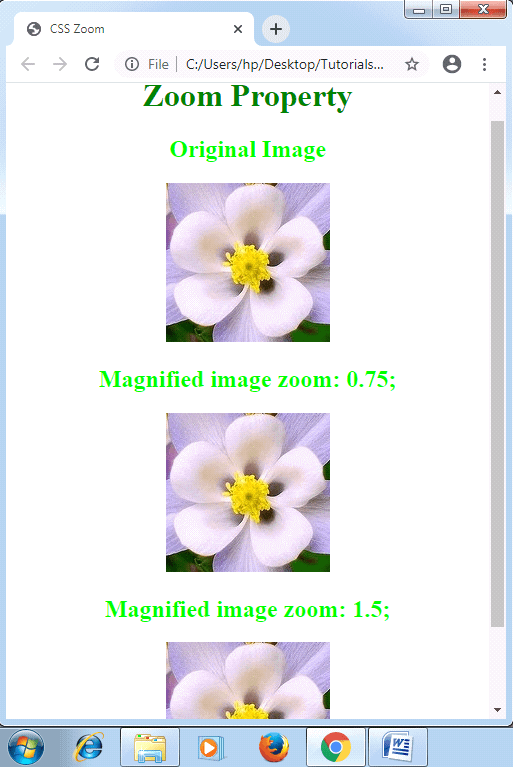
CSS Zoom

Example2:

<!DOCTYPE html>
<html>
<head>
<title>
CSS Zoom
</title>
<style>
h1
{
 color: green;
}
.magnify
{
 width: 100px;
 height: 100px;
 border-radius: 30px;
 display: inline-block;
 color: white;
}
#m1
{
 background-color: yellow;
 zoom: normal;
 color: black;
}
#m2
{
 background-color: blue;
 zoom: 200%;
}
#m3
{
 background-color: lime;
 zoom: 2.9
}
p
{
 padding-top: 20px;
}
</style>
</head>
<body>
<center>
<h1> Zoom Property </h1>
<div id= "m1" class= "magnify"><p>zoom: normal;<p></div>
<div id= "m2" class= "magnify"><p>zoom: 200%;<p></div>
<div id= "m3" class= "magnify"><p>zoom: 2.9;<p></div>
</center>
</body>
</html>

Output:
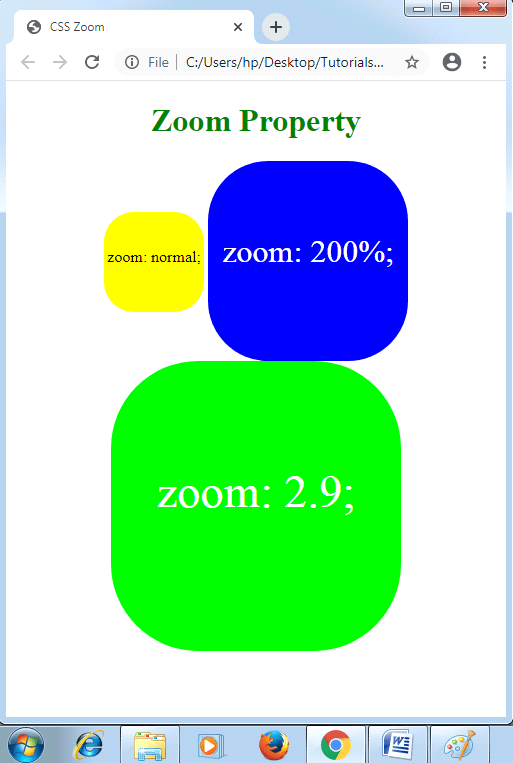
CSS Zoom


Related Topics

CSS Word Wrap

Word Wrap in CSS: The word-wrap property in CSS is referred to break any lengthy word and wrap towards the next or following line. It is employed for preventing overflow...

1 minute read.

CSS 3D Transform

Introduction To understand 3D transformation property of transform you need to first understand the difference between 2D and 3D transform. 2D transform is a CSS effect which transforms the elements according to...

6 minutes read.

CSS Background Color

It is one of the CSS properties to apply styling to html elements.This property is used to apply the background color to any HTML element.The background of an element includes...

2 minutes read.

CSS Order

CSS Order CSS order property in CSS describes the flex item’s order inside the flex or any grid container. It is applied to order any flex item. Note: If any component is...

3 minutes read.

CSS Radio Button

Radio Button A radio button has been defined as an element of HTML. It can support us to take any input from the user. But it is challenging to design a...

4 minutes read.

CSS Overflow

CSS Overflow: The Overflow property in CSS is used to manage the content if it overflows from its container of the block level. We have seen that all the elements...

3 minutes read.

CSS Loader

CSS Loader The loader is the animation that can alert a visitor regarding the loading of the page. We need to wait for some time. It will be helpful if any...

4 minutes read.

How to center a button in CSS

How to center a button in CSS? In the tutorial, we will learn how to center a button in CSS. CSS (Cascading Style Sheets) gives an HTML web page the greatest possible...

4 minutes read.

CSS Button Style

CSS button style: Using CSS properties, we can easily modify the default BUTTON and enhance its appearances using simple graphic commands. TYPES OF BUTTON STYLE: - Program to change button using CSS ...

35 minutes read.

CSS z-index Property

CSS z-index: CSS z-index permits us to represent any visual hierarchy over a 3D plane that is the z-axis. This index can be applied to describe the positioned element’s stacking...

2 minutes read.

CSS Page-break-after Attribute

Page-break-after Attribute As its name implies, the page-break-before property is applied to include page break after any element, at the time of printing a document. It adds the page break after...

5 minutes read.

CSS Transition

CSS Transition The transitions in CSS are influenced, included to modify the component from one design to another, without the use of the JavaScript or Flash. We should describe two of the...

2 minutes read.

CSS Page-break-inside Attribute

Page-break-inside Attribute As its name implies, the page-break-before property is applied to include page break inside any element, at the time of printing any document. It adds the page break before...

3 minutes read.

CSS :root selector

CSS :root selector This CSS pseudo-class matches any document’s root element. It chooses the parent of the highest-level inside the document DOM or tree. An element of <html> is always a...

2 minutes read.

CSS Counters

CSS Counters: The CSS counter property is similar to the variables. CSS counters are controlled via CSS, and its values are incremented via rules of CSS to record how much...

4 minutes read.

How to include CSS

How to include CSS CSS is included in HTML pages for formatting the documents based on the information inside a style sheet. We can add CSS in HTML documents in the following three ways: Inline...

5 minutes read.

CSS Table

CSS table provides better look and feel. There are various properties of CSS table that are given below. border border-collapse padding width height text-align color background-color CSS Table Border You can set...

4 minutes read.

CSS Content Property

Content Property The content attribute produces dynamic content. It can be applied with any pseudo-element ::after and ::before. These CSS properties are entirely supported inside every browser and applied to include...

5 minutes read.

CSS Variables

CSS Variables These variables of CSS are applied to add the custom property values to our various web-pages. The custom properties are often called as CSS variables or cascading variables. Various...

4 minutes read.

CSS translate() Function

Translate() CSS function This function in CSS is a CSS in-built function. It relocates the element in the horizontal direction or in the vertical direction. It can move the items from...

2 minutes read.