
×

CSS Loader

CSS Loader

The loader is the animation that can alert a visitor regarding the loading of the page. We need to wait for some time. It will be helpful if any page takes a few seconds for loading of the webpage content. A visitor could assume that the website is unresponsive if he does not use the loader over any webpage.

With the use of the loader in CSS, we can create a visitor waited or distracted for a few seconds until a page gets completely loaded.

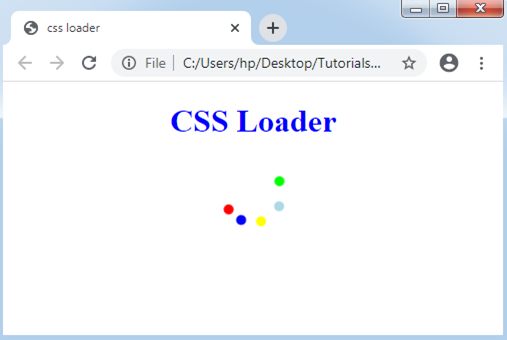
We may understand the CSS loader concept with the use of the following demonstrations.

Consider the below examples:

Example:1

<!DOCTYPE html>  
<html>  
<head>  
<title> CSS loader </title>  
<style>  
h1
{  
color:blue;  
}  
div
{  
display: block;  
position: absolute;  
width: 10px;  
height: 10px;  
left: calc(50% - 1em);  
border-radius: 1em;  
transform-origin: 1em 2em;  
animation: rotate;  
animation-iteration-count: infinite;  
animation-duration: 1.6s;  
}  
@keyframes rotate
{  
0% { transform: rotate(0deg); } 
100% { transform: rotate(360deg); } 
}  
.d1
{  
animation-delay: 0.1s;  
background-color: red;  
}  
.d2
{  
animation-delay: 0.2s;  
background-color: blue;  
}  
.d3
{  
animation-delay: 0.3s;  
background-color: yellow;  
}  
.d4
{  
animation-delay: 0.4s;  
background-color: lightblue;  
}  
.d5
{  
animation-delay: 0.5s;  
background-color: lime;  
}  
</style>  
</head>  
<body>  
<center>   
<h1> CSS Loader </h1>  
<div class='d1'></div>  
<div class='d2'></div>  
<div class='d3'></div>  
<div class='d4'></div>  
<div class='d5'></div>  
</center>  
</body>  
</html> 

Output:
CSS Loader

Example:2

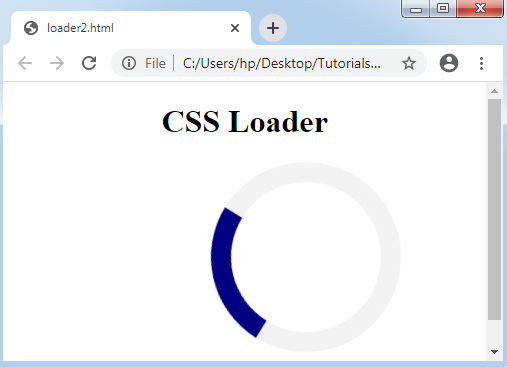
In the following example, we will use spinner in this another demonstration of the CSS loader.

<!DOCTYPE html> 
<html> 
<head> 
<style> 
h1
{ 
text-align:center; 
} 
.loader
{ 
border: 20px solid #f3f3f3; 
position:absolute; 
left:43%; 
border-radius: 50%; 
border-top: 20px solid navy; 
width: 150px; 
height: 150px; 
animation: spin 2s linear infinite; 
} 
@keyframes spin
{ 
0% { transform: rotate(0deg); } 
100% { transform: rotate(360deg); } 
} 
</style> 
</head> 
<body> 
<h1>CSS Loader</h1> 
<div class="loader"></div> 
</body> 
</html> 

In this example, we have specified the border property of CSS, which describes the loader’s border size and border color. Here, we have also applied the border-radius attribute of CSS, which transforms a border into a circle.

We have applied the border-top attribute of CSS for the navy thing that will spin around inside the border. The loader's size is described with the use of the height and width properties. In the last, we have included the animation which create the navy thing spin endless times along with the 2s animation speed.

Output:
CSS Loader

The following another demonstration of loader.

Example:3

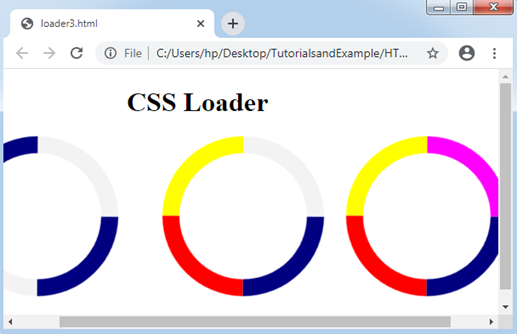
In the above-mentioned example, we have added only the border-top attribute of CSS, but in this demonstration, we will also add the border-right, border-left, and border-bottom attributes of CSS.

<!DOCTYPE html> 
<html> 
<head> 
<style> 
h1
{ 
text-align:center; 
} 
.loader
{ 
  border: 20px solid #f3f3f3; 
  position:absolute; 
  border-radius: 50%; 
  border-top: 20px solid navy; 
  border-bottom: 20px solid navy; 
  width: 150px; 
  height: 150px; 
  animation: spin 2s linear infinite; 
} 
.loader1
{ 
  border: 20px solid #f3f3f3; 
  position:absolute; 
  left:43%; 
  border-radius: 50%; 
  border-top: 20px solid navy; 
  border-bottom: 20px solid yellow; 
  border-right: 20px solid red; 
  width: 150px; 
  height: 150px; 
  animation: spin 2s linear infinite; 
} 
.loader2
{ 
  border: 20px solid #f3f3f3; 
  position:absolute; 
  left:80%; 
  border-radius: 50%; 
  border-top: 20px solid navy; 
  border-bottom: 20px solid yellow; 
  border-right: 20px solid red; 
  border-left:20px solid magenta; 
  width: 150px; 
  height: 150px; 
  animation: spin 2s linear infinite; 
} 
@keyframes spin
{ 
  0% { transform: rotate(0deg); } 
  100% { transform: rotate(360deg); } 
} 
</style> 
</head> 
<body> 
<h1>CSS Loader</h1> 
<div class="loader"></div> 
<div class="loader1"></div> 
<div class="loader2"></div> 
</body> 
</html> 

Output:
CSS Loader

Related Topics

CSS @keyframes rule

CSS @keyframes rule It describes the rule of animation that depicts the properties of CSS for the components at every state along with the timeline. We may make the properties of complex...

4 minutes read.

CSS :root selector

CSS :root selector This CSS pseudo-class matches any document’s root element. It chooses the parent of the highest-level inside the document DOM or tree. An element of <html> is always a...

2 minutes read.

CSS Lists

CSS Lists: Several properties are available in CSS that are used to manage the lists. Lists are distributed as ordered and unordered kind of lists. The ordered lists provide the...

7 minutes read.

CSS Border

CSS Border: The border property of CSS allows us to define the style, color, width, and radius of the element’s border. It is applied to various elements to set-up the...

4 minutes read.

CSS Content Property

Content Property The content attribute produces dynamic content. It can be applied with any pseudo-element ::after and ::before. These CSS properties are entirely supported inside every browser and applied to include...

5 minutes read.

How to make smooth bounce animation using CSS

The smooth bouncing animation project is done with the help of HTML and CSS. This project gives so much fun and excitement to the users. What is HTML? The HTML or HyperText...

2 minutes read.

CSS Table

CSS table provides better look and feel. There are various properties of CSS table that are given below. border border-collapse padding width height text-align color background-color CSS Table Border You can set...

4 minutes read.

CSS Background-clip

CSS Background-clip: The background-clip property describes the background’s painting area. It limits an area where the image or color of the background appears by using any clipping box. Everything will...

2 minutes read.

CSS Word Wrap

Word Wrap in CSS: The word-wrap property in CSS is referred to break any lengthy word and wrap towards the next or following line. It is employed for preventing overflow...

1 minute read.

CSS Checkbox style

CSS Checkbox style: It is an element of HTML, which is used to get input from various users. It is difficult to style any checkbox. However, some elements make it...

6 minutes read.

CSS Syntax

The CSS syntax contains the selector and the declaration block, which will be clearer with the following example: Selector: A CSS selector specifies the HTML tag we wish to style. A selector can be...

2 minutes read.

CSS translate() Function

Translate() CSS function This function in CSS is a CSS in-built function. It relocates the element in the horizontal direction or in the vertical direction. It can move the items from...

2 minutes read.

CSS Font

CSS Font: CSS has font property, which makes the text more attractive. We can alter the entire look by changing font color, font size, font style, and much more. In...

5 minutes read.

CSS Form

You can create attractive HTML form by using CSS. Style input Fields The Input Field width properties are used to determine the width of the input field. Let us see an example of CSS style...

2 minutes read.

CSS Padding

CSS Padding: The padding property in CSS is addressed to describe the space among the element border and the element content.This property is quite different from the margin property of...

2 minutes read.

CSS Sticky

CSS Sticky The position property in CSS is applied to set an element’s position. This property is also applied to position an element behind the other element. It is useful for...

1 minute read.

How To Use CSS

You can use CSS(Cascading Style Sheet) in four ways. These are given below: The given above CSS type, in which various technique will be used. These are different from each other and...

2 minutes read.

CSS Units

CSS Units In CSS, there are so many units available to show the length’s measurement. A single unit of CSS is applied to examine the size of the property, which the...

5 minutes read.

CSS Flex-Box

Introduction The flex-box property of CSS stands for Flexible Box Layout Module. It is specifically used to design a flexible responsive layout. Flex-box is a one dimensional layout model, i.e. it works...

6 minutes read.

How to change the font in CSS

How to change the font in CSS? Professionals can't deny typefaces — how users organize and style text — if we want to completely customize the website's design. One may wish...

4 minutes read.