
×

CSS Text-Transform Property

Text-Transform in CSS

The text-transform property permits us to alter the text case. It controls the capitalization of the text. This property is employed to design the text appearance in every uppercase or every lowercase, or it may transform each word’s first character to uppercase.

Syntax:

text-transform: capitalize| uppercase| lowercase| none| initial| inherit;

 Let’s understand the above property values one by one with an example.

  • Capitalize

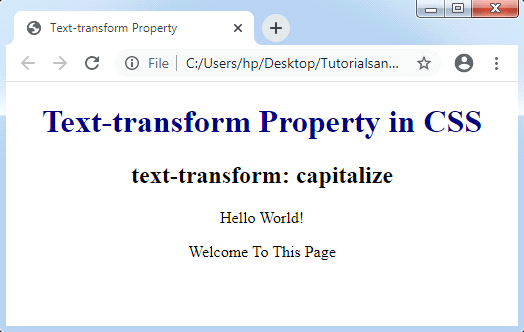
It transforms each word’s first character to uppercase. But, it can’t change any first letter after any number into the capitalized form. It can affect any word’s first letter only, rather changing the other letters of any word.

The letter in any word that has already defined in the capitalized form will not be switched to the lowercase form by using this property.
The example to describe the capitalize property is illustrated below:

Syntax:

text-transform: capitalize;

Example:

<!DOCTYPE html>
<html>
<head>
<title> Text-transform Property </title>
<style>
body
{
 text-align: center;
}
h1
{
 color: navy;
}
p
{
text-transform: capitalize;
}
</style>
</head>
<body>
<center>
<h1> Text-transform Property in CSS </h1>
<h2> text-transform: capitalize </h2>
<p> Hello World! </p>
<p> Welcome to this Page </p>
</body>
</html>

Output:
CSS Text-Transform
  • uppercase

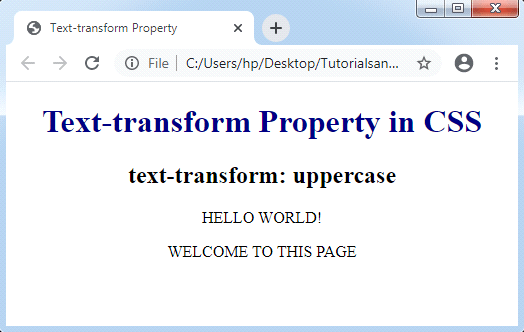
As the name suggests, it transforms word’s every character into uppercase.

Syntax:

text-transform: uppercase;

Example:

<!DOCTYPE html>
<html>
<head>
<title> Text-transform Property </title>
<style>                
body
{
 text-align: center;
}
h1
{
 color: navy;
}
p
{
text-transform: uppercase;
}
</style>
</head>
<body>
<center>
<h1> Text-transform Property in CSS </h1>
<h2> text-transform: uppercase </h2>
<p> Hello World! </p>
<p> Welcome to this Page </p>
</body>
</html>

Output:
CSS Text-Transform
  • lowercase

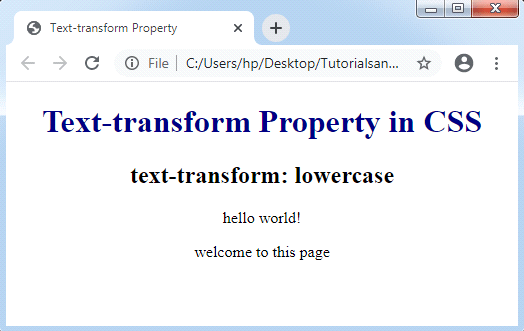
This property can transform word’s every character into lowercase.

Syntax:

text-transform: lowercase;

Example:        

<!DOCTYPE html>
<html>
<head>
<title> Text-transform Property </title>
<style>
body
{
 text-align: center;
}
h1
{
 color: navy;
}
p
{
text-transform: lowercase;
}
</style>
</head>
<body>
<center>
<h1> Text-transform Property in CSS </h1>
<h2> text-transform: lowercase </h2>
<p> HELLO WORLD! </p>
<p> WELCOME TO THIS PAGE </p>
</body>
</html>

Output:
CSS Text-Transform
  • none

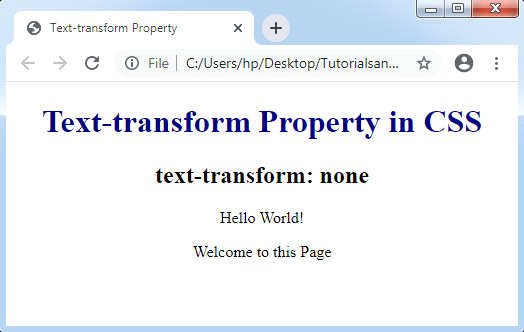
This property does not provide any capitalization and it is defined as a default value. It delivers any text form as it is.

Syntax:

text-transform: none;

Example:

<!DOCTYPE html>
<html>
<head>
<title> Text-transform Property </title>
<style>
body
{
 text-align: center;
}
h1
{
 color: navy;
}
p
{
text-transform: none;
}
</style>
</head>
<body>
<center>
<h1> Text-transform Property in CSS </h1>
<h2> text-transform: none </h2>
<p> Hello World! </p>
<p> Welcome to this Page </p>
</body>
</html>

Output:
CSS Text-Transform

Related Topics

How To Use CSS

You can use CSS(Cascading Style Sheet) in four ways. These are given below: The given above CSS type, in which various technique will be used. These are different from each other and...

2 minutes read.

How to include CSS

How to include CSS CSS is included in HTML pages for formatting the documents based on the information inside a style sheet. We can add CSS in HTML documents in the following three ways: Inline...

5 minutes read.

How to make smooth bounce animation using CSS

The smooth bouncing animation project is done with the help of HTML and CSS. This project gives so much fun and excitement to the users. What is HTML? The HTML or HyperText...

2 minutes read.

CSS Math Functions

The CSS math functions permit numerical articulations. These CSS math functions can particularly be utilized in maybe unforeseen ways, for example, inside angles and shading the functions and in the...

3 minutes read.

CSS Masking

CSS Masking The CSS mask property is applied to hide a component with the use of the masking or clipping an image at any specific point. The masking depicts the use...

3 minutes read.

CSS Descendant Selector

Descendant Selector The Descendant selector in CSS is used to match the descendant components of a particular component. The term descendant depicts nested in whatever place, inside a DOM tree. This...

2 minutes read.

CSS Page-break-before Attribute

Page-break-before Attribute As its name implies, the page-break-before property is applied to include page break before any element, at the time of printing any document. It adds the page break before...

5 minutes read.

CSS Text-stroke

Text-stroke Text-stroke CSS property inserts the stroke to any text and gives a decoration option to them also. It describes the stroke’s width and color for various text characters. It is...

2 minutes read.

CSS Zoom

CSS Zoom: Zoom property in CSS extents the content. This property controls the content’s level of magnification. Rather than the use of this CSS property, we may also apply the...

3 minutes read.

CSS Clip

CSS Clip The Clip property in CSS describes the element’s visible area. It applies over the elements which are absolutely positioned (position: absolute ;). Generally, it is used when an image...

2 minutes read.

Difference between CSS Grid and CSS Flexbox

The way that information is arranged on a website reveals a lot about you or your company. Organizational abilities are just as important as having the right materials. The design...

3 minutes read.

Css Box Model

Introduction The Box Model property of CSS is used for design and layout of an html page. In CSS, all the elements has a rectangular box around it, you have to...

5 minutes read.

CSS Units

CSS Units In CSS, there are so many units available to show the length’s measurement. A single unit of CSS is applied to examine the size of the property, which the...

5 minutes read.

CSS White Space Property

White Space in CSS The white-space CSS property describes how to show the content inside an element. This property is applied to manage a white space within an element. Values of White-space...

2 minutes read.

CSS Content Property

Content Property The content attribute produces dynamic content. It can be applied with any pseudo-element ::after and ::before. These CSS properties are entirely supported inside every browser and applied to include...

5 minutes read.

CSS z-index Property

CSS z-index: CSS z-index permits us to represent any visual hierarchy over a 3D plane that is the z-axis. This index can be applied to describe the positioned element’s stacking...

2 minutes read.

CSS Letter-spacing

CSS Letter-spacing: Letter-spacing attribute is applied to manage the space among all letters within the block or element of the text. This property sets the behavior of the spacing between...

2 minutes read.

CSS Box-shadow

CSS Box-shadow This property is referred to include effects as shadow-like around an element’s frame. Syntax box-shadow: h-offset v-offset blur spread color |inset|inherit|none; Property values Following are the various property values which can be used...

3 minutes read.

Internal CSS

What is CSS? CSS stands for Cascading Style Sheet.CSS is used to apply styling the HTML elements.With CSS user can add or change color, font-size and font-family. It also helps user...

4 minutes read.

CSS Text Effects

Text Effects in CSS We can use distinct text effects used inside the HTML document. Few attributes can be applied to insert the text effects. We can also style various web documents...

5 minutes read.