
×

Go-To Special function in Excel

Go-to Special

The Go-To Special function in Excel allows you to select all cells that meet certain criteria quickly. This command is used to identify specific cells – the ones which are used more have been listed below –

Comments - select only the cells that contain a cell comment

Constants - selects all nonempty cells that don’t contain formulas

Formulas - selects cells that contain formulas

Declaring Go-to special option

  • Under the Home tab ->Click on ‘Find & Replace’.
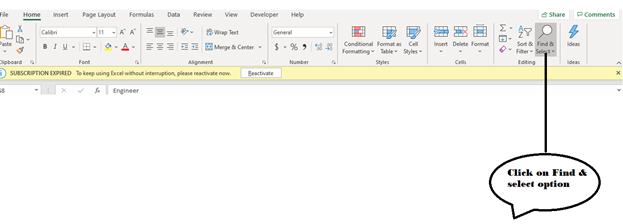
Go-To Special function in Excel
  • A dialog box appears. Click on Go-to special option.
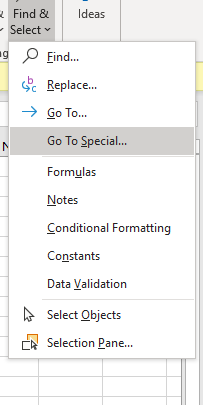
Go-To Special function in Excel
  • Go-to dialog box appears. The various options appear. Choose the appropriate once as per your requirement. Click on Ok
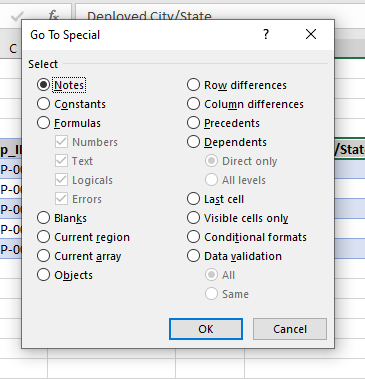
Go-To Special function in Excel

Related Topics

Excel WEEKNUM() Function

The WEEKNUM() function in excel returns the week number from 1 to 54 of a specific date in a year. The WEEKNUM function starts counting with the week that contains January 1...

1 minute read.

Row Difference in Excel

Microsoft Excel is used for multiple purposes in various organizations. It is a combination of numeric values, alphabets etc. To calculate data, the user organizes the data according to their...

5 minutes read.

Gauge Chart in Excel

A Gauge Chart in Microsoft Excel is considered the meter type chart of a group dial chart, which is eventually similar to the speedometer that has the pointer towards the...

7 minutes read.

Error Bar in Microsoft Excel

Error Bar is considered the essential term used in Microsoft Excel. It is defined as the graphical representation of the respective data used to denote the errors. The Error bars can...

7 minutes read.

Excel EXACT() Function

The EXACT() function in excel checks whether the specified values (texts, numbers) are exactly the same or not. It returns a Boolean value TRUE if the compared values are same, else it...

1 minute read.

How to print titles in Excel

In Microsoft Excel, if a particular task is completed in the worksheet, the user wants to print the worksheet. While performing this job, the row and column headings will display...

3 minutes read.

How to use TODAY function in Excel

What is TODAY Function in Excel? Today function is one of the types of Worksheet function (WS) in Excel.Today Function belongs to the Date and Time functions.It is used to calculate...

3 minutes read.

Pivots Table in Excel

What is a Pivot? A pivot table is a tool to create summary reports from data-sets irrespective of their sizes but is helpful even if the data is more than just...

5 minutes read.

Shortcut Keys in Excel

Shortcut Keys in Excel Shortcut keys in Excel are used to simplify the work and save time by pressing a few keys.  These keys are used for navigating and working with Excel spreadsheets quickly and easily. Basic Selection:...

9 minutes read.

Copying formula in Excel

Copy a formula in Excel While working with statistical calculations in Microsoft Excel, the user uses formulas to calculate the mathematical operations. Implementing these formulas manually for each data is a...

3 minutes read.

Excel IFERROR() Function

The IFERROR() function in excel returns the specified value if initially supplied the argument or formula returns an error, otherwise returns the result of the formula supplied in the first argument. When...

2 minutes read.

Calculating the Last Day of the Month in Excel

In Microsoft Excel, various functions exist to calculate the date and time from the current date to the past and future. Among multiple tasks in this tutorial, let's see how...

3 minutes read.

Frequency Distribution in Excel

The term Frequency Distribution in Microsoft Excel is mainly used to explain how the data will be spread out. And it could be achieved with the help of the Histogram,...

7 minutes read.

Excel MAX() Function

Excel MAX() Function The MAX() function in excel returns the largest or maximum number from a range of cells. It ignores logical values and text. Syntax MAX(Number1,Number2, ...) Parameter Number1(required)- This parameter represents the string for which you...

1 minute read.

Formatting in Excel

Formatting in Excel Formatting in Excel is used to alter and change the appearance of your data in a standardized form. It also helps you to give a professional look to your reports, worksheets,...

7 minutes read.

Excel EDATE() Function

Excel EDATE() Function The EDATE() function in excel returns the serial number of the date that is the indicated number of months before or after the start date. Syntax EDATE(Start_Date, Month) Parameter Start_Date(required)- This parameter represents...

1 minute read.

Excel SMALL() Function

The SMALL() function in excel returns the k-th smallest value in a data set. Syntax SMALL(Array, kth small number from the list) Parameter Array (required)- This parameter represents the list of numbers from which nth smallest...

1 minute read.

Excel MIN() Function

Excel MIN() Function The MIN() function in excel returns the smallest or minimum value from the provided numbers, named range or array. It ignores logical values and text. Syntax MIN(Number1,Number2, ...) Parameter Number1(required)- This parameter represents the...

1 minute read.

Excel SUBSTITUTE() Function

The SUBSTITUTE() function in excel substitutes/replaces the old text with the new text in a string. SUBSTITUTE function is used to clean data. This function is case-sensitive. Syntax SUBSTITUTE(Text, Old_Text, New_Text, [instance_number]) Parameter Text (required)- This...

2 minutes read.

Excel RIGHT() Function

The RIGHT() function in excel returns the rightmost characters from a text value. This function is used for data manipulation. Syntax RIGHT(Text, [num_chars]) Parameter Text (required)- This parameter represents the string from which you want to find...

1 minute read.