
×

How to make smooth bounce animation using CSS

The smooth bouncing animation project is done with the help of HTML and CSS. This project gives so much fun and excitement to the users.

What is HTML?

The HTML or HyperText Markup Language is used to design web pages. The file extension name for HTML file is “.html”. It was discovered in 1993. An HTML file is created with the help of CSS and JavaScript. The tags use the markups of HTML. The golden rule of HTML is all the major tags must be opened with <tags> and closed with </tags>. When we have multiple tags, each tag must be closed before they are opened. 

What is CSS?

The CSS or Cascading Style Sheet is a language used to design the webpage that HTML creates. It is the core language of web designing. 

For doing this project, we have to follow some steps. These steps are as follows:

  1. First, we create the animation framework.
  2. Then, we specify the initial position.
  3. Then, we select the bounce position.
  4. Then, we determine the second bounce position.
  5. Then, we continue the bouncing until it stops.

HTML code

<html>
<div id="stage"><div id="traveler"><div id="bouncer"><!-- --></div></div></div></html>

CSS code

/* keyframes definition for WebKit browsers */


@-webkit-keyframes travel {
from { left: 0;     }
to   { left: 640px; }
}


@-webkit-keyframes bounce {
from, to  {
bottom: 0;
-webkit-animation-timing-function: ease-out;
}
50% {
bottom: 220px;
-webkit-animation-timing-function: ease-in;
}
}


@-webkit-keyframes spin {
from {                                     }
to   { -webkit-transform: rotateZ(360deg); }
}


/* keyframes definition for other browsers */


@keyframes travel {
from { left: 0;     }
to   { left: 640px; }
}


@keyframes bounce {
from, to  {
bottom: 0;
animation-timing-function: ease-out;
}
50% {
bottom: 220px;
animation-timing-function: ease-in;
}
}


@keyframes spin {
from {
-moz-transform: rotate(0);
-o-transform: rotate(0);
-ms-transform: rotate(0);
transform: rotate(0);
}
to {
-moz-transform: rotate(360deg);
-o-transform: rotate(360deg);
-ms-transform: rotate(360deg);
transform: rotate(360deg);
}
}


/* styles for the stage and animated elements */


#stage {
position: relative;
margin: 1em auto;
width: 660px;
height: 240px;
border: 2px solid #666;
background: #cff;
}


#traveler {
position: absolute;
width: 20px;
height: 240px;


-webkit-animation-name: travel;
-webkit-animation-timing-function: linear;
-webkit-animation-iteration-count: infinite;
-webkit-animation-direction: alternate;
-webkit-animation-duration: 4.8s;


animation-name: travel;
animation-timing-function: linear;
animation-iteration-count: infinite;
animation-direction: alternate;
animation-duration: 4.8s;
}


#bouncer {
position: absolute;
width: 20px;
height: 20px;
border-radius: 10px;
background: red;
background: -webkit-radial-gradient(60% 40%, circle, rgba(255,255,255,0.8), red 50%) red;
background: -moz-radial-gradient(60% 40%, circle, rgba(255,255,255,0.8), red 50%) red;
background: -o-radial-gradient(60% 40%, circle, rgba(255,255,255,0.8), red 50%) red;
background: -ms-radial-gradient(60% 40%, circle, rgba(255,255,255,0.8), red 50%) red;
background: radial-gradient(60% 40%, circle, rgba(255,255,255,0.8), red 50%) red;


-webkit-animation-name: bounce, spin;
-webkit-animation-iteration-count: infinite;
-webkit-animation-duration: 4.2s;


animation-name: bounce, spin;
animation-iteration-count: infinite;
animation-duration: 4.2s;
}

Output:
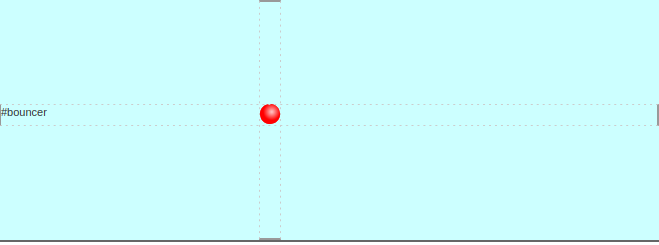
How to make smooth bounce animation using CSS

Supported Browsers

  • Firefox
  • Safari
  • Google Chrome
  • Opera
  • Microsoft Edge

Related Topics

CSS Selector

CSS Selector: There are some selectors used in CSS, which allows us to choose the content we wish to style. Various selectors are considered as the separation of the set...

5 minutes read.

How to edit CSS in WordPress

Developing a new website or blog is a difficult undertaking. We want to create something that the consumers will adore, but we might not want the setting to take months and...

7 minutes read.

How To Use CSS

You can use CSS(Cascading Style Sheet) in four ways. These are given below: The given above CSS type, in which various technique will be used. These are different from each other and...

2 minutes read.

CSS calc()

CSS calc(): The CSS calc() function is a CSS function of inbuilt type, which permits us to implement calculations. It is used for calculating the angle, integer frequency, number, time,...

3 minutes read.

CSS Filter

CSS Filter CSS filter is used to apply visual effects on the images, text, and other factors of the webpage. This filter property in CSS allows us to admit the effects like...

7 minutes read.

CSS Counters

CSS Counters: The CSS counter property is similar to the variables. CSS counters are controlled via CSS, and its values are incremented via rules of CSS to record how much...

4 minutes read.

CSS Page-break-inside Attribute

Page-break-inside Attribute As its name implies, the page-break-before property is applied to include page break inside any element, at the time of printing any document. It adds the page break before...

3 minutes read.

CSS Margin

CSS Margin: The CSS margin property is employed to describe the space throughout the elements. It clears the range throughout the element. These properties do not have a background color...

2 minutes read.

CSS Visibility

Visibility in CSS: This visibility property in CSS is employed to describe whether the components are visible or not. Note: An invisible component also grabs the space over the page. If...

2 minutes read.

How to change the font in CSS

How to change the font in CSS? Professionals can't deny typefaces — how users organize and style text — if we want to completely customize the website's design. One may wish...

4 minutes read.

Radial-gradient() CSS function

Radial-gradient() CSS function It defines a CSS in-built function, which produces a smooth transition among multiple colors. It is used to set any radial-gradient that is same as a background-image. This...

4 minutes read.

CSS Lists

CSS Lists: Several properties are available in CSS that are used to manage the lists. Lists are distributed as ordered and unordered kind of lists. The ordered lists provide the...

7 minutes read.

CSS Browser Support

The desk underneath lists of all CSS properties and the way each belongs to it is supported in the generally unique browsers: - The quantity to the right of the browser...

2 minutes read.

CSS Button Style

CSS button style: Using CSS properties, we can easily modify the default BUTTON and enhance its appearances using simple graphic commands. TYPES OF BUTTON STYLE: - Program to change button using CSS ...

35 minutes read.

CSS Page-break-before Attribute

Page-break-before Attribute As its name implies, the page-break-before property is applied to include page break before any element, at the time of printing any document. It adds the page break before...

5 minutes read.

CSS Display

CSS Display: The CSS Display property is one of an essential property among all other properties of CSS. The display property specifies how the HTML elements should be displayed on...

4 minutes read.

CSS Background

CSS Background The properties of CSS background are applied to describe the effects of background on the element. Here are five properties of background that affects various elements of HTML: Background-colorBackground-imageBackground-repeatBackground-attachment Background-position Background-color The color of the background...

7 minutes read.

CSS Masking

CSS Masking The CSS mask property is applied to hide a component with the use of the masking or clipping an image at any specific point. The masking depicts the use...

3 minutes read.

Css Text Orientation

Introduction: The text-orientation property of CSS is used to specify the orientation of the text characters in the line of content. This property applies only with the vertical writing-mode and not...

4 minutes read.

CSS Links

CSS Link is used to create styled link. There are various ways to implement it. Styling Links Link can be styled with CSS properties like color, font-family, background etc. Example: <!DOCTYPE html>   <html>   <head>   <style>   a {       color: red;   }   </style>   </head>   <body>   <p><b><a href="https://www.tutorialandexample.com"    target="_blank">This is a link</a></b></p>   </body>   </html> Try Now There are four...

2 minutes read.