
Transmission Media
Transmission Media: The physical layer directly controls transmission media. A transmission medium is a way which transmits the data from one place to another. It carries the data from source to destination. For example, the air is the transmission medium for interaction between two peoples. For a written message, the transmission medium might be a mail carrier or airplane. The transmission media is also known as the communication channel. The transmission media is shows in diagram below.
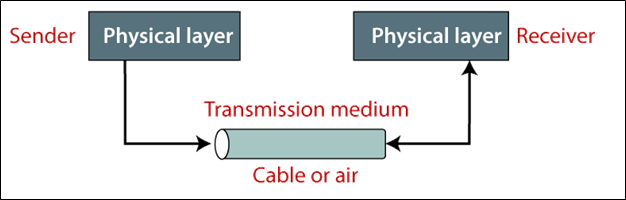
In this, peoples usually use the different types of wires and waves to transmit the data. Data is transmitted from one system to another system generally through electromagnetic energy.
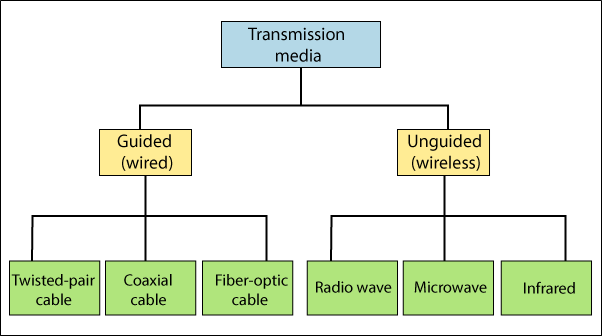
Generally, Transmission media can be divided into two types:
1. Guided Media
2. Unguided Media
Guided Media
Guided media is wired media. Guided media is a physical way to transmit the data from one place to another. Guided media is more secure. These types of networks use the cable to communicate.
Guided media is divided into three types of cable:
1. Twisted-pair cable
2. Coaxial cable
3. Fiber-optic cable.
Twisted-Pair Cable
Twisted-pair cable is a copper cable that is arranged in the spiral pattern to minimize the electromagnetic interference between adjacent pairs. It invented mainly for voice transmission. Twisted-Pair Cable is very cheaper than other cables. Twisted Pair cable is shown in diagram below.
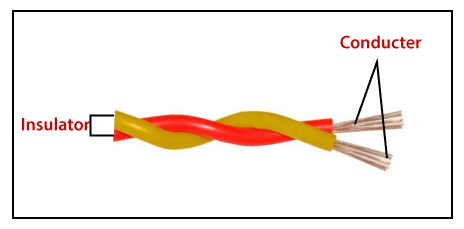
There are two types of Twisted-Pair cable used in a computer network.
1. Shielded Twisted-Pair Cable
2. Unshielded Twisted-Pair Cable
Shielded Twisted-Pair Cable
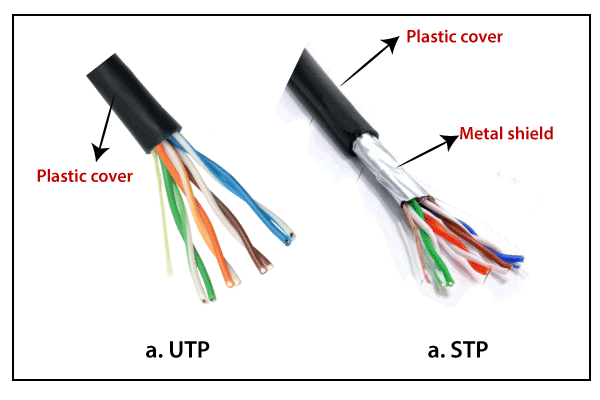
The shielded twisted pairs of each cable are wrapped with the metallic foil to insulate the pair from the electromagnetic interference. It provides more security and transfer speed because this shield reduces the data's electromagnetic field.
Unshielded Twisted-Pair Cable
The unshielded twisted pair’s cable is not wrapped with the metallic foil. This cable has wrapped with a plastic cover. It provides less security and transfer speed than the shielded twisted pair cable.
In this cable, data can transfer from 1 GB to 10 GBPS speed. This cable can travel data in the range between 100 to 150 meters usually.
Advantages of Twisted-pair Cable
1. This cable is cheaper than the other cables.
2. This cable installation is very easy. It can be easily connected with a plug like RJ 45 (Registered Jack type 45).
3. This cable provides an easy connection to other cables.
Disadvantages of Twisted pair cable
1. If the distance of cable is greater than 100 m, high rate error increase in twisted pair cable.
2. It is a very thin cable so it can be easily broken.
3. This cable has low bandwidth, so it is not suitable for the broadband connection.
Coaxial cable
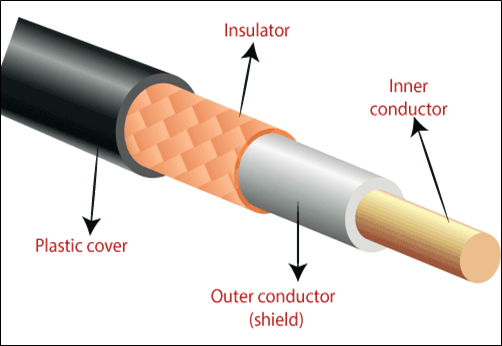
The coaxial cable is a copper cable made of four layers. The most inner layer of the cable is made of copper. The solid plastic covers the upper layer of copper cable. Its upper layer has a metallic foil and copper mesh that is called conductor. At the upper layer, it has a plastic cover that protects all of them. The coaxial cable data transfer speed is 5 Mbps. Coaxial cable is mostly used in cable TV and VCR.
The coaxial cable is used with the BNC connector that are many types such as the T-connector, barrel connector, and terminator. Shown in below Coaxial cable.
There are two types of coaxial cable used in a computer network.
1. Thinnet coaxial cable
2. Thicknet coaxial cable
Thinnet coaxial cable
Thinnet coaxial cable is a thin cable. Thinnet coaxial cable is called Thin Ethernet. The diameter of this cable is 0.25 inches. It can cover only 185 m without a repeater.
Thicknet coaxial cable
Thicknet coaxial cable is thicker than the thinnet cable. Thicknet coaxial cable is called the Thick Ethernet. The diameter of this cable is 0.5 inches. It can cover only 500 m without a repeater. It also called 10Base5.
Advantages of Coaxial Cable
- It provides better bandwidth as compared to the twisted pair cable.
- It is simple to install.
- It provides higher data transfer speed as compared to the twisted pair cable.
Disadvantages of Coaxial Cable
- The maintenance cost is very expensive as compared to the twisted pair cable.
- If the cable breaks from anywhere, the entire network fails.
- It is more expensive than the twisted pair cable.
Fiber-Optic Cable
A fiber-optic cable is made of glass or plastic. It transmits signals in the form of light. It is expensive than all the other cables, and its data transfer speed is also higher than all the other cables. The figure given below illustrates the Fiber-Optic cable.
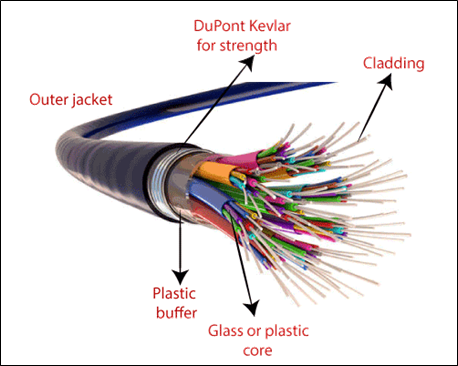
In this cable, the transmission of data occurs in the form of light rather than the electric current, so this cable provides higher data transfer speed. Fiber optic cable data transfer speed range from 100 Mbps to 10 Gbps.
There are used various types of connectors in this cable, such as SC connector, ST connector, MT-RJ connector, etc.
Advantages of Fiber-Optic Cable
- It provides a very higher data transfer speed as compared to all the other cables.
- Fiber optic cables are lighter than twisted pair and coaxial cables.
- This cable is not prone to fire because it doesn't pass the electricity.
Disadvantages of Fiber-Optic Cable
- It is costly as compared to other cables for short distances.
- This cable is complex to install and maintain because it does not become available everywhere.
Unguided Media
The unguided media works on the electromagnetic wave. It does not use any physical conductor. It is also known as wireless media. The unguided signals can travel in three ways, such as Ground propagation, Sky propagation, and Line-of-sight propagation.
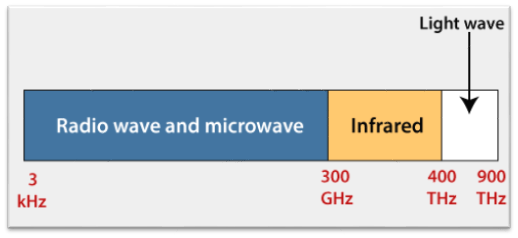
Unguided media is divided into three types of wave:
- Radio Wave
- Micro Wave
- Infrared Wave
Radio Wave
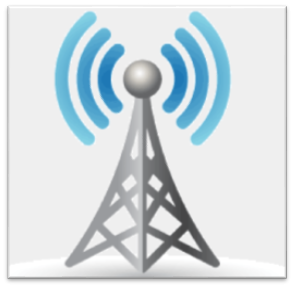
The frequencies of electromagnetic wave lies between 3 kHz and 1 GHz are known as the Radio wave. Radio waves are mostly omnidirectional. When an antenna sends the radio waves, they are transmitted those waves in all directions. This means that it can send and receive those waves which do not required the alliance. Radio waves are mostly used in multicast communication, such as television, FM radio, cordless phones, and paging systems. Shown in below omnidirectional.
Micro Wave
Micro-waves are those electromagnetic waves whose frequency range lies from 1 GHz to 300 GHz. It is unidirectional. These waves move in the unidirectional from the sender to the receiver. This means that it can send and receive those waves which have required the alliance. Micro-waves are mostly used in unicast communication (one to one communication), such as microwave (oven), cellular telephone, and satellite network.
Infrared Wave
Infrared waves are those electromagnetic waves whose frequency range lies from 300 GHz to 400 THz. Infrared waves are mostly used for short-range communication, such as television remote, FM remote, AC remote, CCTV, and wireless keyboard or mouse.