Hexadecimal to Binary in C
What is hexadecimal?
Hexadecimal defines a sequence of numbers centered on-16, i.e., before assigning the next number to a new location, it describes a numbering scheme that includes 16 sequential numbers as basic units (including 0). (Note that here we use "16" as a decimal number to illustrate a number which would be "10" in hexadecimal) The hexadecimal numbers are 0-9, and then A-F letters are used.
What is Binary?
Binary is a system of base number 2. Base 2 ensures that only two digits 1 and 0 correspond to states 0 and 1, which is understood by the computer can. You already know the base 10-the decimal method. Decimal uses ten digits ranging from 0 to 9 and then wraps around to form two-digit numbers, with each digit 10* times larger than the last (1, 10, 100).
Examples:
Suppose the A12C number is hexadecimal. Now the binary value of the hexadecimal number is determined.
Hexadecimal number=A12D
Binary value equal to A is 1010
Binary value equal to 1 is 0001
Binary value equal to 2 is 0010
Binary value equal to D is 1101
Therefore, the binary value equivalent to A12C is 1010000100101100.
Algorithm
Start
 Step 1 -> declare function to convert Hexadecimal to Binary Number
    void convert(string hexa)
    Declare variable as long int i = 0
    Loop While(hexa[i])
       Use Switch (hexa[i])
          case '0':
             print "0000"
             break;
          case '1':
             print "0001"
             break;
          case '2':
             print "0010"
             break;
          case '3':
             print "0011"
             break;
          case '4':
             print "0100”
             break;
          case '5':
             print "0101"
             break;
          case '6':
             print "0110"
             break;
          case '7':
             print "0111"
             break;
          case '8':
             print "1000"
             break;
          case '9':
             print "1001"
             break;
          case 'A':
          case 'a':
             print "1010"
             break;
          case 'B':
          case 'b':
             print "1011"
             break;
          case 'C':
          case 'c':
             print "1100"
             break;
          case 'D':
          case 'd':
             print "1101"
             break;
          case 'E':
          case 'e':
             print "1110"
             break;
          case 'F':
          case 'f':
             print "111"
             break;
          default:
             print please enter valid hexadecimal digit
          End
       i++
    End
 Step 2 -> In main()
    Declare string hexa = "123B"
    Print convert(hexa);
 Stop
We try to understand this with the help of an example.
#include <stdio.h>
 // function to convert Hexadecimal to Binary Number
 void HexToBin(char* hexdec)
 {
     long int i = 0;
     while (hexdec[i]) {
         switch (hexdec[i]) {
         case '0':
             printf("0000");
             break;
         case '1':
             printf("0001");
             break;
         case '2':
             printf("0010");
             break;
         case '3':
             printf("0011");
             break;
         case '4':
             printf("0100");
             break;
         case '5':
             printf("0101");
             break;
         case '6':
             printf("0110");
             break;
         case '7':
             printf("0111");
             break;
         case '8':
             printf("1000");
             break;
         case '9':
             printf("1001");
             break;
         case 'A':
         case 'a':
             printf("1010");
             break;
         case 'B':
         case 'b':
             printf("1011");
             break;
         case 'C':
         case 'c':
             printf("1100");
             break;
         case 'D':
         case 'd':
             printf("1101");
             break;
         case 'E':
         case 'e':
             printf("1110");
             break;
         case 'F':
         case 'f':
             printf("1111");
             break;
         default:
             printf("\nInvalid hexadecimal digit %c",
                    hexdec[i]);
         }
         i++;
     }
 }
 // driver code
 int main()
 {
     // Get the Hexadecimal number
     char hexdec[100] = "1AC5";
     // Convert HexaDecimal to Binary
     printf("\nEquivalent Binary value is : ");
     HexToBin(hexdec);
 }
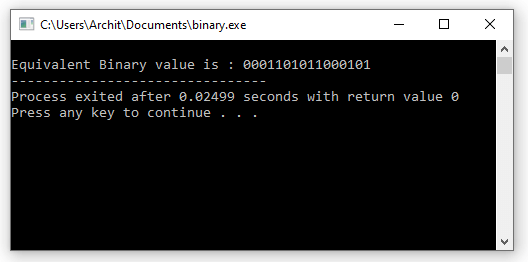
Output: