
Cascading Style Sheet
CSS refers to the Cascading Style Sheet. CSS is a form of a programming language. In other words, CSS is a language of the style sheet that is utilised for describing the documents that are written in HTML. CSS is a style sheet language that is utilised in shaping the HTML elements that will be presented in the browsers in the form of a web page.
- Without CSS, the website that has been created using HTML will seem boring and bland. So the primary role of CSS is to give the outer cover to the HTML elements. If HTML is the skeleton, then CSS is the skin of the skeleton.
-
CSS is the keystone technology of the World Wide Web, just like HTML and JavaScript. CSS helps in enabling and distinction in the presentation of the document, like separating the layout, colours, and fonts. It is a very powerful tool for web designers and has the power, potential to modify or change the design and have a super impact on the presentation of the web pages. So it’s primary purpose is to separate content from the presentation of the document.
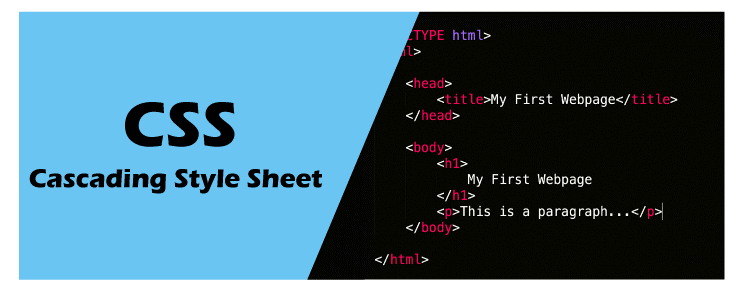
- Cascading Style Sheets was developed by World Wide Web Consortium or W3C in the year 1996. It is pertinent to mention that cascading in CSS refers to the application of multiple sheets in a single or individual web page. The extension that is used to save these files is known as ".css"
- The internet media type (MIME type) of CSS is text/CSS. There are various ways in which CSS can be applied to HTML documents. Separation of the format and content makes it easy and seamless to present the markup page in various styles for various rendering methods like n-screen, by voice, etc. CSS also had rules for the alternative formatting if the content is approached from the mobile device.
- Apart from HTML, other mark-up languages that are used in support of CSS are XHTML, plain XML, SVG, and XUL.
CSS Frameworks
CSS frameworks are pre-defined libraries. Some of these include Blueprints, Cascade Framework, Foundation, and Bootstrap.
These allow easy and standardised web designs. Most of the CSS frameworks include a grid. Some of the functional frameworks include additional Javascript-based functions.
CSS frameworks include various modules and tools;
- Reset style sheet; web typography; set of icons or icon fonts; grid – for responsive web design and much more.
- Whereas bigger frameworks often use CSS interpreters like Sass.
Features of CSS
A global style sheet can be utilised with CSS. This is beneficial as it can help you make changes in the styles or presentation without much effort, difficulty, or consumption of time.
- CSS also facilitates the usage of one external style sheet, which can then later be utilised for styling several web pages.
- CSS or Cascading Style Sheet also facilitates the feature of simply attaching different style sheets to the web page only by changing one line.
- CSS is super easy to maintain, and change at a single place will directly imply or affect globally to the entire website. There is no need to change at every specific place.
- One can easily use one CSS script in several places.
- CSS is supported by all browsers and search engines.
- CSS can even store web applications through an offline cache, so this makes the website visible to you even when you are not online.
- CSS has an exclusive list of attributes, functions that is helpful in designing the HTML page.
- In CSS, there are numerous selectors that are helpful in performing certain tasks; these selectors include ID selectors, class selectors, etc.
CSS Syntax
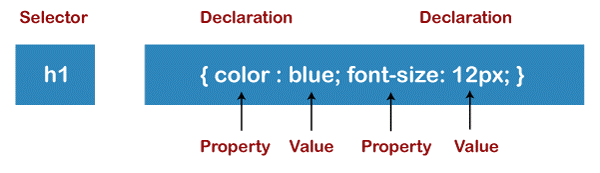
CSS has a simple and easy syntax. It has English keywords for specifying names of several style properties. Each style sheet comprises of the rule list. Each rule set or list comprises of one or more selectors, declaration blocks.
One of the examples is below:
h1 { color:blue; font-size:12px; }
h1 is the selector; whereas font and color are the properties and blue and 12px are the values.
The Declaration Block consists of properties and the values.
Advantages of Cascading Style Sheets
There are various benefits of CSS. Some of these include;
- CSS helps in saving time. One can write the CSS, and later the same sheet can be used in various HTML pages. Simply define a style for each HTML element and apply it to other web pages as required.
- CSS helps with faster page loading and faster downloading. CSS doesn’t require writing HTML tag attributes each time; only one CSS rule of the tag is sufficient and can be applied to all the occurrences. So there is less coding, and less coding implies easy and quick loading of the pages.
- CSS has wider or broader attributes than HTML. So they can make your HTML page look far better than HTML attributes. So CSS has superior attributes in comparison to HTML.
- CSS has the advantage that the style can be applied easily throughout the sites, and only one instruction can control and manage several areas. It applies the styles to other areas.
- CSS not only makes website development easy, effortless but also makes the maintenance of the websites very easy as change or modification of one line of the code is sufficient for the entire websites; this also saves maintenance time.
- CSS is less complex, so it requires minimum effort and helps in making on the spot and quick decisions.
- CSS has another advantage of being device friendly, CSS has responsive web design, and that is a significant advantage these days as people enjoy using smart devices for accessing websites.
- CSS also has the power of re-positioning, i.e., help in determining the changes or the position of web elements that are present on the website.
- CSS makes the customisation of the web pages super easy to use. It also minimises the transfer size of the file.
Disadvantages of CSS
Apart from the advantages, Cascading Style Sheets also have few disadvantages. These include;
- One of the most common disadvantages of CSS is there are different levels of CSS, i.e., CSS1- CSS3. This often results in confusion amongst the developers, browsers, and users, etc. So this becomes a disadvantage that which level to use.
- Another disadvantage of CSS is that it works with one browser, and it is not necessary that it will work with another browser too. So it required a compatibility test, so developers often run a test to makes sure it is running fine across browsers before the website is set live.
- CSS doesn’t have that much security since CSS is an open text-based system, and there is hardly any security that can protect CSS from being overruled; anyone with rights can change or modify the CSS file or links or even format. This is quite a big disadvantage.
- CSS works differently on all the browsers- Internet Explorer and Opera support CSS as distinctive logic. Also, there can be browser issues while using CSS.
-
Multiple levels of CSS can create confusion, lack of clarity for the users and non-developers.
History of Cascading Style Sheets
CSS was first introduced in 1994 by Hakon Wium Lie. He was working with the father of HTML, Tim Berners Lee, at CERN. Apart from this, many other programming languages were also introduced at that time.
Also, CSS2 was introduced in 1998 that too with more advanced features like the absolute, relative, concept of media type, positioning, new fonts, and so on.
Then in the same year, at the end of 1998 development of CSS3 was started, but it was never completed in that year. It was released in 1999 but officially began to be used in 2001.
Ways of using CSS
There are three ways of using CSS.
These are;
- External CSS
- Internal CSS
- Inline CSS
External CSS- The change is made in multiple files of CSS by simply making a change in one file in External CSS. The styles are mentioned in the external file, and that file is linked to the HTML file through syntax. It is important that the external file has an extension of the .css
Whereas in the Internal CSS, this can be used to outline different or unique CSS to a single or individual HTML page. In this, there is no external file, like in the case of external CSS. In this, CSS is written inside the HTML file only. The style tag is placed in between the head tag in this case.
Lastly, coming to the inline CSS. In this unique CSS is outlined to an element in the HTML page. The style is added to the element in this case.
Inline CSS has a superior priority in comparison to the external or the internal CSS.
Conclusion
Conclusively, Cascading Style Sheet is an imperative part of web development. It is impossible to have web development without CSS. CSS might look complex, difficult in the beginning, but after learning, trying, and getting hold of the concepts. You will realise CSS is easy, simple, and effortless to use.
CSS allows a developer to add effects, animations, unique, diverse fonts, colour . It even gives the freedom to the developer to display animation through the various button, loaders, or spinners, or, at times, even animated backgrounds to the website. It describes the HTML elements that have been displayed on the site.
It is sure that without CSS website will not look attractive or presentable. It adds value, life to the website.