
Strings in Data Structures
Strings and functions in C
A string is a collection of characters. We'll learn how to declare strings, operate with strings in C programming, and use pre-defined string handling routines.
We'll look at how to compare two strings, concatenate strings, copy one string to another, and execute other string operations. The pre-defined functions in the "string.h" header file can be used to conduct similar operations. You must include the string.h file in your C programme in order to utilise these string functions.
Declaration of Strings
- char str[] = { ‘J’ , ’A’ , ’V’ , ’A’ , ’T’ , ’P’ , ’O’ , ’I’ , ’N’ , ’T’ , ’\0’ };
- char str[] = { “JAVATPOINT” };
- In this form of declaration, '0' will automatically insert at the end.
What is NULL Char “\0”?
'\0' represents the end of the string. It is also referred as String terminator & Null Character.
In C programming, string Input/Output
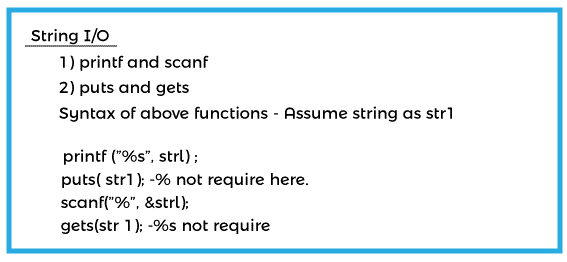
Using the Printf() and Scanf() functions in C, read and write Strings.
#include <stdio.h>
#include <string.h>
int main()
{
    /* String Declaration*/
    char str[20];


    printf("Enter your string here:");


    /* The input string is read and stored in variable str. Because the array name acts as the base address, we may use str instead of &str here.*/


    scanf("%s", str);


    /*Displaying String*/
    printf("%s",str);


    return 0;
}
The following output should be generated by this programme:
Output
Enter your string here: JavaTPoint
JavaTPoint
IMPORTANT: For strings input/output, the %s format specifier is utilised.
In C, use the gets() and puts() methods to read and write strings.
#include <stdio.h>
#include <string.h>
int main()
{
    /* String Declaration*/
    char str[20];


    /* Console display using puts */
    puts("Enter your string here:");


    /*Input using gets*/
    gets(str);


    puts(str);


    return 0;
}
String functions in C
- strlen() - Returns the string's length.
- strlwr() - This command lowercases a string.
- istrupr() - It transforms a string to uppercase .
- strcat() - appends one string to the end of another.
- strncat() - This command appends the first n characters of a string to the end of another string.
- strcpy() - to copy a string into another string.
- strncpy() - This command copies the first n characters of a string into another.
- strcmp() - function that compares two strings.
- strncmp() - compares two strings' first n characters.
- strcmpi() - This function compares two strings without regard to case I indicates that this function ignores case).
- stricmp() - compares two strings regardless of case (identical to strcmpi).
- strnicmp() – This function compares the first n characters of two strings. There is no difference in case.
- strdup() - This command duplicates a string.
- strchr() - Finds the first instance of a character in a string.
- strrchr() - Returns the position of a given character in a string.
- strstr() - Looks for the first instance of a string in another string.
- strset() - This command changes all characters in a string to a specific character.
- strnset() - This command changes the first n characters of a string to a specific character.
- strrev() - It reverses a string
1. strlen is a C string function.
Syntax
size_t strlen(const char *str)size_t is an unsigned short. It returns the length of the string minus the ending character (char '0').
#include <stdio.h>
#include <string.h>
int main()
{
     char string_a[] = "JAVATPOINT";
     printf("Length of string string_a: %d", strlen(string_a));
     return 0;
}
The following output should be generated by this programme:
Output
Length of string string_a: 10strlen vs sizeof
While strlen delivers the length of the string contained in the array, sizeof returns the array's entire allocated size. So, if I analyse the same example again, the following sentences will provide the numbers below.
Because the array size is 20, strlen(str1) returned 13. sizeof(str1) would return 20. (see the first statement in main function).
2. strnlen is a C string function.
Syntax
size_t strnlen(const char *str, size_t maxlen)size_t is an unsigned short. If the length of the string is less than the number supplied for maxlen (maximum length), it returns the length of string value; otherwise, it returns the maxlen value.
#include <stdio.h>
#include <string.h>
int main()
{
     char string_a[20] = "JavaTPoint";
     printf("Length of string string_a when maximum length is 30: %d", strnlen(string_a, 30));
     printf("Length of string string_a when maximum length is 5: %d", strnlen(string_a, 5));
     return 0;
}
The following output should be generated by this programme:
Output
Length of string string_a when maximum length is 30: 10
Length of string string_a when maximum length is 5: 5
Have you observed that even though the string length was 10, the second printf statement only returned 5 because the maxlen was 5.
3. strcmp is a C string function.
Syntax
int strcmp(const char *string_1, const char *string_2)The function compares the two strings and returns the result as an integer. This function will return 0 if two strings are equal, else it will return a negative or positive number depending on the comparison.
A negative number would occur if string2 OR string1 is a substring of string2. If string1 is greater than string2, the result will be positive.
When using this method to compare strings, you'll obtain 0(zero) if string1 == string2.
#include <stdio.h>
#include <string.h>
int main()
{
     char string_1[20] = "JavaTPoint";
     char string_2[20] = "JavaTPoint.COM";
     if (strcmp(string_1, string_2) ==0)
     {
        printf("string 1 and string 2 are equal");
     }else
      {
         printf("string 1 and string 2 are different");
      }
     return 0;
}
The following output should be generated by this programme:
Output
string 1 and string 2 are different4. strncmp is a C string function.
Syntax
int strncmp(const char *string_1, const char *string_2, size_t n)Unassigned short is represented by size_t. It compares both strings till they reach n characters, or the first n characters of both strings.
#include <stdio.h>
#include <string.h>
int main()
{
     char string_1[20] = "JavaTPoint";
     char string_2[20] = "JavaTPoint.COM";
     /* below the first nine characters of string 1 and string 2 are compared.*/
     if ( strncmp(string_1, string_2, 9) == 0 )
     {
         printf("string 1 and string 2 are equal");
     }else
     {
         printf("string 1 and 2 are different");
     }
     return 0;
}
The following output should be generated by this programme:
Output
String_1 and string_2 are equal5. strcat is a C string function.
Syntax
char *strcat(char *string_1, char *string_2)It joins two strings together and returns the resulting string.
#include <stdio.h>
#include <string.h>
int main()
{
     char string_1[10] = "Java";
     char string_2[10] = "TPoint";
     strcat(string_1,string_2);
     printf("Output string after concatenation: %s", string_1);
     return 0;
}
The following output should be generated by this programme:
Output
Output string after concatenation: JavaTPoint6. strncat is a C string function.
Syntax
char *strncat(char *string_1, char *string_2, int n)It joins n characters from str2 to the string str1. At the conclusion of the concatenated text, a terminator char ('0') will always be attached.
#include <stdio.h>
#include <string.h>
int main()
{
     char string_1[10] = "Java";
     char string_2[10] = "TPoint";
     strncat(string_1,string_2, 3);
     printf("Concatenation using strncat: %s", string_1);
     return 0;
}
The following output should be generated by this programme:
Output
Concatenation using strncat: JavaTPo7. strcpy is a C string function.
Syntax
char *strcpy( char *str1, char *str2)It replicates str2 into str1, including the last character (terminator char '0').
#include <stdio.h>
#include <string.h>
int main()
{
     char string_1[30] = "string 1";
     char string_2[30] = "string 2 : I’m gonna copied into string_1";
     /* this function has copied string_2 into string_1*/
     strcpy(string_1,string_2);
     printf("String string_1 is: %s", string_1);
     return 0;
}
The following output should be generated by this programme:
Output
String s1 is: string 2: I’m gonna copied into s18. strncpy is a C string function.
Syntax
char *strncpy( char *string_1, char *string_2, size_t n)n is an integer and size_t is an unassigned short.
- Case 1: If the length of string_2 is more than n, it simply copies the first n characters of string_2 into string_1.
- Case 2: If the length of string_2 is more than n, it copies all of the characters from string_2 into string_1 and appends extra terminator chars ('0') to increase the length of string_1 to n.
#include <stdio.h>
#include <string.h>
int main()
{
     char string_1[30] = "string 1";
     char string_2[30] = "string 2: I’m using strncpy now";
     /* This method copied the first twelve characters of string_2 into string_1.*/
     strncpy(string_1,string_2, 12);
     printf("String string_1 is: %s", string_1);
     return 0;
}
The following output should be generated by this programme:
Output
String string_1 is: string 2: I’9. strchr is a C string function.
Syntax
char *strchr(char *string_1, int ch)It searches string string 1 for character ch (you may be asking why I gave the data type of ch as int in the preceding description; don't worry, I didn't make a mistake; it should only be int). When we use strchr, whatever character we pass in is internally transformed to an integer for improved searching.)
#include <stdio.h>
#include <string.h>
int main()
{
     char mystring[30] = "This is an example of function implementation strchr";
     printf ("%s", strchr(mystring, 'f'));
     return 0;
}
The following output should be generated by this programme:
Output
f function strchr10. strrchr is a C string function.
Syntax
char *strrchr(char *string_1, int ch)It is identical to the function strchr, with the exception that it searches the string in reverse order. You may have guessed why there is an additional r in strrchr, and you are correct.
Consider the following example:
#include <stdio.h>
#include <string.h>
int main()
{
     char mystring30] = " This is an example of function implementation strchr ";
     printf ("%s", strrchr(mystring, 'f'));
     return 0;
}
The following output should be generated by this programme:
Output
function strchrWhy is output different from strchr? It is because it began looking from the end of the string and discovered the first 'f' in function rather than the first 'of'.
11. strstr is a C string function.
Syntax
char *strstr(char *str, char *srch_term)It is similar to strchr, except that it looks for the string srch term rather than a single character.
#include <stdio.h>
#include <string.h>
int main()
{
     char mystring[70] = "String Function in C at JavaTPoint.com";
     printf ("Output string is: %s", strstr(mystring, 'Java'));
     return 0;
}
The following output should be generated by this programme:
Output
Output string is: JavaTPoint.comYou may also use this method instead of strchr since you can pass a single character in place of the search term string.