
What is a Sparse Matrix in Data Structure?
Definition
A matrix in which a few non-zero elements are present is called a Sparse matrix. In a Sparse matrix, almost all the matrices are filled with zero (0). A matrix that contains m * n dimensions is treated as a 2-D array where n represents the number of columns and m represents the number of rows. A matrix is called a Sparse matrix when the number of non-zero elements in the given matrix is more significant in count than the number of zero elements present in the respective matrix.
If the matrix is extensive and the number of non-zero elements is much less in the count, then a lot of memory and space is wasted in such cases. Also, it can take a lot of time to scan the respective non-zero element.
Syntax
Rather than storing fewer non-zero elements, we use two representations to limit space usage and processing time in a matrix. The mentioned two representations are stated below:
- Array representation
In the array representation of a sparse matrix, we convert a 2 – D array into a 1 – D array. The converted array contains three columns, among which represent the following:- Row – The sparse matrix represents the index of the row of the given non-zero element.
- Column - The sparse matrix represents the index of the column of the given non-zero element.
- Value - The sparse matrix represents the value of the non-zero elements in the same row of the given column index in the allotted 2 – D matrix.
- Linked list representation
Each node has four fields in the linked list representing a sparse matrix. The four fields are stated below:- Row – The sparse matrix represents the index of the row of the given non-zero element.
- Column - The sparse matrix represents the index of the column of the given non-zero element.
- Value – In a sparse matrix, it represents the value of the respective non-zero element at (r, c), where r represents the index of the row of the non-zero element and c represents the index of the column of the non-zero element.
- Next node – A sparse matrix represents the reference to the next node considering the given node.
The working of Sparse matrix in data structures
The sparse matrix can be expressed as a two-dimensional matrix in which the count of non-zero elements is much less than the count of zero elements present in the respective two-dimensional matrix. If the given matrix is extensive and the number of non-zero elements is much less in the count, then a lot of memory and space is wasted in such cases. Also, it can take a lot of time to scan the respective non-zero element. The problem of loss in space is caused due to the storage of zeros in the two-dimensional matrix.
When it comes to Sparse matrices, they are used to store the non-zero elements present in the two-dimensional matrices. By using Sparse matrices, we can avoid the problems caused by storing these matrices with significant zero elements and a few non-zero elements (these problems include wastage of space and colossal processing time). Sparse matrices store only the non-zero elements in the given two-dimensional matrix. Hence, they solve the problem of wastage of memory and space that is caused due to the storage of the zero elements in the regular two-dimensional matrices. The processing time in finding a given non-zero element in matrices having large dimensions is also reduced by storing them in the sparse matrices.
Rather than storing fewer non-zero elements, we use two representations to limit space usage and processing time in a matrix. The mentioned two representations are stated below:
- Array representation
In the array representation of a sparse matrix, we convert a 2 – D array into a 1 – D array.
An array representation in a Sparse matrix is often used when accessing the elements is done more frequently. As arrays store elements based on indices, this representation is helpful in such scenarios.
The converted array of the array representation of a Sparse tree contains three columns, among which each represents the following:- Row – The sparse matrix represents the index of the row of the given non-zero element.
- Column - The sparse matrix represents the index of the column of the given non-zero element.
- Value - The sparse matrix represents the value of the non-zero elements in the same row of the given column index in the allotted 2 – D matrix.
- Linked list representation
Each node has four fields in the linked list representing a sparse matrix. A linked list representation is used in a Sparse matrix in the cases where we perform the operations of insertion and deletion elements very frequently on the matrix. As the insertion and deletion operations are more accessible to serve on a linked list rather than an array, this representation is instrumental in these scenarios.
The four fields of linked list representation of a sparse tree are stated below:- Row – The sparse matrix represents the index of the row of the given non-zero element.
- Column - The sparse matrix represents the index of the column of the given non-zero element.
- Value – In a sparse matrix, it represents the value of the respective non-zero element at (r, c), where r represents the index of the row of the non-zero element and c represents the index of the column of the non-zero element.
- Next node – A sparse matrix represents the reference to the next node considering the given node.
Example of Sparse matrix
A sparse matrix representation can be explained by the example stated below. The below-mentioned two-dimensional matrix contains five rows and eight columns.
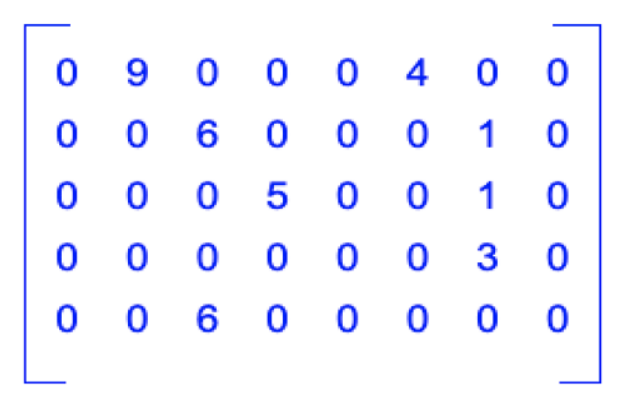
We can observe that we have eight (8) non-zero elements among all the (8 * 5 = 40) forty elements present in the two-dimensional matrix. This means that it is enough if we store the eight non-zero elements in the memory. As the rest of the elements are zero elements, they can be ignored.
We know that we can represent the given matrix as a sparse matrix in two different ways:
- Array representation
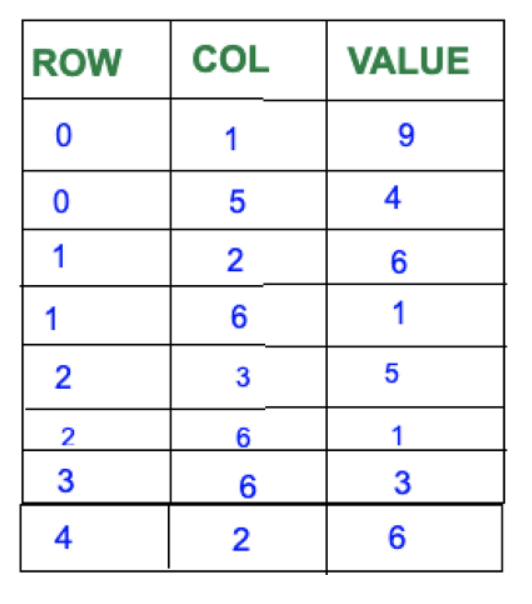
Step -1: Make a list of the non-zero elements in the given two-dimensional matrix, along with their column and row indices.
Step -2: Create an array having:- Rows = count of non-zero elements
- Column = (Row, column, value) 3
Step – 3: Fill the non-zero elements into the array
Advantages of Array list representation of Sparse matrix
An array representation in a Sparse matrix is often used when accessing the elements is done more frequently. As arrays store elements based on indices, this representation is helpful in such scenarios.
Array list representation of Sparse matrices is better in the location of elements compared to linked lists representation of sparse matrices as the elements are stored based on indices in the array list representation of the Sparse matrices.
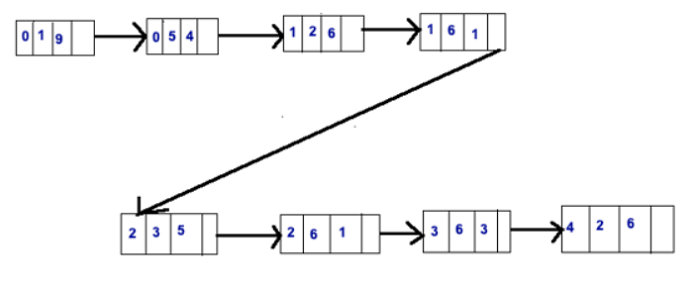
- Linked list representation
Advantages of linked list representation of Sparse matrix
Each node has four fields in the linked list representing a sparse matrix. A linked list representation is used in a Sparse matrix in the cases where we perform the operations of insertion and deletion elements very frequently on the matrix. As the insertion and deletion operations are more accessible to serve on a linked list rather than an array, this representation is instrumental in these scenarios.