
Complete Binary tree
In this article, we will discuss the complete binary tree. But before start discussing the complete binary tree, we should first see a brief description of a binary tree.
What is a binary tree?
Binary means two; therefore, a binary tree means that a node can have a maximum of two children. Thus, a tree in which a node (parent) has the utmost two child nodes (left and right) is called as binary tree. Here, utmost means whether the node has 0 nodes, 1 node, or 2 nodes.
Example –

Now, let's move towards the main topic, the Complete Binary tree.
What is a complete binary tree?
In a complete binary tree, all the levels are completely filled except the last one. Complete filling of a particular level means that each parent that is present in that particular level should have exactly two children nodes, i.e., the left node and the right node. If any of the parents in a level doesn't have both the right child and the left, it will not be considered completely filled.
In a complete binary tree –
- Every level of the tree except the last one is completely filled.
- The last level of the tree should have all the keys as left as possible. That means if a parent node is present in the last level of a Complete Binary Tree, then it should have the child as only the left child node.
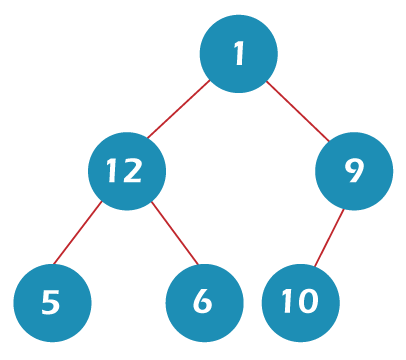
The example of the complete binary tree is shown in the below image –

The number of nodes in a complete binary tree on each horizontal level of the tree is twice as much as the level above it. We can understand it from the below image –

How to create a complete binary tree?
Now, let's create a complete binary tree. Consider a set of elements and try to create a complete binary tree from it.

Step 1 – Select the first element from the above set and put it as the root of the tree. It is the level 1 of the tree that contains 1 element.

Step 2 – Now, select the second element from the list and put it as the left child of the root node and the third element as the right child of the root node. It is level 2 of the tree that has 2 elements.

Step 3 – Now, select the next two elements, and put them as the children of the left node of the second level. And after that, again, put next two elements as the children of the right node of the second level. Thus, level 3rd contains 4 elements.

Step 4 – Keep repeating the procedure until the last element is reached.
Comparison between full binary tree and complete binary tree
The full binary tree can be defined as a binary tree in which all the nodes have two children except the leaf nodes. Whereas, in a complete binary tree, all the levels are completely filled up except the last level that is filled from the left.
From the below images, we can understand the difference between a full binary tree and a complete binary tree.

Above binary tree is a full binary tree because all the nodes have either 0 or 2 children. It is not a complete binary tree because node 2 does not have any children while node 3 has its children, and we know that the nodes should be filled from the left side in a complete binary tree.

The binary tree in the above image is a complete binary tree but not a full binary tree. It is a complete binary tree as all the nodes are left filled. It is not a full binary tree as node 2 has only one child.

The tree in the above image is an example of a complete binary tree as well as the full binary tree. It is a complete binary tree as all the nodes are left filled. It is a full binary tree as all the nodes have either 0 or 2 children.
The complete binary tree can be used in the heap data structure. It can be used in heapsort. A complete binary tree can also be used to implement priority queues and external sorting algorithms.
Implementation of complete binary tree
Now, let's see the implementation of complete binary tree in C++.
In this program, there is a menu-driven approach in which there are options of adding data in the complete binary tree and then printing the data present in the complete binary tree. The values of the nodes are taken by the user during adding the data in the complete binary tree.
#include <iostream>
#include <bits/stdc++.h>
using namespace std;

/* A macro named SIZE is defined with a value of 50 that will represent the size of the queue that will be required for the various operations*/
#define SIZE 50

/* A class named node is created that will act as a single node of the complete binary tree*/
class node{
    public:
          int data;
node *right,*left;
};

/* A class named Queue is created that provide all the utilities of the Queue class*/
class Queue
{
    public:
    int front, rear;
    int size;
    node**array;
};

/* function newNode() with a integer type parameter holding the data is created that will be used to add a new node to the complete binary tree*/
node* newNode(int data) {

    // logic of adding a new node to the complete binary tree
    node* temp = new node();
    temp->data = data;
    temp->left = temp->right = NULL;
    return temp;
}

// A utility function named createQueue is written that will be used to create a new Queue
Queue* createQueue(int size){
    Queue* queue = new Queue();
    queue->front = queue->rear = -1;
    queue->size = size;

    queue->array = new node*[queue->size * sizeof( node* )];

    int i;

    // all the elements in the Queue object are initialized with NULL
    for (i = 0; i < size; ++i)
        queue->array[i] = NULL;

    // And in the end, an object of the Queue is returned
    return queue;
}

/* isEmpty() function is created to check whether the Queue object that is passed as a parameter is Empty or not*/
int isEmpty(Queue* queue){
    return queue->front == -1;
}


/* isFull() function is created to check whether the Queue object that is passed as a parameter is full or not */
int isFull(Queue* queue){
    return queue->rear == queue->size - 1;
}

/* hasOnlyOneItem() function is created to check whether the Queue object that is passed as a parameter has one element or more */
int hasOnlyOneItem(Queue* queue){
    return queue->front == queue->rear;
}

/* A function named Enqueue is created to add data to the Queue object */
void Enqueue(node *root, Queue* queue)
{
    if (isFull(queue))
        return;

    queue->array[++queue->rear] = root;

    if (isEmpty(queue))
        ++queue->front;
}

/* A function named Dequeue is created to remove data from the Queue object*/
node* Dequeue(Queue* queue)
{
    if (isEmpty(queue))
        return NULL;

    node* temp = queue->array[queue->front];

    if (hasOnlyOneItem(queue))
        queue->front = queue->rear = -1;
    else
        ++queue->front;

    return temp;
}

/* getFront() function is written to get the front element from the Queue object*/
node* getFront(Queue* queue){
    return queue->array[queue->front];
}

/*hasBothChild() function is written to check whether the particular node has both the children nodes present or not */
int hasBothChild(node* temp)
{
    return temp && temp->left && temp->right;
}

/* insert() function is written that will be used to insert a new node in the complete binary tree*/
void insert(node **root, int data, Queue* queue)
{
    node *temp = newNode(data);
    // If the tree is empty, initialize the root with new node.
    if (!*root)
        *root = temp;
    else
    {
        // get the front node of the queue.
        node* front = getFront(queue);


        /* If the left child of this front node doesn't exist, set the left child as the new node*/
        if (!front->left)
            front->left = temp;

        /*If the right child of this front node doesn't exist, set the right child as the new node*/
        else if (!front->right)
            front->right = temp;

        /* If the front node has both the left child and right child, Dequeue() it.*/
        if (hasBothChild(front))
            Dequeue(queue);
    }
    Enqueue(temp, queue);
}
void levelOrder(node* root)
{
    Queue* queue = createQueue(SIZE);

    Enqueue(root, queue);

    while (!isEmpty(queue))
    {
        node* temp = Dequeue(queue);

        cout<<temp->data<<" ";

        if (temp->left){
            Enqueue(temp->left, queue);
        }

        if (temp->right){
            Enqueue(temp->right, queue);
        }
    }
}
  int main()
{
    node* root = NULL;
    Queue* queue = createQueue(SIZE);
    char ch;

            do
            {
                  cout<<"Please Choose one of the Operations::"<<endl;
                  cout<<"1. To Insert Data in the Complete binary tree."<<endl;
                  cout<<"2. To Display Data from the Complete binary tree."<<endl;
                  cout<<"\n";
                  int choice;
                  cin>>choice;
                  switch (choice) {
                  case 1:
                        cout<<"Enter the data that you want to add to the Complete binary tree: ";
                        int key;
                        cin>>key;
                        insert(&root,key,queue);
                        cout<<"Data Added Successfully."<<endl;
                        break;
                  case 2:
                        cout<<"Contents of the Complete binary tree are: "<<endl;
                        levelOrder(root);
                        break;
                  default:
                        cout<<"Invalid choice.\n "<<endl;
                        break;
                  }
                  cout<<"Continue? (Y/N) ";
                  cin>>ch;

            } while (!(ch == 'N' || ch == 'n'));

    return 0;
}
Output

So, that's all about the article. Hope, the article will be helpful and informative to you.