
×

Print Table Using Do while Loop in C++

Multiplication Table

In mathematics, a table is created by multiplying a certain number by all of the counting numbers, i.e., 1, 2, 3, 4, 5, 6, and so on. It is also referred to as a multiplication table. Suppose, we need to create a table of the number 7, then we have to multiply 7 by each natural number as follows:

7 * 1 = 7
7 * 2 = 14
7 * 3 = 21
7 * 4 = 28
7 * 5 = 35

What is Do-While Loop?

An iterative loop that checks the condition at the end.
The Do-While loop can be used whenever a test condition is specific, as the control enters the loop at a minimum once before the condition is evaluated. This loop checks the given condition after the execution of looping statements.

The loop actions or statements will be repeated infinitely as long as the test requirements are met.

Note: DO-WHILE LOOP means “first do it, then check”.

Syntax:

The Syntax of the DO-WHILE loop is:

Do
           { 
            statement(s);
           } 
         while(expression);

Program to print multiplication of 2 tables from (1 to 12)

Algorithm

Step 1: Start

Step 2: Read n, res, I;

Step 3: Take a number “n” from the user to print the table

Step 4: Use Do While loop to print table. Initialize (i=1) and check condition until i becomes 12. when, the condition becomes wrong, then control moves to step 6.

Step 5: res=num*i;

Step 6: Print “res”.

Step 7: End.

Program

#include<iostream>
using namespace std;
int main()
{
    int num=2, i, res;
   i=1; 
do{
        res = num*i;
        cout<<num<<" * "<<i<<" = "<<res;
        cout<<endl;
i++;
    }while(i<12);
    cout<<endl;
    return 0;
}

Output

2 * 1 = 2
2 * 2 = 4
2 * 3 = 6
2 * 4 = 8
2 * 5 = 10
2 * 6 = 12
2 * 7 = 14 
2 * 8 = 16
2 * 9 = 18
2 * 10 = 20
2 * 11 = 22
2 * 12 = 24

Explanation

The above code prints the table of 2.
The do while loop is used in this program. And, the control enter in the loop and execute the operation and stores the value of num*i, i.e., 2*1, i.e., 2.

Then, the following statement will exexute:
cout<<num<<" * "<<i<<" = "<<res;

The above statement prints the first line like this 2 *1 = 2 in the output. In the loop, (cout<<endl) is next statement that indicates the program will write the output from new line.

Initially, value of i is initialized to 1, and the update statement which increases the value of i. After that, the condition checks and evaluates to true because (2<12), which allows the program to enter in loop again.
This process will continue until the condition is determined to be untrue.
The multiplication table of 2 is printed on the output screen.

Program to print a table of any user-defined number

#include<iostream>
using namespace std;
int main()
{
    int num, i, res;
    cout<<"Enter the Number: ";
    cin>>num;
    i=1;
    do{
        res = num*i;
        cout<<num<<" * "<<i<<" = "<<res;
        cout<<endl;
    i++;
} while(i<=10);
    cout<<endl;
    return 0;
}

Output

Enter a number: 10
10 * 1 = 10
10 * 2 = 20
10 * 3 = 30
10 * 4 = 40
10 * 5 = 50
10 * 6 = 60 
10 * 7 = 70
10 * 8 = 80
10 * 9 = 90
10 * 10 = 100

Program to print table from 1 to 10

Algorithm

Step 1: Start the program.

Step 2: Read n, i=1, j=1.

Step 3: Use two do-while loops to print the tables

               Iterate the value of i until i=10

                  à in the inner loop itearate j until (j<=n) else go to step4

 Step 4: If (j<n-1)

                 Cout<<j<<”x”<<i<<i*j

               Else

                 Cout<<j<<”x”<<i<<i*j

Step 5: End the program.

Flowchart:
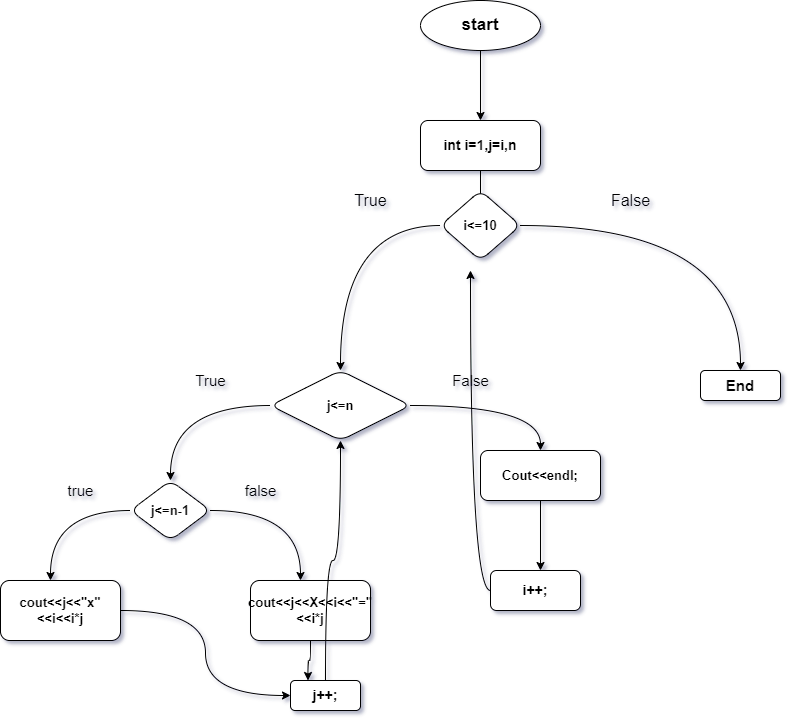
Print Table Using Do-While loop

Program

#include <iostream>
using namespace std;
int main()
{
    int j, i, n;
   cout << "\n\n the multipliaction table from 1 to n:\n";
    cout << "-------------------------------------------------------------\n";
    cout << "Input the number upto 5: ";
    cin >> n;
    cout << "Multiplication table from 1 to " << n << endl;
    i=1;
   do {
        j=1;
        do{
            if (j<=n-1)
                cout<<j<<"x"<<i<<"="<<i*j<<"\t";
            else
                cout<<j<<"x"<<i<< "=" <<i*j<<endl;
        j++;
    }while(j<=n);
i++;
}while(i<=10);
        cout << endl;
     }

Output

Enter any number: 
The multiplication table from 1 to 4
1x1=1    2x1=2      3x1=3         4x1=4  
1x2=2    2x2=4      3x2=6         4x2=8  
1x3=3    2x3=6      3x3=9         4x3=12  
1x4=4    2x4=8      3x4=12        4x4=16                                  
1x5=5    2x5=10    3x5=15         4x5=20                                
1x6=6    2x6=12   3x6=18          4x6=24                                
1x7=7    2x7=14   3x7=21          4x7=28                                  
1x8=8    2x8=16   3x8=24          4x8=32                                
1x9=9    2x9=18   3x9=27          4x9=36                              
1x10=10  2x10=20  3x10=30         4x10=40  

Program to print table using recursive:

#include <iostream>
using namespace std;
 void mul_table(int N, int i)
{
    // Base Case
    if (i > 10)
        return;
       cout << N << " * " << i << " = " << N * i << endl;
      return mul_table(N, i + 1);
}
 
// Driver Code
int main()
{
    int N = 7;
    mul_table(N, 1);
    return 0;
}

Output:

7 * 1 = 7
7 * 2 = 14
7 * 3 = 21
7 * 4 = 28
7 * 5 = 35
7 * 6 = 42
7 * 7 = 48
7 * 8 = 56
7 * 9 = 63
7 * 10 = 70

Related Topics

C++ File Handling

File handling is a mechanism that manipulates the data stored in files. File handling store output data from the program to external file and read file data to the program. There...

3 minutes read.

C++ Writing to file

In file handling, write() function is used to write data into the file. The write() uses ofstream or fstream library to write into the file. Syntax file-stream-class   file-stream-object;   file-stream-object.write((char *)&var , sizeof (var)); The write() takes two arguments. The first argument is the address of variable var...

2 minutes read.

C++ this pointer

'this' is a pointer that points to the object for which this function was called. The 'this' pointer holds the memory address of the current object. The 'this' pointer is implicitly passed to...

2 minutes read.

How to call a void function in C++

Generally, any function has two types: 1. Void function: It doesn't return any value. 2. Non-void function: It returns some value. Program to call a void function in C++ #include <iostream> using namespace std;  void check() {  ...

2 minutes read.

C++ Expressions

C ++ equations are made up of operators, constants and variables arranged according to language rules. It may also include function calls that give results. To calculate the value, the...

4 minutes read.

Array program in C++

What is an Array? An array is a set of identically typed elements that are organized into contiguous memory locations and each element can be independently accessed using an index. We can...

16 minutes read.

Palindrome using For loop in C++

A palindrome is a word, number, phrase, or other sequence of letters that reads the same backward as forward, such as 101 or MOM. Like other programming languages, C++ also allows...

6 minutes read.

Pthread in C++ Parameters

Pthreads, also known as POSIX threads, is a POSIX standard for multithreading in C/C++. It allows a program to control multiple different threads of execution concurrently. Using pthreads, you can create...

4 minutes read.

SET Data Structure in C++

Generally, in our home, we store food items in a fridge or kitchen efficiently to find them easily and use them. Similarly, in programming, we need to store the data...

6 minutes read.

strcat() vs strncat() in C++

In this tutorial, we will explore about strcat() and strncat() in the most usable language C++. We will also look at the difference between them. strcat() C++ is a computer language with...

4 minutes read.

Reverse a String using Stack C/C++

Reverse the given string using stack. To turn "tutorialandexample" into "elpmaxednalairotut," for instance. Here is a straightforward stack-based technique for reversing strings. Algorithm: 1) Make a stack that is empty. 2) Push each character...

3 minutes read.

Stringstream in C++ and its applications

In this tutorial, we will explore what the stringstream in C++ is. We will also learn its application. What is stringstream? With the aid of a stringstream, user can read from a...

2 minutes read.

Reverse a Number in C++

In this tutorial, you'll learn how to utilize a C++ program to reverse a number entered by a user at runtime. Because there are various ways to write a C++...

3 minutes read.

fread() Function in C++ Programming

C++ language is used to make high-performance applications that can work efficiently, and it is one of the world's most popular languages. It is an object-oriented and high-level programming language;...

3 minutes read.

Armstrong Number using Do-While Loop in C++

What is Do-While Loop? An iterative loop that checks the condition at the end.The Do-While loop can be used whenever a test condition is specific, as the control enters the loop...

4 minutes read.

C++ Fibonacci Series

What is a Fibonacci series? A Fibonacci series or sequence is a very popular programming paradigm. The next element occurring in the N terms series is determined by the sum of...

2 minutes read.

Hierarchical Inheritance

C++ Hierarchical Inheritance Hierarchical inheritance inherits the property of one base class in more than one derived class.   C++ Hierarchical Inheritance Example #include <iostream>   using namespace std;   class Person {       char gender[10];       int age;   public:       void getPerson()       {           cout << "Age: "; cin >> age;           cout << "Gender: "; cin >> gender;       }       void dispPerson()       {           cout << "Age: " << age << endl;           cout << "Gender: " << gender << endl;       }   };   class Employee : public Person {       float salary;   public:       void getEmployee()       {           Person::getPerson();           cout << "Salary: Rs."; cin >> salary;       }       void dispEmployee()       {           Person::dispPerson();           cout << "Salary: Rs." << salary << endl;       }   };   class Student : public Person {       char level[20];   public:       void getStudent()       {           Person::getPerson();           cout << "Class: "; cin >> level;       }       void dispStudent()       {           Person::dispPerson();           cout << "Level: " << level << endl;       }   };   int main()   {       Person per;       Employee emp;       Student stu;       cout << "Student data" << endl;       cout << "Enter data" << endl;       stu.getStudent();       cout << endl << "Displaying data" << endl;       stu.dispPerson();       cout << endl << "Staff Data" << endl;       cout << "Enter data" << endl;       emp.getEmployee();       cout << endl << "Displaying data" << endl;       emp.dispPerson();   } Output: Student data Enter data Age: 10 Gender: f Class: 5 Displaying data Age: 10 Gender: f Employee data Enter data Age:...

1 minute read.

Program to find the GCD of two numbers in C++

Before understanding the program of GCD or HCF, one must know what GCD or HCF is. What is GCD? The GCD is referred to as Greatest Common Divisor. HCF is the other...

8 minutes read.

Division in C++

C++ Division Arithmetic Operation In C++ the arithmetic operator / is used for division. This operator takes two operands and returns the result of dividing the left operand by the right...

3 minutes read.

C++ Pipe Tutorial

A pipe is a mechanism for inter-process communication (IPC) in a Unix-like operating system. It allows two or more processes to communicate with each other by sending and receiving data...

3 minutes read.