
Conditional Statements in python
In this article, we will learn about conditional statements and how to apply conditional statements in Python.
A decision-making statement is another name for a conditional statement. Decision-making is an important part of programming languages because it will decide program execution flow. These statements are used to execute a statement or group of statements when a given condition is satisfied or true. These statements are used to handle conditions in our program.
Why do We Need Conditional Statements in Python?
We need conditional statements in Python to execute the specific code if the given condition is satisfied or unsatisfied (true or false). Python has these conditional statements are given below:
- if statement
- if-else statement
- if…Elif Statement
- Nested if Statement
- Short Hand if Statement
- Short Hand if-else Statement
Let’s understand them one by one:
- if statement
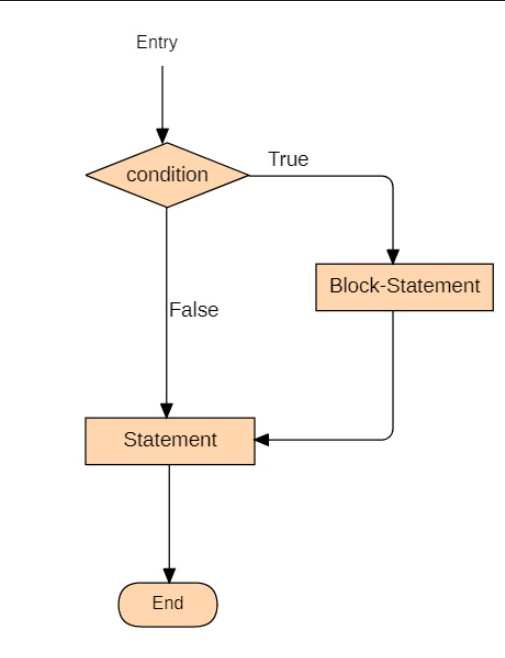
If statement is a conditional statement in Python, the block of code is executed when the given condition is satisfied. We can say whether a statement is used to determine whether a block of code will be executed or not.
Syntax of if statement in Python:
if condition:
      statement
      #block of code
Flow Chart of the if statement is given below:
Example 1:
Let’s take some examples of if statement for better understanding:
#take input from user
n=int(input("Enter a number: "))


#if the input number is greater than 15, then print this statement
if(n>15):
    print(n," is greater than 15.")


print("This statement is always executed.")
Input:
20
Output:
Enter a number: 20
20  is greater than 15.
This statement is always executed.
Example 2:
#Initializing a list
list = [ 0, 1, 2, 3, 4]
#check whether the no is in the list or not
if (2 in list):
    print ("TRUE")
Output:
TRUE
- If-else Statement
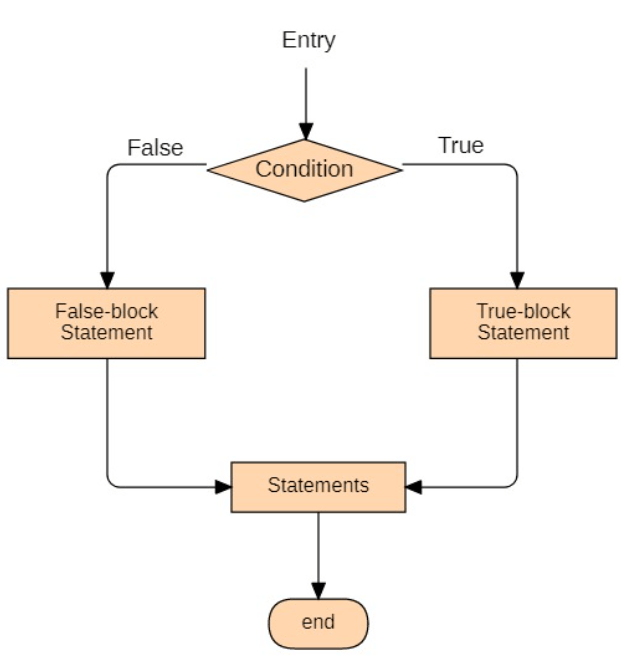
An if-else statement is a conditional statement in Python. In this, the else statement will work when the if statement is not satisfied. If the block of code inside the if statement is not executed when the condition is not satisfied, then the else statement will execute.
Syntax of if-else statement in Python:
if condition:
  statement
#this block of code will be executed
#when condition is satisfied.
else:
statement
#this block of code will be executed
#when if condition is not satisfied.
The flow chart of the if-else statement is given below:
Let's take some examples of if-else statements for better understanding:
Example 1:
#take input from user
n=int(input("Enter a number: "))
#if the input number is greater than 15 then print this statement
if(n>15):
    print(n," is greater than 15.")
#executed when if condition is false.
else:
    print(n, "is not greater than 15.")


print("ProgramProgram will be executed.")
Input:
10
Output:
Enter a number: 10
10 is not greater than 15.
The program will be executed.
Example 2:
#Initializing a list
list = [ 0, 1, 2, 3, 4]


#check whether the no is in the list or not
if (5 in the list):
    print ("TRUE")


#executed when if condition is not satisfied.
else:
    print("5 is not in the list.")
Output:
5 is not on the list.
- if…Elif Statement
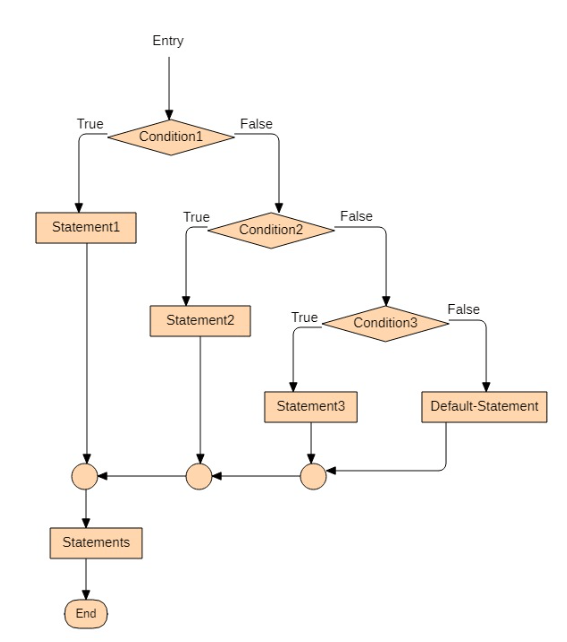
Elif statement is a conditional statement in Python. In this, the elif statement is used to check multiple conditions only if the given condition is false and execute the block of code if any of the conditions are true.
Elif statement is similar to the 'else' statement, but there is one difference. The difference is that the 'else' statement will not check the condition, but elif will check the condition.
Syntax of elif statement in Python:
 if condition:
  statement
#this block of code will be executed
#when condition is satisfied.
elif condition:
statement
#this block of code will be executed
#when if condition is false
#and elif condition is true.
else:
statement
#this block of code will be executed
#when if and elif both conditions are false.
Flow Chart of the elif statement is given below:
Let’s take some examples of elif statement for better understanding :
Example 1:
# this program is for calculating the greatest no from given user inputs
print('input three no.: ')


x, y, z = int(input()), int(input()), int(input())
if x > y and x > z:
    #this block will be executed if x is greatest
    print(x, 'is the greatest')


elif y > z and y > x:
    #this block will be executed if y is greatest
    print(y, 'is the greatest')


elif z > x and z > y:
    #this block will be executed if x is greatest
    print(z, 'is the greatest')


print("program has executed successfully")
Input:
4
6
2
Output:
Input three no.:
4
6
2
6 is the greatest
the program has been executed successfully
Example 2:
frontend = ["html", "css", "react", "javascript", "bootstrap"]
backend = ["java", "python", "sql", "django", "mongodb"]


tech = input("enter tech name: ")
if tech in frontend:
    print("it's a frontend tech")
elif tech in the backend:
    print("it's a backend tech")
else:
    print("didn't recognized")


print("program has executed successfully")
Input:
SQL
Output:
enter tech name: SQL
it's a backend tech
the program has been executed successfully
- Nested if Statement
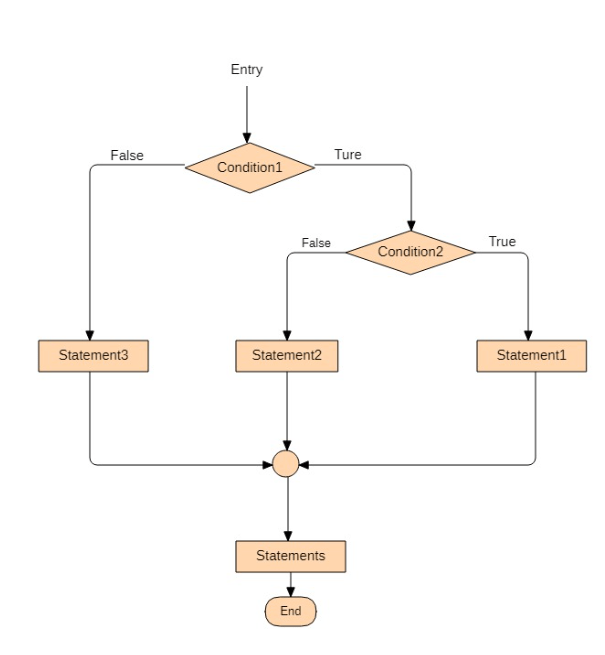
A nested if statement is a conditional statement in Python. In this, the Nested if statement is used to check multiple conditions. Nested if means if inside if means if statement within another if statement.
Syntax of Nested if statement in Python:
if condition:
#this block of code will be executed
#when condition is satisfied.
if  condition:
#this block of code will be executed
#when if condition is satisfied.
#Here,the end of nested if statement.
#Here,the end of if statement.
Flow Chart of Nested if statement is given below:
Let’s take some examples of Nested if statement for better understanding:
Example 1:
# this program for calculating the greatest no from given user inputs
print('input three no.: ')
x, y, z = int(input()), int(input()), int(input())


if x > y:
    if x > z:
        print(x, 'is the greatest')
    else:
        print(z, 'is the greatest')


else:
    if y < z:
        print(z, 'is the greatest')
    else:
        print(y, 'is the greatest')


print("program has executed successfully")
Input:
15
5
9
Output:
input three no.:
15
5
9
15 is the greatest
the program has been executed successfully
Example-2:
# this program checks if the number is even and in the range of 100.
num = int(input("enter number: "))


if num % 2 == 0:
    if num < 100:
        print("Even and in range")
    else:
        print("even")
else:
    print("not even")


print("program has executed successfully")
Input:
234
Output:
enter number: 234
even
the program has been executed successfully
- Short Hand if Statement
Short Hand if statement is a conditional statement in Python, it is used when only one statement needs to be executed inside the if statement.
Syntax of Short Hand if statement in Python:
if condition: statement
Let's take an example of a Short Hand if statement for better understanding :
Example:
#input the number
n = int(input("Enter a number"))


# if input number is divisible by 5 then print this statement
if n % 5 == 0: print(n, "divisible by 5")


print("program is executed successfully")
Input:
35
Output:
Enter a number: 35
35 divisible by 5
program is executed successfully
- Short Hand else statement
A short Hand else statement is a conditional statement in Python. It is used when only one statement needs to be executed inside the if statement, and else statement
Syntax of Short Hand else statement in Python:
statement if condition else statement
Let's take an example of the Short Hand else statement for better understanding :
Example:
#Initialize a list
nums = [4, 7, 9, 5, 0]
print(6, "is in the list") if 6 in nums else print(6, "is not in the list")
print("program is executed successfully")
Output:
6 is not on the list
program is executed successfully