
Multiple Linear Regression using Python
Linear Regression:
Linear regression is a method that models the relationship between a dependent variable and one or more independent variables; in other terms, that models the relationship between a target variable and simple regression or multiple regression.
This model assumes a relationship between the given inputs and the output variables. We can also determine the coefficients required by the model to predict the new data.
Linear regression is of two forms; they are
- Simple Linear Regression
- Multiple Linear Regression
Simple Linear Regression:
Simple linear regression (SLR) predicts a response using a single feature or variable. In simple linear regression, all the variables are linked linearly. Here the main purpose is to find a linear equation used to predict the answer value of y concerning the feature or the independently derived variable (x).
Below is a dataset with x features and y responses respective to x.

For simple understanding, we define
X as features, that is x = [10, 11, 12, ……, 19],
Y as response, that is y = [11, 13, 12, ……, 22]
We have considered 10 values in the above table
The graphical representation of the above dataset looks like this:
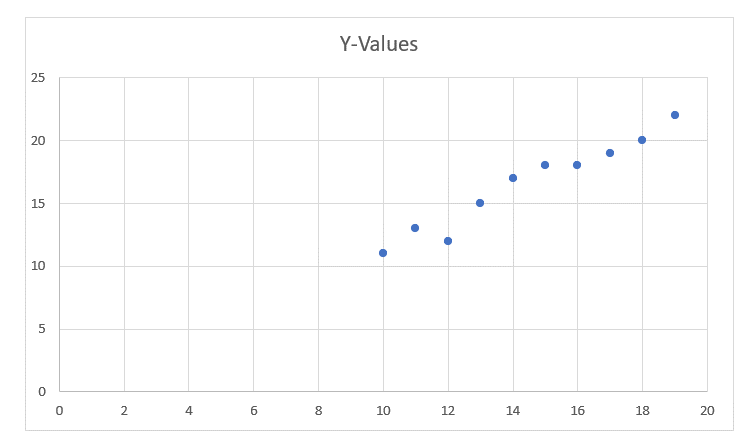
After this, we have to find or identify the most suitable line for this scatter graph to find the response of any new value for a feature.
This line is referred to as the regression line. We have some equations of the regression line.
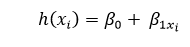
Here,
- h(xi) is the predicted response value for the ith.
- β0 and β1xi are regression coefficients.
If we want to build the model, we must know how to estimate the value of regression coefficients. If we know how to estimate regression coefficients, then only we can use this model to get the responses.
Concept of Least Squares:
Yi = 0 + Ρ1xi + Ρi = h(xi) + Ρi Ρ Ρi = yi – h(xi)
Here, Ρi is a residual error in ith observation.
So, we have to minimize the total residual error.
The cost function or squared error, b as:
b(β0, β1) = 1/2nΣnI = 1 έ2i
We have to find the values of Ρ0 and Ρ1 to find b(Ρ0 and Ρ1) minimum.
Let us not go into deep calculations. We are presenting the result below:
β1 = SSab / SSaa
β0 = b – β1a
where SSab would be the sum of cross deviations of “b” and “a”:
SSab = ΣnI = 1 (ai – a)(bi – b) = ΣnI =1 biai – nab
And SSaa would be the sum of squared deviations of “a.”
SSaa = Σni = 1(ai – a)2 = Σni = 1ai2 – n(a)2
Modules used:
- Numpy
- Pandas
- Matplotlib
- Sklearn
Example:
#simple program for simple linear regression
import numpy as np
import matplotlib.pyplot as mtp

def estimate_coeff(p, q):
# Here, we will assume the total number of points or observation
    n1 = np.size(p)
# Now, we will calculate the mean of a and b vector
    p = np.mean(p)
    q = np.mean(q)

# here, we will calculate the cross deviation and deviation about a
    SS_pq = np.sum(q * p) - n1 * q * p
    SS_pp = np.sum(p * p) - n1 * p * p

# here, we will calculate the regression coefficients
    b1 = SS_pq / SS_pp
    b0 = q - b1 * p

    return (b0, b1)

def plot_regression_line(p, q, b):
# Now, we will plot the actual points or observations as a scatter plot
    MTP.scatter(p, q, color = "m",
            marker = "o", s = 30)

\# here, we will calculate the predicted response vector
    q_pred = b[0] + b[1] * p

# here, we will plot the regression line
    mtp.plot(p, q_pred, color = "g")

# here, we will put the labels
    mtp.xlabel('p')
    mtp.ylabel('q')

# here, we will define the function to show plot
    mtp.show()

def main():
# entering the observation points or data
    p = np.array([10, 11, 12, 13, 14, 15, 16, 17, 18, 19])
    q = np.array([11, 13, 12, 15, 17, 18, 18, 19, 20, 22])

# now, we will estimate the coefficients
    b = estimate_coeff(p, q)
    print("Estimated coefficients are :\nb0 = {} \
        \nb_1 = {}".format(b[0], b[1]))

# Now, we will plot the regression line
    plot_regression_line(p, q, b)

if __name__ == "__main__":
    main()
Output:96
Estimated coefficients are:
b0 = -0.5606006069
b1 = 1.17696867686
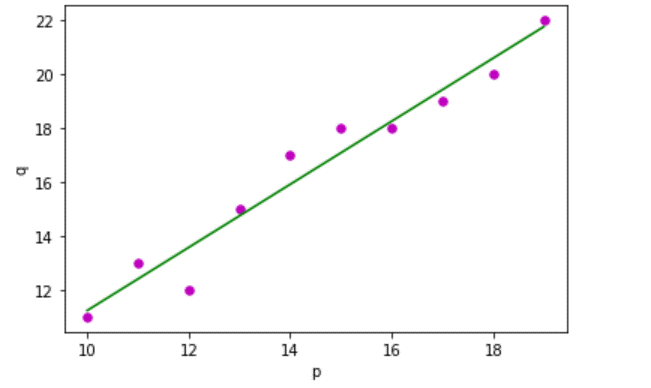
As we can see from the output, we have drawn simple linear regression using Python and the modules matplotlib used to plot the graph and the numpy module.
Multiple Linear Regression:
We require only one independent variable as the input in simple linear regression. However, we provide multiple independent variables for a single dependent variable in multiple linear regression. It is a Machine learning algorithm.
Q(Feature Matrix) = Q is a matrix of size "a * b" where "Qij" represents the values of the jth attribute for the ith observation.
We represent in the matrix form.
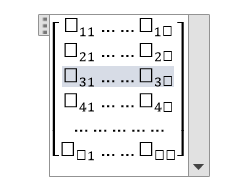
S (Response Vector) = It is a vector of size “a” representing the response value for the ith observation.
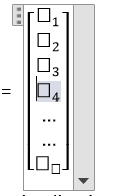
“A” regression line is:
h(Qi) = β0 + β1qi1 + β2qi2 + β3qi3 + β4qi4 + β5qi5 +………. + βbqib
Here, h(qi) is known as the response value for the ith observation point. We have to find the regression coefficients that are Ρ0, Ρ1, Ρ2……, Ρb .
We have another formula:
Si = β0 + β1qi1 + β2qi2 +β3qi3 + ……..+βbqib +Єi
We can represent the linear model in matrix form
Here,
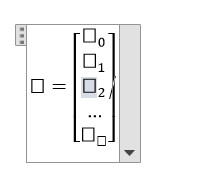
And,
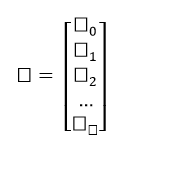
Using the Least Squares algorithm, we can get the estimated value of b (b’). We can only use the Least Squares method when the residual error is minimised.
The result will be shown as

Here, (‘) represents the transpose of the matrix and -1 represents the reverse of a matrix.
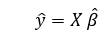
The above formula is used for calculating the multi-linear regression model. Here Y’ is the calculated response vector.
Example:
//program for multiple linear regression using Python
import matplotlib.pyplot as mtp
import numpy as np
from sklearn import datasets as data
from sklearn import linear_model as lmd
from sklearn import metrics as mt

# First, we will load the Boston dataset
boston1 = data.load_boston(return_X_y = False)

# Here, we will define the feature matrix(H) and response vector(f)
H = boston1.data
f = boston1.target

# Now, we will split X and y datasets into training and testing sets
from sklearn.model_selection import train_test_split as tts
H_train, H_test, f_train, f_test = tts(H, f, test_size = 0.4,
                                                    random_state = 1)

# Here, we will create a linear regression object
reg1 = lmd.LinearRegression()

# Now, we will train the model by using the training sets
reg1.fit(H_train, f_train)

# here, we will print the regression coefficients
print('The Regression Coefficients are: ', reg1.coef_)

# Here, we will print the variance score: 1 means perfect prediction
print('The Variance score is: {}'.format(reg1.score(H_test, f_test)))

# Here, we will plot for residual error

# here, we will set the plot style
mtp. style.use('five thirty eight')

# here, we will plot the residual errors in training data
mtp.scatter(reg1.predict(H_train), reg1.predict(H_train) - f_train,
            color = "green", s = 10, label = 'Train data')

# Here, we will plot the residual errors in test data
mtp.scatter(reg1.predict(H_test), reg1.predict(H_test) - f_test,
            color = "blue", s = 10, label = 'The Test data')

# Here, we will plot the line for zero residual error
mtp. hlines(y = 0, xmin = 0, Xmax = 50, linewidth = 2)

# here, we will plot the legend
mtp.legend(loc = 'upper right')

# now, we will plot the title
mtp.title("The Residual errors")

# here, we will define the method call for showing the plot
mtp.show()
Output:
The Regression Coefficients are:  [   -8.95714048e-02  6.73132853e-02  5.04649248e-02  2.18579583e+00       -1.72053975e+01  3.63606995e+00  2.05579939e-03 -1.36602888          2.89576718e-01      -1.22700072e-02         -8.34881849e-01  9.40360790e-03      -5.04008320e-01    ]


The Variance score is: 0.7209056672661751
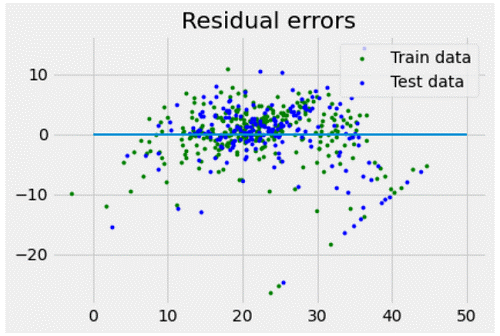
As we can see the output of the program how we have drawn the multiple linear regressions using Python. In the program, we have imported the modules matplotlib, numpy, and sklearn. Matplotlib is used to plot the graph and represent the graph on the output screen. Sklearn for dataset usage and numpy for the larger arrays of the dataset.