
×

How to run a Python file in CMD

Introduction

Today, let us learn about how to run a Python file using cmd. Cmd is nothing but command prompt. So first let us know how to run a Python code first.

We can run a Python in different ways like

  • In the PYTHON IDLE Window by pressing RUN
  • In the PYTHON Command Line Window
  • In the System (or) Command Prompt Window

To run a program let us a create demo Python program to run it in different places.

EXAMPLE:

File name: Demo.py

'''
 Writing a program for running a program in cmd


The demo program is about sorting of numbers


With using sort () method and without using sort method


'''


# Take a list with random numbers


l= [9, 1,4,6,0]


print("Before Sorting")


print(l)


print("Using Sort method")


l.sort()


print("After Sorting")


print(l)
print("-----------------------------------------------------------------------")


l=[9,1,4,6,0]


print("Before Sorting")


print(l)


print("Without Using Sort method")


for i in range(len(l)):


    for j in range(i,len(l)):


        if(l[i]>l[j]):


            l[i],l[j]=l[j],l[i]


print("After Sorting")


print(l)

Output:

'''
 Writing a program for running a program in cmd


The demo program is about sorting of numbers


With using sort () method and without using sort method


'''


# Take a list with random numbers


l= [9, 1,4,6,0]


print("Before Sorting")


print(l)


print("Using Sort method")


l.sort()


print("After Sorting")


print(l)
print("-----------------------------------------------------------------------")


l=[9,1,4,6,0]


print("Before Sorting")


print(l)


print("Without Using Sort method")


for i in range(len(l)):


    for j in range(i,len(l)):


        if(l[i]>l[j]):


            l[i],l[j]=l[j],l[i]


print("After Sorting")


print(l)

So now we know the output of the program. Let us know how to use the command prompt now.

How to Open Command Prompt?

We can open command prompt in two ways. One way is typing command prompt in the search bar.

After typing command prompt in the search bar, press enter key or click on the command prompt icon. Then the command prompt window is opened.

How To Run A Python File In Cmd

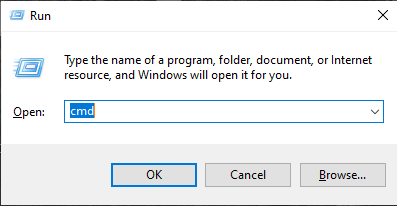
The other way is giving the command windows key+R. Then a popup like this opens up.
How To Run A Python File In Cmd

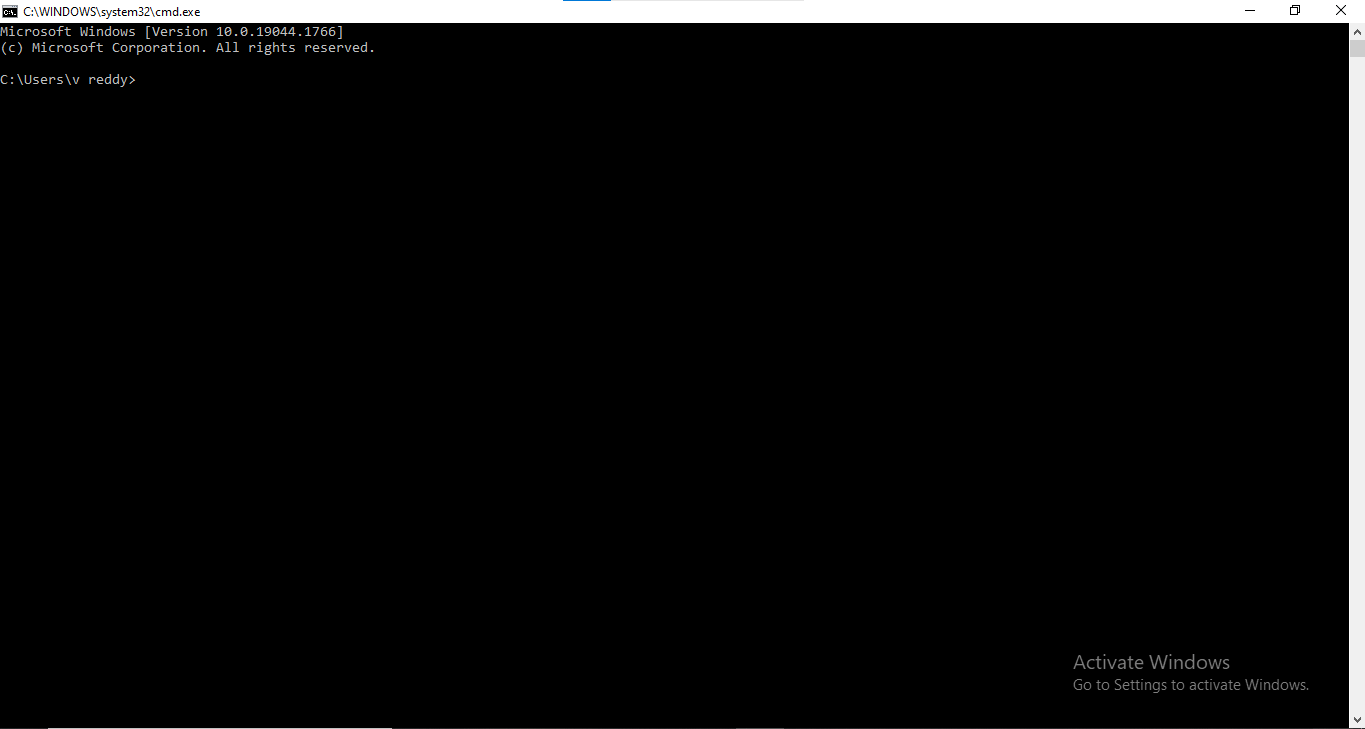
Then type cmd in the given box. Then a window with black screen opens. That window is called as COMMAND PROMPT.

The below black screen how a command prompt window looks like.
How To Run A Python File In Cmd

Functions in a Command Prompt

1) mkdir( make directory)

By using this command in the command prompt a directory is created in the directory in which we are present.

Here it is called directory in computer terms. In general terms directory is also know as a folder

2) dir(directory)

By using this command in the command prompt we can view all the contents of the directory at which our prompt window is present now.

Example:

We are at C directory now.

Now enter a command dir.

Now we can see all the contents of C directory.

Let us see how a program can be runned in a command prompt window. There are steps to be followed for running a program on cmd.

  1. Open command prompt window
  2. Set the path toward the residence of the required file.
  3. After reaching the required file give a command-python file_name.py
  4. Now the output is appeared.

This is how a program is runned on a command prompt.

Let us apply these steps and get the output of the program.

To apply these steps let us know the location of the file.

Location of Demo.py is:

C:\Users\v reddy\AppData\Local\Programs\Python\Python39

To reach to Python39 we use a command called cd. cd means change directory.

Syntax:

Syntax of cd is:

cd directory name

Then after giving the directory name press enter.

Note: The directory can only be changed if and only if the directory is present in the present directory.

The commands in the command prompt:

C:\>cd Users


C:\Users>cd v reddy


C:\Users\v reddy>cd AppData


C:\Users\v reddy\AppData>cd Local


C:\Users\v reddy\AppData\Local>cd Programs


C:\Users\v reddy\AppData\Local\Programs>cd Python


C:\Users\v reddy\AppData\Local\Programs\Python>cd Python39


C:\Users\v reddy\AppData\Local\Programs\Python\Python39>

Only the underlined the content only must be written on the command prompt window. This is how we can reach our file destination in command prompt window.

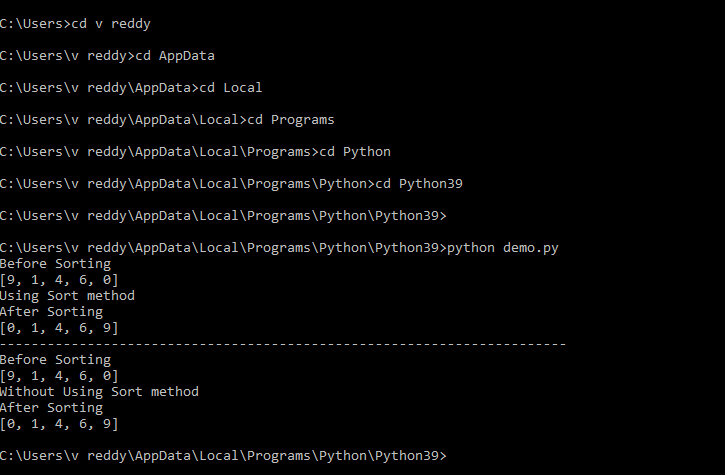
Now let us give a command Python (space) file name.py.

This command shows me the output of the program.

The file name in which we stored the above written program is demo.py

The command given is Python demo.py

Code:

Users\v reddy\AppData\Local\Programs\Python\Python39>python demo.py
Before Sorting
[9, 1, 4, 6, 0]
Using Sort method
After Sorting
[0, 1, 4, 6, 9]
-----------------------------------------------------------------------
Before Sorting
[9, 1, 4, 6, 0]
Without Using Sort method
After Sorting
[0, 1, 4, 6, 9]

Output:

This is how the output of the program looks inside a command prompt.
How To Run A Python File In Cmd

This is all about running a Python file in command prompt.


Related Topics

How to run a Program in Python

How to run a Program in Python Writing a program in Python is an easy task, beginners who are ready to kickstart their career in the world of programming can create...

3 minutes read.

How to upgrade PIP in python

We use the PIP command in our command prompt to install any package. PIP is used to install published Python packages in the PyPI (Python package index) or other indices....

3 minutes read.

Python Syntax Error Invalid Syntax

Python is renowned for its simple and direct syntax. However, we might come across some things that Python doesn't allow if we are learning Python for the very first time or if...

14 minutes read.

Bar Plot in Python

A bar chart or bar graph displays categorical data using rectangular bars with heights or lengths proportionate to the values for the data distributed in the dataset. In a bar...

16 minutes read.

Python Console

Console in Python is referred as the command line Interpreter- (CLI) and also knows as Shell and it functions as taking input from the human user and interpreting it through...

6 minutes read.

Python all() Function

Python all() Function The all() function in Python returns a Boolean value ‘True’ if all the items in iterable are true or if the iterable object is empty, else it returns False. Syntax all(iterable) Parameter Iterable: An iterable object...

1 minute read.

Python if statement

Python if statement Decision making is an essential feature of any programming languages. Condition checking is the strength of decision making. Python provides many decision-making statements, such as: If statementIf-else statementelif statement if statement The if statement is...

2 minutes read.

Python Basics

In this tutorial, we will learn about the basics of Python, a very famous programming language. This tutorial will help you understand the language better if you start with python....

8 minutes read.

Python sum() function

Python sum() function The sum() function in python sums start and the items of an iterable from left to right and returns the total.  Syntax sum(iterable[, start]) Parameter iterable: This parameter represents the sequence to sum. start: It is optional...

1 minute read.

Sort a dataframe based on a column in Python

Sorting the dataframe based on a column requires pandas which is An open-source library called Python Pandas is described as offering high-performance data processing in Python. For both professionals and...

4 minutes read.

Python frozenset()

Python frozenset() class The frozenset() class in Python returns a new frozenset object, optionally with elements taken from iterable. Syntax class frozenset([iterable]) Parameter iterable: This parameter represents an iterable object, like list, set, tuple etc. Return This class returns an unchangeable...

1 minute read.

How to develop a game in python

Fun always makes a task interesting and easy to execute. Learning in the same theoretical way at some point reaches the boring spot. In this article, using some Python knowledge,...

13 minutes read.

Cross Validation in Sklearn

Data scientists can benefit from cross-validation in machine learning in two key ways: it can assist in minimising the amount of data needed and ensure the artificial intelligence model is...

14 minutes read.

Python Seaborn

Seaborn is an open-source library in Python that is used for data visualization and plotting graphs. The plots are used for the Visualization of data. It is built on top...

10 minutes read.

Python Parallel Processing

By performing more jobs concurrently, your software may complete more tasks in a shorter amount of time. These aid in solving major issues. The following subjects will be covered in...

2 minutes read.

Python Multithreading

In python, we can implement multithreading. In this tutorial, we will understand the basics of implementing multithreading in a python programming language. Multithreading is just like multiprocessing. We use it...

4 minutes read.

Sort Dictionary in Python

Dictionaries In Python, a dictionary is an unordered collection or set of data types that enable of store data in an unordered key-value/pair. The key is stored alongside with value. Dictionary contains key:...

4 minutes read.

Difference Between Python and Scala

What is Python? Python is a high-level general-purpose interpreted programing language. It is used for multi general-purpose work such as language construct as well as its object-oriented approach aims to help...

4 minutes read.

Python Not Equal Operator

Python provides us with many operators to make tasks easier. There are about 7 categories of operators in Python. One of the 7 classifications is the comparison operators. Just as...

3 minutes read.

How to Create an Array in Python?

How to Create an Array in Python In the previous article, we have discussed how to declare an array in Python. So, let's have a quick revision of that, and then we...

5 minutes read.