
×

How to create a login page in python

Users can access an application by providing their username and Password or by authenticating with a social media login on the login screen.

Python Tkinter

Python provides a variety of choices for GUI development. Tkinter is the approach used the most frequently among all GUI approaches. It is a standard Python interface for the Python-supplied Tk GUI toolkit. The fastest and most straightforward approach to constructing GUI apps is with Python and Tkinter. Tkinter makes building a GUI a simple process.

Python Tkinter for GUI

One of the most common GUI application components is the login form.

Users that use the Login Form can log in with their user name and Password. The user may be granted privileged access when the credentials have been verified.

Theme Behind the login page created:

In this illustration, we create a program that launches a window with fields for the user name and Password and a submit button.

The user can click the Login button after entering their username and Password.

A function is run to verify the username and Password after clicking the button. You must write your application logic to verify the username and credentials in this function.

For this illustration, we retrieve the user's username and Password from the credential verifying function and print them to the application window.

For starting with the code, we can segregate the program into different sections:

Importing modules section

We have to import the Tkinter module.

We use Tkinter to create the GUI application in python; in this program, we mainly use the Tkinter module, so we first have to import the Tkinter module.

Creating the Mainframe

We will now build the application's primary frame after importing the components.

Designing the Layout

Following the development of the Main Frame, the application will receive some layout. Here we use the grid format to align the labels and input fields.

Initializing the Application

We will now execute the application in the infinite loop so that the main screen can be visible to the user continually until the user exits the page.

Python code for login page

from Tkinter import *
from functools import partial


def validateLogin(username, password):
	print ("User has entered the username :", username.get())
	print ("User has entered the password :", password.get())
	return


# Creating the GUI window 
console = Tk () # Initialization of Tkinter
console.geometry('400x300')  # Size of the window
console.title('Login page for using python Tkinter code')


# Creating input of username 
Label1 = Label (console, text="User Name"). grid (row=0, column=0) # Label to specify Username
Input1 = StringVar() 
# Inputing the user’s name
usernameEntry = Entry (console, text variable = Input1). grid (row=0, column=1)  


# Creating input of Password
# Label to specify Login
Label2 = Label(console,text="Password").grid(row=1, column=0)  
Input2 = StringVar()
# Inputing the Password
passwordEntry = Entry (console, text variable = Input2, show='*'). grid (row=1, column=1)  


validateLogin = partial (validateLogin, Input1, Input2)


# Creating login button
loginButton = Button (console, text="Login", command=validateLogin). grid (row=4, column=0)  


console.mainloop()

The above is used to create the login page with a GUI, which inputs the two String inputs one is a username, and the other is a Password. And we can validate the user by the two inputs taken using validate function.

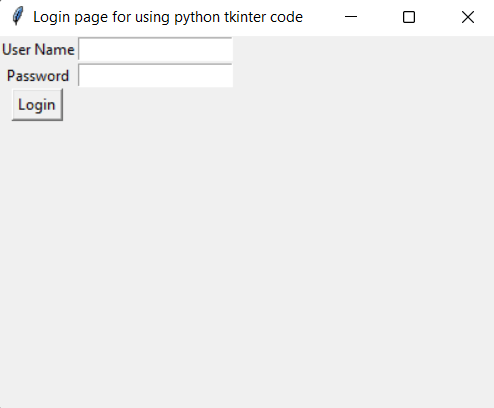
When this code is executed, the output screen is the simple user interface that inputs the username and Password and contains a login button. On clicking the login button after entering the username and Password and in the above code, we have printed the username and Password entered by the user.

The following is the output window after executing the above-given code:
How to create a login page in python

Here we are taking the two inputs:

Username and Password for verifying the credentials of a user.

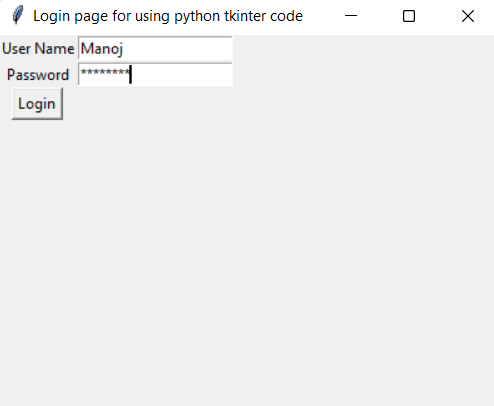
Here the username and Password are printed on the output console after entering the user credentials, that is, username and password, using the general print method in python. The following is the picture of the output window after entering the username and Password and clicking the login button.
How to create a login page in python

To display stars when the user types the Password, we used Entry (.., show = '*') for the Password.

Of course, you can enhance the labels and GUI window. However, because the main focus of this tutorial is on the functionality of a login form, we continue with the standard style of GUI elements.


Related Topics

Idle python download for Windows

Here, we will be discussing how to get the answer to all questions related to installing Python on Windows. What is IDLE? Integrated Development and Learning Environment, or IDLE, is a shorthand....

3 minutes read.

String indices must be integers in Python

Lists, tuples, and strings are examples of iterable objects in Python whose items or characters can be retrieved by their index numbers. For instance, you might take the following action to...

3 minutes read.

Number pattern in Python

Number pattern in Python: This article explains how to print number patterns in Python. The FOR loop, while loop, and range() functions are used in the following Python programs to...

4 minutes read.

Sentiment Analysis using NLTK

Introduction Data is being produced at an astounding rate and volume in the field of the internet and other digital services nowadays. Researchers, engineers, and data analysts often work with tabular...

7 minutes read.

Loan Calculator using PyQt5 in Python

In the following tutorial, we will learn how to build a Loan Calculator application using the PyQt5 library in the Python programming language. So, let's get started. Introduction to the code: The heading...

4 minutes read.

Convert int to Float in Python using Pandas

Introduction We have already learnt about how to convert float variables to int. Now let us know how to convert int variables to float So let us create another Dataset on which...

2 minutes read.

Python getattr() function

Python getattr() function The getattr() function in Python returns the value of the named attribute for the given object. Syntax getattr(object, name[, default]) Parameter object: It is a required parameter which represents an object. name: This parameter represents the...

1 minute read.

Best Database for Python

Database The collection of structured data or information in an organized format in a computer system is known as Database. The data is inserted, deleted, updated, controlled, or manipulated in a...

6 minutes read.

Adding item to a python dictionary

The dictionary is one of python’s built-in data structures where it stores key-value pairs. A dictionary is a collection of ordered values that can be changeable. We can add, modify,...

3 minutes read.

Iterate a Dictionary in Python

In this tutorial, we will learn how to Iterate a Dictionary in Python. Dictionary: In Python, a dictionary is an unordered collection of data values that is used to store data values,...

3 minutes read.

Nested Tuple in Python

If you are a Python learner, this page contains all the information that helps you know about nested tuple and how to access it in python. What is a Tuple? Multiple items...

4 minutes read.

Python Comments

In this tutorial, we will discuss the importance of comments in the Python code and how various types of comments can be inserted in the code. Comments are used to describe...

3 minutes read.

Attributes in python

In this article, we shall learn about attributes in python. Classes are a mix of data and functions, which in reality mean attributes and methods respectively. Typically, the body of a...

3 minutes read.

Python Os sep

Python: Python is an interactive and more accessible language than any other programming language. The python programming language uses a variety of libraries to perform the operations in a faster way....

3 minutes read.

Python Call Function

In this article, you will learn about calling a function in Python. But before learning this, we should know about functions in Python.So, let’s get some overview of functions in...

6 minutes read.

Python maketrans() function

Introduction A static method is the string maketrans() one. It is used to make a one-to-one mapping between a string's character and its translation, i.e., to define the list of characters...

5 minutes read.

Python str() function

Python str() function The str() function in Python converts the specified value into a string. Syntax class str(object='')           or class str(object=b'', encoding='utf-8', errors='strict') Parameter object:  This parameter represents any object to convert the given...

1 minute read.

Python program to count and display vowels in a string

Python program to count and display vowels in a string This python program counts the vowels in a string and displays them on the screen. We can do this in several...

2 minutes read.

Python Statistical Module

Python Statistical Module The Python statistical module provides various functions that we can use in our Python program, to perform mathematical statistics operations on the numerical data given to us. The...

8 minutes read.

Python Strong Number

Strong Number- Logic Divide each of the number's digits into separate units to determine if it is a strong number or not.The factorial of each digit must then be determined. The...

5 minutes read.