
IdentityHashMap in Java
The IdentityHashMap class is comparable to the HashMap class and is an AbstractMap implementation. However, when comparing the key, it uses reference equality rather than object equality (or values).
Identity HashMap is a non-general purpose Map implementation. While this class implements the Map interface, it deliberately violates Map's general contract by comparing objects using the equals () function.
It is designed particularly for the few occasions where reference-equality semantics are necessary. It is used when a user wishes to compare two things with the help of a reference.
To use the IdentityHashMap class, we must import the java.util package.
Features of IdentityHashMap:
- It uses reference equality rather than the equals () approach. It makes use of the == operator.
- Because it was not previously synchronized, IdentityHashMap must be synchronized externally.
- Iterators throw a ConcurrentModificationException when attempting to modify during an iteration.
- It ensures constant-time performance for simple operations like get and put, assuming the System.
- identityHashCode (Object) distributes the elements in the bucket properly. IdentityHashMap uses the System method rather than the hashCode () method. Method identityHashCode () () This is an important distinction since mutable objects can now be used as keys in Maps whose hash code is expected to change when the mapping is stored within IdentityHashMap.
Syntax:
public class IdentityHashMap <K,V> extends AbstractMap <K,V> implements Map<K,V>, Serializable, Cloneable
V- the value of an object
K- key
Constructors of IdentityHashMap:
IdentityHashMap instances can be created in two ways:
- IdentityHashMap <K,V> object_ihm = new IdentityHashMap<K, V>( );
- Map <K, V> object_hm = new IdentityHashMap<K, V> ( );
IdentityHashMap():
It generates a new, empty identity hash map with the expected maximum size of 21.
Syntax:
IdentityHashMap <K, V> object = new IdentityHashMap<K, V>( );
IdentityHashMap (int ExpectedMaxSize):
It generates a new, empty identity hash map with the specified maximum size.
Syntax:
IdentityHashMap <K, V> object= new IdentityHashMap(int ExpectedMaxSize);
IdentityHashMap (Map m):
It generates a new identity hash map using the key-value pairs specified in the previous Map.
Syntax:
IdentityHashMap <K, V> object= new IdentityHashMap(Map m);
| Method | Description |
| void clear (): | It clears the Map, removing all mappings. |
| Set entrySet (): | It returns a set view of the Map's key-value mapping. |
| Object put (Object Key, Object Value): | It associates the supplied value with the given key in the identity hash map. |
| Object remove (Object Key): | It removes from the Map all mappings for the provided key (if present). |
| Set keySet (): | It returns an identity-based set view of the keys in the hash map. |
| void putAll (Map t) : | The current Map receives all mappings from the given Map (in the argument). Any existing mappings for any keys supplied in the Map will be overwritten by these mappings. |
| Object clone (): | It returns a shallow duplicate of the provided identity hash map. The keys and values, on the other hand, are not copied. |
| int size (): | The identity hash map's key-value mapping count is returned. |
| boolean containsValue (Object Key): | It checks to see if the supplied object reference is a value in the identity hash map. |
| boolean containsKey (Object Key): | It checks to see if the supplied object is a key in the identity hash map. |
| boolean equals (Object o) : | It compares the provided item to the Map to determine equality. |
| boolean isEmpty (): | It returns true if the supplied identity hash map has no mappings. |
| Object get (Object key): | It returns the value in the identity hash map that corresponds to the provided key. If there are no mappings for the key in the Map, it returns null. |
| Collection values(): | It returns the Map's value of a collection view. |
| int hashCode(): | It returns the hash code value of the given Map. |
IdenHMapDemo.java:
// importing the pacakages and classes
import java.util.Map;
import java.util.HashMap;
import java.util.IdentityHashMap;
import java.util.*;
public class IdenHMapDemo {
   public static void main(String args[]) {
      // instance- IdenHMapDemo
      Map<String, String> idenHashmap = new IdentityHashMap<>();
      // insert the elements -put method
      //  key value pairs
      idenHashmap.put("Priyanka", "101430");
      idenHashmap.put("Shravani", "23240");
      idenHashmap.put(new String("Shreya"), "23430");
      idenHashmap.put("Anup", "45020");
      idenHashmap.put("Nirnaya", "67705");
      Set iSet = idenHashmap.entrySet();
      Iterator i = iSet.iterator();

      while(i.hasNext()) {
         Map.Entry m= (Map.Entry)i.next();
         System.out.print(m.getKey() + ": ");
         System.out.println(m.getValue());
      }
      System.out.println();
      // idenHashmap.size() comparing  objects through reference
      // and printing the size of IdentityHashMap
      System.out.println(" IdentityHashMap is: " + idenHashmap.size());
   }
}
Output:
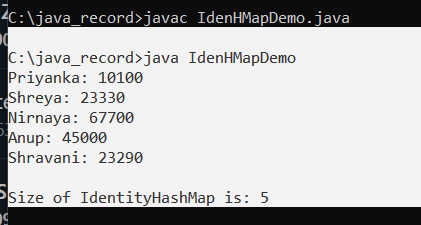
Operations on IdentityHashMap
Adding the elements:
To add entries to the IdentityHashMap, we utilize the put () and putAll () methods. The put () method adds the key and value supplied into the Map. When the current key is given, the previous value is replaced with the new value. PutAll () moves all key-value mappings from one Map to another.
IdenHMapDemoExample.java:
import java.util.*;
public class IdenHMapDemoExample {
    public static void main (String [] args)
    {

        Map<Integer, String> obj_ihm = new IdentityHashMap<Integer, String> ();
        obj_ihm.put (1, "Hello");
        obj_ihm.put (2, "??!");
        obj_ihm.put (3, "welcome");
        obj_ihm.put (4, "tutorials");
        obj_ihm.put (5, "welcome");
        // display IdentityHashMap
        System.out.println (" mappings initially are: " + obj_ihm);
        //  existing key with new value
        //  past value stored in prev_value
        String prev_value  = (String)obj_ihm.put (1, "Heyyy");

        System.out.println ("\nReturned value is: "+ prev_value);
        // displaying  new map
        System.out.println ( "\nIdentityHashMap after assigning new value for the existing key:\n " + obj_ihm);
        //  new Identityhashmap and  putAll ()  method
        Map<Integer, String> newHMap  = new IdentityHashMap<Integer, String> ();
        newHMap.putAll (obj_ihm);
        // Display final IdentityHashMap
        System.out.println ("\n new IdentityHashMap : "+ newHMap);
    }
}
Output:
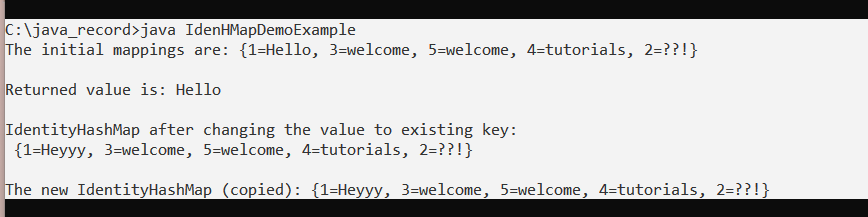
Removing elements:
The remove () method is used to remove mappings (key-value pairs) from the Map.
IdenHMapDemoExample.java
import java.util.*;
public class IdenHMapDemoExample {
    public static void main ( String [] args)
    {
        Map<Integer, String> obj_ihm = new IdentityHashMap<Integer, String> ();
        //  key - value pairs

        obj_ihm.put (1, "Hello");
        obj_ihm.put (2, "How");
        obj_ihm.put (3, "Are");
        obj_ihm.put (4, "You");
        obj_ihm.put (5, "?");
        //  IdentityHashMap  on output screen
        System.out.println ("mappings initially are: " + obj_ihm);
        // removing
        String return_value = (String)obj_ihm.remove (3);
        // Displaying  new IdentityHashMap on the output screen
        System.out.println ("\n IdentityHashMap is: " + obj_ihm);
    }
}
Output:
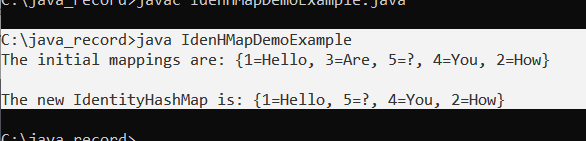
Accessing the elements:
IdenHMapDemoExample.java:
import java.util.*;
public class IdenHMapDemoExample {
    public static void main (String [] args)
    {

        Map<Integer, String> obj_ihm = new IdentityHashMap<Integer, String>();
        //  key - value pairs

        obj_ihm.put (1, "Hello");
        obj_ihm.put (2, "How");
        obj_ihm.put (3, "Are");
        obj_ihm.put (4, "You");
        obj_ihm.put (5, "?");

        //  IdentityHashMap  on the output screen
        System.out.println ("The  mappings initially are: " + obj_ihm);
        // accessing  of 5
        System.out.println ("Value of key 5 is:" + obj_ihm.get (5));
        // accessing  of 2
        System.out.println ("Value of key 2 is:"+ obj_ihm.get (2));

        System.out.println ("Set view of keys: "+ obj_ihm.keySet ());
        // set view using entrySet ()
        System.out.println ("The set is: "+ obj_ihm.entrySet ());
    }
}
Output:
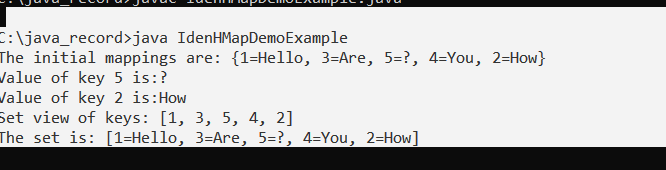
Synchronized IdentityHashMap:
When several threads access the identity hash map at the same time, and at least one of them fundamentally updates the Map, the Map must be externally synchronized. (The addition or deletion of one or more key-value mappings is a structural map alteration. If we just modify the value associated with a key that an instance already has, this is not a structural modification.)
This may be accomplished by synchronizing on any object that includes the Map. If no such object exists, the Map should be wrapped in Collections. synchronizedMap method () This should be done at the time of creation to avoid unsynchronized access to the Map.
Syntax:
Map m = Collections.synchronizedMap (new IdentityHashMap(?));