
Split the Number String into Primes in Java
Given is a string that only contains digits and serves to represent a number. Our goal is to split the string of numbers in a way that ensures each segment of the new number is a prime number. We must also be careful to reduce the number of splits. The minimum split is 1 because we are taking the input string as a whole if it represents a prime number. The numbers discovered must fall within the range of 1 to 10 ^ 6. Let's break it down with the aid of some examples.
In simple words, The aim is to determine the smallest number of segments into which a string representing a huge number, str, can be divided, each segment being a prime number between 1 and 10 ^ 6.
Example 1:
Input: "13477317"
Output: 2
Reason: If we take 1 split, then we must take 13477317 as a whole, and 13477317 can be divided by 3. As a result, only one split is not feasible. After performing two splits, we can see that both 317 and 13477 are prime numbers. As a result, we obtained all the segments as prime numbers in just two splits.
Example 2:
Input: "17"
Output: 1
Reason: The number 13477317 is a prime number and can be explained by the fact that if we take 1 split, we must also take 17 as a whole. So, one split will be sufficient.
Filename: Examplee.java
//Java implementation of the above strategy
import java.util.*;

class Examplee{

//Function to determine whether
//or not a String is a prime number.
static boolean checkPrime(String number)
{
    int num = Integer.valueOf(number);
    for (int i = 2; i * i <= num; i++)
        if ((num % i) == 0)
            return false;
    return true;
}

//A recursive method to determine
//the smallest number of segments that can
//be created from the given String
//so that each one is a prime.
static int splitIntoPrimes(String number)
{
    // If the number is null
    if (number.length() == 0)
        return 0;
//check To determine whether a number is
//a prime number or not,
//the prime function is invoked.
    if (number.length() <= 6 && checkPrime(number))
        return 1;
    else {
        int numLen = number.length();
        // A large number indicating the maximum
        int ans = 1000000;
        // Consider a minimum of 6 and a length
        // since the primes are less than 10 ^ 6
        for (int i = 1; i <= 6 && i <= numLen; i++) {
            if (checkPrime(number.substring(0, i))) {
                // Recursively call the function
                // to check for the remaining String
                int val = splitIntoPrimes(number.substring(i));
                if (val != -1) {
                    // Evaluating minimum splits
                    // into Primes for the suffix
                    ans = Math.min(ans, 1 + val);
                }
            }
        }
        // Checks if no combination is found
        if (ans == 1000000)
            return -1;
        return ans;
    }
}
// Driver code
public static void main(String[] args)
{
    System.out.print(splitIntoPrimes("13499315")+ "\n");
    System.out.print(splitIntoPrimes("43")+ "\n");
}
}
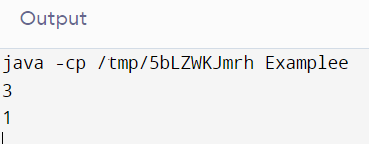
Output
Explanation
Input: str = “13499315”
Output: 3
Explanation: The number can be segmented as [13499, 31, 5]
Input: str = “43”
Output: 1
Explanation: The number can be segmented as [43]
Using Recursion
The idea is to take into account each prefix up to six digits (since the prime numbers are already known to be < 10 ^ 6) and verify if the number is prime or not. Recursively call the method to verify the string that is left if the input is a prime number. An appropriate message is displayed on the console if any combination fails to produce the desired arrangement.
Filename: SplitStringPrimes.java
// statement for importing
import java.util.* ;
public class SplitStringPrimes
{
//The below method tells
//if the string num is prime or not
public boolean isPrime(String num)
{
int no = Integer.valueOf(num) ;
for (int j = 2; j * j <= no; j++)
{
if ((no % j) == 0)
{
//A factor is found that differs from 1 and
//the number itself. Therefore, the response is false.
return false;
}
}
//If the control comes to this point, the
// number is considered to be a prime number.
return true ;
}
//Using a recursive method, determine how many
// segments of the string str must be prime
//in order for there to be a minimum number of segments.
public int splitIntoPrimes(String str)
{
//If the string str contains no numbers
if (str.length() == 0)
{
return 0 ;
}

//To determine whether a number is a prime number
// or not, the isPrime() method is called.
if (str.length() <= 6 && isPrime(str))
{
return 1 ;
}

else
{
int numLength = str.length() ;

//A large number to indicate the maximum
int answer = 1000000 ;
//As 10 7 is not a prime number and is the
//highest possible input number, the most
// digits that can be present in a prime number are 6, (which is six.).
for (int j = 1; j <= 6 && j <= numLength; j++)
{
if (isPrime(str.substring(0, j)))
{

//Recursively call the method to check the remaining
//characters in the string.
int value = splitIntoPrimes(str.substring(j)) ;
if (value != -1)
{
//The minimum splits into the Primes are
 //calculated for the suffix.
answer = Math.min(answer, 1 + value) ;
}
}
}
//Verifying if the combination is present
if (answer == 1000000)
{
return -1 ;
}
return answer ;
}
}
// main method
public static void main(String[] argvs)
{
//creating a SplitStringPrimes object of this particular class
SplitStringPrimes obj = new SplitStringPrimes() ;
String inputStr = "343" ;
int ans = obj.splitIntoPrimes(inputStr) ;
if(ans != -1)
System.out.print("For the number " + inputStr + ", the minimum number of splits is: " + ans + "\n") ;
else
System.out.print("For the number " + inputStr + ", the minimum number of splits is not possible. \n") ;
inputStr = "37";
ans = obj.splitIntoPrimes(inputStr) ;
if(ans != -1)
System.out.print("For the number " + inputStr + ", the minimum number of splits is: " + ans + "\n") ;
else
System.out.print("For the number " + inputStr + ", the minimum number of splits is not possible. \n") ;
inputStr = "44" ;
ans = obj.splitIntoPrimes(inputStr) ;
if(ans != -1)
System.out.print("For the number " + inputStr + ", the minimum number of splits is: " + ans + "\n") ;
else
System.out.print("For the number " + inputStr + ", the minimum number of splits is not possible. \n") ;
inputStr = "367555" ;
ans = obj.splitIntoPrimes(inputStr) ;
if(ans != -1)
{
System.out.print("For the number " + inputStr + ", the minimum number of splits is: " + ans + "\n") ;
}
else
{
System.out.print("For the number " + inputStr + ", the minimum number of splits is not possible. \n") ;
}
}
}
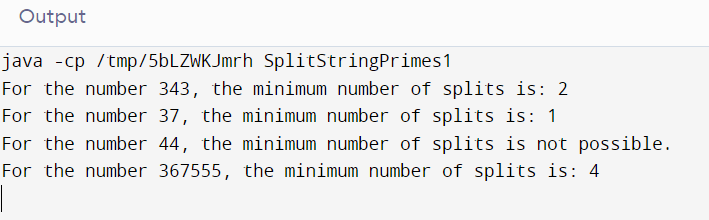
Output
Complexity Analysis
The given code has an O(N^5 / 2) time complexity, where it takes O(N^2) time to identify every conceivable combination iteratively. Since we additionally need to determine whether the integer is prime, this task has an O(N^1/2) time complexity. As a result, the code described above has an overall time complexity of O(N^2) * O(N^1 / 2) = O(N^5 / 2), where N is the total number of digits in the input string.
Using Iteration
Dynamic programming can be used to fix the issue through iteration.
We can create the array splitArr[] and use it, where splitArr[q] denotes the minimum number of splits needed to separate a prefix string of the length 'q' into its subdivision of primes.
The splitArr[] array is being filled in the way described below:
- All of the input string's indices are iterated over in a loop.
- Another loop is started from 1 to 6 for each index 'q' from the above loop to determine whether the substring from the (p + q)th index is a prime number or not.
- The array splitArr[] can be updated as follows if a prime number is formed: splitArr [p + q] = min(splitArr[p + q], 1 + splitArr[p]);
The value at the last index, which has the fewest splits over the entire input string, is our answer when all of the values have been updated.
Filename: SplitStringPrimes1.java
// significant import statement
import java.util.* ;

public class SplitStringPrimes1
{

// determining whether the input string num is a
//whether or not a prime number using a method
public boolean isPrime(String num)
{
if(num.length() == 0)
{
return true ;
}
int nmbr = Integer.parseInt(num) ;
for (int i = 2; i * i <= nmbr; i++)
{
//We have discovered a number that divides the nmbr value exactly.
//That value is also not equivalent to either 1 or nmbr
//. As a result, nmbr is not a prime number.
if ((nmbr % i) == 0)
{
return false ;
}
}

//if control is reached at this point, the
// number nmbr is a prime number.
return true ;
}

// a method used to determine the smallest number
// of splits necessary to ensure that each segment
//of the input String that results from
// the split represents a prime number.
public int splitIntoPrimes(String num)
{
int numLength = num.length() ;

//Declaring an array splitArr[] and
//setting its initial value to -1.
int splitArr[] = new int[numLength + 1] ;
Arrays.fill(splitArr, -1) ;

// Constructing a table in the
// Bottom-up approach
for (int j = 1; j <= numLength; j++)
{

//To begin with, we determine whether or not an entire prefix is a prime number.
if (j <= 6 && isPrime(num.substring(0, j)))
{
splitArr[j] = 1 ;
}

//If it is possible to divide the string into prime numbers,
//check to see if the remaining String from
// j to i is a prime number or not.
//Calculate the minimum split
//until i if the answer is yes.
if (splitArr[j] != -1)
{
for (int i = 1; i <= 6 && j + i <= numLength; i++)
{

//Verifying if the substring from j to i exists
//is the given integer a prime number?
if (isPrime(num.substring(j, j + i)))
{

//Update the split array if the value is prime.
if (splitArr[j + i] == -1)
{
splitArr[j + i] = 1 + splitArr[j] ;
}
else
{
splitArr[j + i] = Math.min(splitArr[j + i], 1 + splitArr[j]) ;
}
}
}
}
}

// Returning the fewest possible splits
// to get the full input String
return splitArr[numLength] ;
}

// main method
public static void main(String[] argvs)
{
//constructing a SplitStringPrimes1 object of the specified class
SplitStringPrimes1 obj = new SplitStringPrimes1() ;

String inputStr = "343" ;

int ans = obj.splitIntoPrimes(inputStr) ;

if(ans != -1)
{
System.out.print("For the number " + inputStr + ", the minimum number of splits is: " + ans + "\n") ;
}
else
{
System.out.print("For the number " + inputStr + ", the minimum number of splits is not possible. \n") ;
}
inputStr = "37" ;
ans = obj.splitIntoPrimes(inputStr) ;
if(ans != -1)
{
System.out.print("For the number " + inputStr + ", the minimum number of splits is: " + ans + "\n") ;
}
else
{
System.out.print("For the number " + inputStr + ", the minimum number of splits is not possible. \n") ;
}

inputStr = "44" ;
ans = obj.splitIntoPrimes(inputStr) ;
if(ans != -1)
{
System.out.print("For the number " + inputStr + ", the minimum number of splits is: " + ans + "\n") ;
}
else
{
System.out.print("For the number " + inputStr + ", the minimum number of splits is not possible. \n") ;
}

inputStr = "367555" ;
ans = obj.splitIntoPrimes(inputStr) ;
if(ans != -1)
{
System.out.print("For the number " + inputStr + ", the minimum number of splits is: " + ans + "\n") ;
}
else
{
System.out.print("For the number " + inputStr + ", the minimum number of splits is not possible. \n") ;
}
}
}
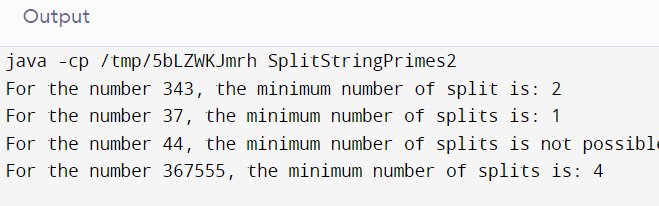
Output
Complexity Analysis
The given code has an O(N^3 / 2) time complexity, where it takes O(N) time to walk over all of the indices. Additionally, we must determine if the number is a prime, which has a time complexity of O(N^1 / 2). With N being the total number of digits in the input string, the whole time complexity of the above algorithm is, therefore O(N) * O(N^1 / 2) = O(N^3 / 2).
We are aware that in this problem, the prime numbers range from 1 to 10 ^ 6. This information can be used to improve the system even more. When we precompute the checks of the prime number and store it in an array, additional optimization is achievable.
Filename: SplitStringPrimes2.java
// significant import statement
import java.util.* ;

public class SplitStringPrimes2
{

//The Sieve of Eratosthenes approach is used
// to precompute all of the primes up to 1000000
// and keep them in the hash set.
public void retrievePrimesFromSeive(HashSet<String> hashSetPrm)
{
boolean []primeArr = new boolean[1000001] ;
Arrays.fill(primeArr, true) ;
primeArr[0] = primeArr[1] = false ;

for (int j = 2; j * j <= 1000000; j++)
{
if (primeArr[j] == true)
{
//a multiple of a number is never a prime number.
// Let us take a prime number 2, for instance.
// However, because they are multiples of 2,
//the numbers 4, 6, 8, 10, and so on are not prime numbers.
for (int i = j * j; i <= 1000000; i += j)
{
primeArr[i] = false ;
}
}
}

//Prime numbers are first converted to strings,
// and then they are added to the hash set.
for (int i = 2; i <= 1000000; i++)
{
if (primeArr[i] == true)
{
hashSetPrm.add(String.valueOf(i)) ;
}
}
}

//A technique that determines the smallest number
//of splits necessary to ensure that each segment
//of the input String that results from
//the split represents a prime number.
public int splitIntoPrimes(String num)
{
int numLength = num.length() ;

//Define an array called splitArr[] and initialize it to -1.
int splitArr[] = new int[numLength + 1] ;
Arrays.fill(splitArr, -1) ;
//To keep the prime numbers in the
// hash set, invoke the sieve method.
HashSet<String> hashSetPrm = new HashSet<String>() ;
retrievePrimesFromSeive(hashSetPrm) ;
//A bottom-up approach is used for constructing
// the dynamic programming table.
for (int j = 1; j <= numLength; j++)
{

//If the prefix is a prime number, the hash
// set will contain the prefix if it was discovered.
if (j <= 6 && (hashSetPrm.contains(num.substring(0, j))))
splitArr[j] = 1 ;
//The remaining String from i to j should be checked
// if the given prefix can be divided into primes.
// Identify Prime. Determine the minimum split
//until j if the answer is affirmative.
if (splitArr[j] != -1)
{
for (int i = 1; i <= 6 && j + i <= numLength; i++)
{
//determining whether or not the substring
// from j to i is a prime number
if (hashSetPrm.contains(num.substring(j, j + i)))
{
//If a prime is discovered, the split array must be changed.
if (splitArr[i + j] == -1)
{
splitArr[i + j] = 1 + splitArr[j] ;
}
else
{
splitArr[i + j] = Math.min(splitArr[i + j], 1 + splitArr[j]) ;
}
}
}
}
}
// Obtaining a result with the fewest splits
//for the entire input String
return splitArr[numLength] ;
}
// main method
public static void main(String[] argvs)
{
//constructing a SplitStringPrimes2 object of the specified class
SplitStringPrimes2 obj = new SplitStringPrimes2() ;
String inputStr = "343" ;
int ans = obj.splitIntoPrimes(inputStr) ;
if(ans != -1)
{
System.out.print("For the number " + inputStr + ", the minimum number of split is: " + ans + "\n") ;
}
else
{
System.out.print("For the number " + inputStr + ", the minimum number of split is not possible. \n") ;
}
inputStr = "37" ;
ans = obj.splitIntoPrimes(inputStr) ;
if(ans != -1)
{
System.out.print("For the number " + inputStr + ", the minimum number of splits is: " + ans + "\n") ;
}
else
{
System.out.print("For the number " + inputStr + ", the minimum number of splits is not possible. \n") ;
}

inputStr = "44" ;
ans = obj.splitIntoPrimes(inputStr) ;
if(ans != -1)
{
System.out.print("For the number " + inputStr + ", the minimum number of splits is: " + ans + "\n") ;
}
else
{
System.out.print("For the number " + inputStr + ", the minimum number of splits is not possible. \n") ;
}
inputStr = "367555" ;
ans = obj.splitIntoPrimes(inputStr) ;
if(ans != -1)
{
System.out.print("For the number " + inputStr + ", the minimum number of splits is: " + ans + "\n") ;
}
else
{
System.out.print("For the number " + inputStr + ", the minimum number of splits is not possible. \n") ;
}

}
}
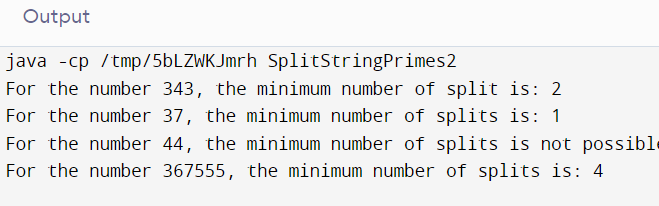
Output
Complexity Analysis
The time complexity of the preceding code, where N is the total number of digits present in the input string, is O(N), making it the most efficient method. The sieve has an O(N * log(N)) time complexity, but we may ignore it since it is only computed once. This means that, in contrast to previous programs, we can determine whether a number is a prime number or not in simply O(1) time.