
Access specifiers in Java
What are access specifiers in Java?
Access specifiers in Java are used to determine whether other classes can use a particular field or invoke a particular method. Access specifiers mainly specify the behavior of a class and the behavior of members such as instance variables and members. Here behavior means where we can access them like where we can access the class or where we can access the instance variables or where we can access the methods. So, this will be specified by the access specifiers.
Access specifiers in Java are of 4 types, they are
- public
- protected
- private
- default
Default is not a specifier. If we do not give any access specifier, then it will be default only.
By using the tabular representation one can easily understand access specifiers in Java.
| Access Specifiers | Within class | Within package | Outside package by subclass only | Outside package |
| private | Yes | No | No | No |
| protected | Yes | Yes | Yes | No |
| public | Yes | Yes | Yes | Yes |
| default | yes | Yes | No | No |
These are the access levels of access specifiers in Java.
Access specifiers vs Access modifiers
Basically, access specifiers are nothing but access modifiers in Java. In olden languages like c++, we use terminology like specifiers to determine public, private, protected, and default so these four are considered specifiers. And except these four words remaining words like static, final, synchronized, etc… are by default considered as modifiers. This kind of terminology is perfectly valid for old languages like c++. But in Java, we don't have any kind of terminology like specifiers. We consider all these words as modifiers themselves. So, there is no big difference between access specifiers and modifiers in Java.
Now let us discuss about each access specifier briefly. First, let us see about class-level access specifiers and later about members' access specifiers in Java.
Private
Within the class only we can access this access specifier. So, once we give the keyword private to any method or variable means that a specific method or variable can only access within the class.
Let us understand this access specifier more briefly using an example.
PrivateExpl1.java
class X
{
private int x = 50;  // using private access specifier for a variable
private void show() // using private access specifier for a method
{
System.out.println(" Welcome to JavaTpoint ");
}  }
 class PrivateExpl1{
 public static void main(String args[])
{
   X o = new X();
   System.out.println(o.x); // we will get error
   o.show(); // Error during the compile time
   }
}
Output:
Code Explanation:
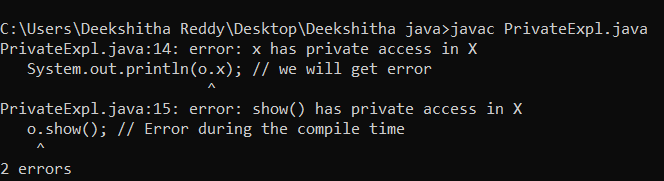
In the above code, we have first created a class X. Inside the class we have declared a variable and used the access specifier private. In the next step, we have created a method called show() which is also access specified by private. Next, we created a class called PrivateExp1. Inside the main method, we have created an instance or an object to class X. In the output statement, we have tried to print the variable of class X. But since the variable inside class X is specified by the access specifier private, we cannot access it. Hence, we will get compile time error. And in the next step, we also wanted to access the method show() which is also from class X and is also specified by the access specifier private. So, there also we got compile time error as output.
We can make a constructor private. But we cannot access it outside the class. To understand it more briefly let us consider the below program.
PrivateExpl2.java
class X
{
private X() // creating a constructor and making it private
{
}
void show()
{
System.out.println(" Welcome to JavaTpoint ");
}
}
class PrivateExpl2{
 public static void main(String args[])
{
   X o = new X(); // Error during compile time
 }
}
Output:

Code Explanation:
In the above code, first, we have created a class called X. Inside class X we have created a constructor and made it private using the access specifier private. Next, we have created a method show(). Next, we created another class called PrivateExpl2. Inside the main method, we have created an instance or object to class X. Since the constructor is private, we cannot access it in another class. Therefore, we will get compile time error as output.
default
Default is not an access specifier in Java. If we do not give any access specifier, then it is considered as default. Within the package only we can access this specifier. That means we cannot access outside a package. This specifier in Java is more accessible than the private access specifier. But when compared to public and protected it is highly restricted.
To understand more about this access specifier in Java let us consider the below program.
X.java
package pack;  // creating the package
class X
{
 Public static void main(String args[])
{
System.out.println(" Hello ! Welcome to JavaTpoint ");
}
}
Output:

Code Explanation:
In the above code, we have created a package called a pack. We have created a class called X. And inside the main method, we have just written the output statement. Since compiling and running a package is different when compared to a normal java file. We have compiled this package using the above format and have also run this package. We got the output as displayed in the above image which is Hello ! Welcome to JavaTpoint.
B.java
package mypack;
import pack.*;
class B
{
  public static void main(String args[])
{
   X o = new X(); // Error during the compile time
   o.msg(); // Error during the compile time
  }
}
Output:

Code Explanation:
In the above code, we have imported the package pack that we have created above. And we have created a class B and inside the main method, we have created an instance or an object to the class X which is under the package pack. Since the package pack is not public, we cannot access the methods and class of that package outside the package and hence we will get compile time error as output.
protected
This access specifier can be accessed within the package or outside the package. But it is accessed only through inheritance. But the condition here is this access specifier cannot be applied to a class or interfaces. We can apply this access specifier to methods or constructors or data members.
Dog.java
class Animal { // parent class
    protected void display() { // applying protected access specifier to the method
        System.out.println(" Hello ! My name is Animal ");
    }
}
// inheritance
class Dog extends Animal { // child class
    public static void main(String[] args) {
        Dog dog = new Dog(); // creating an instance or an object to the dog class
        dog.display(); // calling the method of the animal class
    }
}
Output:

Code Explanation:
In the above code, we have first created a class Animal and inside this class, we have created a method display(). And we have made it protected using the keyword protected. We have used inheritance to access the method of the class Animal. We have created a class called Dog which inherits all the properties of the parent class that is the class Animal. Inside the main method, we have created an instance or an object in the Dog class. Through the object of the Dog class, we have accessed the method display() of the parent class. Since we have used inheritance here, we can access the methods of the parent class even if they are protected. Hence, we got output without any compile time or run time error.
public
This is the most accessible access specifier among all the above. This will give access to class or method or variable anywhere in the program. This means we can access it inside class or outside the class or inside the package or outside the package.
Let us understand more about this access specifier in Java, let us consider the below example.
Y.java
package pack;
public class Y {
public void show() { System.out.println(" Hello ! welcome to JavaTpoint "); }
}
Z.java
package mypack;
import pack.*;
class Z
{
  public static void main(String args[]) {
   Y o = new Y();
   o.show();
  }
}
Code explanation:
In the first code, we created a package called a pack. And we have also created a class called Y. We made the class public using the keyword public. Inside this class, we have created a method show() which is also public since we have written the keyword public in front of the method. In the next line, we have written the output statement.
In the next program, we have created a new package mypack and imported the package pack that we have created in the above program. We have created class Z and inside the main method, we have created an instance or an object to class Y which is imported from the package pack. In the next line, we have tried to display the show() method which is the method of class Y. Since class Y is public, we will get the output without any compile time or runtime errors.
Using Method Overriding with Access Specifiers in Java
MO.java
class E // parent class
{
protected void show() // using access specifier protected
{
System.out.println(" Hello ! welcome to javaTpoint ");
}
}
public class MO extends E // child class
{
void show() // method overriding
{
System.out.println(" Hello ! welcome to javaTpoint "); // error during the compile time
}
 public static void main(String args[])
{
   MO o = new MO();  // creating an instance or an object
   o.show();
   }
}
Output:
Code Explanation:
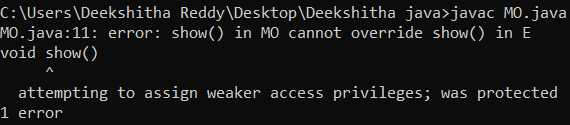
In the above code first, we have created a class E and inside the class, we have created a method show() and we have made it protected. Next, we have created another class which is MO that inherits all the properties of class E. There we have used method overriding. Since protected is used within the class only we will get the output as compile time error.
This is all about access specifiers in Java. Hope you have learned something new.