
×

Java Future Example

Future is an interface in the Java language that is a part of  java.util.concurrent package. It serves as a symbol for the output of an asynchronous computation. The interface offers ways to determine whether a computation has finished,  wait for it to finish, and receive its result. Once the task or calculation is finished, it cannot be undone. A Future interface offers ways to determine whether the computation is finished, to wait for it to finish, and to receive the computation's results. When the computation is finished, the result is retrieved using the Future's get() method, and the computation stalls until it is finished. Future and FutureTask are both included in the Java 1.5 java.util.concurrent package.

Future Inteface()  Methods

MethodDescription
cancel()It tries to halt the task's execution
get()Receives the result after, waiting for the computation to finish.
isCancelled()    If the task was stopped before it finished, the isCancelled() function returns true.
isDone()The isDone() function returns true if the work has been finished.

Getting Result

Future is what an asynchronous task produces. The Java Future interface provides the following two iterations of the get() method, both of which return an object to receive the outcome of that asynchronous task.

Syntax

Object r = f.get(); 

Cancel Asynchronous task

Using the cancel() function of the Future interface, we can end an asynchronous job at any time.

Syntax

Future future = ret;
future.cancel();  

Verify if an asynchronous task has been completed

The interface offers the isDone() method to determine whether or not the asynchronous task has been finished.

Syntax

Future future = ... 
if(future.isDone())   
{  
    Object result = future.get();  
}   

Check if an Asynchronous Task is Cancelled

The isCancelled() method of the Future interface can be used to determine whether or not the asynchronous job that Future represents has been cancelled. If the task is successfully canceled, it returns true; otherwise, it returns false.

Syntax

Future future = ...   
if(future.isCancelled())   
{  
}
  • FutureTask implements the Future interface and the RunnableFuture interface, allowing it to be used as a runnable and sent to the ExecutorService for execution.
  • ExecutorService typically creates FutureTasks when Callable or Runnable objects are called with Future. submit(), but it is also possible to manually construct FutureTasks.
  • FutureTask functions as a latch.
  • FutureTask's computation model is built using the Callable interface.
  • The Future or Callable interface is implemented.
  • The task's state affects how the get() method behaves. If tasks are not finished, the get() method waits or blocks until they are. When a job is finished, it returns the outcome or raises an ExecutionException.

Java program for Future Example

FutureExample.java

// import required packages
import java . util . concurrent . * ;
import java . util . logging . Level ;
import java . util . logging . Logger ;


class R1 implements Runnable {
//
private final long wt ;


public R1 ( int time )
{
this.wt= time ;
}


@Override
public void run ( )
{
try {
Thread . sleep ( wt ) ;


System . out . println ( Thread . currentThread() . getName () ) ;
}


catch ( InterruptedException ex) {
Logger . getLogger ( R1 . class . getName () ) . log ( Level . SEVERE ,null , ex ) ;
} 
}
}


class FutureExample {


public static void main ( String[] args )
{
R1 runnable1 = new R1 ( 1000 ) ;
R1 runnable2 = new R1 ( 2000 ) ;


FutureTask <String> ft1 = new FutureTask <> ( runnable1 ," FutureTask1 is complete " ) ;
FutureTask <String> ft2 = new FutureTask <> ( runnable2 ,"FutureTask2 is complete " ) ;
ExecutorService exe = Executors . newFixedThreadPool ( 2 ) ;
exe . submit ( ft1 ) ;
exe . submit ( ft2 ) ;


while (true) {
try {
if (ft1.isDone() && ft2.isDone()) {


System.out.println("Both FutureTask Complete");
exe.shutdown();
return;
}


if (!ft1.isDone()) { 
System.out.println(" output of futureTask1 = "+ ft1.get());
}


System.out.println( "FutureTask2 to complete Waiting  " ) ;
String str = ft2 . get ( 250 , TimeUnit . MILLISECONDS ) ;


if (str != null) {
System . out . println ( " Output of FutureTask2 = " + str ) ;
}
}


catch ( Exception ex ) {
System . out . println ( " Exception: " + ex ) ;
}
}
}
}

Output:
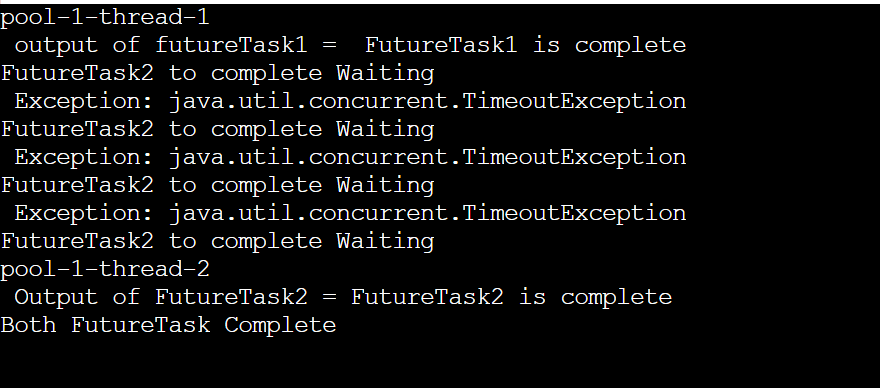
Java Future Example

Related Topics

Java program to print matrix in Z form

In this article, you will be acknowledged about what is a matrix along with an example. Also, most importantly, you will learn how to print matrix in Z form. What is...

5 minutes read.

Beautiful Array in Java

In this section, we will be acknowledged about the beautiful array in Java, its characteristics, how it is achieved. What are the types of approaches and what are the tools...

8 minutes read.

Java String concat() method:

Java String concat() method is used to add the given String to the end of the current String. Syntax: public String concat(String str) Parameter: Str: String to be concatenated at the end of current...

1 minute read.

Compare Two Times in Java

Definition The compareTo() function of the LocalTime class is used to compare times. The class's compareTo() method compares two LocalTime objects. Here we have two objects that have to be compared: the...

4 minutes read.

Swastika Pattern in Java

This part teaches us how to create the Swastika Pattern in Java utilizing user-defined columns and rows as well as stars or other special characters.A Java pattern application that is...

2 minutes read.

GCD Program in Java

GCD Program in Java The GCD program in Java outputs the GCD of the given numbers. In mathematics, Greatest Common Divisor (GCD), Greatest Common Factor or Highest Common Factor (HCF) of...

14 minutes read.

Creating a Jar file in Java

The JDK's jar (Java Archive) tool offers the ability to produce jar files that can be executed. If you double-click a jar file that is executable, it will call the...

2 minutes read.

How to add 4 Hours to the Current Date in Java?

In this tutorial, we will learn how to add 4 hours to the local or current date in Java language. We will begin our topic with basic concepts and would...

2 minutes read.

How to get the current date and time in Java

Introduction: In this article, we are going to discover many processes for Getting the existing-day Date and Time in Java. Most programs require timestamping events or showing date/times, among many...

3 minutes read.

Java Enumeration

In a computer language, enumerations express a set of named constants. For instance, the four suits in a deck of playing cards could be represented by the enumerators Club, Diamond,...

4 minutes read.

Java logger

Logging is a crucial Java feature that aids developers in identifying issues. The logging methodology is included with Java as the programming language. It offers the Logging API, which debuted...

7 minutes read.

Davis Staircase Problem in Java

Davis has several stairs in his home and prefers to ascend one, two, or three steps at a time. As a highly clever youngster, he thinks about how many ways...

3 minutes read.

Stack in Java

Java provides a number of collection frameworks to store the collection of objects. Among the collection of data structures " Stack " is one of them. Stack is one of...

5 minutes read.

Java Program to Create Set of Pairs Using HashSet

HashSet in Java: HashSet is an assortment in Java that has a place with java.util bundle. It inside utilises HashMap to store components. It is an execution of the Set connection...

11 minutes read.

How to use scanner in Java

Scanner class in Java is the part of java.util package. Java programming language has various ways to read input from the user, Scanner class is one of the classes to...

5 minutes read.

Factorial of a Large Number in Java

We've already talked about a number's factorial. We must still go over the factorial of a large number separately, though. The method used to determine the factorial of a small...

8 minutes read.

Java String equals() method

equals() method compares two string based on the their content. Syntax public boolean equals(Objects anObject) parameter anObject: Object to be compared with the current String. Returns It returns true when the current String is equivalent to...

1 minute read.

Method Overloading In Java

If the same class consists of different methods with the same name and the methods can vary by different number of parameters then it is known as Method Overloading. Method...

2 minutes read.

String Matches in Java

Firstly we have to know something about String? Strings are a bundle of different characters that are normally used in Java programming language. Strings are regarded as objects in the Java...

3 minutes read.

How to Print array in Java?

A Java array is a data structure that allows us to hold components of the same data type. An array's items are kept in a single memory region. As a...

6 minutes read.