Tetris Game in Java
The Tetris game is among the most well-known video games ever produced for computers. Today, we may engage in this game on a mobile device as well. Alexey Pajitnov conceptualized and developed the game in 1985. He was a programmer from Russia. This game now has several distinct variations available on the market. But in this tutorial, we'll build a straightforward Tetris game.
A falling brick puzzle game is called Tetris. There are a maximum of seven possible Tetromino shapes in a Tetris game. These seven Tetrominoes come in the following shapes: Line, Z, S, L, T, Square, and a Mirrored L. There are just four squares total in each of the aforementioned shapes. The forms are going to drop off the board. When playing Tetris, a player's goal is to turn and shift shapes in order to get as fit as possible. A row is destroyed as well as the score is increased if a complete row forms. We play the Tetris game till we reach the top.
Firstly let us develop a window or an interface for the game, then later we continue further creation of the interface.
File name: Window.java
import javax.swing.JFrame;

public class Window
{

// fields for the frame's height and breadth Never, under any circumstances, should these //fields be altered across the entire programme. Therefore, they are deemed to be final.
public static final int WIDTH = 445;
public static final int HEIGHT = 629;

private Board boardObj;
private Title titleObj;
private JFrame windowFrame;

public Window()
{

// constructing a class object JFrame
windowFrame = new JFrame("Tetris");
// determining the height and breadth
windowFrame.setSize(WIDTH, HEIGHT);

// When the X button is used, the frame should shut.
windowFrame.setDefaultCloseOperation(JFrame.EXIT_ON_CLOSE);
windowFrame.setLocationRelativeTo(null);
windowFrame.setResizable(false);

// the creation of a new Board object
boardObj = new Board();
// new Title Object creation
titleObj = new Title(this);

// include the primary listener
windowFrame.addKeyListener(boardObj);

windowFrame.addMouseMotionListener(titleObj);

// the mouse listener being added
windowFrame.addMouseListener(titleObj);

windowFrame.add(titleObj);

// turning on the visibility
windowFrame.setVisible(true);
}

public void startTetris()
{
windowFrame.remove(titleObj);
windowFrame.addMouseMotionListener(boardObj);
windowFrame.addMouseListener(boardObj);
windowFrame.add(boardObj);
boardObj.sttGame();
windowFrame.revalidate();
}

public static void main(String[] argvs)
{


// making a window class unnamed object
new Window();
}

}
File name: Title.java
import java.awt.Graphics;
import java.awt.Color;
import java.awt.event.ActionEvent;
import java.awt.Rectangle;
import java.awt.event.MouseEvent;
import java.awt.event.ActionListener;
import java.awt.event.MouseMotionListener;
import java.awt.event.MouseListener;
import java.io.IOException;
import java.awt.image.BufferedImage;
import javax.swing.JPanel;
import javax.imageio.ImageIO;
import javax.swing.Timer;

public class Title extends JPanel implements MouseMotionListener, MouseListener
{

private static final long serialVerUID = 1L;

private int mousX, mousY;
private Rectangle bnds;
private boolean lftClick = false;
private BufferedImage ttle;
private BufferedImage instt;
private BufferedImage ply;
private Window win;
private BufferedImage[] playBtn = new BufferedImage[2];
private Timer tmr;


public Title(Window win)
{
try
{
ttle = ImageIO.read(Board.class.getResource("/Title.png" ));
instt = ImageIO.read(Board.class.getResource("/arrow.png" ));
ply = ImageIO.read(Board.class.getResource("/play.png" ));
}
catch (IOException obj)
{
obj.printStackTrace();
}
tmr = new Timer(1000 / 60, new ActionListener()
{

@Override
public void actionPerformed(ActionEvent ae)
{
repaint();
}

});
tmr.start();
mousX = 0;
mousY = 0;

playBtn[0] = ply.getSubimage(0, 0, 100, 80);
playBtn[1] = ply.getSubimage(100, 0, 100, 80);

bnds = new Rectangle(Window.WIDTH / 2 - 50, Window.HEIGHT / 2 - 100, 100, 80);
this.win = win;


}

public void paintComponent(Graphics gr)
{
super.paintComponent(gr);

if(lftClick && bnds.contains(mousX, mousY))
{
win.startTetris();
}

gr.setColor(Color.BLACK);

gr.fillRect(0, 0, Window.WIDTH, Window.HEIGHT);

gr.drawImage(ttle, Window.WIDTH / 2 - ttle.getWidth() / 2, Window.HEIGHT / 2 - ttle.getHeight() / 2 - 200, null);
gr.drawImage(instt, Window.WIDTH / 2 - instt.getWidth() / 2, Window.HEIGHT / 2 - instt.getHeight() / 2 + 150, null);

if(bnds.contains(mousX, mousY))
{
gr.drawImage(playBtn[0], Window.WIDTH / 2 - 50, Window.HEIGHT / 2 - 100, null);
}
else
{
gr.drawImage(playBtn[1], Window.WIDTH / 2 - 50, Window.HEIGHT / 2 - 100, null);
}


}

@Override
public void mouseClicked(MouseEvent me)
{
}

@Override
public void mousePressed(MouseEvent me)
{
if(me.getButton() == MouseEvent.BUTTON1)
{
lftClick = true;
}
}

@Override
public void mouseReleased(MouseEvent me)
{
if(me.getButton() == MouseEvent.BUTTON1)
{
lftClick = false;
}
}

@Override
public void mouseEntered(MouseEvent me)
{

}

@Override
public void mouseExited(MouseEvent me)
{
}

@Override
public void mouseDragged(MouseEvent me)
{
mousX = me.getX();
mousY = me.getY();
}

@Override
public void mouseMoved(MouseEvent me)
{
mousX = me.getX();
mousY = me.getY();
}
}
File name: Board.java
import java.awt.Color;
import java.awt.BasicStroke;
import java.awt.Font;
import java.awt.Graphics2D;
import java.awt.Graphics;
import java.awt.Rectangle;
import java.awt.event.ActionListener;
import java.awt.event.ActionEvent;
import java.awt.event.MouseMotionListener;
import java.awt.event.KeyEvent;
import java.awt.event.MouseListener;
import java.awt.event.KeyListener;
import java.awt.image.BufferedImage;
import java.awt.event.MouseEvent;
import javax.sound.sampled.AudioSystem;
import javax.sound.sampled.LineUnavailableException;
import javax.swing.JPanel;
import javax.imageio.ImageIO;
import javax.swing.Timer;
import javax.sound.sampled.Clip;

public class Board extends JPanel implements KeyListener, MouseListener, MouseMotionListener
{

private static final long serialVerUID = 1L;

private Clip msic;

private BufferedImage blcks;
private BufferedImage bkground;
private BufferedImage paus;
private BufferedImage rfresh;

// the size of the game board and the playing area

private final int brdHeight = 20;
private final int brdWidth = 10;

// the size of the blocks in the video game Tetris

private final int blckSize = 30;

private int[][] board = new int[brdHeight][brdWidth];

// array for every shape that the game allows for

private Shape[] diffShapes = new Shape[7];


private static Shape currShape;

private static Shape nxtShape;

private Timer timerLooper;

private int FPS = 60;

private int delay = 1000 / FPS;

// parameters for mouse events

private int mousX;
private int mousY;

private boolean lftClick = false;

private Rectangle stpBounds;
private Rectangle rfreshBounds;

// when the hold button is pressed, a boolean field called true is set.
private boolean gmPaused = false;

// a field that is a boolean value and is true if the top row is filled
private boolean gmOver = false;


private Timer btnLapse = new Timer(300, new ActionListener()
{

@Override
public void actionPerformed(ActionEvent ae)
{
btnLapse.stop();
}});


private int totalScore = 0;


public Board()
{
blcks = ImageLoader.loadImage("/tiles.png");

bkground = ImageLoader.loadImage("/background.png");
paus = ImageLoader.loadImage("/pause.png");
rfresh = ImageLoader.loadImage("/refresh.png");

msic = ImageLoader.loadMusic("/music.wav");

msic.loop(Clip.LOOP_CONTINUOUSLY);

mousX = 0;
mousY = 0;

stpBounds = new Rectangle(350, 500, paus.getWidth(), paus.getHeight() + paus.getHeight() / 2);
rfreshBounds = new Rectangle(350, 500 - rfresh.getHeight() - 20, rfresh.getWidth(), rfresh.getHeight() + rfresh.getHeight() / 2);


timerLooper = new Timer(delay, new GameLooper());


diffShapes[0] = new Shape(new int[][]
{
{1, 1, 1, 1}   // creating a linear shape
}, blcks.getSubimage(0, 0, blckSize, blckSize), this, 1);

diffShapes[1] = new Shape(new int[][]
{
{1, 1, 1},
{0, 1, 0},
}, blcks.getSubimage(blckSize, 0, blckSize, blckSize), this, 2);

diffShapes[2] = new Shape(new int[][]
{
{1, 1, 1},
{1, 0, 0},   shape
}, blcks.getSubimage(blckSize * 2, 0, blckSize, blckSize), this, 3);

diffShapes[3] = new Shape(new int[][]{
{1, 1, 1},
{0, 0, 1},
}, blcks.getSubimage(blckSize * 3, 0, blckSize, blckSize), this, 4);

diffShapes[4] = new Shape(new int[][]
{
{0, 1, 1},
{1, 1, 0},   ;
}, blcks.getSubimage(blckSize * 4, 0, blckSize, blckSize), this, 5);

diffShapes[5] = new Shape(new int[][]
{
{1, 1, 0},
{0, 1, 1},  ;
}, blcks.getSubimage(blckSize * 5, 0, blckSize, blckSize), this, 6);

diffShapes[6] = new Shape(new int[][]
{
{1, 1},
{1, 1},
}, blcks.getSubimage(blckSize * 6, 0, blckSize, blckSize), this, 7);


}

private void update()
{
// If the player is currently playing the game, pushing the pause key toggles the game's //state, pausing it. Unless it has previously been paused, the game begins.
if(stpBounds.contains(mousX, mousY) && lftClick && !btnLapse.isRunning() && !gmOver)
{
btnLapse.start();
gmPaused = !gmPaused;
}

// The game begins at the beginning when you touch the refresh button.
if(rfreshBounds.contains(mousX, mousY) && lftClick)
{
sttGame();
}
if(gmPaused || gmOver)
{
return;
}
currShape.update();
}


public void paintComponent(Graphics gr)
{
super.paintComponent(gr);

gr.drawImage(bkground, 0, 0, null);


for(int r = 0; r < board.length; r++)
{
for(int c = 0; c < board[r].length; c++)
{

if(board[r][c] != 0)
{
// drawing the currently-present tetromino after they have fallen off the board.
gr.drawImage(blcks.getSubimage((board[r][c] - 1) * blckSize, 0, blckSize, blckSize), c * blckSize, r * blckSize, null);
}

}
}
for(int r = 0; r < nxtShape.getCoords().length; r++)
{
for(int c = 0; c < nxtShape.getCoords()[0].length; c++)
{
if(nxtShape.getCoords()[r][c] != 0)
{
// the top right corner of the board with the following shape to be drawn
gr.drawImage(nxtShape.getBlock(), c * 30 + 320, r * 30 + 50, null);
}
}
}
currShape.render(gr);

if(stpBounds.contains(mousX, mousY))
{
gr.drawImage(paus.getScaledInstance(paus.getWidth() + 3, paus.getHeight() + 3, BufferedImage.SCALE_DEFAULT), stpBounds.x + 3, stpBounds.y + 3, null);
}
else
{
gr.drawImage(paus, stpBounds.x, stpBounds.y, null);
}

if(rfreshBounds.contains(mousX, mousY))
{
// The mouse shifts somewhat while it is over the refresh button.
gr.drawImage(rfresh.getScaledInstance(rfresh.getWidth() + 3, rfresh.getHeight() + 3, BufferedImage.SCALE_DEFAULT), rfreshBounds.x + 3, rfreshBounds.y + 3, null);
}
else
{
// The refresh button regains its focus when the mouse moves away. place
gr.drawImage(rfresh, rfreshBounds.x, rfreshBounds.y, null);
}

if(gmPaused)
{
// The game must be paused as well as the message "GAME PAUSED" should appear on //the screen if the stop button is pushed.
String gmPausedString = "GAME PAUSED";

gr.setColor(Color.WHITE);

gr.setFont(new Font("Georgia", Font.BOLD, 30));

gr.drawString(gmPausedString, 35, Window.HEIGHT / 2);
}
if(gmOver)
{
// A GAME OVER message pops up after the game is over.
String gmOverString = "GAME OVER";
gr.setColor(Color.WHITE);


gr.setFont(new Font("Georgia", Font.BOLD, 30));

gr.drawString(gmOverString, 50, Window.HEIGHT / 2);
}

// White is used to display the score.
gr.setColor(Color.WHITE);

// Georgia typeface is used to display the score.
gr.setFont(new Font("Georgia", Font.BOLD, 20));


gr.drawString("SCORE", Window.WIDTH - 125, Window.HEIGHT / 2);

// showing the overall result
gr.drawString(totalScore + "", Window.WIDTH - 125, Window.HEIGHT / 2 + 30);

Graphics2D gr2d = (Graphics2D)gr;

gr2d.setStroke(new BasicStroke(2));
gr2d.setColor(new Color(0, 0, 0, 100));

// for illuminating the board's horizontal lines
for(int i = 0; i <= brdHeight; i++)
{
gr2d.drawLine(0, i * blckSize, brdWidth * blckSize, i * blckSize);
}

// for illuminating the board's vertical lines
for(int i = 0; i <= brdWidth; i++)
{
gr2d.drawLine(i * blckSize, 0, i * blckSize, brdHeight * 30);
}
}

// a method that employs the Math.random() method to decide the very next //Tetrominoes that will enter the game at random
public void setNxtShape()
{
int idx = (int)(Math.random() * diffShapes.length);
nxtShape = new Shape(diffShapes[idx].getCoords(), diffShapes[idx].getBlock(), this, diffShapes[idx].getColor());
}


public void setCurrShape()
{
// the current form is the following Tetromino discovered.
currShape = nxtShape;
setNxtShape();

// We are aware that the existing Tetromino will collapse and take up portion of the //playing space. As a result, it's crucial to verify if the playable area is fully occupied up to //the top row. If so, the match is over.
for(int r = 0; r < currShape.getCoords().length; r++)
{
for(int c = 0; c < currShape.getCoords()[0].length; c++)
{
if(currShape.getCoords()[r][c] != 0)
{
if(board[currShape.getY() + r][currShape.getX() + c] != 0)
{
// That game is over if the control gets to this point.
gmOver = true;
}
}
}
}

}


public int[][] getBoard()
{
return board;
}

@Override
public void keyPressed(KeyEvent ke)
{
if(ke.getKeyCode() == KeyEvent.VK_UP)
{
// The up arrow button is used to rotate the form.
currShape.rotateShape();
}
if(ke.getKeyCode() == KeyEvent.VK_RIGHT)
{
// Pressing the right directional buttons causes the Tetromino to move in the proper //direction.
currShape.setDeltaX(1);
}
if(ke.getKeyCode() == KeyEvent.VK_LEFT)
{
// Pressing the left arrow key causes the Tetromino to move in the left direction.
currShape.setDeltaX(-1);
}
if(ke.getKeyCode() == KeyEvent.VK_DOWN)
{

// The tetrominos fall swiftly towards the bottom so when down arrow key is depressed and released.
currShape.speedUp();
}
}
@Override
public void keyReleased(KeyEvent ke)
{
if(ke.getKeyCode() == KeyEvent.VK_DOWN)
{
// The speed with which the tetromino is descending down returns to normal whenever //the down arrow button is released.
currShape.speedDown();
}
}

@Override
public void keyTyped(KeyEvent ke)
{

}

public void sttGame()
{
// The stopped game is followed by the start game.
stpGame();

// The start game determines the next tetromino as well as the one that is currently in //play.
setNxtShape();
setCurrShape();
// A gmOver variable is updated to false once the game begins, and the timer begins.
gmOver = false;
timerLooper.start();


}
public void stpGame()
{
// TotalScore gets lowered to 0 and the playing field is cleared in the halt game.
totalScore = 0;

for(int r = 0; r < board.length; r++)
{
for(int c = 0; c < board[r].length; c++)
{
board[r][c] = 0;
}
}
timerLooper.stop();
}


class GameLooper implements ActionListener
{

@Override
public void actionPerformed(ActionEvent ae)
{
update();
repaint();
}

}


// obtaining the mouse events' coordinates
@Override
public void mouseDragged(MouseEvent me)
{
mousX = me.getX();
mousY = me.getY();
}

@Override
public void mouseMoved(MouseEvent me)
{
mousX = me.getX();
mousY = me.getY();
}

@Override
public void mouseClicked(MouseEvent me)
{

}

@Override
public void mousePressed(MouseEvent me)
{
if(me.getButton() == MouseEvent.BUTTON1)
{
lftClick = true;
}
}

@Override
public void mouseReleased(MouseEvent me)
{
if(me.getButton() == MouseEvent.BUTTON1)
{
lftClick = false;
}
}

@Override
public void mouseEntered(MouseEvent me)
{

}

@Override
public void mouseExited(MouseEvent me)
{

}

// adding one to the overall score
public void addScore()
{
totalScore = totalScore + 1;
}

}
File name: ImageLoader.java
import java.io.IOException;
import java.awt.image.BufferedImage;
import javax.sound.sampled.AudioSystem;
import javax.imageio.ImageIO;
import javax.sound.sampled.Clip;
public class ImageLoader
{
// technique for bringing up the visuals
public static BufferedImage loadImage(String strPath)
{
try
{
System.out.println(strPath);
return ImageIO.read(ImageLoader.class.getResource(strPath));
}
catch (IOException obj)
{
obj.printStackTrace();
System.exit(1);
}
return null;
}
// an approach to loading the sound
public static Clip loadMusic(String dir)
{
try
{
Clip clp = AudioSystem.getClip();
clp.open(AudioSystem.getAudioInputStream(ImageLoader.class.getResource(dir)));
return clp;
}
catch(Exception obj)
{
obj.printStackTrace();
}
return null;
}
}
File name: Shape.java
import java.awt.image.BufferedImage;
import java.awt.Graphics;

public class Shape
{

private int color;

private int x;
private int y;

private long time;
private long lastTime;

private int nrml = 600;
private int fst = 50;

private int del;

private BufferedImage blk;

private int[][] coordinates;

private int[][] ref;

private int delX;

private Board brd;

// The flag is true if the tetromino collides; otherwise, it is false.
private boolean isCollided = false;
private boolean movX = false;

public Shape(int[][] coordinates, BufferedImage blk, Board brd, int color)
{
// constructor for field initialization
this.coordinates = coordinates;
this.blk = blk;
this.brd = brd;
this.color = color;
delX = 0;
x = 4;
y = 0;
del = nrml;
time = 0;
lastTime = System.currentTimeMillis();
ref = new int[coordinates.length][coordinates[0].length];

System.arraycopy(coordinates, 0, ref, 0, coordinates.length);

}

public void update()
{
// the Tetrominoes from high to bottom with statements
movX = true;
time = time + System.currentTimeMillis() - lastTime;
lastTime = System.currentTimeMillis();

// If the crash is real, the recently dropped tetromino's position on the board's playing area needs to be rectified.
if(isCollided)
{
for(int r = 0; r < coordinates.length; r++)
{
for(int c = 0; c < coordinates[0].length; c++)
{
if(coordinates[r][c] != 0)
{
brd.getBoard()[y + r][x + c] = color;
}
}
}

// We will examine the current structure that will fall down when the location of the //previously fallen tetromino is fixed. We will also look for complete lines (or rows).
checkLine();
brd.setCurrShape();

}


// The tetrominoes should travel in the left or right direction if we press the left or right //arrow keys. There are two subconditions that are connected with && in the if condition. //The tetrominoes must not extend past the right side boundary, and the left side border //must be within the limits of the first sub-condition. If the parameter isCollided is true, //the following piece of code won't run.


if(!(x + delX + coordinates[0].length > 10) && !(x + delX < 0))
{

// The falling tetromino should not move if it has reached the ground or has collided with //another tetromino, therefore movX is false.
for(int r = 0; r < coordinates.length; r++)
{
for(int c = 0; c < coordinates[r].length; c++)
{
if(coordinates[r][c] != 0)
{
if(brd.getBoard()[y + r][x + delX + c] != 0)
{
movX = false;
}

}
}
}

if(movX)
{
// We can shift the tetromino in both the left and right directions if move x is true.
x = x + delX;
}

}

if(!(y + 1 + coordinates.length > 20))
{

for(int r = 0; r < coordinates.length; r++)
{
for(int c = 0; c < coordinates[r].length; c++)
{
if(coordinates[r][c] != 0)
{
if(brd.getBoard()[y + 1 + r][x +  c] != 0)
{
// The descending tetromino has hit with the other tetromino if the monitoring reaches //this point.
isCollided = true;
}
}
}
}

if(time > del)
{
y = y + 1;
time = 0;
}
}
else
{
// If the control moves to this location, the tetromino has hit the board's bottom.
isCollided = true;
}

delX = 0;
}

public void render(Graphics gr)
{

for(int r = 0; r < coordinates.length; r++)
{
for(int col = 0; col < coordinates[0].length; col ++)
{
if(coordinates[r][col] != 0)
{
gr.drawImage(blk, col * 30 + x * 30, r * 30 + y * 30, null);
}
}
}

for(int r = 0; r < ref.length; r++)
{
for(int c = 0; c < ref[0].length; c++)
{
if(ref[r][r] != 0)
{
gr.drawImage(blk, c * 30 + 320, r * 30 + 160, null);
}

}

}

}

// a method that looks for completed (rows or lines), and if it finds them, deletes the //matching rows or lines.
private void checkLine()
{
int size = brd.getBoard().length - 1;

for(int i = brd.getBoard().length - 1; i > 0; i--)
{
int count = 0;
for(int j = 0; j < brd.getBoard()[0].length; j++)
{
if(brd.getBoard()[i][j] != 0)
{
count = count + 1;
}

brd.getBoard()[size][j] = brd.getBoard()[i][j];
}
if(count < brd.getBoard()[0].length)
{
size  = size - 1;

}

if(count == brd.getBoard()[0].length)
{
brd.addScore();
}
}
}
  public void rotateShape()
{

int[][] rotatedShape = null;

rotatedShape = transposeMatrix(coordinates);

rotatedShape = reverseRows(rotatedShape);

if((x + rotatedShape[0].length > 10) || (y + rotatedShape.length > 20))
{
return;
}

for(int row = 0; row < rotatedShape.length; row++)
{
for(int col = 0; col < rotatedShape[row].length; col ++)
{
if(rotatedShape[row][col] != 0)
{
if(brd.getBoard()[y + row][x + col] != 0)
{
return;
}
}
}
}
coordinates = rotatedShape;
}


private int[][] transposeMatrix(int[][] mtrx)
{
int[][] tmp = new int[mtrx[0].length][mtrx.length];
for (int i = 0; i < mtrx.length; i++)
{
for (int j = 0; j < mtrx[0].length; j++)
{
tmp[j][i] = mtrx[i][j];
}
}
return tmp;
}


private int[][] reverseRows(int[][] mtrx)
{

int mdle = mtrx.length / 2;


for(int i = 0; i < mdle; i++)
{
int[] tmp = mtrx[i];

mtrx[i] = mtrx[mtrx.length - i - 1];
mtrx[mtrx.length - i - 1] = tmp;
}

return mtrx;

}

public int getColor()
{
return color;
}

public void setDeltaX(int delX)
{
this.delX = delX;
}

public void speedUp()
{
del = fst;
}

public void speedDown()
{
del = nrml;
}

public BufferedImage getBlock()
{
return blk;
}

public int[][] getCoords()
{
return coordinates;
}

public int getX()
{
return x;
}

public int getY()
{
return y;
}
}
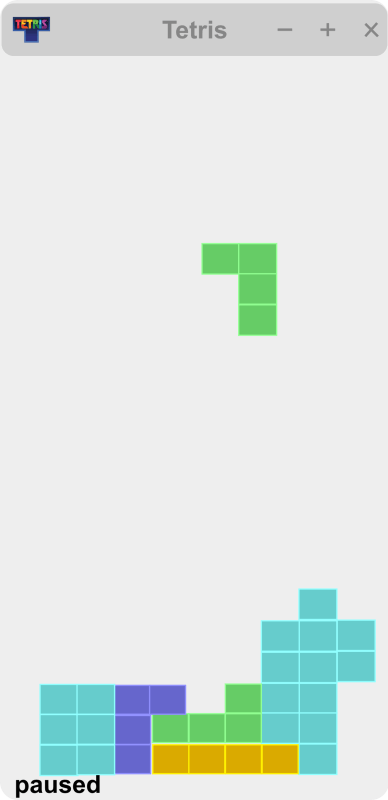
The main method is located in the Window.java file. As a result, we must compile the file. The code that calls the constructor of the classes indicated in the various files is contained in this file. The other files are therefore also compiled when the Window.java file is compiled. Use the java Window command to start the game. Below is a screenshot of the game.