
Java Get File Size
There are three ways to get the file size in Java.
- Using Java InputOutput
- Using NewInputOutput Library
- Files.size() Method
- FileChannel.size() Method
- Using Apache Commons InputOutput
Using Java InputOutput:
The Java IO package offers the classes that deal with file-related operations. The File class, which provides the length() function, is also provided by the Java IO package.This gives the supplied file's size in bytes. If the file represents a directory, it returns an undefined value. You can use the method whether you're running Java 7 or an earlier version.
Pathnames for files and directories are represented abstractly using the Java File class. It is a component of the java.io package.
The path to the file was parsed as a parameter and produced as a function Object() { [native code] } of the Files class in the program below. The class's following methods have been employed by us:
- exists(): This method determines whether or not the directory or file specified by this abstract pathname already exists. If and only if the requested path exists, it returns true; otherwise, it returns false.
- isFile(): Determines if the file represented by this abstract pathname is a typical file. A file is normal if it is not a directory and also meets additional system-specific requirements. A Java application will always produce a normal file, regardless of whether it is a directory or not. If and only if the file indicated by this abstract pathname exists and is a regular file, it returns true; otherwise, it returns false.
- length(): The method length() returns the size of the file identified by this fictitious pathname. In the event that this pathname refers to a directory, the return value is undefined.
Java Program to Demonstrate get File Size
import java.io.File;
public class FS1
{
//path of the file
static final String PATH = "C:\\Users\\JHON\\Desktop\\ X.pdf";
public static void main(String args[])
{
//constructing the File class's function Object() { [native code] } and supplying the file's path to it
File f = new File(PATH);
//determines whether the supplied exists or is a regular file (not a directory)
if (!f.exists() || !f.isFile())
return;
//prints f size in bytes
System.out.println(sizeInBytes(f));
//prints f size in KiloBytes
System.out.println(sizeInKiloBytes(f));
//prints f size in MegaBytes
System.out.println(sizeInMegaBytes(f));
}
//the method calculates the file size in megabytes
private static String sizeInMegaBytes(File f)
{
return (double) f.length() / (1024 * 1024) + " megabytes";
}
//the method calculates the file size in kilobytes
private static String sizeInKiloBytes(File f)
{
return (double) f.length() / 1024 + " kilobytes";
}
//the method calculates the file size in bytes
private static String sizeInBytes(File f)
{
return f.length() + " bytes";
}
}
Output:
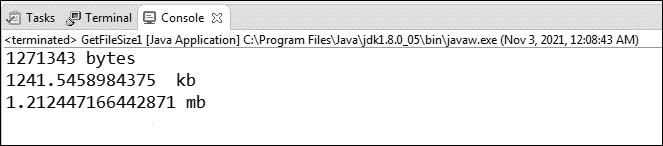
Using Java NewInputOutput Library
Another Java IO library is NIO. Compared to the traditional IO library, it offers an alternative method of working with I/O. It's a different IO API. The library's foundation for I/O operations is a buffer-oriented, channel-based strategy.
Files.size() method:
The class Files is available thanks to the Java NIO library. It is a part of the java.nio.file package. The class has static methods that can be used with files, directories, or other file types. Most of the time, the file operations are delegated by the class' methods to the corresponding file system provider.
The Files class includes a method called size() that returns the file size. The size() method has the following syntax:
Public static long size (Path path) throws IOexception
The method returns the file size in bytes and accepts the file path as an argument.
// java program to demonstrate getFileSize2
import java.nio.file.Files;
import java.nio.file.Path;
import java.io.IOException;
import java.nio.file.Paths;
public class FS2
{
public static void main(String args[])
{
//path of the file
String FN = "C:\\Users\\jhon\\Desktop\\y.mp3";
//method calling
FS(fileName);
}
//function that calculates the size of the file
private static void FS(String FN)
{
//Path: It is an interface for finding files in file systems, and it usually reflects a system-specific file path.
//Paths: It is a class that only contains static methods. it converts a path string or URI and then returns a Path. The specified URI is transformed into a Path object via the get() function.
Path p = Paths.get(FN);
try
{
//calling the Files class's size() function, which returns the file's size in bytes, and putting the result in the bytes variable
long bytes = Files.size(p);
//uses the provided format string and arguments to call the String class's format() function, which produces a formatted string.
System.out.println(String.format("%, d bytes", bytes));
System.out.println(String.format("%, d kilobytes", bytes / 1024));
}
catch (IOException e)
{
e.printStackTrace();
}
}
}
Output:

FileChannel.size() Method
Another class called FileChannel is available from the Java NIO library. The java.nio.channels package contains this abstract class. The class has methods for reading, writing, mapping, and working with files.
To determine the file size, it offers the size() method. It gives the current file size in bytes for this channel.
public abstract long size() throws IOException


// java program to demonstrate getFilesize
import java.nio.channels.FileChannel;
import java.nio.file.Path;
import java.io.IOException;
import java.nio.file.Paths;
public class FS3
{
//path of the file
static final String P = "E:\\photos\\z.jpg";
public static void main(String args[])
{
//Path: It is an interface for finding files in file systems, and it usually reflects a system-specific file path.
//Paths: It is a class that only contains static methods. it converts a path string or URI and then returns a Path. The specified URI is transformed into a Path object via the get() function.
Path p = Paths.get(P);
//creating a reference variable of the FileChannel class
FileChannel fc;
try
{
//An invocation of this function behaves precisely the same as the invocation of fc.open(file, opts, new). It opens or creates a file and returns a file channel to access it.
FileAttribute<?>[0]);
fc = FileChannel.open(path);
//the size() method returns the file size in bytes
long fileSize = fc.size();
//prints the file size
System.out.println(fileSize + " bytes");
//calling the Channel interface's close() function to close the path
fc.close();
}
catch (IOException e)
{
e.printStackTrace();
}
}
}
Output:
1382132 bytes
Using Apache Commons IO
A third-party package called Apache Commons offers common tools for manipulating files. The org.apache.commons.io package contains the classes in question.
Using FileUtils.size of () method:
To determine the file size in bytes, use the class's sizeOf() method.
Syntax:
public static long sizeOf(File file)
A file or directory can be passed as a parameter to the procedure. Keep in mind that the parameter can't be empty. If the input parameter is a regular file, it returns the file's length (in bytes). Recursively calculating the directory's size (in bytes) is done if the parameter is a directory.
Example:
import java.io.File;
import org.apache.commons.io.FileUtils;
public class FS4
{
//path of the file
static final String P = "D:\\CAM\\cam.3.5.exe";
public static void main(String args[])
{
//creating the File class constructor and passing the file path into it
File f = new File(P);
//get the file size
long fileSize = FileUtils.sizeOf(f);
//prints the file size
System.out.println("The file size is: " +fileSize + " bytes");
}
}
Output:
File size is: 65042816 bytes