
Sudoku in Java
Sudoku is a combinatorial-number-placement puzzle with a logic-based approach. The goal of a traditional Sudoku puzzle is to fill in the numbers on a 9 by 9 grid so that every row, every column, and every sub-grid of size 3 x 3 has all of the numbers from 1 to 9.
Sudoku can be implemented by various methods in Java.
Simple Approach
To fill the vacant cells, the naive way is to produce all possible combinations of numbers from 1 to 9. Try each configuration one at a time until the right one is discovered, i.e., assign a number between 1 and 9 to each vacant place. Verify that the matrix is secure after filling out every open place.
Algorithm
- Make a function that determines whether the provided matrix is a valid sudoku puzzle. Maintain a HashMap for the boxes, columns, and rows. If any HashMap number has a frequency greater than 1, return false; otherwise, return true.
- It is necessary to develop a recursive function that takes a grid and the current row and column indexes.
- Start several base instances. Display the grid and indicate whether it is safe to do so; if it is unsafe, return false. If the index is at the end of the matrix, that is, if i1=M-1 and j1=M, return false. The second fundamental situation is when you want to move to the following row, i1++, and j1 = 0, and the value of the column is M, i.e., j = M. In the event that the current index is not assigned, fill in the elements from 1 to 9 and then repeat for all 9 cases using the subsequent element's index, which is i1, j1+1. Break the loop and return true if the recursive call returns true.
- Call the recursive function using the index of the following element, i1, j1+1, if the current index has been assigned.
Program of Sudoku in Java by Simple Approach
Sudoko_example1.java
public class Sudoko_example1{
static int M = 9 ;
static boolean solve_sudoku ( int grid [ ] [ ] , int r ,int c)
{
if ( r == M - 1 && c == M )
return true ;
if (c == M) {
r++ ;
c = 0 ;
}
if ( grid [ r ] [ c ] ! = 0 )
return solve_sudoku ( grid , r , c + 1 ) ;
for  ( int number = 1 ; number  < 10 ; number++  ) {
if  ( is_safe ( grid ,  r ,  c , number ) ) {
grid [ r ] [ c ] = number ;
if ( solve_sudoku ( grid ,  r ,  c + 1 ) )
return true ;
}
grid  [ r ] [ c ] = 0 ;
}
return false ;
}
static void print ( int [ ] [ ] grid )
{
for ( int i1 = 0 ; i1 < M ; i1++ ) {
for ( int j1 = 0 ; j1 < M ; j1++ )
System . out . print ( grid [ i1] [j1 ] + " " ) ;
System . out . println ( ) ;
}
}
static boolean is_safe ( int [ ] [ ] grid ,  int r , int c, int number )
{
for ( int x1 = 0 ; x1 <= 8 ; x1++ )
if ( grid [ r ] [ x1 ] == number )
return false ;
for ( int x1 = 0 ;  x1 < = 8; x1++ )
if ( grid [ x1 ] [ c ] == number )
return false ;
int sr = r - r % 3 , sc = c - c % 3 ;
for  ( int i1 = 0 ;  i1 < 3 ; i1++ )
for ( int j1 = 0 ; j1 < 3 ; j1++ )
if ( grid [i1 + sr ] [ j1 + sc ] == number )
return false ;
return true ;
}
public static void main ( String [ ] args )
{
int grid1 [ ] [ ] = {               { 7 , 0 , 0 , 6 , 0 , 0 , 5 , 0 , 0 } ,
                                        { 0, 0, 0, 0, 0, 3, 0, 8, 5 },
                                        { 0, 0, 1, 0, 2, 0, 0, 0, 0 },
                                        { 0, 0, 0, 5, 0, 7, 0, 0, 0 },
                                        { 0, 0, 4, 0, 7, 0, 6, 0, 0 },
                                        { 1, 4, 0, 0, 5, 2, 0, 0, 7 },
                                        { 0, 0, 0, 4, 0, 9, 0, 0, 0 },
                                        { 5, 0, 0, 0, 0, 0, 1, 0, 6 },
                                        { 0 , 0 , 6 , 0 , 0 , 0 , 0 ,  0 , 1 }  } ;
if ( solve_sudoku (grid1 ,  0 , 0 ) )
print ( grid1 ) ;
else
System . out . println  ( " No Solution exists " ) ;
}
}
Output

Backtracking Approach
In this method, we fill each empty cell with a different integer. Prior to assigning a number, we make sure that it is either present in the current column, row, or 3 x 3 sub-grid. We take another number and check its security if the identical number is present.
If the same number is absent, it is assigned, and we then iteratively determine whether or not this assignment results in the answer. We take another number and continue the process if the assignment does not lead to the solution. False is returned and the message "the solution did not exit" is displayed if none of the integers between 1 and 9 find a solution.
Algorithm
- When a number is allocated to the current index, create a function whose job it is to determine whether or not the grid is secure. Make a hashmap for the boxes, column, and row to store the frequency of the numbers. Return false if the HashMap reveals the frequency of any number higher than 1, and true otherwise. Loops can be used as an alternative to hash maps.
- You should create a recursive function that takes the grid as an input.
- Search the grid for the unassigned spot. If the unassigned location is present, then choose a number between 1 and 9, determine whether the number chosen for the current index renders the grid safe, Recursively call the procedure for all of the safe scenarios from 1 to 9 if the grid is safe. Returning true will end the loop if any of the recursive calls return true. Return false if there isn't a recursive call that does so.
- Return true if there are zero total unassigned places in the grid.
Program of Sudoku in Java by Backtracking Approach
sudoko_back_tracking_example.java
public class sudoko_back_tracking_example
{
public boolean is_safe ( int [ ] [ ] b1 , int row , int col , int N )
{
for (int d1 = 0 ; d1 < b1 . length ; d1++ )
{
if ( b1 [ row ] [ d1 ] == N )
{
return false ;
}
}


for ( int row2 = 0 ; row2  <  b1 . length ; row2 ++ )
{
if  ( b1 [ row2 ] [ col ] == N )
{
return false ;
}
}
int s1 = ( int ) Math . sqrt ( b1 . length ) ;
int brs = row – row  %  s1 ;
int bcs = col - col  % s1 ;


for ( int row1 = brs ; row1 < brs  +  s1 ; row1++ )
{
for  ( int d1 = bcs ; d1 < bcs + s1 ; d1++ )
{
if ( b1 [ row1 ] [ d1 ] == N )
{
return false ;
}
}
}
return true ;
}


public boolean solve_sudoku( int [ ] [ ] b1 , int number )
{
int row =  -1 ;
int col =  -1 ;
boolean is_vacant  = true ;
for ( int i1 = 0 ; i1 < number ; i1++ )
{
for (int j1 = 0 ; j1 < number ; j1++ )
{
if ( b1 [ i1 ] [ j1 ] == 0 )
{
row = i1;
col = j1;
is_vacant = false ;
break ;
}
}


if ( !is_vacant )
{
break ;
}
}
if ( is_vacant )
{
return true ;
}


for ( int n1 = 1 ; n1 < = number ;  n1++ )
{
if ( is_safe ( b1 , row , col , n1 ) )
{
b1 [ row ] [ col ] = n1;
if ( solve_sudoku ( b1 , number ) )
{
return true ;
}
else
{
b1[ row ] [ col ] = 0 ;
}
}
}
return false ;
}


public void display ( int [ ] [ ] b1 , int N )
{


for ( int i1 = 0 ; i1 < N ; i1++ )
{
for ( int d1 = 0 ; d1 < N ; d1++ )
{
System . out . print ( b1 [ i1 ] [ d1 ] ) ;
System . out . print ( " " ) ;
}


System . out . print ( " \n " ) ;


if  ( ( i1 + 1 ) % ( int ) Math . sqrt ( N ) == 0 )
{
System . out . print ( " " ) ;
}
}
}


public static void main ( String argvs [ ] )
{


int  [ ] [ ] b1 = new int [ ] [ ] {
                { 7 , 0 , 0 , 6 , 0 , 0 , 5 , 0 , 0 },
                { 0 , 0 , 0 , 0 , 0 , 3 , 0 , 8 , 5 },
                { 0 , 0 , 1 , 0 , 2 , 0 , 0 , 0 , 0 },
                { 0, 0 , 0 , 5 , 0 , 7 , 0 , 0 , 0 },
                { 0 , 0 , 4 , 0, 7 , 0 , 6 , 0 , 0 },
                { 1 , 4 , 0 , 0 , 5 , 2 , 0 , 0 , 7 } ,
                { 0 , 0 , 0 , 4 , 0 , 9 , 0 , 0 , 0 } ,
                { 5 , 0 , 0 , 0 , 0 , 0 , 1 , 0 , 6 } ,
                 { 0 , 0 , 6 , 0 , 0 , 0 , 0 , 0 , 1 }
                        } ;


sudoko_back_tracking_example object1 = new sudoko_back_tracking_example();


int s1 = b1.length;


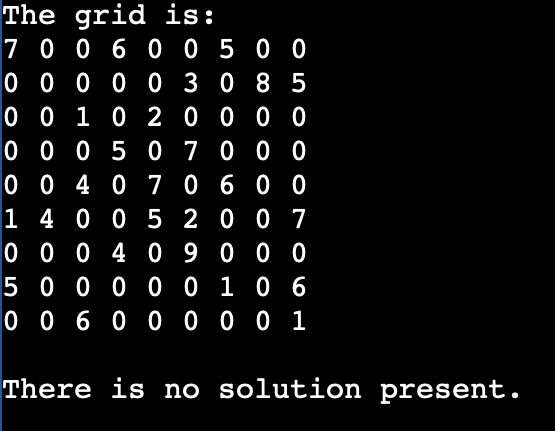
System.out.println("The grid is: ");
for(int i1 = 0; i1 < s1; i1++)
{
for(int j1 = 0; j1 < s1; j1++)
{
System.out.print(b1[i1][j1] + "");
}


System.out.println();
}
System.out.println();
if (object1.solve_sudoku(b1, s1))
{


System.out.println("The solution is: ");
object1.display(b1, s1);
}
else
{
System.out.println("There is no solution present.");
}
}
}
Output
Bit Masks Approach
This approach is a small improvement over the previous two approaches. Create a bitmask for each row, column, and box, and set the bit at position "value" to 1 for each element in the grid to enable O(1) tests.
Algorithm
- Create 3 N-sized arrays (one for rows, columns, and boxes).
- The boxes are numbered 0 through 8. (We use the following method to determine an element's box-index: row / 3 * 3 + column / 3).
- Map the grid's initial values first.
- When an element is added or removed from the grid, the bit is set to 1/0 in the relevant bitmasks.
Program of Sudoku in Java by Bit Masks Approach
sudoko_example3.java
import java.io.*;


class sudoko_example3 {
static int M = 9;


static int r[] = new int[M] , c[] = new int[M], b[] = new int[M];
static Boolean set = false;


static int get_box(int i1,int j1)
{
return i1 / 3 * 3 + j1 / 3;
}


static Boolean is_safe(int i1,int j1,int num)
{
return ((r[i1] >> num) & 1) == 0
&& ((c[j1] >> num) & 1) == 0
&& ((b[get_box(i1,j1)] >> num) & 1) == 0;
}


static void set_initial_values(int grid[][])
{
for (int i1 = 0; i1 < grid.length;i1++){
for (int j1 = 0; j1 < grid.length; j1++){
r[i1] |= 1 << grid[i1][j1];
c[j1] |= 1 << grid[i1][j1];
b[get_box(i1, j1)] |= 1 << grid[i1][j1];
}
}
}


static Boolean solve_sudoku(int grid[][] ,int i1, int j1)
{
if(!set){
set = true;
set_initial_values(grid);
}


if(i1 == M - 1 && j1 == M)
return true;
if(j1 == M){
j1 = 0;
i1++;
}


if(grid[i1][j1]>0)
return solve_sudoku(grid, i1, j1 + 1);


for (int nr1 = 1; nr1 <= M;nr1++)
{
if(is_safe(i1, j1, nr1))
{


grid[i1][j1] = nr1;
r[i1] |= 1 << nr1;
c[j1] |= 1 << nr1;
b[get_box(i1, j1)] |= 1 << nr1;


if(solve_sudoku(grid, i1,j1 + 1))
return true;


r[i1] &= ~(1 << nr1);
c[j1] &= ~(1 << nr1);
b[get_box(i1, j1)] &= ~(1 << nr1);
}


grid[i1][j1] = 0;
}


return false;
}


static void print(int grid[][])
{
for (int i1 = 0; i1 < grid.length; i1++){
for (int j1 = 0; j1 < grid[0].length; j1++){
System.out.printf("%d ",grid[i1][j1]);
}
System.out.println();
}
}


public static void main(String args[])
{
int grid[][] = {                    { 7, 0, 0, 6, 0, 0, 5, 0, 0 },
                                        { 0, 0, 0, 0, 0, 3, 0, 8, 5 },
                                        { 0, 0, 1, 0, 2, 0, 0, 0, 0 },
                                        { 0, 0, 0, 5, 0, 7, 0, 0, 0 },
                                        { 0, 0, 4, 0, 7, 0, 6, 0, 0 },
                                        { 1, 4, 0, 0, 5, 2, 0, 0, 7 },
                                        { 0, 0, 0, 4, 0, 9, 0, 0, 0 },
                                        { 5, 0, 0, 0, 0, 0, 1, 0, 6 },
                                        { 0, 0, 6, 0, 0, 0, 0, 0, 1 }};


if (solve_sudoku(grid,0 ,0))
print(grid);
else
System.out.println ( " No solution exists " ) ;
}
}
Output
