
Finding Odd Occurrence of a Number in Java
In this tutorial, we will learn how to find the odd occurrence of a number through a java program.
Let us consider an array of non-negative integers. Here, except for one number, the rest all the numbers occur an odd number of times. The goal is to fetch that number that is occurring an odd number of times in an array
Example 1:
Input: arr[] = {17, 24, 35, 24, 35, 17, 35, 59, 38, 59, 96, 35, 38, 96, 35}
Output: 35
Explanation: Except for 35, all the other numbers are occurring an even number of times. We can see in the array arr[] that the number 35 occurs 5 times which is odd.
Example 2:
Input: arr[] = {54, 27, 9, 27, 45, 9, 34, 7, 34, 7, 2, 54, 45 }
Output: 2
Explanation: Except for 2 all the other numbers are occurring an even number of times. We can see in the array arr[] that the number 2 occurs 1 odd time.
Example 3:
Input: arr[] = {94, 88 , 19, 88 , 1512 , 15, 19, 34, 17, 34, 17, 12, 94, 15 }
Output: 15
Explanation: Except for 15 all the other numbers are occurring an even number of times. We can see in the array arr[] that the number 15 occurs 3 times which is odd.
Simple Approach
The goal of our program is to get the count of a number that occurs an odd number of times in an array. So, we can do it by using two loops. One loop is to be used for picking the number and the other one is to count the frequency of that no. If the count of frequency comes even, we will discard the number therein and if it’s odd we will return it.
Implementation
public class OddOccurrence
{


public int OddOccurrence(int arr[], int size)
{


// outer loop that runs for each element
for (int i = 0; i < size; i++)
{


// to count the number of
// times a number occurs in the array
int Freq = 0;


for (int j = 0; j < size; j++)
{
    if(arr[i] == arr[j])
    {
        // stores the frequency of the nos.
        Freq = Freq + 1;
    }
}
 //checking odd occurrence of the no.
if(Freq % 2 == 1)
{
return  arr[i];
}


}
return -1;
}


// main method
public static void main(String argvs[])
{


// creation of an object of the class named OddOccurrence
OddOccurrence obj = new OddOccurrence();


// input array
int arr[] = {27, 54, 215, 54, 54, 27, 215, 9, 81, 9, 6, 81, 6};


// calculating the size of the array
int size = arr.length;


// showing the result
System.out.println("The input array is ");


for(int i = 0; i < arr.length; i++)
{
System.out.print(arr[i] + " ");
}
System.out.println();
int result = obj.OddOccurrence(arr, size);


System.out.println("The number whose occurrence is odd : " + result);


System.out.println();


// input array
int arr2[] = {41, 23, 19, 23, 41, 19, 41, 7, 41, 7, 41};


// computing the size of the array
size = arr2.length;


// displaying the outcome
System.out.println("The input array: ");


for(int i = 0; i < arr2.length; i++)
{
System.out.print(arr2[i] + " ");
}
System.out.println();
result = obj.OddOccurrence(arr2, size);


System.out.println("The number whose occurrence is odd is: " + result);


// input array
int arr3[] = {61, 43, 19, 43, 81, 19, 81, 7, 79, 7, 79, 71};


// calculating the size of the array
size = arr3.length;


// displaying the outcome
System.out.println("The input array: ");


for(int i = 0; i < arr3.length; i++)
{
System.out.print(arr3[i] + " ");
}
System.out.println();
result = obj.OddOccurrence(arr3, size);


System.out.println("The number whose occurrence is odd is: " + result);


}
}
Output:
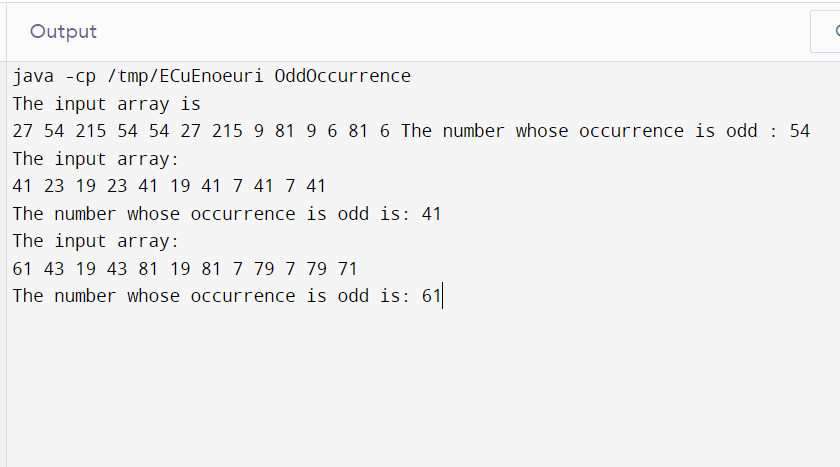
Explanation: The program uses 2 nested loops.So, the time complexity program is O(n2) where n refers to the total number of elements.
Space complexity here is O(1).
Approach 2:
Using Array
One can take an array into account to store the frequency of the occurrence of the elements. Then, one can easily find out the numbers whose frequency of occurence is odd.
Implementation:
public class OddOccurrence1
{


// method to find the maximum element
public int findMax(int arr[], int size)
{
int res = 0;
for(int i = 0 ; i < size; i++)
{
if(res < arr[i])
{
res = arr[i];
}
}


return res;
}


public int OddOccurrence(int arr[], int size)
{
int res = findMax(arr, size);


// to store the counting of elements
int storeFreq[] = new int[res + 1];


int leng = res + 1;


for(int j = 0; j < size; j++)
{
storeFreq[arr[j]] = storeFreq[arr[j]] + 1;
}


for(int j1 = 0; j1 < leng; j1++)
{
if(storeFreq[j1] % 2 == 1)
{
return j1;
}


}
return -1;


}


// main method
public static void main(String argvs[])
{


// creation of an object of the class named OddOccurrence1
OddOccurrence1 obj = new OddOccurrence1();


// input array
int arr[] = {17, 24, 35, 44, 36, 35, 17, 35, 91, 48, 91, 36, 48, 36, 36};


// calculating the size of the array
int size = arr.length;


// showing the result
System.out.println("The input array: ");


for(int i = 0; i < arr.length; i++)
{
System.out.print(arr[i] + " ");
}
System.out.println();
int res = obj.OddOccurrence(arr, size);


System.out.println("The number that occurred an odd number of times is: " + res);


System.out.println();


// input array
int arr1[] = {24, 93, 77, 19, 93, 24, 19, 24, 77, 24, 77, 24, 24};


// calculating the size of the array
size = arr1.length;


// displaying the result
System.out.println("The input array: ");


for(int i = 0; i < arr1.length; i++)
{
System.out.print(arr1[i] + " ");
}
System.out.println();
res = obj.OddOccurrence(arr1, size);


System.out.println("The number that occurred an odd number of times is: " + res);


}
}
Output:
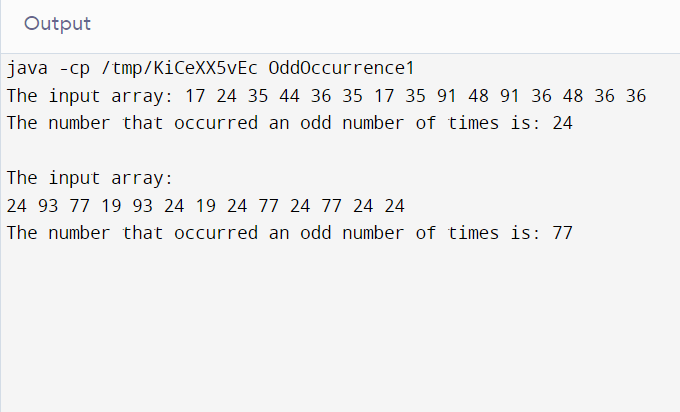
Explanation: The program uses 3 loops but they are not nested So, the time complexity program is O(n) where n refers to the total number of elements.
The space complexity here is more than the above approach. Spaces here are getting wasted too.
To reduce the space complexity, we can use another approach.
Approach 3:
Using HashMap
To store the frequency of the elements in an array, one can use the hash map and later can check which number has an odd frequency of its occurrence.
Implementation:
// import statement required to use HashMap
import java.util.HashMap;


public class OddOccurrence2
{


public int OddOccurrence2(int arr[], int size)
{


// In the hash map, the key will serve as the element and the value will serve as the
// frequency of occurrence of the elements.


HashMap<Integer, Integer> hm = new HashMap<Integer, Integer>();


// For every number beginning from 1 till n, calculate the sum of digits


for (int i = 0; i < size; i++)
{


if(hm.containsKey(arr[i]))
{
int countFreq = hm.get(arr[i]);


// If the element is present in the hash map then
// increase the frequency count of the occurrence of that element by 1.
hm.put(arr[i], countFreq + 1);
}
else
{
// if the element does not lie in the hash map then put
// that element in the hash map and initialize the  count of the frequency
// by one.
hm.put(arr[i], 1);
}
}


// finding out the odd occurrence of each of the element
// in the hash map
for(Integer j :hm.keySet())
{
    if(hm.get(j) % 2 != 0)
    {
        return j;
    }
}


return -1;


}


// main method
public static void main(String argvs[])
{


// creation of an object of the class named OddOccurrence2
OddOccurrence2 obj = new OddOccurrence2();


// input array
int arr1[] = {15, 77, 94, 15, 94, 15, 77, 15, 19, 18, 19, 26, 18, 15, 26};


// calculating the length of the array
int size = arr1.length;


// showing the output
System.out.println("The input array is ");


for(int i = 0; i < arr1.length; i++)
{
System.out.print(arr1[i] + " ");
}
System.out.println();
int res = obj.OddOccurrence2(arr1, size);


System.out.println("The number that occurred an odd number of times is: " + res);


System.out.println();


// input array
int arr2[] = {14, 43, 59, 43, 14, 59, 14, 37, 14, 37, 14};


// calculating the size of the array
size = arr2.length;


// showing the output
System.out.println(" The input array is ");


for(int j = 0; j < arr2.length; j++)
{
System.out.print(arr2[j] + " ");
}
System.out.println();
res = obj.OddOccurrence2(arr2, size);


System.out.println("The number that occurred an odd number of times is: " + res);


}
}
Output:
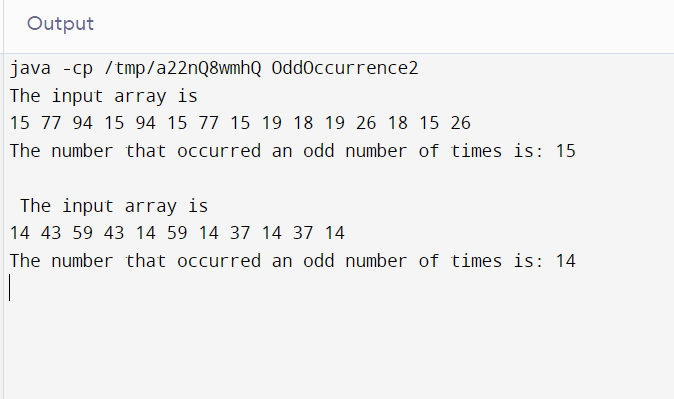
Explanation: The time complexity of the program remains O(n) as no nested loops are used. The space complexity is also O(n). However, some spaces are being wasted here as well.
We can further optimize our program and get a better result.
We can use the Bitwise XOR method which will yield space complexity as O(1).
But in this tutorial, we will restrict our discussion to here only.