
×

Java callable example

What is callable in Java?

Callable is an interface that is present in Java. There are two methods for constructing threads: one is to inherit the Thread class, while the other is to combine a Runnable with a thread. The inability to force a thread to return results when it ends or when run () is finished is a feature that Runnable lacks. The Callable interface is introduced in Java to facilitate this functionality.

Callable example:

Let us create a java code that implements the callable interface.

Let's look at the snippet of code that uses the Callable interface and, after a delay of between 0 and 5 seconds, produces a random integer between 0 and 20.

CallableExample.java

// A Java code for the Callable interface implementation
// For generating random numbers between 0 - 20  
  
// Importing the packages required.
import java. util. concurrent. Callable;  
import java.util.Random;  
  
class Jtp implements Callable {  
public Object call () throws Exception {  
Random obj = new Random ();  
// Object creation for the Random class using new   
Integer num = obj.nextInt(20);  
// generating a random number between 0 to 20 using nextInt method.
Thread.sleep(num * 1000);  
// the thread is kept in sleep mode for some random time  
return num;  
}  
}  

The callable interface is demonstrated in the previous sample of code. But the work is not yet finished. The returned object, accessible to the main thread, must be stored after the call () method exits. It is important as the main thread must know the call () method returning value. The same goal is achieved by using a Future object. The response from a separate thread is sent from the call () function and is stored in a Future object.

Future is an application just like Callable. Therefore, it must be put into practice to be used. The Future interface does not, however, need to be manually implemented. The FutureTask class from the Java library already implements the Runnable and Future interfaces.

CallableExample1.java

// A Java code for the Callable interface implementation
// For generating random numbers between 0 - 20  
import java. util. concurrent. Callable;  
import java.util.Random;  
import java.util.concurrent.FutureTask;  
  // importing the packages required.  


Class JCal implements Callable  
{  
@Override  
public Object call () throws Exception  
{  
Random obj = new Random ();  
// Object creation for the Random class   
Integer num = obj.nextInt(10);  
// generating a random number between 0 to 9 using nextInt method.  
  
Thread.sleep(num * 1000);  
// the thread is kept in sleep mode for some random time
// returning the object created that contains a random number  
return num;  
}  
}  
  
public class CallableExample1 {  
  // start of the main method 
  public static void main (String args[]) throws Exception {  
      
    // creating an array of 5 objects of the FutureTask class  
    FutureTask[] treads = new FutureTask[10];  
    
    // using a loop for creating and running 10 threads  
    for (int j = 0; j < 10; j++)  
    {  
      // Object creation for the JavaCallable class  
      Callable cobj = new JavaCallable();  
    
      //Creation of the FutureTask reference with Callable object
      treads[j] = new FutureTask(cobj);  
    
      Thread tobj = new Thread(treads[j]);  
      tobj.start();  
    }  
    
    // Using a loop for generating the random numbers  
    for (int i = 0; i < 10; i++)  
    {  
  
      // Calling the get () method to invoke the thread 
      Object ojb1 = treads[i]. get ();  
        
      // While waiting for the result, the get method maintains control. 
      //When the method is disrupted, the get method may throw the checked exception.
      // Due to this, we must include the throws statement in the main method.  
        
       // printing the numbers generated randomly
      System.out.println("Random number generated is: " + obj1);  
  
    }  
  }  
}  

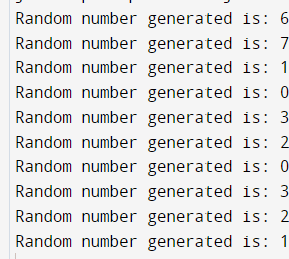
Output:
Java callable example

We created 10 separate threads in the code. The call () method is called by each thread, which generates a random number and returns it. The main thread receives the generated random number object from the various threads using the get () function. The FutureTask class implements the get () method, defined in the Future interface.

Callable Interface:

  • If we are working with the Callable interface, the call () method must be defined.
  • An Object is the return type of the interface's call () function. Consequently, an Object is returned by the call () function.
  • An exception may be thrown by the call () method.
  • The Callable interface does not allow for the Creation of threads.

Related Topics

Trimorphic numbers in Java

Wondered what the Trimorphic number is!! In this article, you can learn about what a Trimorphic number is referred to as and how to find whether a number is trimorphic...

3 minutes read.

Streams in Java

The conventional Java SE 8 version came with many new peculiarities, out of which the most striking of which are assuredly lambda expressions and the method references. Streams and Streams...

14 minutes read.

Self-Descriptive Numbers in Java

A number n is given. Identifying the self-descriptive numbers that exist between 1 and n is our task. Self-Descriptive Numbers The definition of a self-descriptive number, m, is a number with b...

6 minutes read.

Java Arrays Fill

We may use the Arrays.fill () function to fill a whole array or a subset of it. Arrays.fill () may fill both 2D and 3D arrays. Syntax: Arrays.fill(boolean[] fillArr, int fromIndex, int toIndex, boolean val )   Parameters: The array to be filled...

4 minutes read.

Java Map Example

In Java, the Map is an interface that is used mainly to denote key and value pairs. The central concept and theme of this mapping in the java collection framework...

4 minutes read.

Fibonacci Series Program in Java

Fibonacci Series Program in Java using Recursion Fibonacci series is a series whose every term is comprised of adding its previous two terms, barring the first two terms 0 and 1....

3 minutes read.

How to Convert String to float in Java

How to Convert String to Float in java It is used if you want to perform mathematical operations on the string that contains float number. You can convert String to float...

3 minutes read.

Annotations in Java

Annotations in Java Java Annotations are metadata about the source code. They do not have any direct effect on the execution of the java program. Annotations in Java were introduced in...

4 minutes read.

Read the XLSX file in Java

Excel files contain cells; reading an excel file in Java differs from reading a word file. JDK doesn't have a direct API that can read or write Word or Excel...

3 minutes read.

Why String in Immutable in Java?

Why String in Immutable in Java Immutable means unchangeable or unmodifiable.  Strings in Java are immutable, it means once a string is created, it cannot be modified or changed. Any change...

2 minutes read.

How to Convert boolean to String in Java

How to Convert boolean to String in Java There are two methods to convert boolean to String. Using valueOf(boolean) method Using toString(boolean) method For both the above methods, if the passes Boolean...

2 minutes read.

The final Keyword in Java

The final keyword is employed in several instances. Firstly, the non-access modifier final only applies to variables, methods, and classes. The final can be used in the following situations. Final Variables When...

6 minutes read.

Tug of War in Java

As in the tug-of-war issue, we must divide the given collection of n numbers into two groups of sizes that are equal or nearly equivalent. A minimum difference must exist...

5 minutes read.

Root exception in java

Java: The main feature of java which is not in C or object oriented programming language is platform independence. Not only the platform independence there are many other features in java...

3 minutes read.

Java Linters

When it comes to programming, everyone makes mistakes. Errors are bad for developers since they are difficult to handle. But handling as many as possible errors will bring out the...

6 minutes read.

Java Integer signum() method

The signum() method of Java Integer class returns the signum function of the specified int value. Syntax public static int signum (int i)  Parameters The parameter ‘i’ represents the value whose signum is to...

1 minute read.

Tilt operator in Java | Tilde operator in Java Example

The symbol designates it as a unary operator (pronounced as the tilde). It gives back the bit's complement or inverse. Every 0 turns into a 1, and every 1 back...

3 minutes read.

Java copy file

There are for the most part 3 methods for duplicating documents utilizing java language. They are as given underneath: Utilizing File StreamUtilizing FileChannel ClassUtilizing Files class. 1. Using File Stream: Here we are...

5 minutes read.

Java Integer parseInt() method

The parseInt() method of Java Integer class parses the CharSequence argument as a signed decimal integer. The second parameter parses the string argument as a signed integer in the radix specified...

2 minutes read.

Buffer reader to read string in Java

The Buffered Reader class of Java is used to read the stream of characters from the input stream. Program to read string using Buffer reader import java.io.*; class  Demo {   public static void main(String...

3 minutes read.