
×

String Declaration in Java

A string is a group of characters. In Java, the string can be treated as both class and datatype. In Java programming, the String class have many advantages. Everything in java can be treated as a string.

Example for string: “ Tutorials”

The strings are enclosed with the double quotes. The String class contains many methods. Strings in Java are available in java.lang package. The declaration of string in Java can be done in two ways:

  1. By using the string literal
  2. By using the heap area, i.e. new keyword

1. String literal

In the literal string, the string is created with double quotes.

Example:

String name =" Hello";

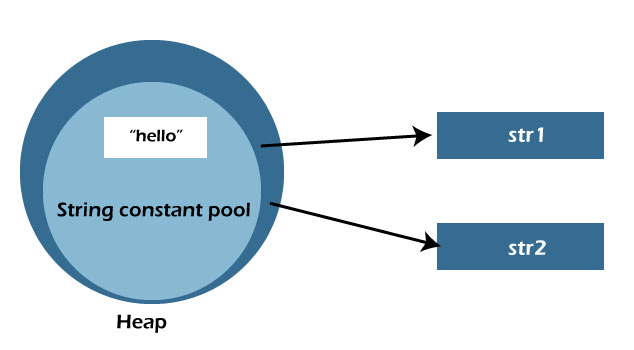
In the above example, the string is enclosed with double quotes. Each time you create the string literal, The Java virtual machine(JVM)  first checks the “string constant pool”. If the pool already has the string, then it will return the reference from the pool. If the string constant pool doesn’t contain the string, for the created string new instance will be treated and will store

 the string. Can be understood with the below example:

String str1 = "Hello"; 
String str2 =" Hello."  
String Declaration in Java

From the above example, the String str2 contains the same string which is declared in str1 will create one object. At the initial, the string object named  “hello“  is not found in JVM so it will create an instance for that variable. After the new string named str2 is created with the same value as str1, it will not create a new instance for that variable. So the new instance is not created for the string str2.

An example program for string declaration using the string literal.

StringExample.java

class StringExample {
  public static void main(String[] args) {
    
    // create strings
    String str1= "Programming";
    String str2= "Online";
    String str3= "competetions";


    // printing the string
    System.out.println(str1);   //programming will prints
    System.out.println(str2);  // online will prints
    System.out.println(str3);   // competetions will prints
  }
}

Output

String Declaration in Java

2) By using a new keyword

 A new keyword is used to allocate memory in the heap area.

Example:

String str = new String(“hello”);

JVM will create a new object in the heap memory area in this case. In the above example, the literal passed as parameter will store in the constant string pool, and the variable will point to the heap area.

Example 1

StringExampleNew.java

public class StringEx{    
public static void main(String args[]){    
String str1="Programming";// literal is created   
char ch[]={'R','e','c','u','r','s','i','o','n'};    
String str2=new String(ch);//character array is to string    
String str3=new String("Demo");// Programming string is created by new keyword    
System.out.println(str1);    
System.out.println(str2);    
System.out.println(str3);    
}
}    

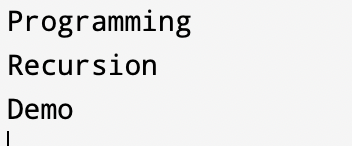
Output:
String Declaration in Java

From the above program, the character array is converted to string, and str1,str2, and str3 display the result using the print( ) method.

StringExample.java

class StringExample{
public static void main(String args[])
{ 
  char c[]={'g','o','o','d'};
  String str1=new String (c); // new instance in heap area
  String str2=new String (str1); // copies the same instance as in str1
  System.out.println(str1);  // prints str1
  System.out.println(str2); // prints str2
}
}

Output

String Declaration in Java

From the above two examples, we can understand how to declare a string using the heap memory area.


Related Topics

Java File Input Stream

Java makes use of stream ideas to speed up input and output processes. All packages of input and output streams are contained in java.io.package. Stream: A stream is nothing more...

5 minutes read.

Awesome explanation of Strings in Java

What do you mean by String? Strings are a collection of characters that are commonly used in Java programming. Strings are regarded as objects in the Java programming language. “String” is a...

4 minutes read.

Grepcode Java util date

What is java.util.Date Class? The date and time in Java are provided through the java.util.Date class. If you imported java.util, it could be helpful. Use the Java.util.Date class to implement this class...

4 minutes read.

Array and String based questions in Java

1. What is an Array in Java? A collection of identical data types is referred to as an array. There can be no separate data kinds. It supports the storage of...

4 minutes read.

How to Create a Generic List in Java?

Generics are types that have parameters. The goal is to make it possible for methods, classes, and interfaces to take type (Integer, String, etc., and user-defined types) as a parameter....

4 minutes read.

Java Package Keyword

A collection of classes, interfaces, and subpackages in a Java program are referred to as a package. Here, we'll learn in-depth how to make and use user-defined packages. package is a...

6 minutes read.

Addition Program in Java

Addition Program in Java We can perform the addition (sum) of two or more numbers by using the arithmetic operator (+). To write an addition program in Java, one must understand...

3 minutes read.

How to Convert double to int in Java

The double is a larger data type than int. When we assign a larger type value to a variable of smaller type, then we need to perform the explicit conversion....

2 minutes read.

Difference between String and Char Array in Java

We are heading to examine some significant differences between String and Character arrays. Both char arrays and String hold the series of characters and are utilised as a cluster of...

3 minutes read.

JDBC vs ODBC

Difference Between JDBC and ODBC ODBC: ODBC (Open Database Connectivity) is the accepted method for accessing databases among organisations and programmers. A database is linked to other programmes, such as word processors, spreadsheets,...

4 minutes read.

How to add 4 Hours to the Current Date in Java?

In this tutorial, we will learn how to add 4 hours to the local or current date in Java language. We will begin our topic with basic concepts and would...

2 minutes read.

Finding middle node of a linked list in Java

To find the middle node of a linked list we have various methods in Java. Method 1 In this method two pointers are used, one of which advances quickly, and the other of...

6 minutes read.

How to install Java in Windows 10

To make programs that can run on our systems, we need to install the programming language related software in our systems. Different programming language requires a different type of software aka...

6 minutes read.

String to JSON in Java

Nowadays, receiving data in JSON String format rather than XML is quite frequent. Java does not transform JSON String to JSON Object when dealing with JSON String. However, using the...

3 minutes read.

Difference between Abstract Class and Interface

There is a similarity between abstract class and interface is that we cannot create objects for both of them. But irrespective of this, there are some differences between them, let’s...

2 minutes read.

How to Split String by Comma in Java

strsplit() technique permits you to break a string given the explicit Java string delimiter. The Java string split property is frequently a space or a comma(,) that you want to...

7 minutes read.

Trim Method in String Java

What is a String? Strings are a bundle of different characters that are normally used in Java programming language. Strings are regarded as objects in the Java programming language. “String” is a...

3 minutes read.

Java Class Syntax

A class is a fundamental building piece in object-oriented programming. It can be characterised as a template that outlines the information and actions connected to the creation of a class....

3 minutes read.

How to create array of objects in Java

Java is an object-oriented programming language therefore everything in Java is based on objects and classes. Array is a data structure that holds data of similar type and dynamically creates...

4 minutes read.

How to Set Environment Variables for Java

Introduction Java is an object-oriented programming language that is based on classes and can be employed mostly to develop web and desktop applications. No matter the computer architecture, Java applications are...

7 minutes read.