
Java InputStreamReader
What is InputStreamReader?
An InputStreamReader is a converter between byte and character streams: It reads bytes and converts them to characters with the help of a charset. The charset it uses can be provided explicitly or by name, or the platform's default charset can be allowed. It comes under the java.io package and extends the abstract class Reader. InputStreamReader is often known as the path which connects streams and character streams as it reads a byte from the given input stream of character.
How to Create InputStreamReader?
Following are the steps to create an InputStreamReader.
Importing the java.io.InputStreamReader package is the first step in creating an InputStreamReader without this package, we cannot implement InputStreamReader. After we've imported the package, we must follow the steps below.
First, we create an InputStreamReader, which has a reference variable has st. Then we need to create a FileInputStream which has a reference variable fl. The following example demonstrates the above lines.
FileInputStream fl = new FileInputStream( path);
InputStreamReaderst   = new InputStreamReader( fl  );
2. The fetched data is stored using default character encoding by implementing this code. We can also define the character encoding as per the file or one's need. The character encoding can be either UTF8 or UTF16. We have specified the character encoding in the file in the following code by using the Charset class.
InputStreamReaderst = new InputStreamReader( fl, Charset c );Constructors of InputStreamReader
Following are the Constructors provided by InputStreamReader:
- InputStreamReader(InputStreamst): This constructor is implemented when there is a need to create an InputStreamReader that has the default charset.
- InputStreamReader(InputStreamst, Charset ): This constructor is implemented when there is a need to create an InputStreamReader that has the specified charset.
- InputStreamReader(InputStreamst, CharsetDecoder dc): This constructor is implemented when there is a need to create an InputStreamReader that has the specified charset decoder.
- InputStreamReader(InputStreamst, String name): This constructor is implemented when there is a need to create an InputStreamReader that uses the named charset
Methods of InputStreamReader
Following are the methods provided by InputStreamReader.
- ready()
This is a method with a return type. This method is implemented when there is a need to check whether the character stream is ready to perform its function ( i.e., whether it can read or not ).
An InputStreamReader is considered ready to perform its function, If an InputStreamReader's input buffer is empty or bytes are available to be read from the underlying byte stream.
- read(char[] arr)
It is used when it is necessary to read characters from a reader and store them in a predefined array.
- read(char[] arr, int st, int l)
It is used when several characters equal to length must be read from the reader and stored in the specified array starting at the beginning.
- close( )
This method is implemented when there is a need to close cInputStreamReader and releases all the Streams attached to it.
Once this method is implemented, the stream gets closed. Thus, methods such as ready( ), ready(), and other mentioned methods in the articles won't perform their function and will throw an IOException.
- getEncoding() Method
This method is implemented when there is a need to acquire the type of encoding is implemented to save the fetched data in the input stream.
- mark()
When it's necessary to mark the point in the stream where data has been read, this method is implemented
- reset()
This is a method with a return type. It returns the control to the position where the mark was set in the stream.
import java.io.InputStreamReader;
import java.io.FileInputStream;
public class a {
public static void main(String[] args) {
char[] arr = new char[14];


        try {


            FileInputStream fl = new FileInputStream("d://sample.txt");


InputStreamReader File_input = new InputStreamReader(fl );


File_input.read(arr);
System.out.println("File contains the following data:");
System.out.println(arr);


input.close();
}


catch(Exception e) {
            e.getStackTrace();
}
    }
}
In the above code, first, we imported the important packages to implement FileInputStream and InputStreamReader.
Then we created an array of characters as reference variable as arr and size of 14 as it is the size of the data inside the file.
Then we created a FileOutputStream in which as reference variable as fl and contains specified file path as d://sample.txt. And created an InputStreamReader, a reference variable as File_input, and a default encoding.
Then we read the characters from the file stores them in an array of arrays. To see the data inside the file, we have to print the array. Following is the output obtained when the above code is implemented.
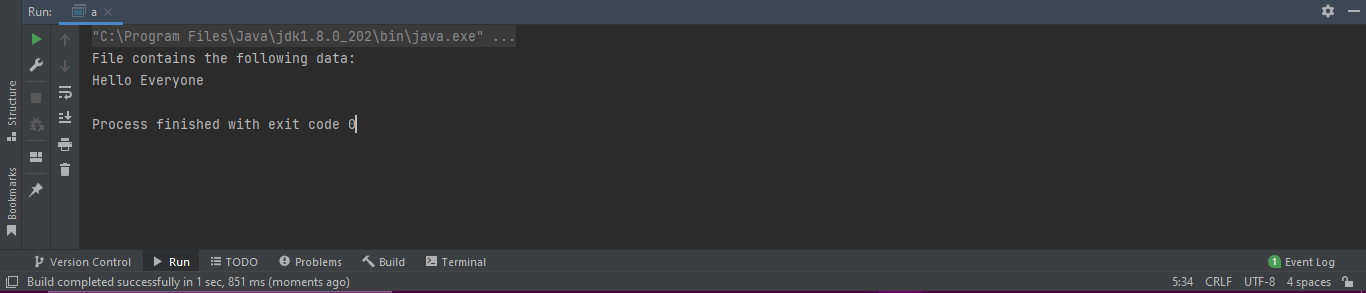
The file contains the following text: Hello Everyone, and the same text is shown in the output.