
Method Overriding in Java
Overriding
Overriding is also known as run time polymorphism, and it is about the same method with the same signatures in different classes. Overriding can be applied only methods.
Method Overriding
Method Overriding is a phenomenon that occurs when there are two or more methods with the same method name with the same parameters but in different classes. They are parent class and child class. Method overriding can be applied only in the inheritance concept. Method overriding is also known as run time polymorphism.
Example:
class Parent
{
void add (int x)
}
class Child
{
void add(int x)
}
Here in the above example, the method "add()" has the same method name and same parameters and is present in both parent class and child class.
Ways for Method Overriding
Method overriding can be done by having
- The method in both parent class and child class should have the same name and the same number of parameters.
- The method in both parent class and child class should also have the same return type.
- Method overriding is prevented in both final and static methods.
Advantages of Method Overriding in Java
- We can implement the same method multiple times.
- We can also invoke the parent class method without creating the object using the super keyword.
- Super keyword used to access the method from child class to parent class without creating an object for the parent class.
- It also improves the readability of the source code.
- It also defines the behavior of the class.
Disadvantages of Method Overriding
- We can’t override the private, static and final methods.
- We can’t override a method outside the package.
- We cannot reduce the visibility of the overridden method.
- We can’t override a method if the classes are not in inheritance.
Some Points on Method Overriding
- Method overriding is also known as run time polymorphism.
- Method overriding has the same method name with the same parameters and same return type in different classes, that is, parent class and child class.
- Method overriding is used to implement the method in the parent class using the super keyword.
- Method overriding occurs in two classes that have an inheritance relationship.
- Method overloading gives better performance as compared to method overriding.
- We cannot override final and private methods.
Example program on method overloading:
//Program to implement method overriding in java
import java .io.*;
import java .lang.*;
importjava.util.*;
class KK // parent class
{
void display(int x) // dispaly method in parent class
{
System.out.println(" Welcome to parent class: ");
    // printing the square root of the argument passed
System.out.println(" square root of x is = "+ Math.sqrt(x));
} // display
} // KK
class R extends KK
{
void display(int x) // display method inchild class
{
System.out.println(" Welcome to child class: ");
    // printing the square value of the argument passed
System.out.println(" square value of x is = "+ (x*x));
} // display
} // R


classHelloWorld // class with main
{
public static void main(String[] args) // main method
    {
        // creating object for Scanner class which is present utill package
        Scanner sc = new Scanner(System.in);
System.out.println("Hello, World!");
System.out.println(" Enter the number: ");
int x = sc.nextInt(); // reading the input
        R r1 = new R() ; // object creation for R class
        r1.display(x); // calling display method
        KK k1 = new KK(); // object creation for KK class
        k1.display(x); // calling display method
    } // main
} // HelloWorld
Output:
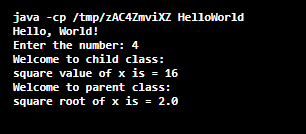
In the above Program, we have created a method "display()" in both parent class and child class with the same parameters and same return type. We have created objects for both parent class and child class and have passed the parameters. So that we can perform different operations as shown above in the Program. Here we have imported the lang package to access the "Math.sqrt()" function to find the square value. Hence we can see the output of the Program.
Ways for Preventing Method Overriding
- By declaring the overriding method using the final keyword(Ex: final void display()).
- By using the static method rather than non-static method.
- By using the privet access modifier in the overriding method.
- By using the default access modifier in the overriding method.
Example Program to Prevent Method Overriding
1. By using the final keyword:
The final keyword is used to stop inheritance. If the classes or not an inheritance, we can’t perform method overriding.
//Program to prevent method overriding using final keyword:
import java .io.*;
import java .lang.*;
importjava.util.*;
class KK // parent class
{
final void display(int x) // Final method
{
System.out.println(" Welcome to parent class: ");
    // printing the square root of the argument passed
System.out.println(" square root of x is = "+ Math.sqrt(x));
}
}
class R extends KK // child class
{
void display(int x) // display method inchild class
{
System.out.println(" Welcome to child class: ");
    // printing the square value of the argument passed
System.out.println(" square value of x is = "+ (x*x));
} // display
} // R


classHelloWorld // class with main
{
public static void main(String[] args) // main method
    {
        // creating object for Scanner class which is present utill package
        Scanner sc = new Scanner(System.in);
System.out.println("Hello, World!");
System.out.println(" Enter the number: ");
int x = sc.nextInt(); // reading the input
        R r1 = new R() ; // object creation for R class
        r1.display(x); // calling display method
        KK k1 = new KK(); // object creation for KK class
        k1.display(x); // calling display method
    }
}
In this Program, we declared the method in the parent class using the final keyword. The parent class method gets overridden, but we can override the final method, so the output of the Program should be an error, and the overridden method is final.
Output:

2. By using private access modifier:
Access modifiers are used to define the scope of the method or variables. If we define a method using private access, the scope of the method will be only within the class, and we can't access that method outside the class. Without accessing the method, we can't override a method.
//Program to prevent method overriding using private access modifier
import java .io.*;
import java .lang.*;
importjava.util.*;
class KK // parent class
{
private void display(int x) // Static method
{
System.out.println(" Welcome to parent class: ");
    // printing the square root of the argument passed
System.out.println(" square root of x is = "+ Math.sqrt(x));
}
}
class R extends KK // child class
{
void display(int x) // display method inchild class
{
System.out.println(" Welcome to child class: ");
    // printing the square value of the argument passed
System.out.println(" square value of x is = "+ (x*x));
} // display
} // R


classHelloWorld // class with main
{
public static void main(String[] args) // main method
    {
        // creating object for Scanner class which is present utill package
        Scanner sc = new Scanner(System.in);
System.out.println("Hello, World!");
System.out.println(" Enter the number: ");
int x = sc.nextInt(); // reading the input
        R r1 = new R() ; // object creation for R class
        r1.display(x); // calling display method
        KK k1 = new KK(); // object creation for KK class
        k1.display(x); // calling display method
    }
}
Output:
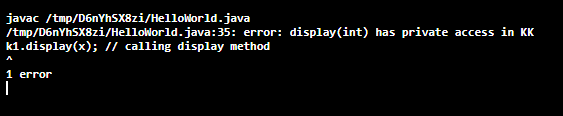
In this Program, we declared a method using a private access modifier, so the scope of the method is within the class, so we can't access the method from another class. Thereby we can't override the method. So we get an error.
3. By using the static method
Another method to prevent method overriding is using the static method. If we declare a static method, it will become a class method rather than an object method, and we can't override the class methods.
//Program to prevent method overriding using static method rather than non-static
// method:
import java .io.*;
import java .lang.*;
importjava.util.*;
class KK // parent class
{
static void display(int x) // Static method
{
System.out.println(" Welcome to parent class: ");
    // printing the square root of the argument passed
System.out.println(" square root of x is = "+ Math.sqrt(x));
}
}
Class R extends KK // child class.
{
void display(int x) // display methodinchild class
{
System.out.println(" Welcome to child class: ");
    // printing the square value of the argument passed
System.out.println(" square value of x is = "+ (x*x));
} // display
} // R


classHelloWorld // class with main
{
public static void main(String[] args) // main method
    {
// creating object for Scanner class which is present utill package
        Scanner sc = new Scanner(System.in);
System.out.println("Hello, World!");
System.out.println(" Enter the number: ");
int x = sc.nextInt(); // reading the input
        R r1 = new R() ; // object creation for R class
        r1.display(x); // calling display method
        KK k1 = new KK(); // object creation for KK class
        k1.display(x); // calling display method
    }
}
In this Program, we declared a method in the parent class using the static keyword. If a method s declared a method using a static keyword, it will become a class method rather than an object method, and we can’t override a class method, so the output should be an error and we can’t override a static method.
Output:

4. By using the default access modifier in the overriding method.
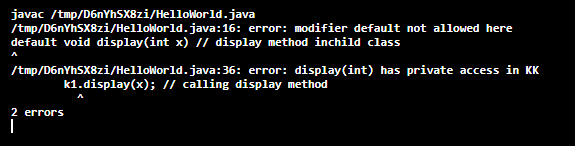
This is only possible when the access of the overridden method is within the package but not outside the package. To obtain this situation, we have to declare the parent class method using private and child class with default access modifier.
//Program to prevent method overriding using default access modifier
import java .io.*;
import java .lang.*;
importjava.util.*;
class KK // parent class
{
private void display(int x) // Static method
{
System.out.println(" Welcome to parent class: ");
    // printing the square root of the argument passed
System.out.println(" square root of x is = "+ Math.sqrt(x));
}
}
class R extends KK // child class
{
default void display(int x) // display method inchild class
{
System.out.println(" Welcome to child class: ");
    // printing the square value of the argument passed
System.out.println(" square value of x is = "+ (x*x));
} // display
} // R


classHelloWorld // class with main
{
public static void main(String[] args) // main method
{
        // creating object for Scanner class which is present utill package
        Scanner sc = new Scanner(System.in);
System.out.println("Hello, World!");
System.out.println(" Enter the number: ");
int x = sc.nextInt(); // reading the input
        R r1 = new R() ; // object creation for R class
        r1.display(x); // calling display method
        KK k1 = new KK(); // object creation for KK class
        k1.display(x); // calling display method
    }
}
Output:
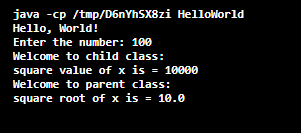
We can access the parent class method from the child class using the super keyword.
//Program to access parent class method from child class
import java .io.*;
import java .lang.*;
importjava.util.*;
class KK // parent class
{
void display(int x)
 {
System.out.println(" Welcome to parent class: ");
    // printing the square root of the argument passed
System.out.println(" square root of x is = "+ Math.sqrt(x));
}
}
Class R extends KK // child class.
{
void display(int x) // display method inchildclass
{
System.out.println(" Welcome to child class: ");
    // printing the square value of the argument passed
System.out.println(" square value of x is = "+ (x*x));
super.display(x); // calling parent class method
} // display
} // R


classHelloWorld // class with main
{
public static void main(String[] args) // main method
    {
        // creating object for Scanner class which is present utill package
        Scanner sc = new Scanner(System.in);
System.out.println("Hello, World!");
System.out.println(" Enter the number: ");
int x = sc.nextInt(); // reading the input
        R r1 = new R() ; // object creation for R class
        r1.display(x); // calling display method
    }
}
Output:
Conclusion
In this article, we discussed method overriding in java and rules to perform method overriding. We discussed how to prevent method overriding. We executed the programs on method overriding and prevention of method overriding. We discussed the advantages and disadvantages of method overriding.