
How to avoid deadlock in java
Deadlock:
A deadlock is an event that never going to occur. In java, deadlock is just a part of the multithreading. It is an environment that allows us to run multiple threads sequentially for multitasking. In some cases, the different threads themselves will be waiting and it lasts for a forever state which is called deadlock.
In the thread, every block has a lock. To make a lock, it provides synchronization to lock to a method or block of code.
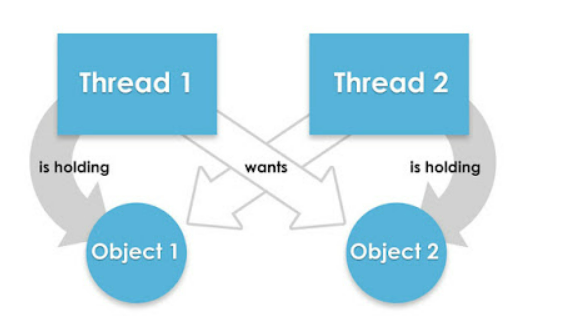
How to avoid deadlock in java:
- Avoid Unnecessary Locks: We should assign the locks for only those blocks on which it is going to perform the operations. The unnecessarily using of locks will leads to a deadlock condition. We suggest that you use a lock-free data structure. otherwise, keep your code free from locks. For example, use the concurrent linked queue instead of using a synchronized array list.
- Avoid Nested Locks: The other possible way to avoid deadlock is to avoid assigning a lock to multiple threads at a time if we have already assigned a lock to one thread then we must avoid assigning a lock to multiple threads otherwise it leads to a deadlock.
- Using Thread.join() Method: we get a deadlock if we use two threads or more threads waiting for each other to complete by using another thread to join method. If our thread has to wait for another thread to complete, then it's always the best way to use the join method with the maximum time you want to wait for the other thread to finish.
- Use Lock Ordering: We should assign a numeric value to each lock when we are performing the operation. Before assigning the lock with a high numeric value, then we should acquire the locks with the least numeric value.
- Lock Time-out: We can also specify the time for a thread to perform a lock. If a thread does not assign a lock, then that thread must wait for a particular time before retrying to acquire a lock.
Example:
public class DeadlockTest {
   public static void main(String[] args) throws InterruptedException {
      Demo obj1 = new       Demo ();
            Demo obj2 = new       Demo ();
           Demo obj3 = new       Demo ();
      Thread t1 = new Thread(new SyncThread(obj1, obj2), "t1");
      Thread t2 = new Thread(new SyncThread(obj2, obj3), "t2");
      t1.start();
      Thread.sleep(2000);
      t2.start();
      Thread.sleep(2000);
   }
}
class SyncThread implements Runnable {
   private       Demo obj1;
   private      Demo obj2;
   public SyncThread(      Demo o1,       Demo o2){
      this.obj1=o1;
      this.obj2=o2;
   }
   @Override
   public void run() {
      String name = Thread.currentThread().getName();
      System.out.println(name + " allocating lock on " + obj1);
      synchronized (obj1) {
         System.out.println(name + " allocated lock on " + obj1);
         work();
      }
      System.out.println(name + " removed lock on " + obj1);
      System.out.println(name + " allocating lock on " + obj2);
      synchronized (obj2) {
         System.out.println(name + " allocating lock on " + obj2);
         work();
      }
      System.out.println(name + " removed lock on " + obj2);
      System.out.println(name + " completed execution.");
   }
   private void work() {
      try {
         Thread.sleep(5000);
      } catch (InterruptedException ie) {
         ie.printStackTrace();
      }
   }
}
Output:
t1 allocated g a lock on java. lang.Demo@917d8d4
t1 allocated lock on java. lang. Demo@ 917d8d4
t2 allocating lock on java. lang. Demo@ 5c4b42fb
t2 allocated lock on java. lang. Demo@ 5c4b42fb
t1 released the lock on java. lang. Demo@917d8d4
t1 allocating a lock on java. lang. Demo@ 5c4b42fb
t1 allocated lock on java. lang. Demo@ 5c4b42fb
t2 released the lock on java. lang.Object@5c4b42fb
t2 allocating lock on java. lang. Demo@ 528cb702
t2 allocated lock on java. lang. Demo@ 528cb702
t1 removed the lock on java. lang. Demo@ 5c4b42fb
t2 removed the lock on java. lang. Demo@ 528cb702
t1 completed execution.
t2 completed execution.
Deadlock occurs
Example:
// Importing the required packages
import java.io.*;
import java.util.*;

// Class 1
class Demo {

    public synchronized void last()
    {

        // Print and display the statement
        System. out.println("Inside Demo, last() method");
    }

    public synchronized void d1(B b)
    {
        System.out.println(
            "Thread1 start execution of d1() method");
        try {

            // Putting the existing thread to sleep for
            // specific time using sleep() method
            Thread.sleep(2000);
        }

        // Catch block to handle the exceptions
        catch (InterruptedException e)
            System.out.println(e);
        }

        System.out.println(
            "Thread trying to call B's last() method");

        // Calling method 1 of this class as created
        // above
        b.last();
    }
}

// Class 2
// Helper class Sample
class Sample {

    // Method 1 of this class
    public synchronized void last()
    {

        // Display statement only
        System.out.println("Inside Sample, last() method");
    }
    public synchronized void d2(Demo a)
    {

        // Display message only
        System.out.println(
            "Thread2 start execution of d2() method");

        try {
            Thread.sleep(2000);
         }
        catch (InterruptedException e) {
             System.out.println(e);
        }


        System.out.println(
            "Thread2  trying to call A's last method");
        a.last();
    }
}

// Deadlock class which is extending Thread class
class Simple extends Thread {

    // Creating object of type class Demo
    Demo a = new Demo();

    // Creating object of type class Sample
    Sample b = new Sample();

    public void m1()
    {

        // Starting the thread
        this.start();

        // Calling d1 method of class A
        a.d1(b);
    }

    // run() method for the thread
    public void run()
    {

        // Calling d2 method of class B
        b.d2(a);
    }

    // Main driver method
    public static void main(String[] args)
    {

        // Creating object of this class
        Simple deadlock = new Simple();

        // Calling the m1 method
        deadlock.m1();
    }
}