
×

Java Finally Keyword

The final block in Java is used to run essential code, such as connection closure, among other things. Whether an exception is resolved or not, the Java finally block has always been run. Even the Prior execution or printing statements of the program is given we cannot know whether an exception happens or not to implement necessary statements are not.

The try-catch block is executed after the finally block is implemented or executed.

Finally Block Flow Chart
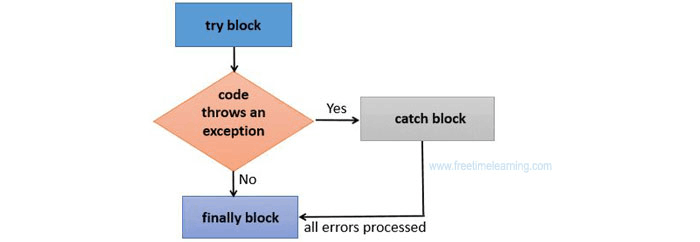
Java Finally Keyword

In the same manner that Java's final is a reserved keyword, finally is also a reserved keyword that cannot be used as an identifier. Finally, keyword ensures that a part of code will be run even if an exception is thrown when used in combination with a try/catch block. The control of the program to its source before the try and catch blocks are executed then last block will be executed.

Note: The JVM will implement or execute the finally block before terminating or stopping the application (if any), if we doesn’t handle the exception.

Usage of the Finally Block in Java

In Java programming language, "cleanup" code, such as terminating a file or a connection, can be inserted in the finally block. As part of programming specifications, we interface with databases by creating connections, using input and output streams, and resources inside a try block. It is advisable to use the finally block together with try-catch blocks as a good programmer to ensure the safety of resources and to make sure that there is no resource leak as part of our software.

The finally block is where you can print the essential statements.

Usage of Java keyword Finally

Let's understand and examine the various scenarios in which the Java finally block can be applied and implemented.

Case 1: In the absence of an exception

Let's look at the example below, where the Java programme doesn't raise any exceptions and the finally, block is executed following the try block.

TestFinallyBlock.java


class Fnl_Block {    
  public static void main (String s []) {
try {
// any exception is not thrown in the above code
   int ja=25/5;
   System.out.println(ja);
  }    
//executed without regard to exception happened or not
catch (NullPointerException e) {
System.out.println(e);
}    
 finally {  
System.out.println("Ececution of the finally block is always done.");
}    


System.out.println("remaining of the code...");
  }    
}    

Output:

Java finally block

Case 2: A catch block is not used when an exception occurs.

In this case, the catch block is unable to handle the exception when the code throws exception statements. Excepting this, the programme terminates improperly or irregularly after the finally block is executed after the running of try block.

public class Fnl_block_1{    
      public static void main (String s []) {
      try {    
        System.out.println("inner of try block");


        //The code below raises the divide-by-zero exception.
       int ja=25/0;
       System.out.println(ja);
      }    
//cannot handle exception of the arithmetic type
//can only accept exceptions of the Null Pointer type.
catch (Null_Pointer_Exptne) {
        System.out.println(e);
      }   
//checking whether an exception has occurred is executed or not.
      finally {  
        System.out.println("Execution of the finally block is always done");
      }    


      System.out.println("remaining of the code...");
      }    
    }    

Output:

Java finally block

Case 3: When a catch block is used to handle an exception that arises.

Example:

Let's look at the example below, where the catch block handles an exception that the Java code throws. After the block of try-catch, the finally block is then run. Additionally, the remaining code runs normally as well.

public class Fnl_Block_2{    
      public static void main (String s []){
      try {    
        System.out.println("Inner side of try block");


        //below code throws divide by zero exception  
       int ja=25/0;
       System.out.println(ja);
}  //handles the Arithmetic Exception 
            // Divide by zero


catch (Arithmetic_Exception e) {
        System.out.println("Exception handled");
        System.out.println(e);
      }   


      //regardless of whether an exception has occurred, /executes
      finally {  
        System.out.println("Execution of the final block is always done");
      }    


      System.out.println("remaining of the codeexecuted...");
      }    
    }  

Output:

Java finally block

Rule: There may be zero or more catch blocks for each attempt block, but there may only be one finally block.

Note: If the application terminates (either by calling System.exit() or by introducing a fatal error that causes the procedure to return), there they won't be carried out bt finally keyword.


Related Topics

Java String toUpperCase() methods

Java String toUpperCase() method is used to convert all the characters of the String into upper case. Syntax public String toUpperCase() public String toUpperCase(Locale locale) Returns It returns upper case String. Java String toUpperCase() Example 1: public...

1 minute read.

Deadlock Prevention and avoidance in Java

This tutorial will discuss deadlock prevention and Avoidance in Java programming language. Introduction Multithreading in Java includes deadlock. We can multitask by running several threads concurrently in the multithreading environment. Deadlock occurs...

4 minutes read.

How many ways to create object in Java?

In this article, you will be acknowledged about the different ways to create an object in java. So far you construct an object from a class, as is common knowledge,...

6 minutes read.

JIT in Java

What is JIT ? JIT stands for " Just in Time Compiler ". It is called "Just in time" because it is called at the very last moment when the interpretation...

5 minutes read.

How to calculate time difference in Java

In this tutorial, we learned about how to calculate time differences in java language and which methods use to find the difference and its example. Prerequisite To understand this example, you need...

5 minutes read.

Java Math tanh() Method

The tanh() method of Java Math class returns the hyperbolic tangent of the specified double value. Syntax: public static double tanh(double x) Parameters: The parameter ‘x’ represents the number whose hyperbolic tangent is to...

2 minutes read.

Java Comparable Interface

We implement comparable interface when we need a new logic for determining equality. if two objects are equal, the equals() method returns true and compareTo() method returns 0. The basic...

1 minute read.

How to Create Immutable Classes in Java

Introduction Java is a programming language that is entirely object-oriented, and everything in it is seen as an object. And the blueprint or template of these objects are classes. Several classes...

3 minutes read.

Java Lock

A lock is indeed a threaded synchronization technique similar to Java's synchronized blocks, however, locking can be more complex. It's not like we can completely get rid of the synchronized...

5 minutes read.

Bully Algorithm code in Java

Election algorithms include the bully algorithm, mainly used to select a coordinate. To find a coordinator in a distributed system that can carry out the tasks required by other processes,...

4 minutes read.

Java String substring() method

Java String substring() method returns a part of the String. Syntax: public String substring(int startIndex) public String substring(int startIndex, int endIndex) Parameters: startIndex : starting index endIndex : ending index Returns: It returns a specified String. Throws: StringIndexOutOfBoundsException if start...

2 minutes read.

XOR of Array Elements Except Itself in Java

A lot of the biggest IT organisations, including The Google, Amazon, TCS, and The Accenture, etc., question about this issue in their interview processes. By addressing the issue, one hopes to assess...

5 minutes read.

Swing Program in Java

Java Swing is part of Java Foundation Classes (JFC). The swing toolkit is used to generate Graphical User Interface (GUI) for programs written in Java. The Java swing API is...

4 minutes read.

Sum of digits in string in java

To find the sum of all digits in a string, you need to traverse through the string one by one character; if the character is an integer, you need to...

2 minutes read.

Java Math toIntExact() Method

The toIntExact() method of Java Math class returns the int value of the given long argument, throwing an exception if the value overflows an int. Syntax: public static int toIntExact (long value) Parameters: The...

2 minutes read.

Java Applications

The growth in technology is increasing rapidly, so some languages are used for developing them. Java is one such famous programming language which is having numerous applications. The Java Programming...

4 minutes read.

Java Math nextUp() Method

The nextUp() method of Math class returns the floating-point number adjacent to the argument in direction of the positive infinity. Syntax: public static double nextUp (double d)public static float nextUp (float f) Parameters: The...

2 minutes read.

Java Command Line Argument

Command-line arguments are passed to the main() method when we want to pass information into a program during runtime. It is the information that directly follows the program’s name on the...

1 minute read.

Java Console

If there is a character-based console device connected to the active Java virtual machine, it can be accessed using methods provided by the Java.io.Console class. JDK 6 adds the Console...

3 minutes read.

Difference between this and super in Java

In this article, you will be very well equipped with the knowledge of this keyword and super keyword in java. You will be able to understand where to implement this...

3 minutes read.