Hollow Diamond Pattern in Java
Why are patterns important?
Programmers frequently create Java pattern programs to practice coding and ace interviews. Interviewers frequently test candidates' logical reasoning and implementation by asking about pattern programs.
Hollow Diamond Pattern
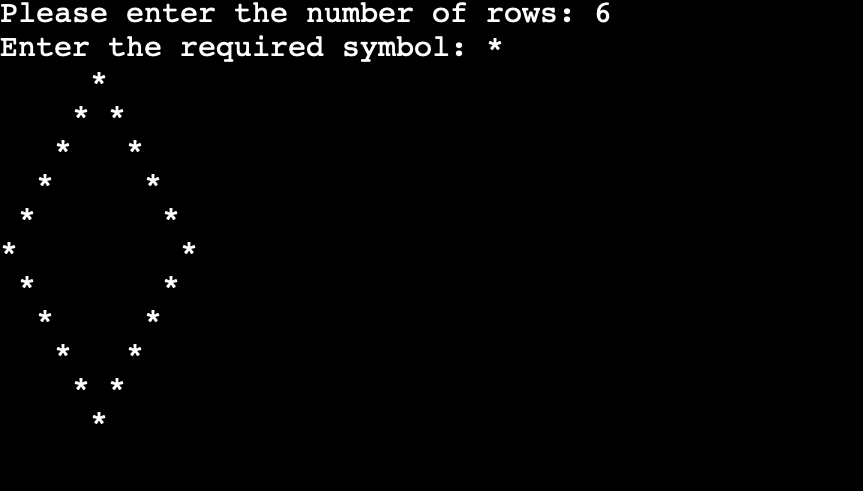
The initial and last rows of hollow diamond design each have just one star, whereas the remaining rows all have two stars. We can display any other symbol in replacement of the star (*).
We will separate the design into two pieces to construct the hollow diamond pattern, i.e., upper and lower. Additionally, we will independently create the logic for the top and lower portions.
Approach:
The strategy is to print spaces before and after the star to increase the spacing between the stars steadily.
To display the box shape, we must print "-" for the very first row (i==1) and also in the final row (i==n), and "|" for the very first column (j==1) and the very last row (j==n) (last column).
Algorithm:
1. If n is odd, raise it.
2. locate mid=n/2.
3. Go from 1 to middle to print this design's top half (say i).
4. To print the spaces for the upper-left corner of the outer box, go from 1 to mid-i (say j).
5. Print "*" if (i==1) (since for the first row, we need only one star).
6. When the loop is complete, print "*" and then traverse from 1 to 2*i-3 to print gaps for hollow diamonds (let's say j).
7. Navigate from 1 to mid-i and then print spaces once more for the box in the upper right corner (say j).
8. At stage 3, complete the loop.
9. To print the lower half of the design, go from mid+1 to n-1 (say i).
1. Move the cursor from 1 to i-mid (say j) for the lower leftmost outer rectangle.
2. If (I==n-1), print "*" (since for the last row, we need only one star).
3. If not, print "*" and then travel form 1 to 2*(n-i)-3 to print gaps for hollow diamonds (let's say, j), and then print "*" after the loop is finished.
4. For the lowest rightmost outside box, go from 1 to i-mid and print spaces once more (say j).
5. Finish step 9 to close this loop.
By using the for loop
Example: HollowDiamond1.java
//this program is for printing the hallow diamond in java
// importing the required packages
import java.util.Scanner;
public class HollowDiamond1
{
public static void main(String args[])
{
Scanner sc=new Scanner(System.in);
System.out.print("Please enter the number of rows: ");
// an integer was read from the user
int row=sc.nextInt();
System.out.print("Enter the required symbol: ");
// The required symbol is printed by the user
char sym=sc.next().charAt(0);
//printing the top section of the pattern
for(int i=1; i<=row; i++)
{
for(int j=row; j>i; j--)
{
// the space is printed
System.out.print(" ");
}
//the symbol is printed
System.out.print(sym);
for(int j=1; j<(i-1)*2; j++)
{
//the space for each character is printed
System.out.print(" ");
}
if(i==1)
{
// the cursor is then moved to the next line
System.out.print("\n");
}
else
{
//the following line is selected after the symbol is printed.
System.out.print(sym+"\n");
}
}
//logic for printing the lower section of the pattern
for(int i=row-1; i>=1; i--)
{
for(int j=row; j>i; j--)
{
//the space (hallow) is printed
System.out.print(" ");
}
//the selected symbol of the user is printed
System.out.print(sym);
for(int j=1; j<(i-1)*2; j++)
{
// the required space
System.out.print(" ");
}
if(i==1)
{
// the cursor is then moved to the next line
System.out.print("\n");
}
else
{
// the following line is selected after the symbol is printed
System.out.print(sym+"\n");
}
}
}
}
Output
By using the while loop
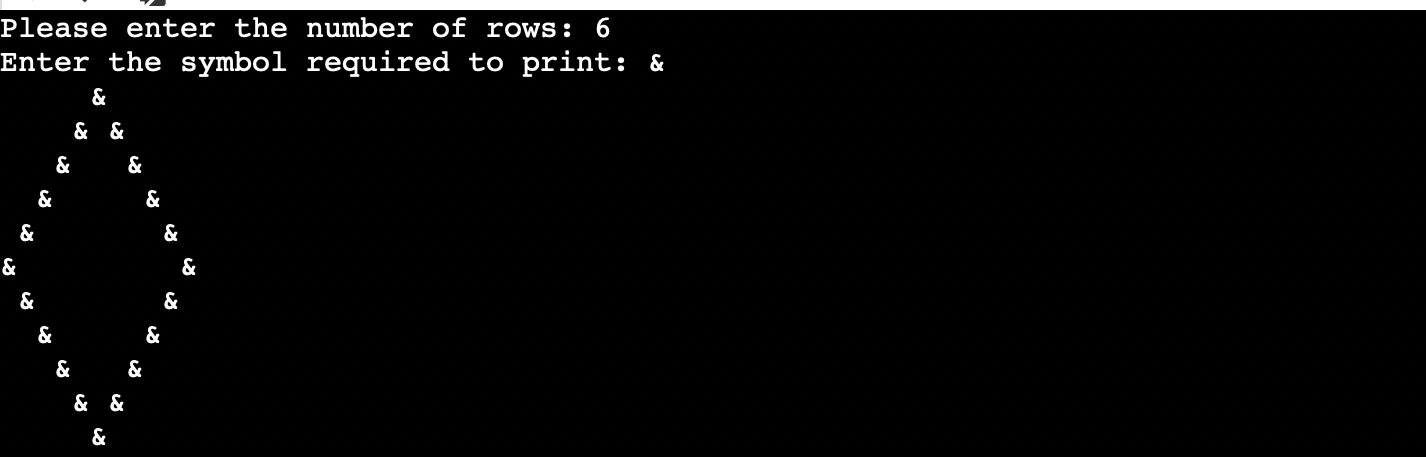
The below program is used for printing the hollow diamond by using the while loop.
Example: HallowDiamond2.java
 //this program is for printing the hallow diamond in java
// importing the required packages
import java.util.Scanner;
public class HallowDiamond2
{
public static void main(String args[])
{
int i,j;
Scanner sc=new Scanner(System.in);
System.out.print("Please enter the number of rows: ");
int row=sc.nextInt();
// reading the integer value from the user to print num of rows
System.out.print("Enter the symbol required to print: ");
//The required symbol is printed by the user
char sym=sc.next().charAt(0);
i=1;
// the upper part of the pattern is printed
while(i<=row)
{
j=row;
while(j>i)
{
System.out.print(" ");
j--;
} // end of the while loop
System.out.print(sym);
j=1;
while(j<(i-1)*2)
{
System.out.print(" ");
j++;
}
// the while loop is ended
if(i==1)
{
// the cursor is then moved to the next line
System.out.print("\n");
}
else
{
// the symbol is printed, and the cursor is then moved to the next line
System.out.print(sym+"\n");
}
i++;
}
// end of the while loop
// the bottom part of the pattern is printed
i=row-1;
while( i>=1)
{
j=row;
while(j>i)
{
System.out.print(" ");
j--;
}
// the symbol is printed
System.out.print(sym);
j=1;
while(j<(i-1)*2)
{
System.out.print(" ");
j++;
}
//ends the loop
if(i==1)
{
// the cursor is moved to the line to the next
System.out.print("\n");
}
else
{
// the following line is selected after the symbol is printed
System.out.print(sym+"\n");
}
i--;
}
// termination of the while loop
}
}
Output
By using the do-While loop
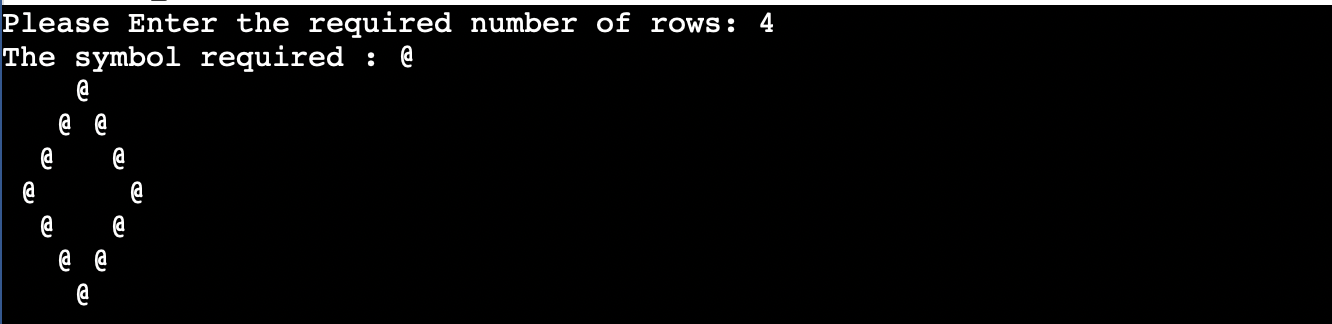
By using the do while loop, we can print hollow diamond patterns.
Example:HollowDiamond3.java
//this program is for printing the hallow diamond in java
// importing the required packages
import java.util.Scanner;
public class HollowDiamond3
{
public static void main(String args[])
{
int i,j;
Scanner sc=new Scanner(System.in);
System.out.print("Please Enter the required number of rows: ");
// an integer row in reading from the user for printing the rows
int row=sc.nextInt();
System.out.print("The symbol required : ");
// the required symbol from the user is printed
char sym=sc.next().charAt(0);
i=1;
//the top section of the pattern is printed
// the loop will iterate until the condition become false
do
{
j=row;
// it will continue until (j>=i) becomes as false
do
{
// the space between the symbol is printed
System.out.print(" ");
j--;
}
//end of the do
while(j>=i);
System.out.print(sym);
j=1;
// the loop will continues until ( j<(i-1)*2 ) condition becomes false
do
{
// the space between the character is printed
System.out.print(" ");
j++;
}
// the do-while will ends
while(j<(i-1)*2);
if(i==1)
{
// the cursor is then moved to the next line
System.out.print("\n");
}
else
{
// after the symbol is printed cursor is moved to the next line
System.out.print(sym+"\n");
}
i++;
}
// do loop will ends
while(i<=row);
i=row-1;
// the bottom part of the pattern is printed
// the loop will iterate until the condition becomes false
do
{
j=row;
//executes until the condition j>=i becomes false
do
{
// the space is printed
System.out.print(" ");
j--;
}
while(j>=i);
// the selected symbol is printed
System.out.print(sym);
j=1;
// the loop will iterates until (j<(i-1)*2) condition is false
do
{
// the spaces are printed
System.out.print(" ");
j++;
}  // the do will end
while(j<(i-1)*2); //condition
if(i==1)
{
// the cursor is then moved to the next line
System.out.print("\n");
}
else
{
//after the symbol is printed, the cursor is then moved to the next line
System.out.print(sym+"\n");
}
i--;
}
// the do will ends
while(i>=1);
}
}
Output
Here is another hollow diamond pattern
Divided between upper and lower portions, the following hollow diamond design will be printed. The diamond-shaped design is divided into two sections, the top part including the first five rows and the bottom section containing the final five rows. The logic for the upper and lower portions will each be implemented independently.
We'll start by making a 10 by 10 matrix. Print the (*) sign in the first row. Two spots are located in the second row from the top. Space has to be calculated. The amount of space increases by two in the top portion while decreasing by two in the lower section.
Therefore, we may compute the space by applying the generalized formula 2*i-2. Let's say we need to determine the third row's space. 2*3-2 Equals 4 (space) (space). The variables i ,j, and k are used in the program below to represent rows, columns, and spaces.
Example: HollowDiamond4.java
//this program is for printing the hallow diamond in java
// importing the required packages
import java.io.*;
import java.util.*;
// a class HollowDiamond4 is created
public class HollowDiamond4
{
public static void main(String args[])
{
// logic for displaying the half of the pattern in the hallow diamond pattern
for(int i=1; i<=11; i++)
{
for(int j=1; j<=11-i+1; j++)
{
System.out.print("*");
}
// loop for measuring the space required
for(int l=1; l<=2*i-2; l++)
{
System.out.print(" ");
}
for(int j1=1; j1<=11-i+1; j1++)
{
System.out.print("*");
}
System.out.println();
}
//  logic for displaying the half of the pattern in the hallow diamond pattern
for(int i=10; i>=1; i--)
{
for(int j=i; j<=11; j++)
{
System.out.print("*");
}
//loop for measuring the space required
for(int k1=1; k1<=(2*i)-2; k1++)
{
System.out.print(" ");
}
for(int j1=i; j1<=11; j1++)
{
System.out.print("*");
}
System.out.println();
}
}
}
Output