
Client Server Program in Java
Client Server Program in Java
The client and server are the two main components of socket programming. The client is a computer/node that request for the service and the server is a computer/ node that response to the client. In Java, using socket programming, we can connect the client and server.
A socket is an endpoint for sending and receiving messages. It is a combination of IP address and port number. There are two types of sockets used in a client-server program: one is a client socket, and another is a server socket. The client, in a client-server program, must know the whereabouts of the endpoint (IP address and port number) of the server, where the client wants to send the request for a service. In the computer world, both client and server are application programs. A server program uses a server socket, whereas a client program uses a client socket for communication.
The following Java programs illustrate how to establish communication between a client and a server. Let’s start with the client-side program.
Client-Side Program
Filename: ClientSide.java
 // import statements
import java.net.*;
import java.io.*;
import java.util.Scanner;
public class ClientSide
{
    // initializing socket and input output streams
    private DataOutputStream dataOut  = null;
    private Scanner sc                = null;
    private Socket skt                = null;
    // constructor to create a socket with given IP and port address
    public Client(String address, int port)
    {
        // Establishing connection with server
        try
        {
             // creating an object of socket
            skt = new Socket(address, port);
            System.out.println("Connection Established!! ");
            System.out.println("input \"Finish\" to terminate the connection. ");
            // taking input from user
            sc = new Scanner(System.in);
            // opening output stream on the socket
            dataOut = new DataOutputStream(skt.getOutputStream());
        }
        catch(UnknownHostException uh)
        {
            System.out.println(uh);
        }
        catch(IOException io)
        {
            System.out.println(io);
        }
        // to store the input messages given by the user
        String str = "";
        // The reading continues until "Finish" is input
        while (!str.equals("Finish"))
        {
            input = sc.nextLine(); // reading input
            try
            {
                dataOut.writeUTF(str); // writing to the underlying output stream
            }
            // For handling errors while writing to output stream
            catch(IOException io)
            {
                System.out.println(io);
            }
        }
        System.out.println(" Connection Terminated!! ");
        // for closing the connection
        try
        {
            dataOut.close();
            skt.close();
        }
        catch(IOException io)
        {
            System.out.println(io);
        }
    }
    public static void main(String argvs[])
    {
         // creating object of class Client
        ClientSide client = new ClientSide("localhost", 6666);
    }
}
Explanation: We know that to establish a connection, sockets are required on the client and server-side. The following statement creates a socket on the client-side:
sk = new Socket(address, port);
The constructor of the Socket class takes two arguments: one is address (IP address), and another is port (port number) and creates the object of the Socket class. In the code, we have used port number 6666. Here, we have used localhost because the client application program and the server application program are running on the same system. Generally, a client program and a server program sit on different systems. In such a scenario, instead of localhost, the IP address of the system on which the server is running is used. Ensure that a fully qualified IP address/ name is used in such case.
The port number 6666 means the client is trying to establish a connection to the server at port 6666. If the server is present at port 6666, the connection gets established; otherwise, not.
The statement
 dataOut = new DataOutputStream(skt.getOutputStream());
dataOut.writeUTF(str);
writes to the output stream opened on the socket. Whatever is written on the output stream is being read by the server. Here, str is a string that reads whatever the user gives as input. The reading of the variable str continues until the user inputs “Finish”. If any error occurs while writing to the underlying stream, the catch block of the IOException comes into the picture.
The following code snippet of the above catch block comes into action if we give any invalid IP address in the argument of the constructor of the Socket class.
 catch(UnknownHostException uh)
{
System.out.println(uh);
}
For example, instead of “localhost”, had we typed “locahost”, the statements of the above catch block would have come into action.
Now, let’s discuss the server-side program.
Server-Side Program
Filename: ServerSide.java
// import statements
import java.net.*;
import java.io.*;
public class Server
{
    //initializing input stream and socket
    private DataInputStream inStream = null;
    private Socket skt = null;
    private ServerSocket srvr = null;
    // constructor of the class Server
    public Server(int port)
    {
        // Starting the server and waiting for a client
        try
        {
            srvr = new ServerSocket(port);
            System.out.println("Server starts");
            System.out.println("Waiting for a client to connect ... ");
            skt = srvr.accept(); // waiting for  a client to send connection request
            System.out.println("Connected with a Client!! ");
            // Receiving input messages from the client using socket
            inStream = new DataInputStream( skt.getInputStream() );
            String str = ""; // variable for reading messages sent by the client
            // Untill "Finish" is sent by the client,
            // keep reading messages
            while (!str.equals("Finish"))
            {
                try
                {
                    // reading from the underlying stream
                    str = inStream.readUTF();
                    // printing the read message on the console
                    System.out.println( str );
                }
               // For handling errors
                catch(IOException io)
                {
                    System.out.println( io );
                }
            }
            // closing the established connection
            skt.close();
            inStream.close();
            System.out.println(" Connection Closed!! ");
        }
        // handling errors
        catch(IOException i)
        {
            System.out.println(i);
        }
    }
    public static void main(String argvs[])
    {
        // creating an object of the class ServerSide
        Server server = new Server(6666);
    }
}
Explanation: The statement
srvr = new ServerSocket(port);
creates a new socket and binds it to the port number, which is passed as an argument (port) to the constructor of the class ServerSocket. In the code, we have used port number 6666. This means the server is listening to port number 6666, and a client has to use this port number (6666) to connect to the server.
The statement
skt = srvr.accept();
is used by the server to accept the connection request from the client. The server waits after invoking the method accept(). The waiting continues till the server gets a connection request from the client. Here, waiting means any statement written after the accept() method does not get executed until the server gets a connection request. At this position, we say the server is listening on the given port number, which is 6666 in our case.
In order to read the messages sent from the client, we have to open an input stream to the socket. The following statement does the same.
inStream = new DataInputStream( skt.getInputStream() );
The method getInputStream() returns the input stream attached to the socket. In Java, the data output stream is used to write data that can be later read by the input stream. The same is happening in the above statement. Whatever we send from the client-side is being read here when we invoke the readUTF() method of the class DataInputStream. The following statement does the same
str = inStream.readUTF();
On the client-side, we have used the method writeUTF() to do the writing part to the stream. Similarly, on the server-side, we have used here readUTF() to do the reading part from the stream. The readUTF() method returns a Unicode string, which we store in the variable str. The reading continues till the client sends the word “Finish”. After reading the word “Finish”, the connection gets closed. The below-written statements achieve the same.
 skt.close();
inStream.close();
Execution Step
First, the server-side program should be executed. This is because, when we start executing the client-side program, it starts looking for a server at port number 6666. Since we have not executed the server-side program first, there will no server present listening to port number 6666. Therefore, the client-side program raises the NullPointerException. Thus, the client-side program must be executed after the server-side program is executed.
In order to execute the above programs, open two command prompts, one for the client-side program and another for the server-side program. Use commands javac and java for doing compilation and execution, respectively.
Output:
First, we execute the server-side program.
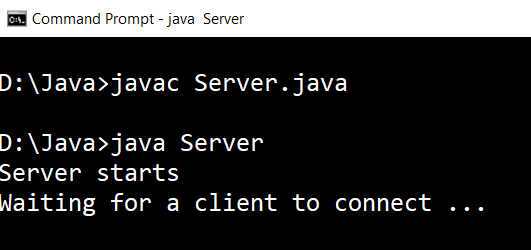
We see that after the execution, server waits for a client to connect. Now, execute the client-side program and observe how the server responds.
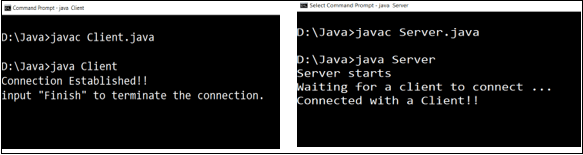
We see the server responds with the message Connected with a client!! Now, the connection has been established and we can send messages to the connected server. Observe the following snapshots.
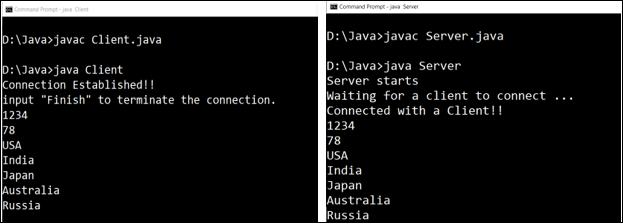
1234, 78, …, Russia are the inputs send from the client. Those input messages are displayed as it is on the server-side. To terminate the connection, we have to input the word Finish.
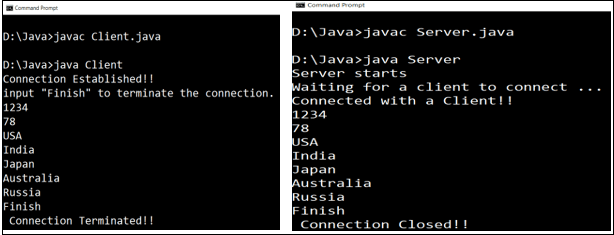
After the word “Finish” is input, the connection is closed on both the sides.
Examples of Client-Server Application
There are many uses of client-server applications. A few of them are mentioned below.
- Whenever we use ATMs to check the bank account balance or to make the money withdrawal, we actually participate in client-server communication. The ATMs are designed to interact with the bank servers. The programs written on the server side serve the request sent by us through ATMs. It is obvious that ATMs act as the clients, and the bank servers act as the servers.
- We frequently use web browsers like Opera, Mozilla Firefox, Google Chrome, etc., for net surfing. These browsers act as the clients that send a request to the servers. To which server the connection request is going to be sent by the browser is decided by the URL (Uniform Resource Locator), which is given by the user to the browser.
- Sending a mail is also an example of a client-server application. The client, who is willing to send an email, sends a connection request to the mail server. Then, the server requests authentication (password and email address) from the client. If the password and email address match, the email is sent to the destination address.