
if-else Program in Java
if-else Program in Java
The if-else program in Java controls which code snippet will execute. The if-else program is very basic and yet very important. Because it checks how well one can make a decision in the world of computer programming by controlling the flow of the program. There are following types of if-else statements in Java.
- if statements
- if-else statements
- if-else if-else statements
- Nested if-else statements
Let’s discuss in detail.
1. if statements
The syntax of the if statement is:
if(expression)
{
               // Body of if statement
}
//Statements after if block
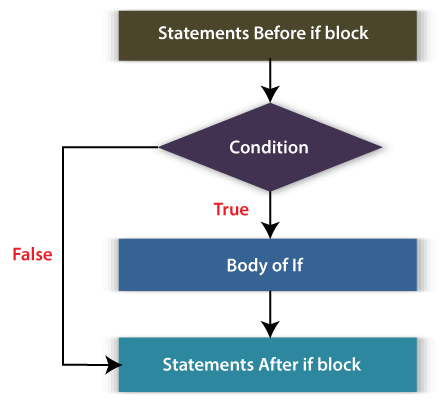
Here, the expression is of type Boolean. The body of the if statement is only executed when the expression is evaluated true. The following flow-diagram demonstrates the same.
We can have any number if statements in our code. Let’s take an example to understand it.
Suppose, we have to assign grades to students on the basis of the following rule:
- If a student gets a percentage equal to or above 80, grade A is awarded.
- If a student gets a percentage above or equal to 60 but less than 80, grade B is awarded.
- If the percentage is between 40 to 60, grade C is awarded.
- If the percentage is below 40, then the student is considered to fail, and a grade F is awarded.
We see that we are making some decisions to assign grades on the basis of the percentage obtained. Let’s implement the above rules in a Java program and make decisions using if statements.
Filename: IfElseExample.java
public class IfElseExample
{
public static void main(String argvs[])
{
               // Assigning percentage to the totalPercentage variable
               int totalPercentage = 75;
               // Awarding grades on the basis of percentage obtained.
               // The first if statement
               if(totalPercentage >= 80 )
               {
                   System.out.println("Grade A is awarded.");
               }
               // The second if statement
               if(totalPercentage < 80 && totalPercentage >= 60)
               {
                   System.out.println("Grade B is awarded.");
               }
               // The third if statement
               if(totalPercentage < 60 && totalPercentage >= 40 )
               {
                   System.out.println("Grade C is awarded.");
               }
               // The fourth if statement
               if(totalPercentage < 40)
               {
                   System.out.println("Grade F is awarded.");
               }
}
}
Output:
Grade B is awarded.
Explanation: First of all, the first if statement is evaluated (totalPercentage >= 80). The value of the variable totalPercentage is 75. Therefore, we get 75 >= 80, which is false. Hence, the body of the first if statement is not executed. The control then shifts to the second if statement. The expression is totalPercentage < 80 && totalPercentage >= 60. Thus, we get 75 < 80 && 75 >= 60, which is true and the body of the second if statement is executed. For the third and fourth if statements, the condition is evaluated false, and their body is not executed.
2. if-else statements
We know the body of if statement executes when its expression is evaluated true. But when the expression of the if statement is evaluated false then the body of the else statement (if an else statement is present) is executed. Let’s see the flow chart of ie-else statement.
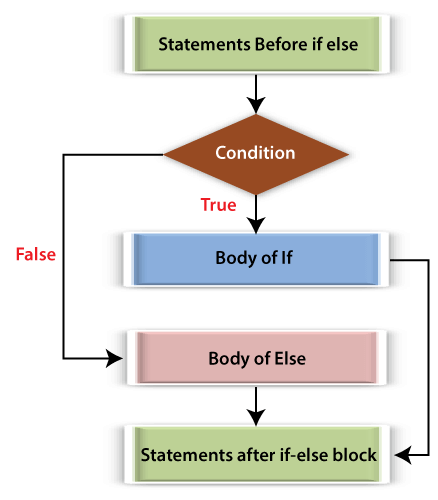
The else statements can never exist independently as its execution depends on the result of the preceding if expression. It will always come along-with an if statement. However, if statements can exist independently (see the above example). The syntax of an if-else statement is:
if(expression)
{
               // Body of if statement
}
else
{
               // Body of else statement
}
//Statements after if-else block
Let’s see an example of if-else statement.
Filename: IfElseExample1.java
public class IfElseExample1
{
public static void main(String argvs[])
{
               int no = -75; // Assigning a number to no variable
               if(no >= 0)
               {
                               System.out.println(no + " is a non-negative number.");
               }
               else // if the expression no >= 0 results false then this block will execute
               {
                               System.out.println(no + " is a negative number.");
               }
}
}
Output:
-75 is a negative number.
Explanation: The input number we have taken is -75, which is less than 0. Therefore, the expression of the if statement evaluates false. After that, the else part is executed. Note that the else part must come immediately after the if block. Otherwise, the compiler will understand that the else part is independent and therefore punishing the programmer by giving the compilation error. Consider the following program.
Filename: IfElseExample2.java
public class IfElseExample2
{
public static void main(String argvs[])
{
               int no = -75; // Assigning a number to no variable
               if(no >= 0)
               {
                               System.out.println(no + " is a non-negative number.");
               }
               // Statement between the if and else block
               System.out.println("Something between if and else");
               else // if the expression no >= 0 results false then this block will execute.
               {
                               System.out.println(no + " is a negative number.");
               }
}
}
Output:
/IfElseExample2.java:15: error: 'else' without 'if'
               else
               ^
1 error
3. if-else if-else statements
We can even create a ladder of if-else if-else statements. The ladder style of programming is better than the multiple if statements. The syntax of an if-else if-else statement is:
if(expression)
{
               // Body of if statement
}
else if
{
               // Body of else if statement
}
else if
{
               // Body of else if statement
}
else
{
               // Body of else statement
}
//Statements after the if-else ladder
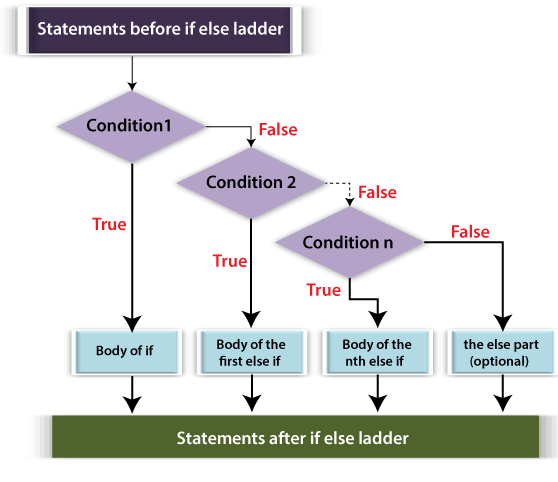
The flow diagram of if-else … if-else ladder is given below.
Let’s re-write the code of the first example where we had multiple if statements.
Filename: IfElseExample3.java
public class IfElseExample3
{
public static void main(String argvs[])
{
               // Assigning percentage to the totalPercentage variable
               int totalPercentage = 75;
               // Awarding grades on the basis of percentage obtained.
               // The first if statement
               if(totalPercentage >= 80 )
               {
                   System.out.println("Grade A is awarded.");
               }
               // The first else if statement
               else if(totalPercentage < 80 && totalPercentage >= 60)
               {
                   System.out.println("Grade B is awarded.");
               }
               // The second else if statement
               else if(totalPercentage < 60 && totalPercentage >= 40 )
               {
                   System.out.println("Grade C is awarded.");
               }
               // The else statement
               else
               {
                   System.out.println("Grade F is awarded.");
               }
}
}
Output:
Grade B is awarded.
Explanation: In the above program, we have four blocks. Each block deals with each of the given grade (A, B, C, F). As the input percentage is 75, the expression of the first if statement is false, and the control shifts to the first else-if statement. Here, the expression evaluates to true, and grade B is awarded. The rest of the code does not get executed. It is because the following statements start with else, and the else part is only executed when the preceding if expression is evaluated false, which is true in our case. The last else block only gets executed when the expressions of the if statement and all else if statements are evaluated false.
In the first example, we observe that no matter what happens, all the expressions of the if statements are evaluated, but, in this case, when we get a true value for any of the expressions, the rest of the code of the if-else ladder is skipped. Hence, reducing the execution time.
4. Nested if-else statements
In Java, it is possible to write if-else statements inside an if-else statement. It is called the nesting of if-else statements. The nesting can be done to any degree. Let’s write a Java program to find the smallest or largest among three numbers by using the nesting of if-else statements.
Filename: IfElseExample4.java
public class IfElseExample4
{
public static void main(String argvs[])
{
               int a = 75, b = 76, c = 77; // given numbers
               if(a > b)
               {
                               // Nesting if-else inside the if block
                               if(a > c)
                               {
                                              System.out.println(a + " is the largest number.");
                               }
                               else // this part will be executed when c >= a
                               {
                                              System.out.println(c + " is the largest number.");
                               }
               }
               else // Reaching here means a <= b
               {
                               // Nesting if-else inside the else block
                               if(b > c)
                               {
                                              System.out.println(b + " is the largest number.");
                               }
                               else // this part will be executed when c >= b
                               {
                                              System.out.println(c + " is the largest number.");
                               }
               }
}
}
Output:
77 is the largest number.
Explanation: First of all, we decide whether the if part of the code will be executed or the else part by choosing the largest among the two of the given three numbers. Then, we compare the result, largest among the two, from the third number and display the result accordingly.
By making little tweaks in the above code, we can achieve the smallest among the given three numbers.
Filename: IfElseExample5.java
public class IfElseExample5
{
public static void main(String argvs[])
{
               int a = 75, b = 76, c = 77; // given numbers
               if(a < b)
               {
                               // Nesting if-else inside the if block
                               if(a < c)
                               {
                                              System.out.println(a + " is the smallest number.");
                               }
                               else // this part will be executed when c <= a
                               {
                                              System.out.println(c + " is the smallest number.");
                               }
               }
               else // Reaching here means a >= b
               {
                               // Nesting if-else inside the else block
                               if(b < c)
                               {
                                              System.out.println(b + " is the smallest number.");
                               }
                               else // this part will be executed when c <= b
                               {
                                              System.out.println(c + " is the smallest number.");
                               }
               }
}
}
Output:
75 is the smallest number.
Explanation: Similar to the previous example, we are finding whether the if part of the code will be executed or the else part, to get the smallest among any two numbers out of given three. The nested part of the code makes the final decision on finding the smallest number.
Ternary Operator
Another way to perform the task done by an if-else statement is to use the ternary operator (? :). The syntax of the ternary operator is:
(expression) ? (statements) : (statements);
If the expression is evaluated true, the statements of the? part will be executed (similar to the if block). When the expression results in false, statements of the : part will be executed (similar to the else block). Thus, we can easily convert the code written in an if-else block using the ternary operator. Let’s convert a few of the above-written code.
Filename: IfElseExample6.java
public class IfElseExample6
{
public static void main(String argvs[])
{
int no = -75; // Assigning a number to no variable
String output; // it will be used for storing the result.
output = (no >= 0) ? (no + " is a non-negative number.") : (no + " is a negative number.");
System.out.println(output);
}
}
Output:
-75 is a negative number.
Explanation: Since the input number is negative, the : part got executed. The work of the above code is exactly the same if we compare it with the code written in the IfElseExample2.java file.
Similar to the nesting of the if-else block, we can also do the nesting of the ternary operator to any degree. Let’s re-write the program to find the largest among the three given numbers using the ternary operator.
Filename: IfElseExample7.java
public class IfElseExample7
{
public static void main(String argvs[])
{
               int a = 75, b = 76, c = 77; // given numbers
               int ans; // Final result will be stored in this variable
               //Nesting of the ternary operator
               ans = (a > b) ? ((a > c) ? a : c) : ((b > c) ? b : c);
               // Displaying the result
               System.out.println(ans + " is the largest number.");
}
}
Output:
77 is the largest number.
Difference Between if-else and the Ternary Operator
As far as execution time is concerned, if-else and the ternary operator takes almost the same amount of time. However, the ternary operator makes the program less verbose. See for yourself and compare the lines of code we have written to find the largest number using if-else and the ternary operator. But, the major drawback of the ternary operator is that it makes the code difficult to understand. Therefore, for the small if-else operations, ternary operators should be used. But for the lengthy stuff, we should stick with the if-else even though it is making the program wordy.
Another drawback of the ternary operator is that independent ? part (similar to if block) never exists. The ? will always come with the : (similar to the else). Thus, those programs that are only using if statements do not get converted easily using the ternary operator.