
Java Exception Propagation
Java Exception Propagation
When an exception is being thrown from the peak of the stack and not getting caught, it runs down the stack to the previous method, which is sitting immediately behind the peek method. If the exception is not caught, then again, it goes down to the next previous method, and the propagation continues till the exception is caught.The list of the methods that are present in the stack is called as call stack, whereas the process by which an exception propagates from peak to bottom of a stack is known as the Java Exception Propagation.
Propagation in Unchecked Exception
By default, Java facilitates the propagation of an unchecked exception in the call stack. Let’s confirm the same with the help of the following program.
FileName: ExceptionPropagationExample.java
 public class ExceptionPropagationExample
{
void m1()
{
    // Arithmetic Exception occurred which is an unchecked exception
    int i = 51 / 0;
    // propagating the exception to m2()
}
void m2()
{
    m1();
    // propagating the exception to m3()
}
void m3()
{
    try
    {
        m2();
    }
    // handling any raised exception in the catch block
    catch (Exception e)
    {
System.out.println("Handling exception in the catch block " + e);
    }
}
// main method
public static void main(String argvs[])
{
    // Creating an object of the ExceptionPropagationExample class
ExceptionPropagationExample  obj = new ExceptionPropagationExample ();
    // invoking the method m3()
    obj.m3();
System.out.println("The normal flow ...");
}
}
Output:

Explanation:The method m3() invokes the method m2(), which in turn invokes the method m1(). In the method m1(), an unchecked exception is raised. The Java runtime system tries to tackle the exception. However, the system finds no code to handle the exception in m1(). Therefore, it goes down the stack and looks for the exception handling code in m2(). However, this time also, the search goes in vain, and the search continues in the bottom last method present in the stack, and this time the code handling the exception is found, which handles the raised exception of the method m1(). The call stack is described in the following diagram.
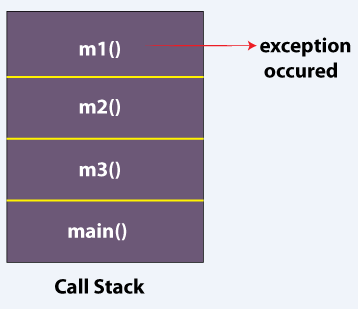
Propagation inchecked Exception
In the checked exception, the propagation of exception does not occur by default. Observe the following program.
FileName: ExceptionPropagationExample1.java
 // import statement
import java.io.IOException;
public class ExceptionPropagationExample1
{
// a method that throws a checked exception
void m1()
{
    // throwing the IOException, which is a checked exception
    throw new IOException("device error");
    // propagating the exception to m2()
}
void m2()
{
    m1();
    // propagating the exception to m3()
}
void m3()
{
    try
    {
        m2();
    }
    // handling any raised exception in the catch block
    catch (Exception e)
    {
System.out.println("Handling exception in the catch block " + e);
    }
}
// main method
public static void main(String argvs[])
{
    // Creating an object of the ExceptionPropagationExample1 class
    ExceptionPropagationExample1  obj = new ExceptionPropagationExample1 ();
    // invoking the method m3()
    obj.m3();
System.out.println("The normal flow ...");
}
}
Output:

Explanation:The output confirms that the program has not terminated normally. It is because the checked exception raised in the method m1() has not been handled. We also see that m3() is willing to handle the exception using the try-catch block. However, the IOException raised in the m1() method never gets propagated to the method m3(). Thus, we see that the checked exception does not propagate on its own.
Forcing the Propagation in the Checked Exception
There can be a scenario when one needs to propagate the checked exception. To achieve the same, one needs to use the throws keyword. The following program illustrates the same.
FileName: ExceptionPropagationExample2.java
 // import statement
import java.io.IOException;
public class ExceptionPropagationExample2
{
// a method that throws a checked exception
// and propagates the exception handling
// responsibility to the caller method
void m1() throws IOException
{
    // throwing the IOException, which is a checked exception
    throw new IOException("device error");
    // propagating the exception to m2()
}
// the method m2() also propagates the exception handling
// responsibility to the caller method
void m2() throws IOException
{
    m1();
    // propagating the exception to m3()
}
void m3()
{
    try
    {
        m2();
    }
    // handling any raised exception in the catch block
    catch (Exception e)
    {
System.out.println("Handling exception in the catch block " + e);
    }
}
// main method
public static void main(String argvs[])
{
    // Creating an object of the ExceptionPropagationExample2 class
    ExceptionPropagationExample2  obj = new ExceptionPropagationExample2 ();
    // invoking the method m3()
    obj.m3();
System.out.println("The program ended with the normal flow ...");
}
}
Output:

Explanation:We observer that the program terminated normally. It happened because of the throws keyword. The throws keyword provides the path to the raised exception from the method m1() to m3() via method m2().