
×

JRE (Java Runtime Environment)

JRE is an installation package that provides an environment to run the Java program on any Operating System. It does not deal with the development process of any application. It is a part of the Java Development Kit (JDK). It is a software distribution that has Java Class Library, specific tools, and a stand-alone JVM.
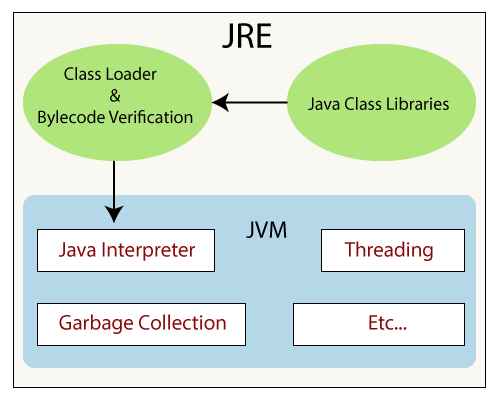
JRE

JRE is the most common environment available on devices to run Java programs. The source codes are compiled and translated to Java bytecode. If we want to run this bytecode on any Operating System, we just need a specific JRE for that Operating System that is available freely on the Oracle website. The JRE fetch classes, verify access to memory, and retrieves the system resources that are required by the created software.

Java Runtime Environment works as a layer on the top of the OS and also includes:

  • It includes the technologies that are used for the deployment, such as Java Web Start and Java plug-in.
  • JRE contains the toolkits for user interface like Java 2D, AWT (Abstract Window Toolkit), Swing, Image I/O, print service, sound, etc.…
  • It provides integration libraries such as JDBC (Java Database Connectivity) and JNDI (Java Naming and Directory Interface), IDL (Interface Definition Language), RMI (Remote Method Invocation), etc.
  • It contains lang, util, zip, Java Archive (JAR), instrument, reflection, Collections, Concurrency Utilities, management, versioning, Logging, Preferences API, etc.…  
  • Other base libraries such as input/output (I/O), extension mechanism, Beans, JMX (Java Management Extension), Java Native Interface, and JAX-WS (Java for XML Processing).

Working of JRE

Once we write any source code, we have to save it with the .java extension. Next we compile our program using the “javac” command in command prompt (no need in any IDE). It translates the code to the bytecode which is platform-independent. When we compile our program it will generate a .class which has the bytecode for the equivalent java file. And that bytecode is executed on any platform having the JRE. The workflow is explained below.

  • ClassLoader- It loads the various classes dynamically in the JVM (Java Virtual Machine), which are essential for executing the program. After JVM started following three class loader are used:
    • Bootstrap class loader
    • Extension class loader
    • System class loader
  • Byte code verifier- It verifies the bytecode during the run time so that the code doesn’t make any disturbance for the interpreter. The codes are interpreted, only if it passes the tests of the bytecode verifier that check the formatting and for illegal code.
  • Interpreter- When class loaded and code gets verified, then it reads the assembly code line by line and process the following two functions:
  • It executes the Byte Code.
  • Make appropriate calls to the integrated hardware.

Related Topics

Java Thread Lifecycle: States and Stages

Multithreading Multithreading is one of the most important features in object-oriented programming, and this multithreading can be implemented by various object-oriented programming languages like Java, Python, and C++. A multithreaded process...

7 minutes read.

Java Integer equals() method

The equals() method of Integer class compares the given object to the specified object. Syntax public boolean equals(Object obj) Parameters The parameter ‘obj’ represents the object to be compared with. Overrides The equals() method overrides equals...

1 minute read.

Star Program in Java

By solving the patterns, we can develop our coding skills and logical thinking. Mostly each pattern program uses two or more loops. Loops' number depends on the complexity of logic....

3 minutes read.

Best Java Libraries

One of the most widely used programming languages is Java. Java has a large number of libraries, including the standard Java library that includes libraries such as java.lang, java.util, and...

7 minutes read.

Static() Function in Java

The static keyword in Java is suitable for variables, constants, and functions. The static keyword is mainly used to control storage so that it may be appropriately used. We shall...

3 minutes read.

Java Custom Exception

Java Custom Exception Java language facilitates us to create our own exceptions. The class intended to throw the Custom Exception has to be derived from the Java Exceptionor RuntimeExceptionclass. The Java...

4 minutes read.

Bottom view of a binary tree in Java

The lowest nodes in their horizontal distance are present and referred to as the bottom view of a binary tree. The horizontal distance between the nodes of a binary tree...

4 minutes read.

Java Integer toUnsignedLong() method

The toUnsignedLong() method of Java Integer class returns a long value by simply converting the given argument to long after an unsigned conversion. Syntax public static long toUnsignedLong (int  x) Parameters The parameter ‘x’...

1 minute read.

Model Class in Java

In this section, we will be acknowledged about the model class in Java, its purpose and its uses. Also, we will learn how is this created and leveraged in java. Model...

4 minutes read.

Java Exception Propagation

Java Exception Propagation When an exception is being thrown from the peak of the stack and not getting caught, it runs down the stack to the previous method, which is sitting...

3 minutes read.

Java Static Keyword

It can be either said that static declares the value to be the same, not only in the instance of a class but also as the whole. To declare a variable...

6 minutes read.

Copy data/content from one file to another in java

In this article, you will be acknowledged about how to copy data or content from one file to another file. Also, you will be acknowledged about the classes and methods...

3 minutes read.

Java RMI

What is RMI in Java? A framework for developing distributed Java applications is provided by the RMI (Remote Method Invocation) API. An object can call methods on an object running in...

4 minutes read.

How to Convert Octal to Decimal in Java

How to Convert Octal to Decimal in Java There are two methods to convert Octal to Decimal: Using parseInt() method Using user-defined logic Using Integer.parseInt() method The Integer.parseInt() method is a static method...

2 minutes read.

Replace character in string Java

Characters in Java In the package of Java language, there is a container class called Character. A single field of type char is contained in a Character object. For manipulating characters,...

4 minutes read.

Java While Loop

A while loop is used to repeatedly execute a set of statements as long as its condition evaluates to true. This loop checks the condition before it starts the execution...

1 minute read.

Converting Roman to Integer Numerals in java

In this article, you will be acknowledged about the process of conversion of roman numbers to integers in java. The most important approaches are discussed and also the implementation of...

3 minutes read.

Constructor in Java with Example

Java Constructor  The constructor is used for object initialization. It's a block of code that initializes a newly created object. It contains a collection of statements that are executed at the...

5 minutes read.

Java copy constructor Example

Java provides the copy constructor much like C++ does. However, it is produced by default in C++. While we define our own copy constructor in Java. With an example, we will...

3 minutes read.

Java File Input Stream

Java makes use of stream ideas to speed up input and output processes. All packages of input and output streams are contained in java.io.package. Stream: A stream is nothing more...

5 minutes read.