
Multithreading in Java
Multithreading is a specialized form of multitasking. It is responsible for executing more than one task at a time of a single program, and each task is a separate thread. A program that is multithreaded consists of two or more parts that can run concurrently, and each part can handle a different task. The multithreading is a technique for making optimal or better use of the available resources, especially when our computer has multiple CPUs. Multi-threading enhances the idea of multitasking into applications where we can distribute specific operations within a single application into individual threads. The threads can run in parallel in a single process. The OS distributes processing time not only among different program but also among each thread within a program.
It enables us to write in a way where multiple activities can proceed concurrently in the same program.
The main important application areas of multithreading are
- To develop multimedia graphics.
- To develop animations.
- To develop video games.
- To develop web server and applications server setup.
Note: when compared with the old languages developing multithreaded applications in java is very easy because java provides inbuilt support for multithreading by having a rich API.
What are the types of Thread?
Two types of Threads that are created in the system.
- Kernel Level Threads.
- User Level Threads.
Kernel Level Threads
The concurrency has become cheaper(fast) because a process has multiple threads that are executed its multiple jobs at a time. As such, the OS manages these threads and processes. The kernel implements all the thread operations, and the OS schedules all threads in the kernel. The OS managed threads are called kernel-level threads or light- weight processes.
A kernel thread is a schedulable entity, which means that the system scheduler(kernel) handles kernel threads. These threads are strongly implementation-dependent and known by the system scheduler.
A kernel thread is a kernel entity, such as processes and interrupts handlers; it is the entity controlled by the system scheduler. A kernel thread runs within a process but can be referenced by another thread in the system. There is no direct control over these threads by the programmer. The libraries provide user threads for facilitating the writing of portable programs.
The management of the threads is performed by the kernel because it is having the information of the threads. There is no need for a runtime system in the case of kernel management. The kernel contains a thread table that keeps track of the threads in the system rather than it has the thread table in every process. Besides, the kernel also has the traditional process table for keeping the processes track. The creation and management of the threads are by the system calls of the kernel.
The context information for the process, as well as the process threads, is all managed by the kernel. Because of this, kernel-level threads are slower than user-level threads.
Kernel-Level Threads advantages:
- The scheduler decides to give more time to a process consisting of a large number of threads than process having a small number of threads because the kernel has full knowledge of all threads.
- On the different processors in kernel-level threads, multiple threads of the same process can be scheduled.
- Multithreaded environments can also be applied to the kernel routines.
- Kernel-level threads are considered better, especially for applications that frequently block.
- The kernel can schedule the rest of the threads of the same process if a kernel-level thread is blocked.
kernel-level Threads disadvantages:
- The Kernel-level threads are inefficient and slower to create as well as manage as compared to user-level threads. The operations of the kernel threads are hundreds of times slower than that of user-level threads.
- There is significant overhead and increased kernel complexity because it manages and schedules threads as well as processes and also maintains a full thread control block (TCB) for each thread to maintain information about threads.
User Level Threads
Kernel-Level threads make concurrency much cheaper because much less state to allocate and initialize. However, for fine-grained concurrency, kernel-level threads still suffer from too much overhead. Thread operations still require system calls. Ideally, we require thread operations to be as fast as possible as procedure calls. Kernel-Level threads have to be general to support the needs of all programmers, languages, runtimes, etc. For such fine-grained concurrency, we need still cheaper threads which perform operations as fast as possible.
So, to make threads cheap and fast, they need to be implemented at the user level. User-level threads are small and much a hundred times faster than kernel-level threads. The run-time system (user-level library) manages the User-Level threads entirely. Creating a new thread, switching between threads, and synchronizing threads are done via a procedure call, i.e., there is no involvement of kernel. The kernel does not know about user-level threads and only manages(handle) them in last (i.e., to execute them) as if they were single-threaded processes.
Within a program to handle multiple control flow, a user thread is an entity used by programmers. The API for handling user threads is provided by the thread library. A user thread exists only within a process; User thread in process A cannot refer to user thread in process B. The library uses a proprietary interface to handle kernel threads to execute user threads. The user threads API is a part of a POSIX-standards complaint portable-programming model, unlike the kernel threads interface. Thus, a multithreaded program created on an AIX system can be easily ported to other systems. On the other systems, User threads are called threads, and the lightweight process refers to kernel threads.
User-Level Threads advantages:
- On an operating system, the user-level threads can be implemented.
- Each thread is represented by a PC, registers, stack, and a small control block, all stored in the user process address space.
- A thread creation, threads switching, and thread- synchronization can all be done without the intervention of the kernel.
- To create the User-level threads are easier and faster than kernel-level threads.
- On the operating system, User-level threads can be run.
- For thread switching in user-level threads, there are no kernel-mode privileges required.
User-Level Threads disadvantages:
- As the User-Level threads are not well integrated with the OS, so threads are invisible to it. Due to this, OS performs poor decisions like process scheduling with idle threads, process blocking whose thread initiated an I/O even though the process has the threads that can run and un-scheduling a process with a thread holding a lock.
- There is a lack of coordination(communication) between the operating system kernel and threads. As a result, the whole process gets a one-time slice irrespective of whether the process has one thread or 1000 threads in it.
- Non-blocking systems call required by the User-level threads. The entire process will be blocked in the kernel else, even if there are runnable threads left in the processes.
- Multithreaded applications in user-level threads cannot use multiprocessing to their advantage.
- The entire process is blocked if one user-level thread performs blocking operation.
What is the difference between User-Level and Kernel-Level thread?
| User-Level Thread | Kernel-Level Thread |
| These threads are faster to manage and create. | These threads are slower to create and manage. |
| Context switch time is less. | Context switch time is more. |
| If one user-level thread performs blocking operation, then the entire process will be blocked. | If one kernel thread performs blocking operation, then another thread can continue execution. |
| The operating system does not recognize user-level threads. | The operating system recognizes kernel threads. |
| Multi-threaded applications cannot take advantage of multiprocessing. | Kernel routines themselves can be multithreaded. |
| The user-level thread can run on any operating system. | Kernel-level thread is not generic and relates to a specific operating system. |
| The user thread utilizes a thread library at the user level. | The operating system supports the creation of kernel threads. |
What are the Multithreading models?
To increase multiprogramming or increase the efficiency of the systems, we are using multithreading models.
There are three types of multithreading models:
Many-to-one
Many user-level threads are mapped to one single kernel thread. One kernel thread is responsible for handling the operation of the many user-level threads.
Thread management is done in user-space that means the creation of thread and managing the thread is done in the user-space.
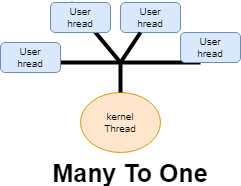
If anyone user thread makes blocking calls or is blocked due to some reason so the entire operation is blocked, and the kernel thread also gets blocked because of that one user thread. For example, while executing, a process a thread ends up reading some invalid memory locations, the thread makes a blocking call, and kernel thread also gets blocked due to this user thread.
One-to-one
For every user thread, there is a kernel thread. Whatever user thread is created for each user thread, a kernel will also create a kernel thread, so each user thread is mapped to a kernel thread.
It provides more concurrency. If one thread makes a blocking call, the remaining another thread is allowed to run the application or the process for completing the task with the remaining kernel threads.
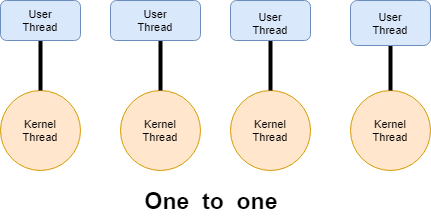
This model increases the concurrency, but it increases the overhead to the operating system for creating the corresponding kernels for the corresponding user threads. For managing the users’ threads, the operating system has to create many kernel threads. So one-to-one overloads or burdens the operating system by creating many kernel threads for each user threads. Creating a kernel thread may not be possible after a point as managing these kernel threads will again be the overhead for the operating system.
Many-to-Many
It multiplexes many user-level threads to a smaller or equal number of kernel threads. One kernel thread will be associated with one or more user threads. In this model, even if one or more user threads are blocked, the other kernel threads will manage the user threads and executes the task or continuing executing the task.
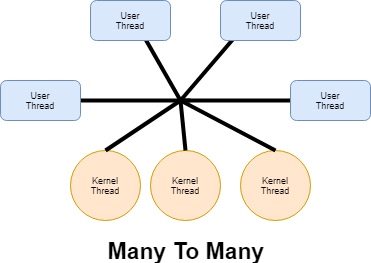
The user threads are multiplexed with the kernel thread, so one kernel thread may be handling more than one user thread. In that case, even if one user thread makes a blocking call, the other user threads may be handled over the other kernel threads, and the execution continues to run.
So, here scheduling of threads is done so the kernel is scheduled a thread for execution, so if one user thread makes a blocking call to one kernel thread so the remaining user threads will be scheduled for the other kernel threads. The Many-to-Many model provides more concurrency as compared to the previous two models, and it is considered the best model for multithreading.