×

Calculator Program in Python

Simple Calculator Program in Python

This example helps to learn how to create a simple calculator program to perform operations like addition, subtraction, multiplication, and division.

Source Code

The following is the source code to perform simple calculations. In this program, we will perform addition, subtraction, multiplication, and division operations.

Function to perform addition operation
 def addition(num1, num2):                                    
     return num1 + number2                                    
 Function to perform subtraction operation
 def subtraction(num1, num2):                                
     return num1 - num2                                    
 Function to perform multiplication operation
 def multiplication(num1, num2):                                
     return num1 * num2                                    
 Function to perform division operation
 def division(num1, num2):                                    
     return num1 / num2                                    
 Choose operation
 print("Select desired operation: \n"                                
       "1.Add\n"                                            
       "2.Substraction\n"                                        
       "3.Multiplication\n"                                        
       "4.Division")                                            
while True:
# Take input from the user
operation = input("Choose operation(1/2/3/4): ")
# Check if operation is one of the four options if operation in ('1', '2', '3', '4'):    
number1 = float(input("Enter first number: "))     
number2 = float(input("Enter second number: "))   
  if operation == '1':     
#Print sum of two number        
 print(number1, "+", number2, "=", addition(number1, number2))     
elif operation == '2':     
# Print subtraction of two number         
print(number1, "-", number2, "=", subtraction(number1, number2))     
elif operation == '3':     
# Print multiplication of two number         
print(number1, "*", number2, "=", multiplication(number1, number2))     
elif operation == '4':     
# Print division of two number         
print(number1, "/", number2, "=", division(number1, number2))     
break else:     
print("Wrong operation selected")

Output

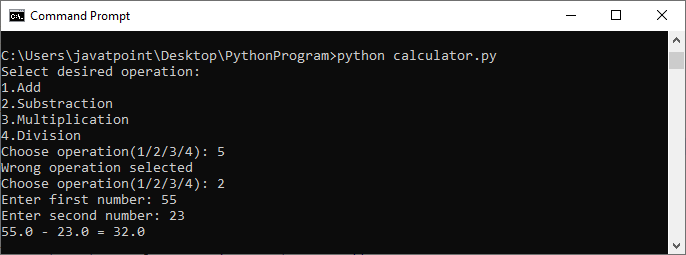
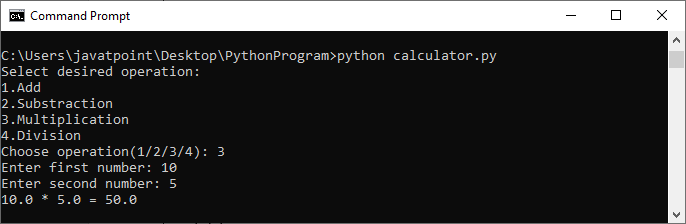
Here is the output:

CASE 1:
Calculator Program in Python

CASE 2:

Calculator Program in Python

Explanation:

Here, a user asks to enter two numbers. These numbers are stored in two different variables. Then select the desired option to perform operations. After this, the function will return the selected operation that represents different arithmetic operations. After taking input, we check the selected operation using if...elif...else statements. If the operation is valid, the value will be evaluated based on the respective operations, and finally, print the result. If we select any other input, it will print the wrong operation, and the loop continues until a valid option is selected.


Related Topics

BOTTLE Python Web Framework

The Bottle is a lightweight WSGI micro web framework for python. It acts like a thin wrapper around a web server where it is distributed as a single file module...

4 minutes read.

How To Print Colored Text in Python

Changing the colour of certain parts of a string when printing the output of a Python programme to the terminal may make it easier to read. We can approach this...

3 minutes read.

Python List

The list is one of the most versatile, mutable data-structures in Python. It can store heterogeneous data or different types of data. The list contains comma-separated values (item) within the square brackets. Creating...

4 minutes read.

GUI to extract lyrics from a song Using Tkinter in Python

GUI: A graphical interface (GUI) is a user interface that lets users interact with electronic devices like computers and smartphones by using menus, icons, and other visual cues (graphics). In contrast...

4 minutes read.

Python Program to Print Sum of all Elements in an Array

Python program to print sum of all elements in an array A set of objects stored in contiguous memory locations is referred to as an array. The concept is to keep...

2 minutes read.

How to write a program in python?

How to write a program in python? In python, writing programs is not a big deal. What we need to work on is our logic and some basic rules of this...

4 minutes read.

How to print in the same line in Python?

How to print in the same line in python By default, the print function in Python takes us to the next line and prints the desired statement in the output. In this...

5 minutes read.

Python MySQL Update Operation

Python MySQL Update Operation: In this part of tutorial, we will learn that how can we update a table present in SQL database through our Python program. As like SQL,...

4 minutes read.

Python Empty Tuple

How to Create an Empty Tuple Tuple A tuple is a data structure used to store non-homogeneous data elements. These non-homogeneous data elements consist of integer data type, character data type, String...

3 minutes read.

How to create a dictionary in Python?

How to create a dictionary in python Dictionary is a data structure in Python that represents our data in the form of keys and values. Each value in a dictionary can be...

5 minutes read.

Python Queue

Python Queue There are various day to day activities where we find ourselves engaged with queues. Whether it is waiting in toll tax lane or standing on the billing counter for...

7 minutes read.

Python 2.7 data structures

The rundown information type has a few additional techniques. Here is every one of the strategies for listing objects: list.append(x): Add a thing to the furthest limit of the rundown; comparable...

9 minutes read.

Importing Numpy in Pycharm

Numpy : Numpy is one of the important library in python. The abbreviation of numpy is “Numerical python” or “Numeric Python”. This library is mainly used to access arrays. Numpy was created...

5 minutes read.

CatPlot in Python

Python Seaborn Library Seaborn is a superb Python tool for displaying graphical statistics graphing. Seaborn provides different color schemes and attractive default styles to facilitate the creation of various statistics charts...

8 minutes read.

Python String replace() method

Python String replace() method The string.replace() method in Python returns a copy of the string with all occurrences of substring old replaced by new. Syntax replace(old, new[, count]) Parameter old: This parameter represents a substring you want to...

2 minutes read.

os.stat() method in Python

In Python, the os module provides the capacity to interact with the operating system. The operating system comes under the Python module. In this module, Python provides a specific feature...

3 minutes read.

Python Parse Text File

We will learn different ways of read text records in Python. TL;DR The accompanying tells the best way to read all texts from the readme.txt document into a string: with open('readme.txt') as f: lines...

5 minutes read.

Python System Requirements

Introduction As we know, Python is a popular programming language usually used to write scripts for operating systems. It’s handy adequate for utilizing in web development and application design. In this article,...

2 minutes read.

Python Bubble Sort

Bubble sort is one of the techniques used to sort the elements in lists in a certain order, either in ascending or descending order. It is called Bubble sort because...

4 minutes read.

Python Recursion

Recursion is one of the most interesting yet important concepts of any programming language. If you want to be a good programmer or data scientist, then you should better have...

4 minutes read.