
How to Add Elements in List in Python?
How to Add Elements in List in Python
We all are aware of the wide spectrum of applications where the data structures of Python are used. Be it lists, tuples, or dictionaries somewhere or the other, three of them are contributing significantly to accomplish our tasks.
Here, first, we will have a glance at a brief introduction of lists and then try to understand how we can add elements in lists with the help of examples-
So, let’s begin-
The list is a data structure in Python that can hold values of different data types. The values are enclosed in square brackets [ ]. Lists are mutable which means their values can be changed. An example of a list is-
list1 = [23,’Apple’,3.5,’Mangoes’]
The values present in a list can be accessed through indexing. For instance, list1[1] will return the value ‘Apple’.
In this article, we will discuss how we can add elements to list in Python using the following methods-
- Insert()
- Append()
- Extend()
- List Concatenation
So, let’s have a look at the first method-
INSERT()
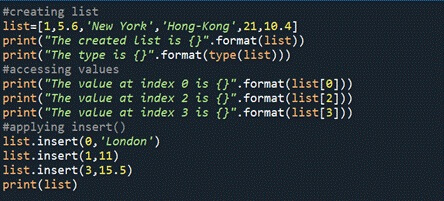
When we are using the insert() method to add elements to our list, we must specify the position that is the index where we would like to add the element and the value of our element.
The following program illustrates the same-
 #creating list
 list=[1,5.6,'New York','Hong-Kong',21,10.4]
 print("The created list is {}".format(list))
 print("The type is {}".format(type(list)))
 #accessing values
 print("The value at index 0 is {}".format(list[0]))
 print("The value at index 2 is {}".format(list[2]))
 print("The value at index 3 is {}".format(list[3]))
 #applying insert()
 list.insert(0,'London')
 list.insert(1,11)
 list.insert(3,15.5)
 print(list)
INPUT-
OUTPUT-
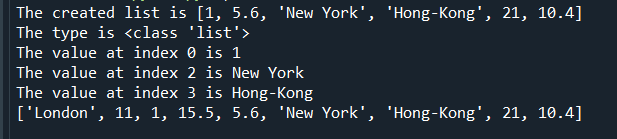
In the output, we can observe the following things-
- It prints the list that we provided.
- Then the data type is printed with the help of type().
- Next, we have accessed the values present at the 0, 2nd, and 3rd index.
- And finally, the inserted values are displayed, we can see that the values are present at the specified positions.
The second method which we will discuss is append()-
APPEND()
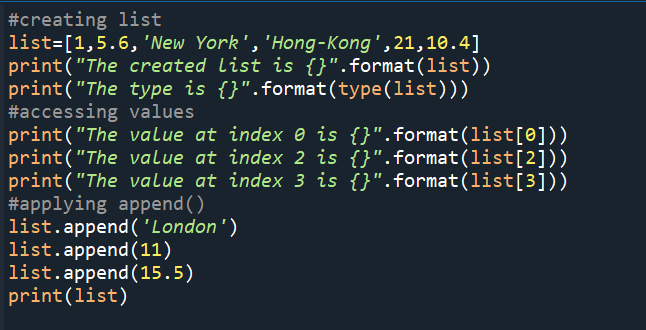
When we are using the append() method to add elements to our list, we have to specify only the value of our element since it adds the value at the end of our list.
Following program illustrates the same-
 #creating list
 list=[1,5.6,'New York','Hong-Kong',21,10.4]
 print("The created list is {}".format(list))
 print("The type is {}".format(type(list)))
 #accessing values
 print("The value at index 0 is {}".format(list[0]))
 print("The value at index 2 is {}".format(list[2]))
 print("The value at index 3 is {}".format(list[3]))
 #applying append()
 list.append('London')
 list.append(11)
 list.append(15.5)
 print(list)
INPUT-
OUTPUT-
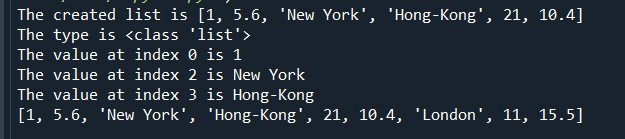
In the output, we can observe the following things-
- It prints the list that we provided.
- Then the data type is printed with the help of type().
- Next, we have accessed the values present at the 0, 2nd, and 3rd index.
- And finally, the appended values are displayed which are ‘London’, 11 and 15.5
The third method which we will discuss is extend().
EXTEND()
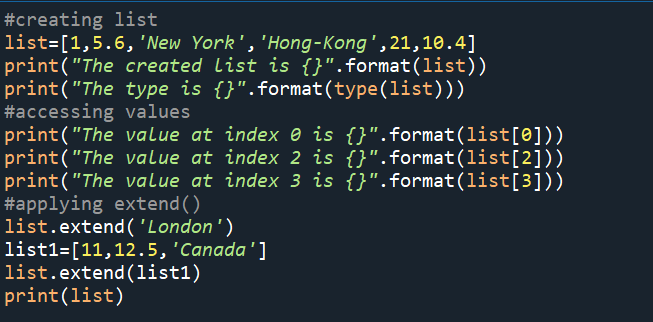
When we are using the extend() method to add elements to our list, we have to specify the value of our element since it adds the value at the end of our list and iterates over its argument.
The following program illustrates the same-
 #creating list
 list=[1,5.6,'New York','Hong-Kong',21,10.4]
 print("The created list is {}".format(list))
 print("The type is {}".format(type(list)))
 #accessing values
 print("The value at index 0 is {}".format(list[0]))
 print("The value at index 2 is {}".format(list[2]))
 print("The value at index 3 is {}".format(list[3]))
 #applying extend()
 list.extend('London')
 list1=[11,12.5,'Canada']
 list.extend(list1)
 print(list)
INPUT-
OUTPUT-
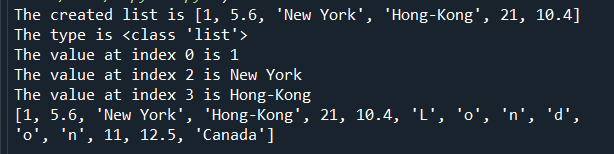
In the output, we can observe the following things-
- It prints the list that we provided.
- Then the data type is printed with the help of type().
- Next, we have accessed the values present at the 0, 2nd, and 3rd index.
- And finally, we can see when we pass the string ‘London’ as an argument in extend(), it takes each character of the string as an element and that’s how the list is extended but when we pass a list in it, it simply adds the element of the parameter list at the end.
The last method which we will discuss is adding elements in the list using concatenation-
List Concatenation
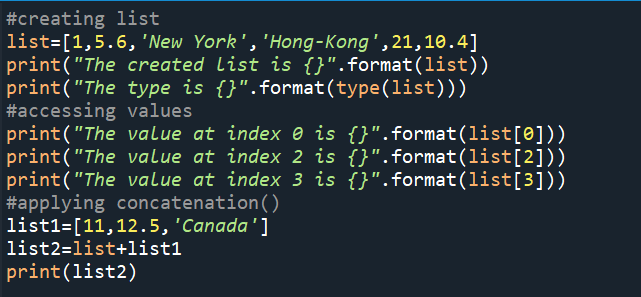
When we are using list concatenation to add elements in our list, we create two lists and then concatenate or merge them using the '+' operator to obtain a single list that contains elements of both.
The following program illustrates the same-
 #creating list
 list=[1,5.6,'New York','Hong-Kong',21,10.4]
 print("The created list is {}".format(list))
 print("The type is {}".format(type(list)))
 #accessing values
 print("The value at index 0 is {}".format(list[0]))
 print("The value at index 2 is {}".format(list[2]))
 print("The value at index 3 is {}".format(list[3]))
 #applying concatenation()
 list1=[11,12.5,'Canada']
 list2=list+list1
 print(list2)
INPUT-
OUTPUT-
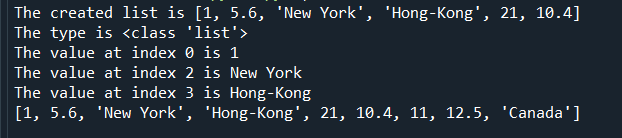
In the output, we can observe the following things-
- It prints the list that we provided.
- Then the data type is printed with the help of type().
- Next, we have accessed the values present at the 0, 2nd, and 3rd index.
- And we can see when we print list2, it is a list that contains elements of both list and list1.
So, in this article, we discussed the various methods of adding elements to a list in Python.