×

How to Install Matplotlib in Python?

How to Install Matplotlib in Python

The speed at which the enormous amount of data is generating has become a huge aid in understanding what's going on currently in the market. The people who are associated with industries now have a better idea of how they can flourish their business. The tech giants are now able to make much wiser decisions on investments because they know exactly what's in trend. Let's see what is that one thing that is making everything possible? The answer is data.

Once the data is collected and the useful features are extracted comes the most critical part which is visualization.

Matplotlib is a vast and interesting library for people who are enthusiastic about inferring results from the data.

There are scatter plots, histograms, box plots, and a lot more which makes it easy for us to comprehend.

In this article, we will discuss how to install matplotlib in Python.

  1. Checking the version of Python installed in our PCs, we have discussed this already in the previous articles but let’s talk about this again-

There are two ways to check the version of Python in Windows-

  • Using Powershell
  • Using Command Prompt

Using Powershell

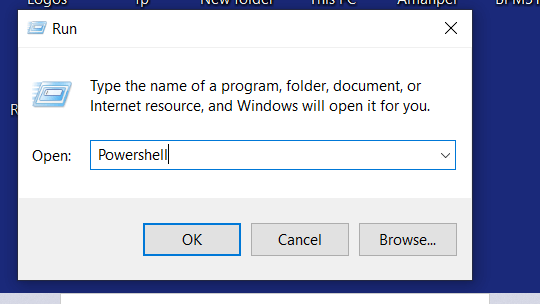
  1. Click ‘Win+R’ or type ‘Run’ on the taskbar’s search pane.
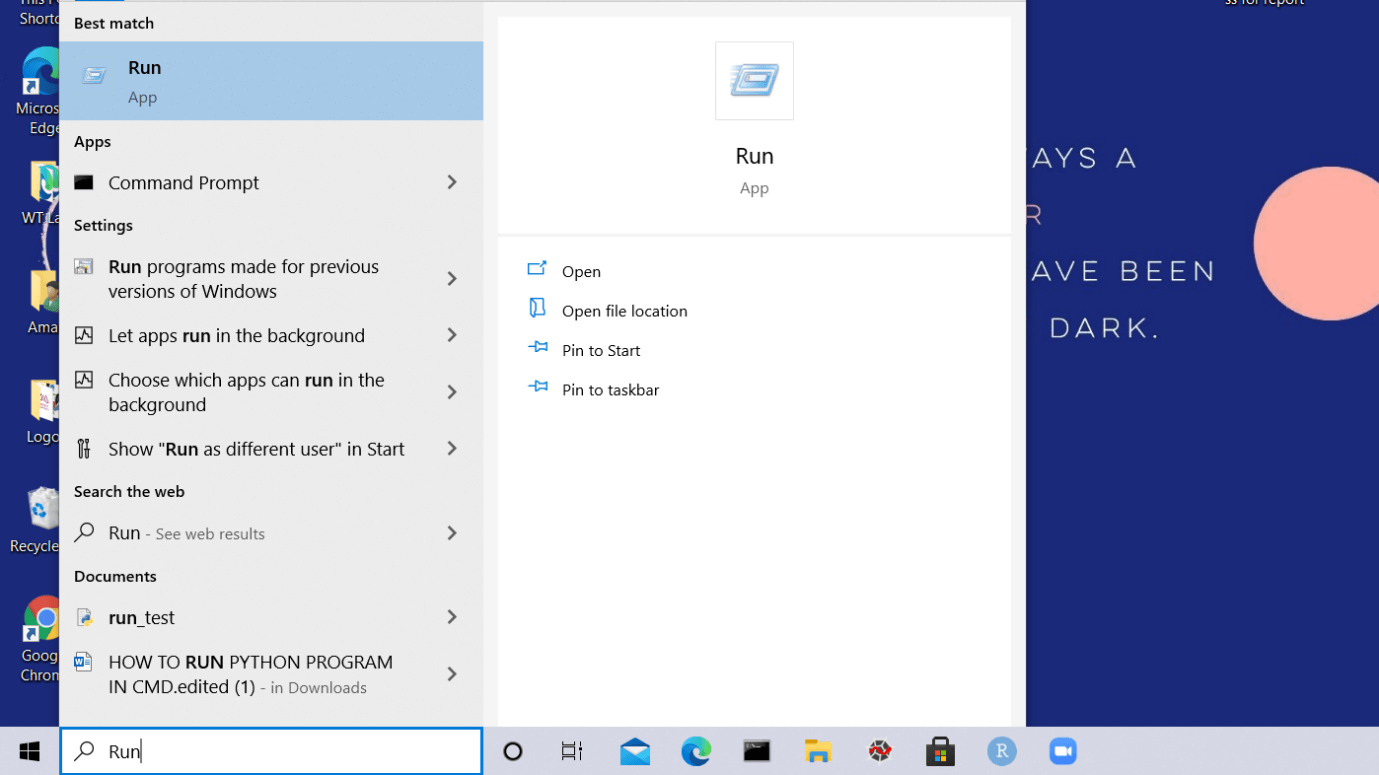
How to Install Matplotlib in Python
  1. Type ‘Powershell.’
How to Install Matplotlib in Python
  1. A window will appear on your screen named ‘Windows Powershell’
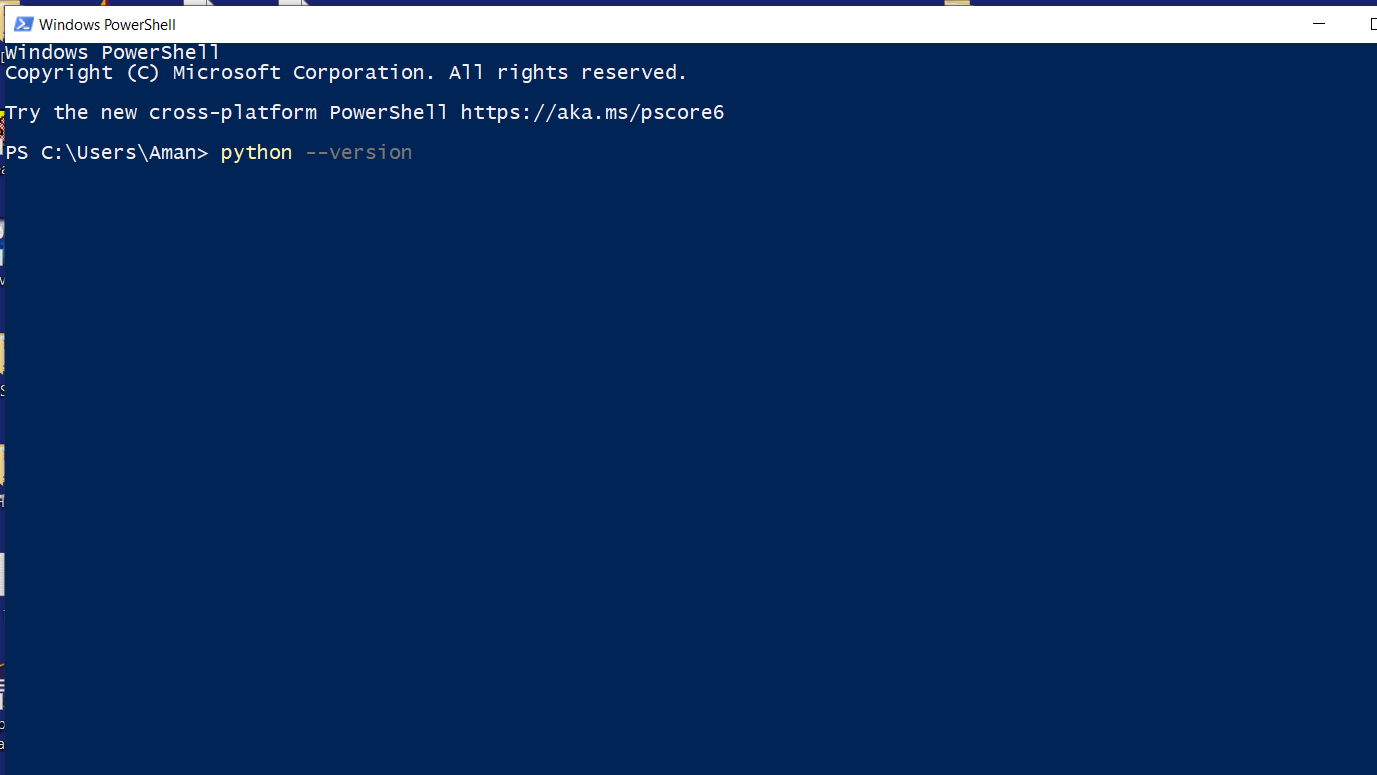
How to Install Matplotlib in Python
  1. Click on ‘Enter’
  2. Type python –version and click on ‘Enter’
  3. The version would be displayed in the next line.
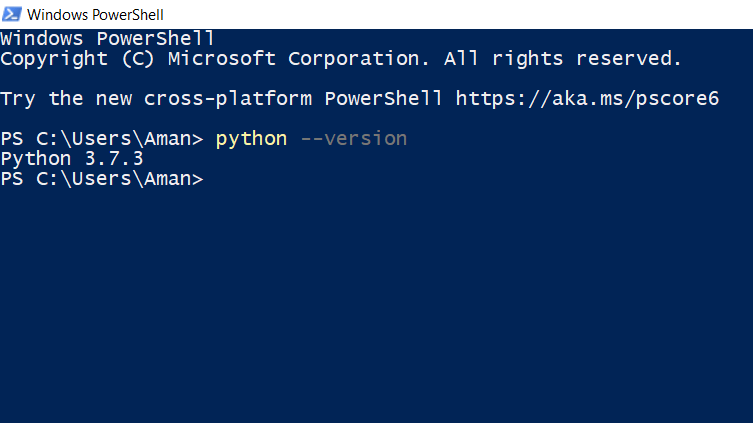
How to Install Matplotlib in Python

Using Command Prompt

How to Install Matplotlib in Python

Type 'Command Prompt' on the taskbar's search pane and you'll see its icon. Click on it to open the command prompt.

Also, you can directly click on its icon if it is pinned on the taskbar.

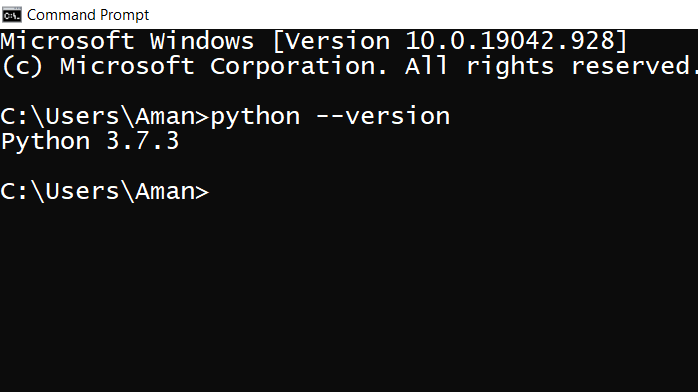
  1. Once the ‘Command Prompt’ screen is visible on your screen.
  2. Type python –version and click on ‘Enter’.
  3. The version installed in your system would be displayed in the next line.

Checking the version of Python in Linux

In Linux, we have a shell where we type our commands that are interpreted and tell the operating system about what the user wants.

The steps to check the version of Python in Linux is-

  • Start your system and switch on to the Linux operating system (you might find it with the name Ubuntu).
  • Once the desktop screen of Linux appears, click on ‘Terminal’ to open it.
  • In the terminal window, type python –version and click on ‘Enter’.

In the next line, it will display the current version of python installed in your system.

  1. The next step is to use the pip command to install NumPy in our system

Simply writing the pip command in the command prompt can help us to download & manage packages.

Packages contain all the necessary files for a module and modules are the in-built codes that can be used directly in our python projects.

Installing pip in python (Windows)

  • First of all, to check the version of python installed on our PCs we will type the python –version in the command prompt.
  • If you have Python 2.7(or greater) or Python 3.4(or greater) you need not install pip because it is present by default in these versions.
  • Download the get-pip.py installer script and save it with the extension .py
  • The next step is to open the command prompt and run the command

get-pip.py

  • Now this pip is installed successfully in your system.
  • We can check the version of the pip using the pip –version.

Installing pip in python (Linux)

Linux has a great variety of commands. Since it follows the shell scripting way of interaction, the OS understands our tasks through commands. In Linux, the commands for installing pip vary with the version of Python.

We will look at some of them here-

First, we will see how to install pip in Python3

 sudo apt update
sudo apt install python-3 pip 

We can check its version after the successful installation

pip3 –version

Using Command Prompt

Matplotlib can be installed in our system by using the given command in the Command Prompt-

pip install matplotlib

USING ANACONDA

We can install matplotlib using Anaconda by typing the following command in the Anaconda Prompt-

conda install matplotlib

How to Install Matplotlib in Python

Verifying the Installation

We can verify that matplotlib has been successfully installed in our system or not by typing the given program in the terminal-

 import matplotlib
matplotlib.__version__ 

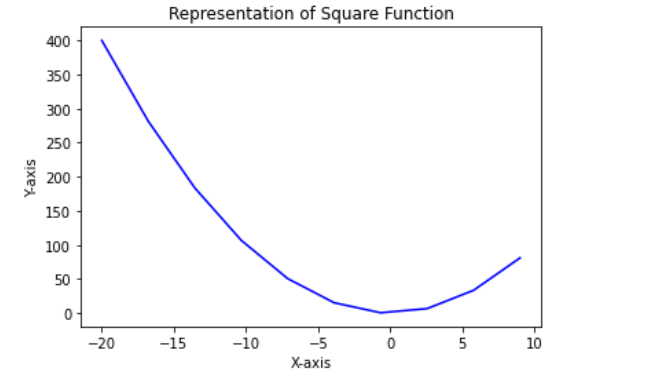
Let us see how we can create a line chart using matplotlib-

 import numpy as np
import matplotlib.pyplot as plt
x=np.linspace(-20,9,10)
y=x**2
plt.plot(x,y,'b')
plt.xlabel('X-axis')
plt.ylabel('Y-axis')
plt.title('Representation of Square Function')
plt.show() 

INPUT-

How to Install Matplotlib in Python

OUTPUT-

How to Install Matplotlib in Python

So, in this article how the matplotlib library can help us and what are the ways of installing it.


Related Topics

Data Structures and Algorithms Using Python | Part 1

Data Structures: Data Structure is defined as a way to organize and store the data so that we can access the data and work more efficiently. Data structures also describe the...

18 minutes read.

IPython Display

A command shell, often known as IPython is a software application that makes an operating system's features accessible to users or other applications. Based on the purpose and specific functioning...

6 minutes read.

Python Built-in Functions

Python Built-in Functions The Python interpreter has a number of functions and types built into it that are always available. The Python built- in functions are as follow: Methods Explaining abs() The abs() function returns...

6 minutes read.

Difference between Python and CPP

Difference between Python and C++ We all know that both C++ and Python are two of the most popular programming languages. Both C++ and Python shares some basic similarities such as...

6 minutes read.

Python Read Excel file

Python Read Excel file Excel is the spreadsheet application for Window, which is developed by Microsoft. The Excel stores data in the tabular form. It provides easy access to analyze and maintain the...

3 minutes read.

How to check if the dictionary is empty in Python?

What is a dictionary in Python? A directory is a collection of data but data is not ordered. Unlike other data types, it does not hold a single value as its...

3 minutes read.

Enumerate() Function in Python

The enumerate() function in Python is used to convert a data collection object into an enumerate object. It returns an object that contains a counter as a key for each...

3 minutes read.

Array to String in Python

What is an Array: The idea behind an array is to group several items of the same type, making it easier to locate each element by adding an extra offset to...

4 minutes read.

Python Word Tokenizer

Python Overview Python is an Object-Oriented high-level language. Python is designed to be highly beginner-friendly. Python has an English-like syntax, which is very easy to read. Python is an interpreted language...

4 minutes read.

Slicing of a String in Python

In this tutorial, we will learn about slicing of a string in Python. First of all, let us know what String and Slicing is. String String is a group of characters that...

6 minutes read.

The Calendar Module of Python

The calendar module provides calendar features, including printing functions for a specific month or year. Default is the first day of the week on Monday and the last day on Sunday...

3 minutes read.

Python ascii() Function

Python ascii() Function The ascii() function returns a readable version of any object (Strings, Tuples, Lists, etc). This function will replace any non-ascii characters with escape characters. Syntax ascii(object) Parameter object:  An object, like String, List, Tuple, Dictionary, etc. Return This...

1 minute read.

Python email utils

Python is a popular programming language in this growing world. There are many resources to learn python online without spending a single penny. In this article, we will talk about a...

4 minutes read.

Python List pop() method

Python List pop() method The list.pop() method removes the item at the specified position in the list, and return it. If no index is specified, this method removes and returns the last item in the list. Syntax list.pop([i]) Parameter i:...

1 minute read.

File Explorer using Tkinter in Python

File Explorer: Users can control folders and files on a device using an application known as a file manager or file explorer. Customers can access, edit, copy, delete, and start moving files...

3 minutes read.

Math Module in Python

In this article, you are going to learn everything in detail about the “ math “ module in Python. We can normally work with general operations using python without importing or...

16 minutes read.

Difference between Sort and Sorted in Python

If you new to Python, it must be confusing the distinction between the Sort and Sorted functions. However, it is important to understand the differences in order to use them...

5 minutes read.

Python Set difference() Method

Python Set difference() Method The set.difference() method in Python returns the set difference of two sets(A-B). Syntax set.difference(set1) Parameter set- This argument represents a set (minuend) set1- This arguments represents a set(subtrahend) Return This method returns the difference of the two specified...

2 minutes read.

Add Dictionary to Dictionary in Python

Dictionary in python: Python's execution of a data model, known more commonly as an implicit array, is a dictionary. A dictionary is made up of a group of key-value pairs. Each...

4 minutes read.

Python String swapcase() method

Python String swapcase() method The string.swapcase() method in Python returns a copy of the string with uppercase characters converted to lowercase and vice versa. Syntax string.swapcase() Parameter NA Return This method returns a copy of the string...

1 minute read.