
×

Difference between Hard Copy and Soft Copy

Hard copy: A hard copy is a printed version of a computer-generated digital document file on paper or another transparent medium. The result is physically printed on paper and is consequently occasionally referred to as a permanent copy. It might be a picture, text, sketch, or printed file. These are called "hard copies" because humans can touch tangible physical objects. So, it qualifies as a physical copy as well. Books, newspapers, printed document files, notebooks, and other items are a few examples. They are real things that exist.

 Hard copies still have value in the digital age for various reasons. The physical copies may occasionally be a backup if someone loses or unintentionally deletes their digital data. Some people also find managing and distributing hard copies quite simple. In certain cases, users can use these copies as pencil- or pen-scribbled templates or schemas.

Soft copy: A digital document file kept on a computer or disk is known as a "soft copy." It is not a printed version of any document; rather, it is an electronic version. Depending on the kind of document, you may open and modify a soft copy using software applications, including database programs, processing programs, presentation software, and many more.

A temporary copy results from a soft copy, which is stored in computers, USB devices, etc. The soft copy cannot be touched because it is a virtual object. This makes it another name for a virtual copy of a file or document. we can easily see that a  digital document file or electronic version of a document that has not been printed on paper is referred to as a "soft copy." The output of a soft copy can be found on computers, USB drives, and other devices and is occasionally referred to as a temporary copy.

Soft copies are readily shared and sent over a network connection through social media, email, etc. Compared to physical copies, they are more affordable and practical for communication. Ebooks, ENews publications, scanned notes, PDF notes, etc., are a few examples. When we compare it to hard copies, soft copies are more resilient and long-lasting. Hard copies are very simple to fold, twist, burn, rip, or destroy. When a user makes several backups and stores the soft copy in a proper hardware setup, it remains resistant to destruction.

Hard Copy vs. Soft copy
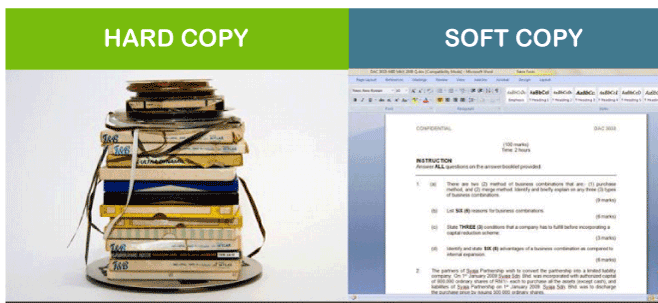
Difference between hard copy and soft copy
              Hard copy                Soft copy
1. It is an actual duplicate.1. It is a digital copy.
2. It is handled as an eternal copy.2. It is regarded as a temporary copy.
3. Hard copies may be viewed and displayed without an electronic interface, such as a computer, a phone, or another device.3. An electronic interface, such as a computer or smartphone, is needed
4. Hard copies take up real physical space to read and display a soft copy.  4. Soft copies don't take up any actual space.  
5. Hard copies cannot be changed into digital versions.5. Hard copies can be made from soft copies.  
6. No electrical device is necessary to read and display the material.  6. An electronic media for reading and displaying the electronically preserved material is a requirement for a soft copy.  
7. Hard copies cannot be changed.  7. Soft copies can be changed.  
8. It's a temporary duplicate.8. It is an unforgettable copy.  
9. Physically speaking, hard copies take up a lot of space.9. Even with enormous files, soft copies don't occupy any physical space. They use up memory and virtual space.
10. To write and create tangible copies, you need paper and ink.10. To write and create soft copies, a user needs a keyboard and a computer.
11. A printed document file is a hard copy.11. A non-printed document file is a soft copy.
12. Reading a physical copy does not require power-driven media.12. To read a soft copy, a power source is always needed.
  13. Paper-based hard copies can be costly to produce. For example, colored photocopies and prints of images might be more expensive.    13. It is quite cheap to create and distribute soft copies.
14. Hard copies can be handed out immediately or sent by mail, among other methods.14. Any digital sharing tool, including Email, WhatsApp, etc., may transfer soft copies.    
15. Books, formal letters, property papers, notes, news articles, periodicals, job advertisements, and more are examples of hard copies.15. Examples of soft copies include ebooks, PDF documents, xlx files, Word files, presentation files, scanned copies, etc.

Related Topics

What does ALT + Q do?

It is a useful shortcut that can open the ‘tell me’ box in recent versions of the Office software. The user has to press the Alt key while holding the...

4 minutes read.

What is Cable Modem?

A common piece of gear that links computers to your ISP is the cable modem. A cable modem, unlike other types of modems, uses coax cable to proxy that connection...

7 minutes read.

Difference between File and folder

File: A file is a unit of Storage for comparative data. A document can be a picture, video, executable record, framework, or application document. Secondary storage options include DVDs, flash drives, SSD...

3 minutes read.

ROM and its Types

What is ROM? ROM stands for “Read Only Memory”. It is a type of non-volatile memory that is used to store data that cannot be modified or written to by a...

4 minutes read.

What is a boot device?

A boot device would be any machinery containing the files required to launch a system. A hard disk, an optical disk drive, a CD - ROMS drive, a Storage device,...

3 minutes read.

Case Sensitive Languages

Every language, system, or program has the capability to differentiate between different case alphabets. If a programming language doesn’t work properly in upper case and lower case letters interchangeably, it...

4 minutes read.

Where can I ask questions on the internet?

The internet is a great resource of knowledge and information where you can find all types of questions like imaginable questions, past answers, and much more. However, there are times...

6 minutes read.

Why has my IP address changed

IP Address: Internet Protocol address, in short form, is known as IP address. This address could pose security liability, and these addresses are building blocks of the internet. IP addresses...

6 minutes read.

What are the Disadvantages of Computers?

Although there are various advantages to using a computer, there are also hazards and disadvantages (like most things in life). Computers, if not used properly, can create a variety of...

6 minutes read.

What is Procedural language?

A procedural language is a PC programming language with many capacities, guidelines, and explanations that should be executed in a specific request to achieve a task or program. As a...

10 minutes read.

What is a Slide?

A slide is typically a single page of a presentation or lecture. Slides are usually used to present information visually, using text, images, charts, and other media to convey ideas...

4 minutes read.

Introduction and Features of FoxPro

Microsoft Visual FoxPro (VFP) is an environment of Object-oriented programming (OOPs). The relational database engine is available in the Microsoft Visual FoxPro (VFP). It was developed by Microsoft in the...

3 minutes read.

What is Hybrid Topology?

A hybrid topology is also called network topology. Topology can be defined as the physical and logical arrangements of computer networks. We can say that topology is nothing, but how...

6 minutes read.

Infrastructure Readiness Check

IRC (Infrastructure Readiness Check) is an online test to check the compatibility of your system and internet bandwidth of your network against the requirements before taking a test from a...

3 minutes read.

Computer: Registers Memory

Registers in Computer The Registers are the type of computer memory, which is used to accept, store quickly, and transfer the data and instructions that are immediately used by the CPU (Control Processing...

5 minutes read.

What is Chat Slang?

Chat slang, also known as internet slang or cyber slang, is a form of shorthand language used in instant messaging, text messaging, and other online communications, such as social media...

4 minutes read.

What is Task Pane?

Task panes are interface elements frequently appearing on the right side of the windows in Word, PowerPoint, Excel, and Outlook. Through task panes, users can access interface controls that can...

3 minutes read.

What is Task View?

Task view is used to manage windows across several monitors or virtual desktops, quickly find open windows, rapidly hide all windows and reveal the Desktop, and more. Task View is...

4 minutes read.

What is an Alignment?

The phrase aligns, or alignment refers to how text is positioned on the screen. Left-aligned text, for example, Left align, provides a straight line on the left side of the...

4 minutes read.

How to installation or uninstallation Microsoft Paint

Instead of Microsoft Paint, we can also call it MS paint. Sometimes, it is also known as Paint. Dan McCabe programmed the first version of Microsoft Paint and also introduced...

3 minutes read.