×

What is a Print Preview?

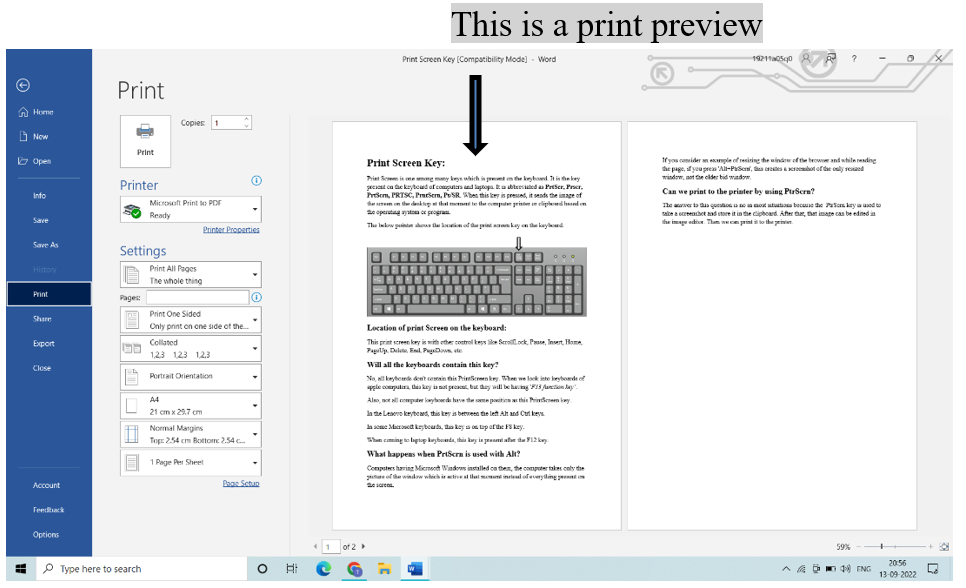
Print Preview is one of the functionalities that helps users to see the pages layout before printing. It gives the users an idea of what pages look like when printed. By this, users can check whether there exist any errors or decide on the correct layout of the pages before printing. With the help of this, you can save reprinting time and paper.

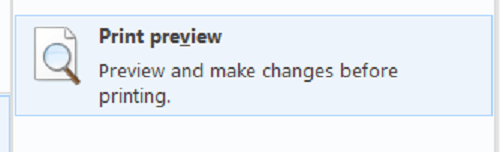
To open this Print Preview functionality, open the toolbar and check for the print preview icon, or search for a file, and in that, choose the print preview option.
What is a Print Preview

Microsoft word's Print Preview lets the document zoom in or out and shows multiple pages in a window. In MS Word, "Ctrl+F2" is used to open this print preview of the file you are in current time.

In many browsers, the print preview option is available, but in some other web browsers and applications, print preview is present as a built-in feature. Through this, it automatically gets opened when the print option is selected.

Many browsers and applications have icons to get and launch the preview feature. The tools such as Adobe Photoshop, where graphic technology is needed, have many advanced features in print preview, which include scaling the image and positioning the image as required before printing the designed page.

This print preview has many advantages in web development-related tools such as mark-up language editing applications like html, php, etc.

Internet Explorer is a web browser that is enabled with a print preview function to prevent accidents like print pages, but print papers get so dark that we cannot see anything, and it wastes the printer's ink. Internet Explorer preview option also allows modifying the margin, font, and color of the web page before printing.

Still, many browsers, such as Mozilla Firefox have auto-enabled print previews.

Microsoft word Print Preview

Document printing

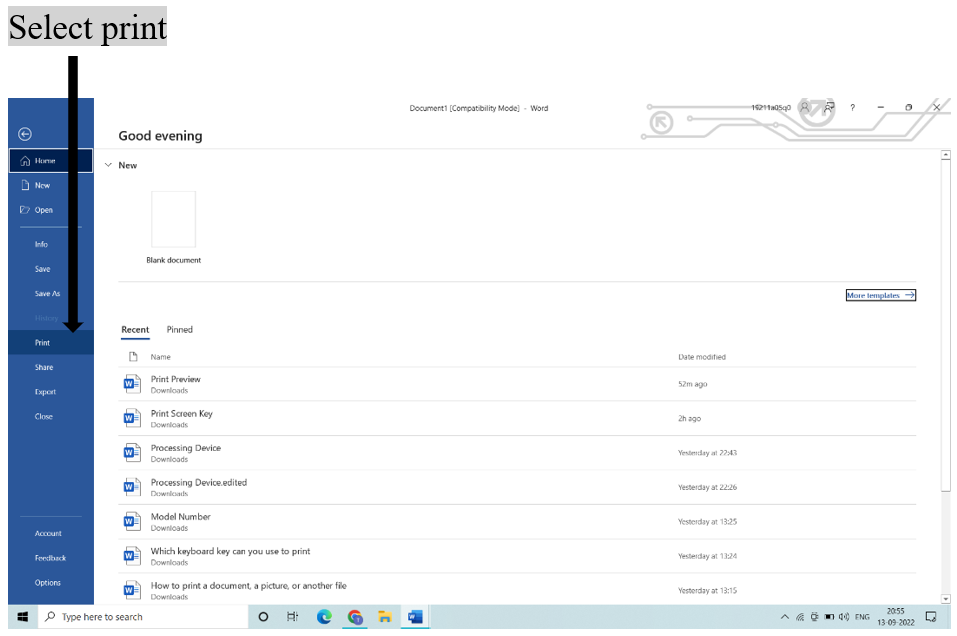
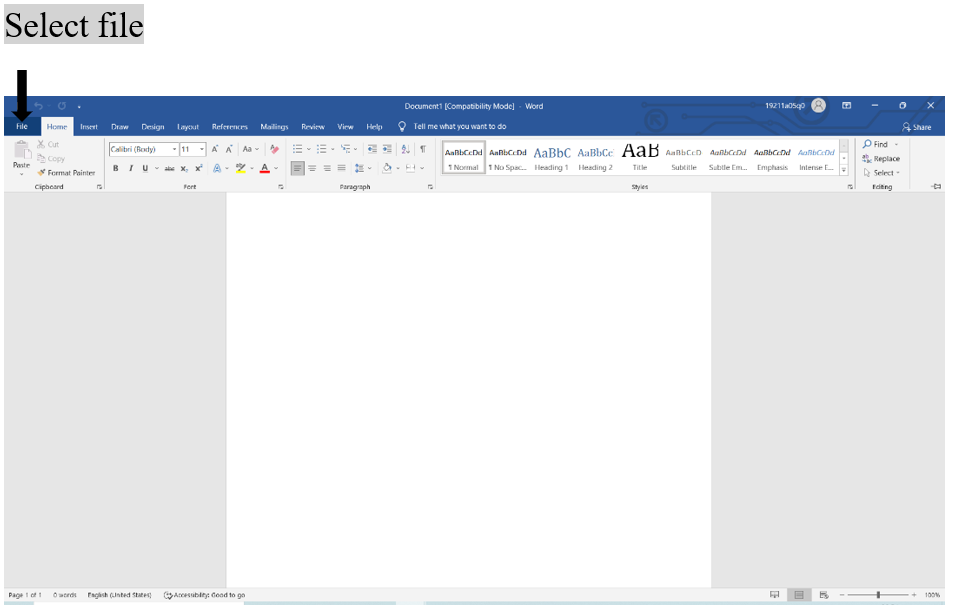
  • For document printing, first, choose "file" option and select print.
  • Then all pages present in a document are selected automatically.
  • If you want to print a particular un continuous page, use comma(',') to separate page numbers.
  • If the user wants to print only any specific content within a document, then choose "file" and select "print" from the menu bar.
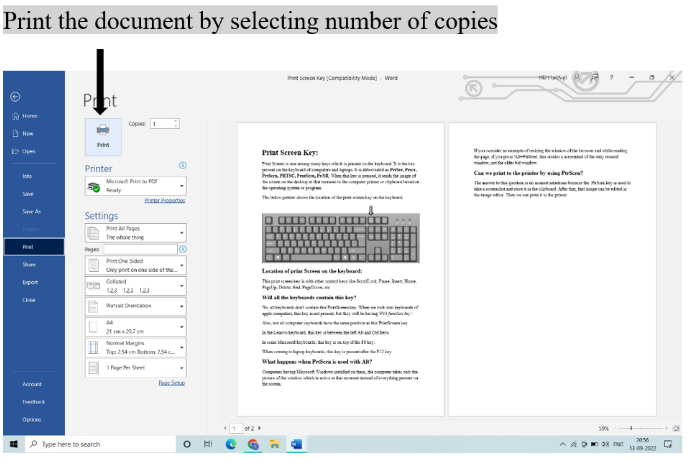
  • After opening the print window, select the radio button to get the printer and finally select ok.
  • Sometimes, we observe that many pages are printed on a single page by reducing the page size. To get this feature select the number of pages to print on a single page from the print window 'settings' option and click ok.
What is a Print Preview

Print Preview in Microsoft Excel

Print preview is also available in Microsoft excel sheet; if we preview the excel sheet, it is always opened in Microsoft Office Backstage view; here users can modify the layout and page borders before users print.

For previewing the excel sheet:

  1. Select the sheet which you want to preview.
  2. Then select file > print > print preview
  3. The shortcut key for preview is "Ctrl+P".

To print part or whole excel sheet:

  1. To print only a single active sheet or complete workbook, go to the "print" box and then from “selection” select “Active sheets, Entire workbook”.
  2. Then select print, and your worksheet is printed.

Print Preview features have advantages

  • Saves the paper by editing the errored- document before printing.
  • Contains the functionality of zooming out the small-sized letters by which the user can see the entire document and check for errors.
  • Provides the feature of viewing multiple pages within the same document.
  • It provides the functionality of editing the font, margins, and color of the font and helps in the orientation of the page.
  • Can avoid results that we don't like, which wastes time and money.

Difference between print and print preview

The most basic and important difference between print and print preview is that the print option prints the document to a printer that is connected to a system. In comparison, print preview allows us to review the entire document before printing it on paper.

The print does not save any money and paper if any error occurs, but print preview allows us to save paper and ink in the printer in error conditions.

If a document is given to print, we cannot modify page contents. In the print preview, we can modify content.

So it is always recommended to use print preview first and after complete check only go for print option. This method gives you the right result.


Related Topics

What is Sound Card?

What is a Sound Card? A sound Card is an interior expansion that is utilized to input and output audio from a machine under the authority of a computer program....

9 minutes read.

Computer Pioneers and people who are CEO

The world of technology has been shaped by several individuals who have made significant contributions as computer pioneers and CEOs of technology companies. This article will take a deeper look...

42 minutes read.

What does Alt+R do?

Alt+ R The Alt button is adjacent to the spacebar in the keyword. The Alt key is used with many other keys to perform various functions. When the user uses R...

4 minutes read.

How to install a computer processor

Installing a CPU is much simpler than many other steps in the PC-building process. There is no need to worry that you will make a mistake because we will walk...

6 minutes read.

What is Myspace?

Myspace is a social networking platform where users may create web pages, communicate with others, and share content, including music, photos, and blogs. Chat rooms, newsgroups, forums, categorised classified ads,...

7 minutes read.

What is a capacitor?

A capacitor is a passive electrical component that stores energy in an electric field. It comprises two conductive plates separated by a non-conductive material called the dielectric. When a voltage...

6 minutes read.

Who invented the Internet?

Introduction of the Internet: The Internet is the foremost important tool and useful resource for any person. It connects millions of millions of computers, smartphones, web pages, servers, etc. It connects...

6 minutes read.

What is a Web Browser?

Web browser is a powerful software that enables the user to efficiently access the world wide web. It allows the user to access the data and information available on the...

7 minutes read.

What are Toggle keys?

keys that are used to turn on or off a function or the keys used to switch between two functions is called the Toggle key. The caps lock key, scroll...

3 minutes read.

What is SAN?

A storage area network, sometimes known as SAN, is a specialized, quick network that provides network access to storage devices. Hosts, switches, storage components, and storage devices make up standard...

7 minutes read.

What is an Output Device?

The equipment that accepts input or data from a computer commonly for display, projection, or physical reproduction. For example, the image depicts an inkjet printer, an output device that creates...

6 minutes read.

What is RDIMM?

Servers use the RDIMM (registered memory) kind of memory chip most frequently. By reducing the electrical strain on a memory controller, it helps systems running on a server be more...

3 minutes read.

What is a router?

A router allows the user to connect multiple packet-switched networks or subnetworks. It ensures the delivery of the data packet to the IP addresses they are assigned. We can use...

10 minutes read.

How does a computer process data into information?

What is data Data is a type of information. Data can be in the form of images, integers, or strings of letters. All data must be entered into the personal computer...

3 minutes read.

Top 10 online services and applications

It can be difficult to select the best Internet service or application for your needs because there are tens of thousands of them. An online service is a business that...

4 minutes read.

Memory Hierarchy

Memory Hierarchy: In computer architecture, the Memory Hierarchy separates computer storage into the hierarchy based response time. It is developed to organize the memory in such a way that it...

5 minutes read.

What is a LED Monitor?

An LED monitor, also known as an LED display, is a computer or television with a flat panel and a screen that emits light. The most advanced computer display technology...

5 minutes read.

How to View or Change the Screen Resolution of a Monitor?

The images you see on your computer screen are made up of "pixels," millions of minimal components. These pixels produce the colors, patterns, and videos you see on your monitor....

4 minutes read.

What does Alt + T do?

Alt + T is one of the keyboard shortcuts mostly used to open the Tools present in the file menu. Usage of Alt + T Keyboard shortcut For using the Alt +...

4 minutes read.

Why can’t I open any web pages when connected to the internet

You can follow the instructions below if you are able to connect to the Internet, you are unable to access any websites. Ping an Internet Address You need to open the Command...

4 minutes read.