
×

What is MsConfig?

Microsoft Windows starting issues can be resolved using the system application MSConfig. In Windows Vista, Windows 7, Windows 8, and Windows 10, it is officially called System Configuration or Microsoft System Configuration Utility. It can change the boot parameters and turn off or on startup-running programs, device drivers, and Windows services.

The System Configuration Tool, often known as Msconfig, is a Microsoft utility that debuted with Windows 98 and is present in all subsequent versions of Windows. It is used to set up a computer's startup settings, including which applications and services run when Windows starts.

With the help of this practical application, you may modify the boot settings and services that are enabled (or disabled) upon the beginning of your operating system. By doing this, you can prevent Windows from starting up with any incompatible apps or services.

Opening Msconfig

Note: To use MSConfig, users of Microsoft Windows XP and later need administrator permissions. Windows NT, Windows 2000, and Windows 95 do not support this function.

In Windows 11

  • Click the magnifying glass icon in the Windows taskbar.

What is Msconfig
  • Enter MSConfig in the text area at the top of the search window.
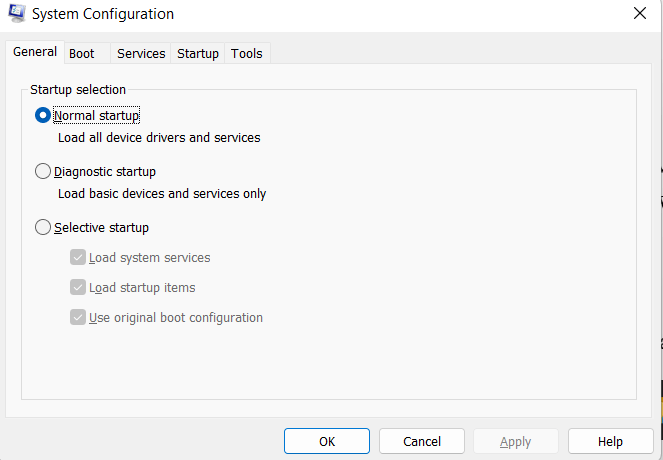
  • A System Configuration Utility window pops out, which will be as below.
What is Msconfig

In Windows 10

  1. Type MSConfig in the text field next to the Start menu button on the taskbar of the Windows desktop's "Search the web and Windows" section.
  2. Select the System Configuration option from the search results by pressing the Enter key.

In Windows 8

  1. The first step is to open the Windows Start screen.
  2. Then type “MSConfig” and then press Enter.

In Windows Vista and Windows 7

  1. The first step is to launch the Start menu.
  2.  Then in the search field type “MSConfig” and then press enter.
  3. We can see a System Utility Window pop out. Click Continue if the UAC (User Account Control) asks for your authorization.

General Tab

The System configuration's default tab, General, displays how the computer boots up. Normal startups ought to be chosen by default. The selective startup will be chosen if you've modified any Boot tab settings or stopped any services or programs from starting up. When the operating system makes use of Selective Startup, you are reminded via a notification.

There were also two buttons in earlier versions of Windows, such as Windows XP, but they were eventually eliminated. The "Launch System Restore" and "Expand File" buttons, respectively, offered users access to Windows System Restore and the ability to expand any zipped file.

Boot Tab
What is Msconfig

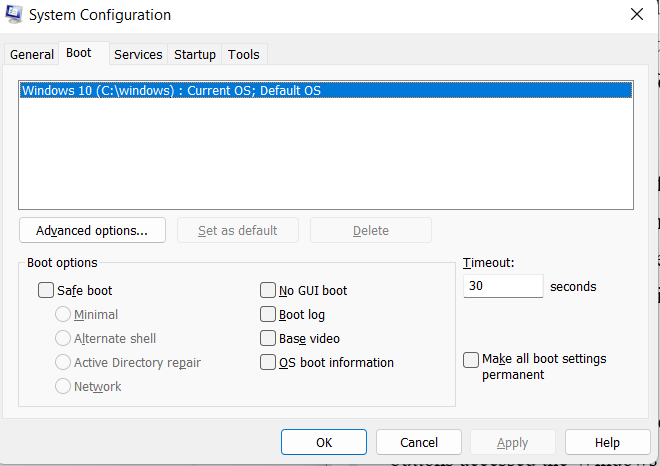
The System Configuration utility later added the Boot tab (Windows 98 and XP have boot.ini). Without having to edit the Windows boot.ini file, you can use this tab to make the same changes. In Advanced options, you can change additional settings like how many processors are used during boot, how much memory is allowed, and other debug options.

Services Tab

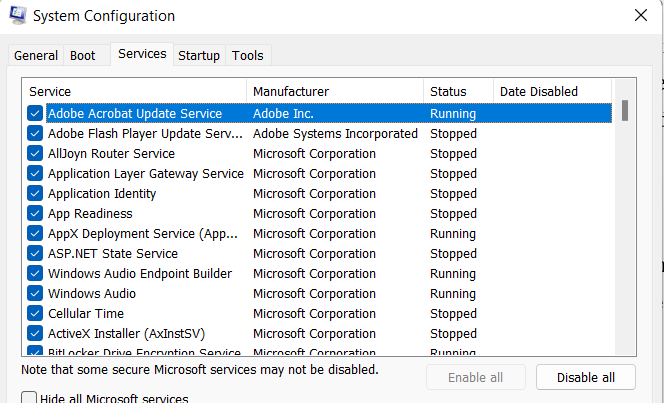
Any Microsoft Windows services or other program services running on your computer can be turned on or off from the Services tab. Check the "Hide all Microsoft services" box at the bottom of the window to only show non-Windows services such as driver and program services. When a box is unchecked, the service cannot start.
What is Msconfig

Startup Tab

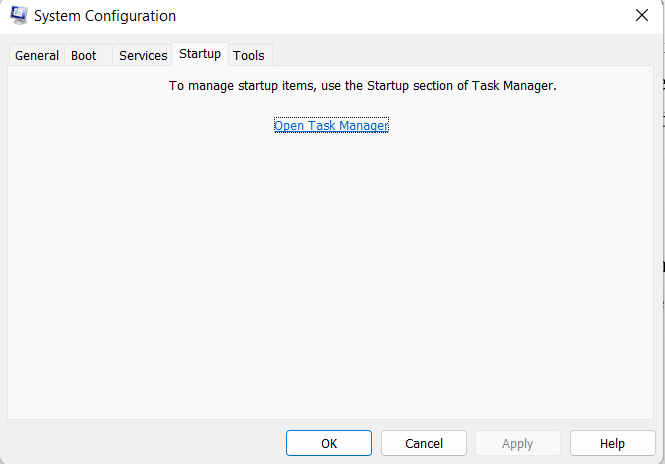
One of the most common reasons most Windows users open the System Configuration utility is to access the Startup tab. By browsing the Startup tab, you can start and stop any of the programs (TSRs) that launch each time your computer starts. A computer's startup and performance are frequently hampered by these startup programs. Remove any program from the list that you want to prevent from starting each time.

Note:

This function was transferred by Microsoft from the System Configuration tool to the Windows 8 Task Manager.
What is Msconfig

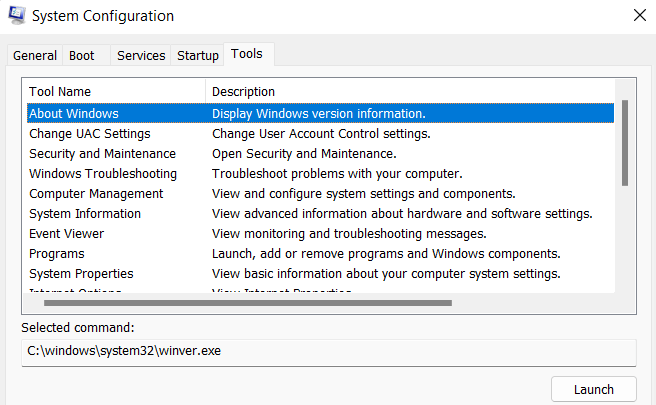
Tools Tab

You can quickly access all of Microsoft Windows' tools from the Tools tab. For instance, by selecting the Event Viewer option from the tool name list, you can utilize the Launch button to open the Event Viewer tool.
What is Msconfig

WIN.INI

Users of Windows 98 and Windows XP have quick access to editing, enabling, and disabling the Windows win.ini file via the WIN.INI tab.

SYSTEM.INI

Users of Windows 98 and Windows XP have quick access to editing, enabling, and disabling the Windows system.ini file via the SYSTEM.INI tab.

BOOT.INI

Users of Windows 98 and Windows XP have quick access to editing, enabling, and disabling the Windows boot.ini file via the BOOT.INI tab.


Related Topics

History of Computers

You might think just like there were no computers available in ancient times, no people can know about computers, but at that time, they had to calculate and compute by...

6 minutes read.

What is A4?

A4 is a standard paper size widely used for printing documents and other materials. It is 210 x 297 millimeters or about 8.27 x 11.69 inches. It is part of...

7 minutes read.

What is an Alignment?

The phrase aligns, or alignment refers to how text is positioned on the screen. Left-aligned text, for example, Left align, provides a straight line on the left side of the...

4 minutes read.

Computer Memory

The computer memory is the storage space in the computer and related to the hardware integrated circuits. It can store the information for immediate use on the computer. The memory...

9 minutes read.

What is a router?

A router allows the user to connect multiple packet-switched networks or subnetworks. It ensures the delivery of the data packet to the IP addresses they are assigned. We can use...

10 minutes read.

What is BIOS?

BIOS stands for Basic Input/Output System. It is firmware that controls the basic functions of a computer, such as booting the system and communicating with the hardware. It is stored...

7 minutes read.

What is an Elevated Command Prompt?

An elevated command prompt, also called "the command line" or "the DOS window," is a command prompt with administrator rights. The command-line interface program used to run low-level software or...

4 minutes read.

What Does Alt + L Do?

The keyboard shortcut, "Alt+L"  is frequently used to open the Developer Tab in the Ribbon. Open the program in which you want to use the Developer tab. Press and hold the "Alt"...

3 minutes read.

How to fix the "no input signal" error message?

How to fix the "no input signal" error message If the computer monitor shows the error message, which is "No input Signal," try to troubleshoot the operation by following: The computer is...

4 minutes read.

What does Alt+D do?

Computer keyboard shortcut keys play an important role in the working of any computer user. We can do anything from the mouse and keyboard, but shortcut keys provide data in...

3 minutes read.

Who invented the Internet?

Introduction of the Internet: The Internet is the foremost important tool and useful resource for any person. It connects millions of millions of computers, smartphones, web pages, servers, etc. It connects...

6 minutes read.

What is the Pg Dn Key (Page Down Key)

The Pg Dn key is a computer keyboard key located on the numeric pad number 3 or between the keyboard and the numeric keypad. It can also be referred to...

2 minutes read.

What is AM?

AM may refer to any of the following: When referring to audio or a signal, amplitude modulation (AM) is a method of transmitting information using radio waves. In AM, the information...

4 minutes read.

What is Device Driver?

Device Driver A device driver is a specific type of programming application that permits one equipment device (like a PC) to interface with another equipment device (like a printer). A device...

6 minutes read.

What is Line In?

Basically, Line-In is an audio jack that is present in an audio device, which is used to connect the other audio output and input devices like speakers, microphones, etc. A...

6 minutes read.

Why can’t I open any web pages when connected to the internet

You can follow the instructions below if you are able to connect to the Internet, you are unable to access any websites. Ping an Internet Address You need to open the Command...

4 minutes read.

What is open with?

You can open a file with your chosen program by using Windows' Open With function. The software that opens those files may not be the normal Windows program. When you...

3 minutes read.

Quantum Computing

Topics Covered What is Quantum Computing Applications of Quantum Computing How Quantum Computing works Difference between classical computers and Quantum Computers What is Quantum Computing? We all know that quantum physics...

8 minutes read.

What is a touch screen?

The touch screen has been proved a revolution for every sector, such as electronics, communication, the service industry and the daily lifestyle, etc. It is one of the types of...

6 minutes read.

What is boot menu?

When we turn on our computer, the machine goes through a process known as booting that is carried out automatically. This could be accomplished by the CPU's circuitry, software, or...

3 minutes read.